
Static timing analysis is not a single step at the end of chip design. It is run again and again, each time with more realistic data. Knowing where it sits in the flow tells you how much to trust a timing number.
Think of planning a car trip. At first you estimate the time from the distance on a map. Later you use the real route. At the end you add traffic and road works. The answer gets more accurate at each step, and STA works the same way: the early runs give a quick estimate, and the last run is the one you trust. The last run before the chip is built is called sign-off, because the team signs it off as the final proof that timing is met.
The stages are: synthesis turns the RTL into gates, placement decides where each gate sits on the chip, clock tree synthesis builds the wiring that delivers the clock to every flip-flop, and routing draws the real wires. If you want the big picture of these stages, read The RTL to GDSII Flow first. This article only follows the timing thread through it.
6 min read | Intermediate
What You'll Learn
- Identify the stages of the implementation flow where STA runs
- Describe how interconnect, clock and crosstalk modeling change from stage to stage
- Explain the difference between ideal and propagated clocks
- Recognize what a pre-layout STA run in ChipVerify Lab does and does not include
STA at Every Stage
STA is rarely run on RTL. At that point function matters more than timing, and behavioral code does not yet describe real cells with real delays. Once synthesis has produced a gate-level netlist, STA becomes useful and stays in the flow until sign-off.
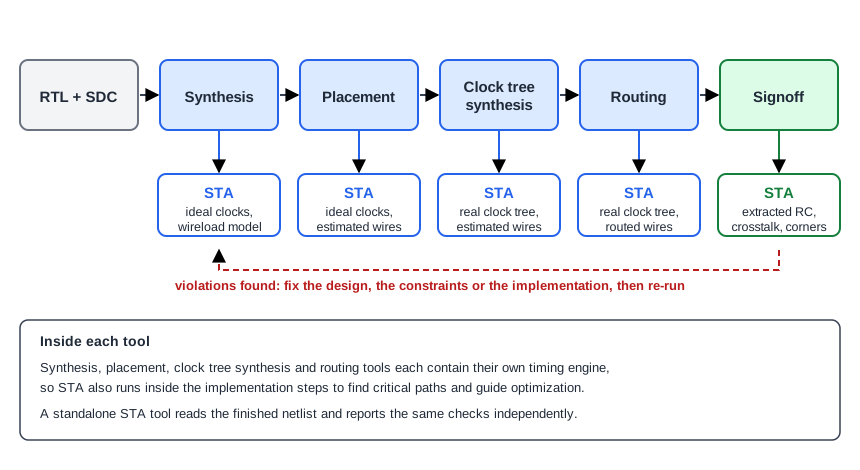
Run before logic optimization, STA identifies the worst paths the optimizer must work on. Run after, it shows which paths still fail. Physical design repeats the cycle after placement, after clock tree synthesis and after routing.
The implementation tools do not simply call an external STA program. Synthesis, optimization and placement tools contain their own timing engines, which keep the timing of the design up to date as the design changes. A standalone STA tool then verifies the result independently.
What Changes From Stage to Stage
The method stays the same. Only how realistic the inputs are changes, in three ways:
- How interconnect is modeled: ideal wires with zero delay, a wireload model, estimates from the layout, or real extracted resistance and capacitance
- How clocks are modeled: ideal clocks with zero delay, or propagated clocks that follow the real clock tree
- Whether coupling between neighboring wires is included, which adds crosstalk effects to the timing
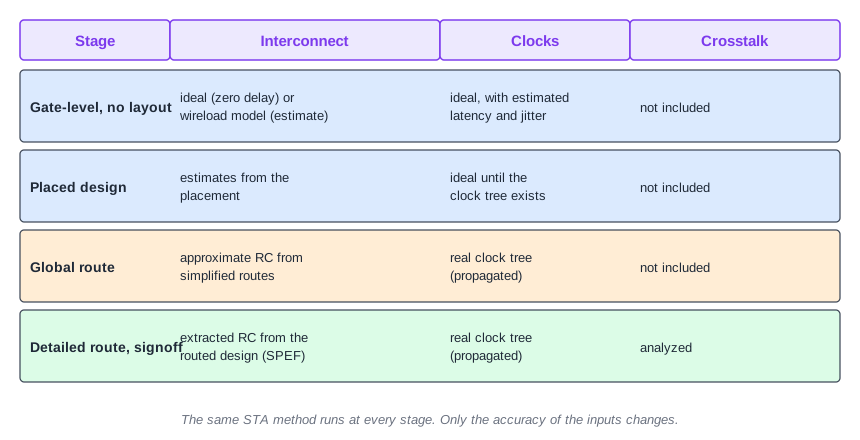
A wireload model estimates the wire capacitance and resistance of a net from its fanout, because no layout exists yet to measure. Once routes exist, simplified global routes give approximate values. After detailed routing, an extraction tool measures the actual parasitics of every wire, and only then can coupling be analyzed. If the wire RC idea is new, see RC Model of Wire Delay.
Ideal and Propagated Clocks
Before clock tree synthesis there is no clock wiring yet, so STA pretends the clock is perfect: it reaches every flip-flop at the same moment with zero delay. This is called an ideal clock. Designers can still add estimates for the latency and the jitter they expect, so early results stay realistic.
After the clock tree is built, STA switches to propagated clocks. This means it follows the clock through the real wiring and buffers, where the clock arrival at each flip-flop is the real delay through the clock buffers. Differences between those arrival times are clock skew, which directly moves setup and hold slack. For how skew arises, see Clock Tree and Skew.
Where ChipVerify Lab Fits
ChipVerify Lab runs STA on the netlist produced by its synthesis step. This is an early analysis done before layout, so the cells are not placed and the wires do not exist yet. There is no clock tree and no wire parasitics. Two lines in a lab report show it. The clock row says ideal, and the net rows between cells have no delay of their own:
             0.0000    0.0000    0.0000   clock clk (rise edge)
                       0.0000    0.0000   clock network delay (ideal)
             0.0000    0.0000    0.0000 ^ _7_/CLK (sky130_fd_sc_hd__dfxtp_1)
   0.0058    0.0401    0.2874    0.2874 v _7_/Q (sky130_fd_sc_hd__dfxtp_1)
             0.0401    0.0000    0.2874 v _4_/A (sky130_fd_sc_hd__xor2_1)
   0.0017    0.0367    0.1450    0.4323 v _4_/X (sky130_fd_sc_hd__xor2_1)
The row for _4_/A is the net from the flip-flop to the XOR input, and its delay column is 0.0000. Only cell delays contribute. With real wires, those net rows would add time, so layout generally moves the numbers. The lab article Static Timing Analysis shows the panels and buttons for running it.
This is still valuable. Cell delays and the structure of the critical paths are visible, and you can explore how constraints change the slack, which is the skill that carries over to every later stage.
Common Mistakes
Mistake #1: Expecting post-layout numbers from a pre-layout run
A pre-layout analysis has no wire delay and no real clock tree. Treat its numbers as an early estimate. Real wires and a real clock tree will change them, usually for the worse on long or heavily loaded nets.
Mistake #2: Staying on ideal clocks after the clock tree is built
With ideal clocks, STA ignores the skew of the real clock tree. Results after clock tree synthesis only mean something when the clocks are propagated.
Quick Check: At which point in the flow can crosstalk be included in the timing analysis?
Only after detailed routing, when real parasitics have been extracted. During global routing the routes are still simplified, so coupling cannot be included.
Practice Exercise
Challenge: Add Clock Latency and Watch What Moves
Use the sta_demo design and constraints from the previous article. Add this line to constraints.sdc, re-run STA, and look at the register-to-register path:
set_clock_latency 0.3 [get_clocks clk]
Predict first: which numbers in the report change, and does the worst slack change?
Open the ready-made example in the lab, run synthesis, and then run STA. Editing constraints.sdc and re-running only STA, and choosing another library or corner, are PRO features.
Hint
Look at the clock network delay (ideal) row in both the launch and the capture part of the report. Then compare the slack with the previous run.
Solution
The clock row now reads 0.3000 in both the launch and the capture sections. The launching flip-flop's clock arrives at 0.3000, so the data arrival time grows by 0.3000, and the capture clock arrives at 2.3000, so the required time grows by 0.3000. The slack is exactly what it was before (1.4502 on the register-to-register path in our run), because the latency is added to both ends of the path. Only the difference between launch and capture clock arrival, the skew, affects a register-to-register slack. The same happens on the input and output paths, because their delays are measured against the same clock.
Summary
- STA runs after synthesis and repeatedly through placement, clock tree synthesis, routing and sign-off.
- Implementation tools contain their own timing engines, and a standalone STA tool verifies the result.
- The method is constant. The modeling of interconnect, clocks and crosstalk gets more accurate at each stage.
- Clocks are ideal until the clock tree exists, then propagated.
- Crosstalk can only be included after detailed routing and extraction.
- STA in ChipVerify Lab is a pre-layout analysis: ideal clock and no wire parasitics.
