
Inside the chip, STA knows every clock edge and every delay. At the ports it knows nothing, because the outside world is not part of the design. Input delay and output delay are the two commands that describe it. They say how much of the clock period the outside logic uses. This article explains what they mean, why each has a minimum and a maximum value, and how they change the setup and hold slack of the port paths.
9 min read | Intermediate
What You'll Learn
- Explain what an input delay and an output delay describe
- Use the
-maxand-minoptions and say which check each one belongs to - Calculate the arrival and required times of an input path and an output path
- Use
-rise,-falland-add_delaywhen the data needs more than one value
Input Delay
An input delay says how late the data at an input port arrives, measured from the clock edge that launches it in the outside device. The outside device has its own clock-to-Q delay and its own wires, and the input delay holds all of that:
set_input_delay 0.4 -clock clk [get_ports {a b c d}]
The data at the ports a to d arrives 0.4 ns after the edge of clk. For the path from the input c to a flip-flop, the arrival time is the input delay plus the delay of the logic, so the logic has the rest of the period. With a period of 2.0 ns, 0.4 ns is used outside the chip.
Output Delay
An output delay says how much time the outside device needs after the data leaves the chip. It includes the wires outside the chip and the setup time of the flip-flop that captures the data there:
set_output_delay 0.4 -clock clk [get_ports {y z}]
The data at y and z must be there 0.4 ns before the next clock edge. The required time at an output port is the clock period minus the output delay, 2.0 - 0.4 = 1.6 ns.
Minimum and Maximum
The outside device does not always take the same time. Its delay depends on the data, on the temperature and on the transition. For setup you need the largest delay, for hold the smallest. The options -max and -min give the two values:
set_input_delay  -max 0.6 -clock clk [get_ports {a b c d}]
set_input_delay  -min 0.2 -clock clk [get_ports {a b c d}]
set_output_delay -max 0.5 -clock clk [get_ports {y z}]
set_output_delay -min -0.1 -clock clk [get_ports {y z}]
When you give a single value without -min or -max, STA uses it for both. That is what the demo constraints do. The diagram shows the effect of an input delay with a window between 0.2 ns and 0.6 ns. The data at the port may change anywhere inside the window, so STA uses the late end for setup and the early end for hold:
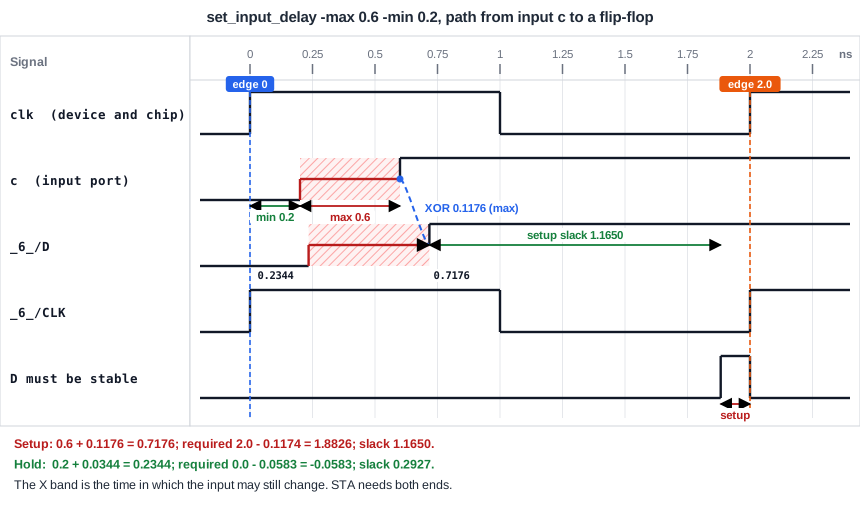
| Check | Input delay used | Calculation for the path from c to _6_/D | Slack (ns) |
|---|---|---|---|
| Setup | -max 0.6 | arrival 0.6 + 0.1176 = 0.7176, required 2.0 - 0.1174 = 1.8826 | 1.1650 |
| Hold | -min 0.2 | arrival 0.2 + 0.0344 = 0.2344, required 0 + (-0.0583) | 0.2927 |
The path report shows the two input delays with the transition symbol. The setup report has a row 0.6000 v input external delay and the hold report has 0.2000 ^ input external delay.
Output Delay Min and Max
For an output, the roles are the opposite way round. The maximum output delay is the setup requirement of the outside device, and it reduces the required time for setup. The minimum output delay is the hold requirement of the outside device. A hold requirement can be negative, as in the example with -min -0.1, which means that the outside device accepts the data to change slightly before the clock edge.
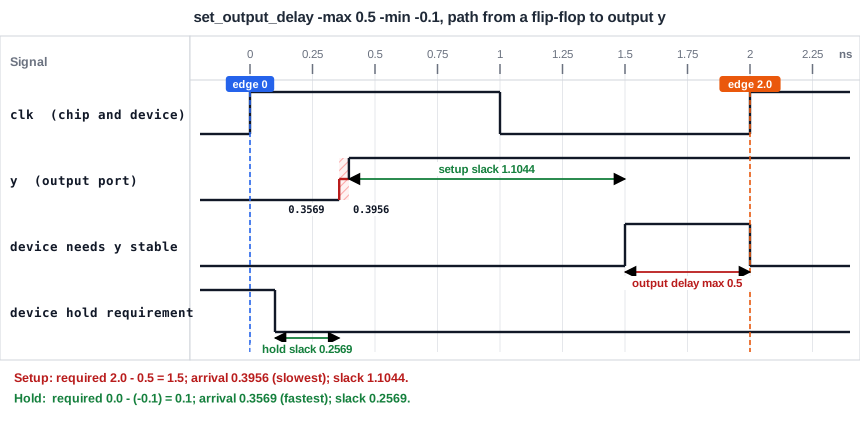
For the path from a flip-flop through an AND gate to the output y:
| Check | Output delay used | Calculation | Slack (ns) |
|---|---|---|---|
| Setup | -max 0.5 | required 2.0 - 0.5 = 1.5, arrival 0.3956 | 1.1044 |
| Hold | -min -0.1 | required 0 - (-0.1) = 0.1, arrival 0.3569 | 0.2569 |
Rise, Fall and More Than One Clock
Some devices are slower for a rising output than for a falling one. The options -rise and -fall set a different value for each transition, as shown in the article about timing arcs.
A port can also be launched or captured by more than one clock, for example when the outside device runs in two modes. A second set_input_delay for the same port with a different clock replaces the first one unless you add the option -add_delay. With -add_delay both constraints stay, and STA checks the paths for both clocks. Another option, -clock_fall, tells STA that the delay is measured from the falling edge of the clock, which is used for devices that launch or capture on that edge.
Common Mistakes
Mistake #1: Using one value for min and max when the device has a range
If the real delay is between 0.2 ns and 0.6 ns, a single value of 0.4 ns is too optimistic for setup and too pessimistic for hold. Use both options when you know the range.
Mistake #2: Forgetting that the second command replaces the first
Two set_input_delay commands for the same port do not add up. The second command overwrites the first one, unless it has the option -add_delay. Use -add_delay when you want to describe an additional clock or edge for the port, not when you want to correct a value.
Quick Check: An output delay of 0.5 ns is set with a 2.0 ns clock. What is the required time at the output port for setup?
The required time is 2.0 - 0.5 = 1.5 ns, measured from the launch edge.
Practice Exercise
Challenge: Give the Ports a Range
Replace the input and output delay lines of the demo constraints with the four lines of min and max values from this article. Predict the setup and hold slack of the path from input c to the data pin of _6_, and the slack of the paths to the output y. Before the change they were 1.3650 and 0.4927 ns for c, and 1.2044 ns for the setup of y.
Open the ready-made example in the lab, run synthesis, and then run STA. Editing constraints.sdc and re-running only STA, and choosing another library or corner, are PRO features.
Hint
For the input path, the arrival time changes by the difference of the input delays: 0.6 - 0.4 for setup, and 0.2 - 0.4 for hold. For the output path, only the required time changes.
Solution
The setup slack of c is 1.3650 - 0.2 = 1.1650 ns, and the hold slack is 0.4927 - 0.2 = 0.2927 ns. The setup slack of y is 1.2044 - 0.1 = 1.1044 ns, because the maximum output delay grew from 0.4 to 0.5 ns. The hold slack of y is 0.2569 ns.
Summary
- Input delay is the time from the clock edge to the arrival of the data at an input port. It describes the outside device.
- Output delay is the time the outside device needs after the data arrives at an output port.
- Setup uses the maximum input delay and the maximum output delay. Hold uses the minimum values.
- A single value is used for both min and max.
- The required time at an output port is the clock edge minus the output delay.
-rise,-fall,-clock_falland-add_delaydescribe devices with different values per transition, edge or clock.
