
UVM transaction recording writes the transactions that drivers and monitors process into a transaction database, with their start and end times and field values, so a waveform viewer can show them next to the signals. Instead of decoding a read or a packet from dozens of signal edges, you see it as one labelled bar on a timeline. The calls are begin_tr() and end_tr() in the component, and a do_record() function in the transaction that says which fields to store.
It costs little to add and pays back at debug time. Many simulators draw recorded transactions automatically in their wave window, and the default UVM recorder writes a plain text log that doesn't depend on any tool.
8 min read | Intermediate
What You'll Learn
- Mark the start and end of a transaction from a driver or monitor
- Choose which fields are recorded with
do_record()or the field macros - Switch recording on for the components you want
- Understand what the recording database does and does not do
How Recording Works
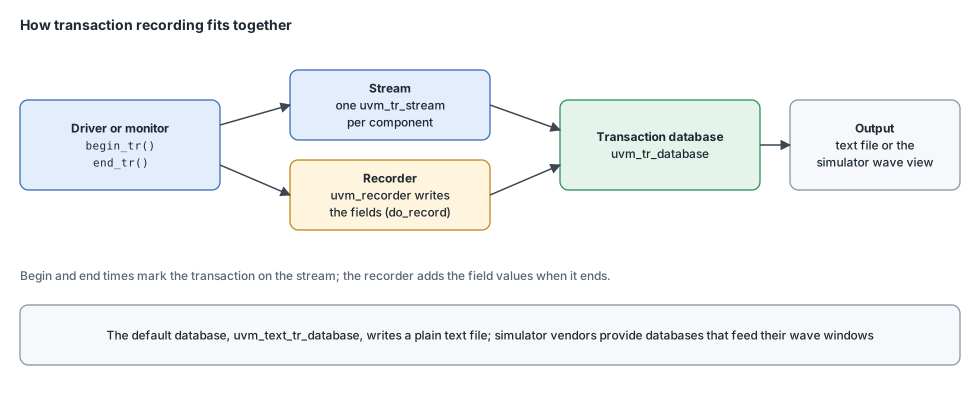
Recording has three parts:
- A transaction database, a
uvm_tr_database, which is the backend. UVM hides what it is, since that depends on the tool. The default,uvm_text_tr_database, writes a text file. Simulator vendors provide databases that feed their wave viewers. - A stream for each component, a
uvm_tr_stream, named after the component. Transactions from that component are recorded in its stream. - A recorder, a
uvm_recorder, which is the policy object a transaction uses to write its fields.
A component marks the beginning and end of a transaction. If recording is on for that component, UVM creates a database transaction with those times and records the transaction's fields when it ends.
Syntax
// In a uvm_component
function integer begin_tr(uvm_transaction tr, string stream_name = "main", string label = "",
                          string desc = "", time begin_time = 0, integer parent_handle = 0);
function void    end_tr(uvm_transaction tr, time end_time = 0, bit free_handle = 1);
function integer record_error_tr(string stream_name = "main", uvm_object info = null,
                                 string label = "error_tr", string desc = "", ...);
function integer record_event_tr(string stream_name = "main", uvm_object info = null,
                                 string label = "event_tr", string desc = "", ...);

// In a uvm_object (a transaction)
virtual function void do_record(uvm_recorder recorder);
Times default to the current simulation time. begin_tr() returns a handle that is valid only when recording is enabled, so don't depend on it for anything but passing it to child transactions.
Recording in a Driver
A driver marks the start of a transaction when it begins to drive it and the end when the bus transfer completes. The call to accept_tr(), made when the driver receives the item from the sequencer, records the time at which the item arrived, which may be earlier than the start if the driver has to wait for a grant.
virtual task run_phase(uvm_phase phase);
  bus_item m_req;
  forever begin
    seq_item_port.get_next_item(m_req);
    accept_tr(m_req);                              // item received from the sequencer
    void'(begin_tr(m_req, "bus_driver"));          // the transfer starts now
    drive_item(m_req);                             // wait for the bus, drive the pins
    end_tr(m_req);                                 // the transfer is complete
    seq_item_port.item_done();
  end
endtask
Both begin_tr() and end_tr() are component methods, which call the matching methods of the transaction. Items received by a driver always have a parent sequence, so UVM records them as children of the sequence's own transaction automatically. In the wave viewer, the sequence appears as a long bar with the individual items nested underneath.
Recording in a Monitor
A monitor records what it observes. It can't call begin_tr() before the transaction exists, so it usually creates the transaction object as soon as it sees the start, and supplies the real begin time afterwards:
virtual task run_phase(uvm_phase phase);
  forever begin
    bus_item item;
    time     t_start;
    @(posedge vif.clk iff vif.sel);                // transaction starts
    t_start = $time;
    item = bus_item::type_id::create("item");
    item.addr = vif.addr;
    item.write = vif.write;
    @(posedge vif.clk iff vif.ready);              // transaction completes
    item.data = vif.write ? vif.wdata : vif.rdata;
    void'(begin_tr(item, "bus_monitor", .begin_time(t_start)));
    end_tr(item);                                  // end time: now
    ap.write(item);
  end
endtask
Passing begin_time lets the monitor record the transaction at its true start, even though it only knew its full contents at the end. The times may lie in the past, but the begin time must not be earlier than the accept time of the same transaction.
Choosing the Fields: do_record()
When recording is on, the transaction's record() function is called as it ends, and it calls do_record(). Override that function and tell the recorder about each field:
class bus_item extends uvm_sequence_item;
  rand bit [7:0]  addr;
  rand bit [31:0] data;
  rand bit        write;
  `uvm_object_utils(bus_item)
  // Rest of the code (constructor)

  virtual function void do_record(uvm_recorder recorder);
    super.do_record(recorder);
    recorder.record_field("addr",  addr,  $bits(addr),  UVM_HEX);
    recorder.record_field("data",  data,  $bits(data),  UVM_HEX);
    recorder.record_field("write", write, $bits(write), UVM_BIN);
  endfunction
endclass
The last argument is the radix, which controls how the viewer displays the value. If the class uses field macros, do_record() is generated for you, and a field is left out of the recording with the UVM_NORECORD flag. As with the other policy functions, writing do_record() by hand gives full control and avoids the macros' overhead; see UVM Field Macros.
Quick Check
Q: The driver in the example calls begin_tr() and end_tr(), but nothing appears in the transaction database. What is the most likely reason?
Show Answer
Recording is not enabled for that component. The calls still run and keep the transaction's times, but a database transaction is only created if recording is on. Set the component's recording detail, and make sure a database is active, before expecting output.
Turning Recording On
Recording is controlled per component through its recording_detail property: begin and end calls create database transactions only when it is not UVM_OFF. A test can enable it for exactly the components it wants to see:
// In the test, after the environment is built
m_env.m_agent.m_driver.recording_detail  = UVM_FULL;
m_env.m_agent.m_monitor.recording_detail = UVM_FULL;
Recording only the components you are debugging keeps the database small and the simulation fast. The database itself is selected through the component's tr_database, and by default is the text implementation, whose output file name is set with set_file_name(). If your simulator offers its own database, use it to get transactions drawn in the waveform window.
Errors and Events
Not everything has a duration. record_event_tr() marks a single point in time, such as a pause or a reset seen by the monitor, and record_error_tr() marks an error, so it stands out on the timeline. Both can attach a transaction object whose do_record() output is stored with the marker:
if (vif.err)
  void'(record_error_tr("bus_monitor", item, "slave_error", "slave returned an error"));
Common Mistakes
Mistake #1: Forgetting to end the transaction
A begin_tr() without an end_tr() leaves an open transaction that is never written. Call end_tr() on every path, including error paths.
Mistake #2: Recording everything
Recording every component of a large testbench slows the simulation and fills the database. Switch it on for the components under investigation.
Mistake #3: Reusing one object for many transactions
A monitor that keeps one item object and changes its fields records the same transaction repeatedly. Create a new object per transaction, as the examples do.
Mistake #4: Forgetting super.do_record()
Without the call to the parent's function, fields defined by a base class are missing from the recording.
Summary
In this article, you learned:
- Recording stores transactions with start time, end time and fields, so waveform viewers can show them with the signals
- Drivers and monitors call
begin_tr()andend_tr()around each transaction do_record(), or the field macros, decides which fields are stored- Recording is enabled per component through
recording_detailand stored in a transaction database record_event_tr()andrecord_error_tr()mark points in time and errors
