
A timing result from one library and no wires is a first estimate. Sign-off asks for more: the slowest conditions for setup, the fastest for hold, and the real wire delays from the layout. This article shows how to run these checks in one OpenSTA session, with three libraries and a parasitic file, and what changes in the numbers when the wires are added. It uses the small demo circuit, so that every number can be traced.
10 min read | Intermediate
What You'll Learn
- Load several libraries as corners in one OpenSTA session and report each corner
- Read a parasitic file for each corner with
read_spef - Explain why the wires change setup and hold slack in opposite directions
- Choose which corner to use for the setup sign-off and which for the hold sign-off
Corners in One Session
The article about multi-corner multi-mode analysis explained why a design is checked at several operating conditions. In OpenSTA, you declare the corners first and then load one library for each:
define_corners ss tt ff
read_liberty -corner ss sky130_fd_sc_hd__ss_100C_1v60.lib
read_liberty -corner tt sky130_fd_sc_hd__tt_025C_1v80.lib
read_liberty -corner ff sky130_fd_sc_hd__ff_n40C_1v95.lib
read_verilog net.v
link_design sta_demo
read_sdc demo.sdc
The netlist and the SDC are read once and shared. Only the delays of the cells change from corner to corner, because each corner has its own library. In ChipVerify Lab you choose the library and the corner in a drop-down (a PRO feature), so each corner is one run of the demo example below. The lab does not read SPEF files, so the second half of this article cannot be repeated there. To see one corner in a script, add -corner to the report:
report_checks -corner ss -path_delay max -format end -digits 4
report_checks -corner ff -path_delay min -format end -digits 4
Results Without Wires
The design is the demo circuit of the first article of this chapter, with the clock at 2.0 ns and input and output delays of 0.4 ns. With no parasitic file, OpenSTA assumes that every wire has zero resistance and zero capacitance. The worst slack of each corner is:
| Corner | Worst setup slack (ns) | Setup endpoint | Worst hold slack (ns) | Hold endpoint |
|---|---|---|---|---|
| ss | 0.7856 | y | 0.5966 | _6_/D |
| tt | 1.0326 | z | 0.4241 | _6_/D |
| ff | 1.0994 | z | 0.2681 | _6_/D |
Setup is tightest at the slow corner and hold at the fast corner, as expected. The setup endpoint changes from y at the slow corner to z at the others, because the delays of the two paths do not scale by the same factor from one library to the other. This is one reason why the worst path of a design is not the same at every corner, and why a single-corner run is not enough.
Adding the Wires
A SPEF file describes the resistance and capacitance of the wires. The article about parasitic extraction showed the format. This one describes a single net, r1, the output of the first flip-flop, which goes to two gates (the header of the file is left out here):
*D_NET r1 0.009
*CONN
*I _7_:Q O
*I _3_:A I
*I _4_:A I
*CAP
1 _7_:Q 0.001
2 r1:1 0.004
3 _3_:A 0.001
4 _4_:A 0.003
*RES
1 _7_:Q r1:1 1.0
2 r1:1 _3_:A 0.8
3 r1:1 _4_:A 1.6
*END
The net has a total capacitance of 0.009 pF, and the resistances of the pieces are 1.0, 0.8 and 1.6 kilo-ohm. The file is read after link_design, once for each corner, so that each corner can have the parasitics extracted for its own conditions:
read_spef -corner ss r1.spef
read_spef -corner tt r1.spef
read_spef -corner ff r1.spef
In a real flow the three files are different (the article about RC corners explains why). Here the same file is used three times, so that the change from the wires can be seen on its own. These are the results with the net r1 annotated:
| Check | Without wires (ns) | With the wires (ns) | Change (ns) |
|---|---|---|---|
| ss setup, endpoint y | 0.7856 | 0.6380 | -0.1476 |
| tt setup, endpoint z | 1.0326 | 1.0326 | 0.0000 |
| ff setup, endpoint z | 1.0994 | 1.0994 | 0.0000 |
| ss hold, endpoint _6_/D | 0.5966 | 0.5967 | +0.0001 |
| tt hold, endpoint _6_/D | 0.4241 | 0.4927 | +0.0686 |
| ff hold, endpoint _6_/D | 0.2681 | 0.3290 | +0.0609 |
Why the Wires Move the Numbers
The wire on the net r1 has two effects: it adds capacitance, which makes the flip-flop slower, and it adds resistance, which delays the signal on the way to the gates. Both make the data later.
- For setup, later data is bad. At the slow corner, the path from the flip-flop to the output
yarrives at 0.9620 ns instead of 0.8144 ns. The required time is 1.6000 ns, so the slack falls from 0.7856 to 0.6380 ns. - For hold, later data is good. The data at
_6_/Dchanges later, so there is more time between the clock edge and the change. The hold slack of the tt corner grows by 0.0686 ns, and the ff corner by 0.0609 ns. - The paths that do not use the net
r1, such as the path fromatoz, do not change at all.
At the slow corner, the hold slack hardly moves (+0.0001 ns). The effect of the wires is not the same size at every corner, so it must be looked at for each corner.
The Hold Result on a Waveform
This is the same hold check at the three corners with the wires read. The clock edge is at 0, the data changes later, and the hold slack is the distance between the required time and the change:
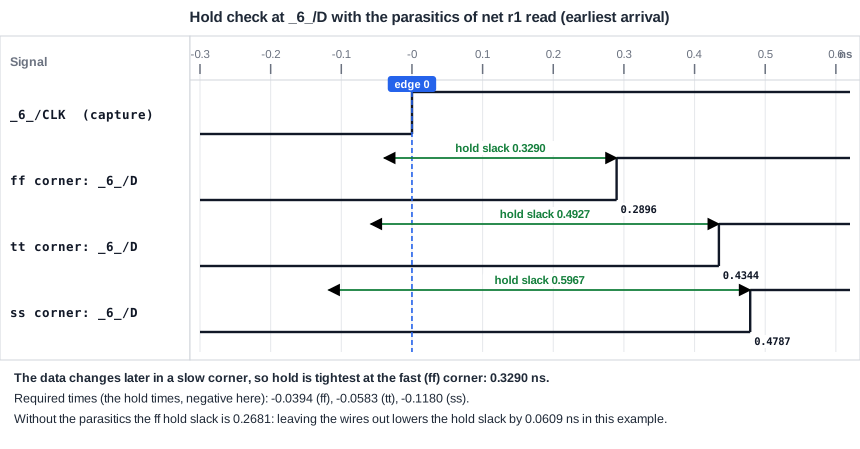
The hold margin is the smallest at the fast corner, 0.3290 ns. That is the number that counts for the hold sign-off. If the wires were left out, the margin would look smaller (0.2681 ns), and a designer might add delay cells that are not needed. That is a cost in area and in setup slack.
Which Corner for Which Check
The rule that follows from the tables is:
- Setup sign-off: the slowest library (ss) with the slowest wires (the Cworst and RCworst parasitics). Data is as late as it can be.
- Hold sign-off: the fastest library (ff) with the fastest wires (the Cbest and RCbest parasitics). Data is as early as it can be.
Do not use the hold slack of the slow corner, or the setup slack of the fast corner, as sign-off numbers. They are the safest numbers of their kind and they hide the real limit. Taking the wires out is a mistake in both directions: it gives a setup slack that is too good and, as above, a hold slack that is too small.
Common Mistakes
Mistake #1: Reading the parasitics for only one corner
A corner without parasitics is analyzed with zero-delay wires, and its setup slack is too optimistic. Read a SPEF file for every corner that you report.
Mistake #2: Comparing a corner with wires to another corner without wires
Differences between corners are only meaningful when the same wires are in all of them. Check that every corner has its parasitics before you compare the numbers.
Quick Check: With the wires, the output y at the ss corner arrives at 0.9620 ns and the required time is 1.6000 ns. What is the setup slack?
1.6000 - 0.9620 = 0.6380 ns.
Practice Exercise
Challenge: Which Corner Limits the Clock?
Use the table of this article. With the wires read, what is the smallest clock period at which the demo circuit meets setup at every corner? Assume the input delay and the output delay stay at 0.4 ns, and the endpoint with the smallest slack at each corner is the one in the table. Which corner decides?
Hint
For these paths the slack changes by the same amount as the period. The smallest period at a corner is 2.0 ns minus its slack.
Solution
The smallest periods are 2.0 - 0.6380 = 1.3620 ns at ss, 2.0 - 1.0326 = 0.9674 ns at tt, and 2.0 - 1.0994 = 0.9006 ns at ff. The slow corner with the wires decides: the clock cannot be faster than about 1.36 ns. This holds only if the paths with the worst slack stay the same when the period changes, which should be checked with a new run, and the hold slacks do not depend on the period.
Summary
define_cornersandread_liberty -cornerload several libraries into one session, andreport_checks -cornerreports one corner.read_spef -corneradds the parasitics of the wires to the corner. Without a SPEF file, the wires have no delay.- The worst setup path can change from corner to corner. In the demo it is
yat ss andzat tt and ff. - Wires make data later: the ss setup slack of
ydrops from 0.7856 to 0.6380 ns, and the tt and ff hold slacks rise by 0.0686 and 0.0609 ns. - Sign off setup at the slowest corner with the slowest wires, and hold at the fastest corner with the fastest wires.
- Reading the parasitics for every corner keeps the comparison between corners fair.
