
Almost every computer built since the late 1940s follows one plan. A processor fetches instructions one after another from memory and carries them out; the same memory holds both those instructions and the data they work on; and input/output devices connect the system to the world. This plan is called the stored-program computer. Everything else in computer architecture, from pipelines to caches to multicore chips, is a way of making this plan run faster. This article explains each part of the plan, how the parts work together, and what a small program looks like inside the memory of a RISC-V computer.
12 min read | Beginner
What You'll Learn
- Name the three parts of a computer and describe what each one does
- Explain what "stored program" means and why it made computers general-purpose
- Describe the fetch-execute loop and the role of the program counter
- Read the memory layout of a small program: its code, its data and its stack
What a Computer Has to Do
A computer runs a program: a list of simple steps such as "add these two numbers", "copy this value from memory" or "if the result is zero, continue at step 40". To do that, it needs three things. It needs somewhere to keep the program and the data the program works on. It needs something that reads the steps one by one and carries them out. And it needs a way to get information in from the outside world and send results out.
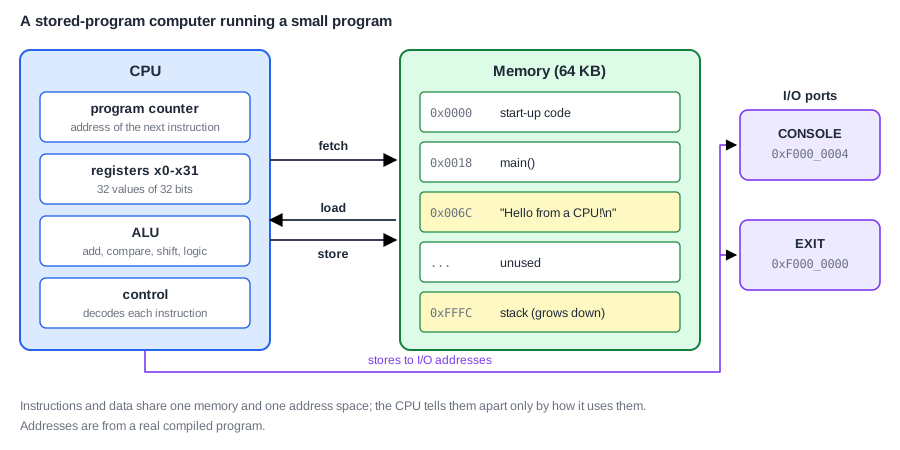
These three needs give the three parts of every computer: memory, the processor, and input/output (I/O). The picture below shows them for a small RISC-V computer running a short program that prints a greeting.
The Processor
The processor, also called the CPU (central processing unit) or the core, is the part that does the work. Inside it are four kinds of circuit, shown as boxes on the left of the picture.
The program counter (PC) is a register that holds the memory address of the instruction the processor is about to run. It is how the processor keeps its place in the program, like a finger following lines on a page.
The registers are a small set of fast storage locations inside the processor, 32 of them in RISC-V, each holding one 32-bit value. Instructions take their inputs from registers and put their results back into registers. Registers and the Register File explains them in detail.
The ALU (arithmetic logic unit) is the circuit that computes: it adds, subtracts, compares, shifts and combines bits. Every calculation the program does passes through it.
The control logic reads each instruction and decides what the other parts must do for it: which registers to read, which ALU operation to perform, whether to read or write memory, and where the next instruction is. It is the processor's interpreter for the instruction language.
Memory and Addresses
Memory is a long row of numbered storage cells. Each cell holds one byte (8 bits), and its number is its address. The memory in the picture has 65,536 cells, numbered from 0x0000 to 0xFFFF in hexadecimal (base 16, the usual way to write addresses; the prefix 0x marks a hex number, and Numbers in Hardware explains the notation).
The processor uses memory in only two ways. To read, it sends an address and receives the value stored at that address. To write, it sends an address and a value, and the memory stores the value there. Memory does nothing else: it does not know what the values mean, it just keeps them.
Input and Output
I/O devices connect the computer to the world: a serial port that sends text, a display, a sensor, a network interface. The processor must be able to send them data and read data from them.
In most modern computers, devices are reached exactly like memory, through addresses. Some addresses do not belong to memory cells but to a device. In the computer in the picture, writing a value to address 0xF000_0004 does not store anything in memory: the value goes to a console port, which prints it as a character. Writing to 0xF000_0000 tells the outside world that the program has finished and gives its result. This arrangement is called memory-mapped I/O, and it means the processor needs no special instructions for devices: an ordinary write to the right address is enough.
Quick Check
Q: A program on the computer in the picture writes the value 0x48 to address 0xF000_0004. What happens, and what does memory contain at that address afterwards?
Show Answer
The console port receives 0x48, the code for the letter "H", and prints it. Nothing is stored in memory: that address belongs to the device, not to a memory cell. The system decides from the address where the value goes.
The Stored-Program Idea
The key idea of the plan is that instructions are just numbers stored in memory, next to the data. Each RISC-V instruction is a 32-bit number. The first instruction of the greeting program, for example, is stored at address 0 as the number 0x00010137. The control logic knows how to read that number: its lowest 7 bits say "this is a lui instruction", other bits name a register, and the rest form a constant. Read as an instruction, it means "put the value 0x10000 into the stack pointer register". The same 32 bits, read as data, would simply be the number 65,847.
The processor never asks which kind of value it is looking at. Whatever the program counter points to is fetched and executed as an instruction; whatever a load or store instruction addresses is treated as data. That single rule has a large consequence: to change what a computer does, you only need to put a different program into its memory. The first electronic computers did not work this way; reprogramming them meant re-plugging cables and setting switches, which could take days. Storing the program in memory made computers general-purpose machines, and it is also what makes compilers and operating systems possible, because they create and move programs as ordinary data.
There are two ways to build the connection between processor and memory. In the original design, one memory and one path serve both instructions and data. Many modern processors keep one shared memory but give the processor two separate paths into it, one for fetching instructions and one for loads and stores, so that both can happen in the same cycle. Either way, instructions and data share one set of addresses.
The Fetch-Execute Loop
The processor's whole behavior is one loop, repeated for every instruction:
forever:
    instruction = memory[PC]          # fetch the instruction the PC points to
    decode the instruction            # which operation, which registers, which constant
    execute it                        # compute, read or write memory, or decide a branch
    PC = address of the next one      # usually PC + 4; a branch or jump sets a new address
Each RISC-V instruction is 4 bytes long, so in the normal case the next instruction is at PC + 4: the processor walks through memory four bytes at a time. Branch and jump instructions break this pattern on purpose by loading a new address into the PC. That is how a program repeats a loop, calls a function or skips code. The Instruction Cycle takes the loop apart step by step, and the datapath article shows the hardware that carries out each step.
Where the Processor Starts
When a computer is switched on or reset, its program counter is set to a fixed address called the reset address, and the processor starts fetching from there. The address differs from one chip to another; in the computer in the picture it is 0. The program therefore has to be placed so that its first instruction sits at that address; if anything else were there, the processor would execute it anyway.
Something has to put the program into memory before that. In a finished product, the first code comes from a read-only memory built into the chip, which then loads the rest from storage. During chip design, a simulation usually writes the program straight into memory before releasing the processor from reset. How a program file is produced and placed in memory is the subject of Assembling, Linking and Loading.
Quick Check
Q: The program counter holds 0x0040, and the instruction there is an ordinary addition. What is the PC after that instruction, and what would change it to something else?
Show Answer
0x0044, because each instruction is 4 bytes and the next one follows directly. Only a branch whose condition is true, or a jump, would load a different address into the PC.
A Small Program in Memory
The greeting program is a good map of all this. It was written in C, translated into RISC-V instructions by a compiler, and placed in memory starting at address 0. Its whole image is 127 bytes:
| Address range | Contents | Used by the processor as |
|---|---|---|
| 0x0000 - 0x0017 | start-up code: 6 instructions that set up the stack, call main and report its result | instructions |
| 0x0018 - 0x006B | main: the compiled C function, 21 instructions | instructions |
| 0x006C - 0x007E | the text "Hello from a CPU!" with a newline and a terminating zero, 19 bytes | data |
| 0x007F - 0xFFFF | unused memory; the stack starts at the top (0x10000) and grows downward | data |
| 0xF000_0000 and 0xF000_0004 | EXIT and CONSOLE ports | I/O |
Code comes first because the processor starts at address 0. The program's constant data, the message text, follows directly after the code. The stack, a region a program uses for temporary values while functions run, is placed at the opposite end of memory so that it can grow without running into the code; How a Program Runs explains it.
When it runs, the program reads the message one byte at a time from addresses 0x006C onward, writes each byte to the CONSOLE address, and finally writes its result to the EXIT address. To the processor, each of those is just a load or a store. It prints 18 characters and executes about 200 instructions in total, although only 27 instructions are stored: about seven and a half instructions run for each one stored, because the loop that prints one character is stored once and executed 18 times.
Where Is This Used?
Every phone, laptop, microcontroller and server is a stored-program computer. Larger systems add more of everything, such as several processor cores, fast memories between the processor and main memory, and hundreds of devices, but each core still fetches instructions from addresses, follows its program counter and reaches devices through the address space.
Common Mistakes
Mistake #1: Thinking memory knows what it stores
Memory holds bytes and nothing else. Whether a word is an instruction, a number or a character depends only on how the processor uses it. This is why a jump to a wrong address makes the processor "execute" data, which usually ends in a crash.
Mistake #2: Treating I/O as separate from addresses
On most systems, devices sit in the same address space as memory and are reached with ordinary loads and stores. The first step in programming any device is knowing which addresses belong to it.
Mistake #3: Confusing the size of a program with the work it does
A short program with a loop can execute millions of instructions, and a long program can finish quickly. What matters for speed is how many instructions are executed, not how many are stored.
Practice Exercise
Challenge: Read the Memory Map
Using the table of the greeting program above, answer: (a) how many bytes do the instructions of the program occupy, and how many instructions is that? (b) At which address is the letter "f" of "from"? (c) The program prints 18 characters, and its printing loop runs once per character. Why does the processor execute about 200 instructions when only 27 are stored?
Hint
Each instruction is 4 bytes. The message starts at 0x006C with "H" and has one byte per character, counting the space.
Solution
(a) The instructions run from 0x0000 to 0x006B, which is 0x6C = 108 bytes, or 108 / 4 = 27 instructions (6 of start-up code and 21 of main). (b) "Hello from" puts "f" at position 6 counting from 0 (H, e, l, l, o, space, f), so it is at 0x006C + 6 = 0x0072. (c) Most of main is the printing loop, and the processor executes the loop's instructions once for each of the 18 characters. A few instructions before and after the loop run once. Repeating code is what loops are for, so executed instructions are usually far more than stored ones.
Summary
- A computer has a processor that executes instructions, a memory of addressed bytes, and I/O devices.
- The processor contains the program counter, registers, the ALU and control logic.
- In a stored-program computer, instructions are numbers in the same memory as data; whatever the PC points to is executed.
- The processor repeats fetch, decode, execute and next-PC forever, starting at the reset address.
- Most systems reach devices through addresses, so an ordinary store to the right address can print a character.
