
Every chip is a set of blocks that talk to each other and to the outside world. A processor reads memory, a DMA engine moves data, a timer raises an interrupt, a sensor sends a temperature over two wires. The rules for those conversations are bus protocols. This tutorial explains the ideas behind them, then the AMBA buses used inside most chips, then the UART, SPI and I2C interfaces used at the pins, each with working Verilog you can run in ChipVerify Lab.
A bus is a set of shared signals plus a set of rules, called a protocol, that lets several blocks exchange data. This article explains what a bus is, where buses appear inside and around a chip, and walks through a small bus with one master and two slaves that the rest of this chapter builds on.
8 min read | Beginner
What You'll Learn
- Explain what a bus and a bus protocol are
- Tell on-chip buses from off-chip interfaces, with examples of each
- Name the roles of master, slave and decoder
- Read a waveform of reads and writes on a simple bus
Signals Plus Rules
Without a bus, every block that needs data from another block would need its own private wires to it. With ten blocks that is up to 90 point-to-point connections, each with its own timing. A bus replaces them with one shared set of signals and one agreement about how to use them:
- Which signals exist: an address, data in each direction, a signal that says "read" or "write", and signals that say when a transfer starts and when it is finished.
- Who drives what: the block that starts a transfer drives the address and the request; the block that answers drives the response.
- When values are valid: on which clock edge each signal is sampled, and how long it must be held.
That agreement is the protocol. Two blocks that follow the same protocol can be connected without knowing anything else about each other, which is why every IP block on the market comes with a standard bus interface.
On-Chip Buses and Off-Chip Interfaces
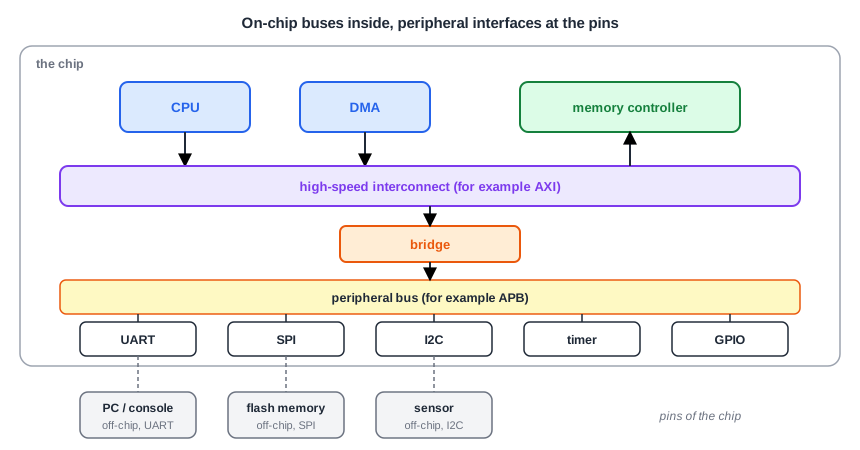
Inside the chip, a fast interconnect such as AXI connects the processor, DMA engines and memory controller. A bridge leads to a slower, simpler bus such as APB, where the peripherals sit. These on-chip buses are wide (32 bits of data or more), run on the chip clock, and never leave the silicon.
At the pins, the picture changes. Every pin costs package area and power, so off-chip interfaces use few wires: UART uses two, I2C two, SPI four. They run much slower, and they must cope with long wires, noise and devices from other vendors. The UART, SPI and I2C controllers are themselves peripherals on the on-chip bus: software writes a byte into a register over APB, and the controller sends it out bit by bit.
Quick Check
Q: A processor sends a byte to a sensor over I2C. Which buses does the byte travel over?
Show Answer
From the processor over the on-chip interconnect, through the bridge onto the peripheral bus, into the I2C controller's data register; then off the chip over the two I2C wires to the sensor.
Masters, Slaves and the Decoder
Every transfer has two sides:
- The master (some newer specifications say manager or requester) starts the transfer: it drives the address, says read or write, and for a write provides the data. Processors and DMA engines are masters.
- The slave (subordinate or completer) answers: it stores the write data, or returns read data. Memories and peripherals are slaves.
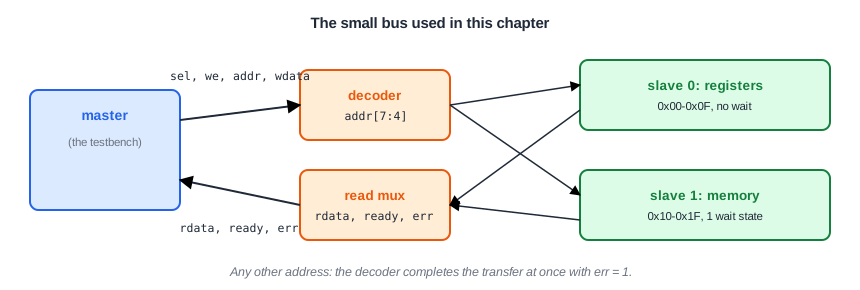
When there are several slaves, a decoder looks at the address and selects the one slave that owns it. A multiplexer brings that slave's answer back to the master.
A Small Bus to Work With
This chapter uses a small teaching bus with one master, a decoder and two slaves. It is simpler than any real standard, but it has everything a bus needs, and the APB bus of Chapter 3 is very close to it.
| Signal | Driven by | Meaning |
|---|---|---|
sel | master | a transfer is requested |
we | master | 1 = write, 0 = read |
addr[7:0] | master | byte address |
wdata[7:0] | master | write data |
rdata[7:0] | slave | read data, valid when ready is 1 |
ready | slave | the transfer completes in this cycle |
err | slave or decoder | the transfer failed |
The rule of this bus: the master holds sel, we, addr and wdata steady, and the transfer ends at the rising clock edge in which ready is 1. The register slave is always ready. The memory slave is slower and holds ready low for one cycle first:
module mem_slave (
  input            clk,
  input            rst,
  input            sel,
  input            we,
  input      [3:0] addr,
  input      [7:0] wdata,
  output     [7:0] rdata,
  output           ready
);
  reg [7:0] m [0:15];
  reg       waited;         // 1 in the second cycle of a transfer

  always @(posedge clk) begin
    if (rst)
      waited <= 1'b0;
    else if (sel && !waited)
      waited <= 1'b1;
    else
      waited <= 1'b0;
  end

  assign ready = waited;    // first cycle: wait, second cycle: done

  always @(posedge clk) begin
    if (sel && we && ready)
      m[addr] <= wdata;
  end

  assign rdata = m[addr];
endmodule
The Bus in Action
The testbench acts as the master. It writes and reads register 1, writes and reads memory byte 3 (address 0x13), and reads address 0x40, where there is no slave:
25  write addr=01 data=a5    ok
45  read  addr=01 data=a5    ok
75  write addr=13 data=3c    ok
105  read  addr=13 data=3c    ok
125  read  addr=40 data=00 ERROR
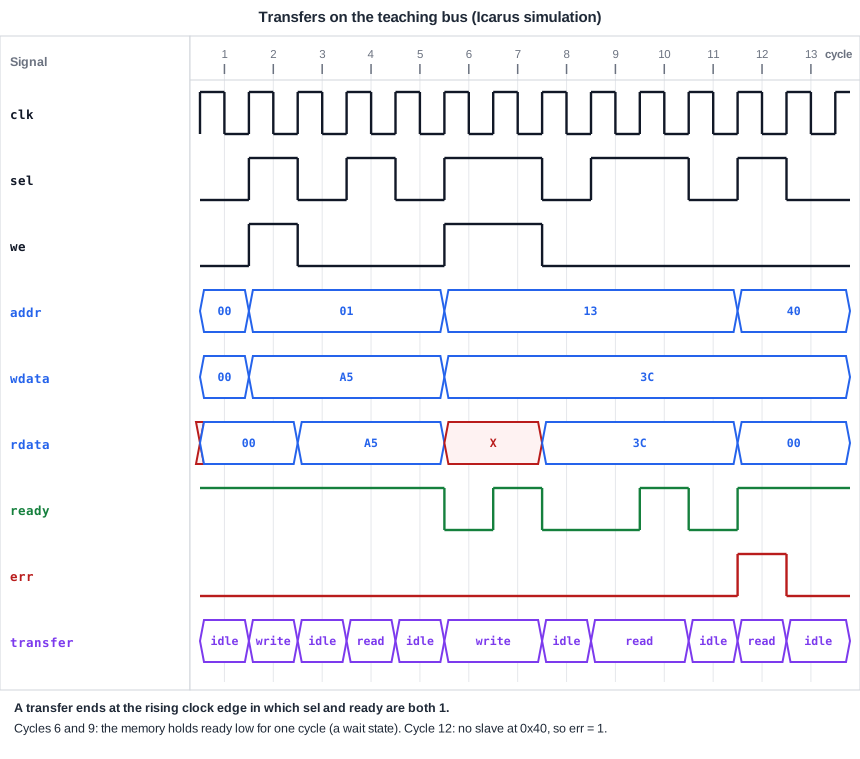
Each transfer to the registers takes one cycle. Each transfer to the memory takes two, because of the wait state. The read of 0x40 completes at once with err = 1: the decoder found no slave and answered on its behalf. These three behaviors, single-cycle transfers, wait states and errors, appear in every bus protocol; the bus transfers article looks at each of them.
Quick Check
Q: In the waveform, ready is also 1 in some cycles where sel is 0. Does a transfer happen there?
Show Answer
No. A transfer needs sel = 1. Without a request, ready has no meaning; the register slave simply drives it high all the time.
Running It in ChipVerify Lab
The example below contains the bus system and the testbench. Run the simulation and open the waveform to see the transfers of this article. The lab examples of this tutorial are simulations, so the waveform you see is the same kind as the diagrams.
Common Mistakes
Mistake #1: Changing the request before the slave is ready
The master must hold the address, the direction and the write data until the transfer completes. A master that moves on after one cycle loses every transfer to a slow slave.
Mistake #2: Reading read data in the wrong cycle
Read data is only valid in the cycle in which ready is 1. Sampling it a cycle earlier picks up a wait-state value.
Mistake #3: Forgetting unmapped addresses
If no slave answers an address and nothing else does either, the master waits forever. A real bus needs a default response, such as the error from this decoder.
Practice Exercise
Challenge: A Slower Memory
Open the example. Change the memory slave so it inserts two wait states instead of one. Predict how many cycles a memory write takes, then run the simulation and check the time of the memory write in the log.
Hint
Replace the waited flag with a small counter that counts the cycles of the current transfer, and raise ready when it reaches 2.
Solution
reg [1:0] cnt;            // cycles already waited in this transfer

always @(posedge clk) begin
  if (rst || !sel || ready)
    cnt <= 2'd0;
  else
    cnt <= cnt + 2'd1;
end

assign ready = (cnt == 2'd2);  // two wait states, done in the third cycle
A memory transfer now takes three cycles: two with ready low, one with ready high. The memory write completes at 85 instead of 75, and every later line of the log moves accordingly. The register transfers are unchanged, because only the memory got slower.
Open the ready-made example in the lab and run the simulation.
Summary
- A bus is a shared set of signals plus a protocol that says who drives what and when values are valid.
- On-chip buses such as AXI and APB are wide and fast; off-chip interfaces such as UART, SPI and I2C use few pins and run slower.
- A master starts transfers, a slave answers them, and a decoder selects the slave from the address.
- On the teaching bus, a transfer completes at the clock edge where
readyis 1; the memory slave adds a wait state, and an unmapped address returns an error.
