
Physical design is the part of chip design that turns a gate-level netlist into a layout: a drawing of every transistor, every metal wire and every via, precise enough to make photomasks from. Synthesis tells you which cells the design needs and how they connect. Physical design decides where each cell sits on the silicon, how power reaches it, how the clock reaches every flip-flop, and which metal tracks carry each signal. This article explains what physical design does, why it matters for speed, power and area, and what you will build in this tutorial.
7 min read | Beginner
What You'll Learn
- Explain what physical design adds to a synthesized netlist
- Name the main steps: floorplan, power planning, placement, clock tree synthesis, routing and sign-off
- Understand why the layout changes timing, power and area
- Know which tools this tutorial uses and what you can run in ChipVerify Lab
From Netlist to Layout
After synthesis, a design is a netlist: a list of standard cells from a library, such as an and3_1 gate or a dfxtp_1 flip-flop, and the nets that connect their pins. A netlist has no geometry. It does not say where the AND gate is, or how long the wire from it to the flip-flop is.
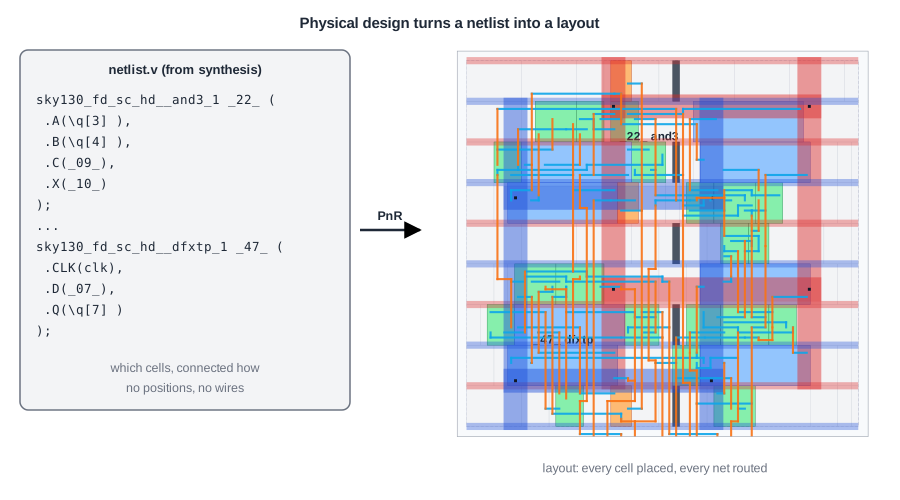
The picture on the right is the real layout of an 8-bit counter after place and route in the open-source flow that ChipVerify Lab uses. Every coloured box is a standard cell sitting in a row. The thin blue and orange lines are metal wires on two routing layers. The wide red and blue bands are the power and ground network. The two cells from the netlist on the left, _22_ and _47_, now have a fixed position, and every pin is connected by real metal.
The Steps of Physical Design
Physical design is a sequence of steps, each building on the last:
- Floorplan: choose the size of the chip (the die), the area for standard cells (the core), and where the input and output pins go.
- Power planning: build the grid of power (VDD) and ground (VSS) wires that feeds every cell.
- Placement: give every cell a legal position in a row, with connected cells close together.
- Clock tree synthesis (CTS): insert buffers so the clock reaches every flip-flop at nearly the same time.
- Routing: draw the metal wires and vias for every net, following the design rules of the process.
- Sign-off: check timing, power, voltage drop, design rules (DRC) and that the layout matches the netlist (LVS), then write GDSII for manufacturing.
The next article, The RTL-to-GDSII Flow, follows one design through all of these steps.
Quick Check
Q: Synthesis already chose the cells. Why can't the chip be made from the netlist directly?
Show Answer
A mask shop needs geometry: the exact shapes of every layer. The netlist only lists cells and connections. Physical design supplies the positions, the power network, the clock tree and the wires, and checks that all of it follows the manufacturing rules.
Why the Layout Changes Speed, Power and Area
Synthesis estimates timing with idealized wires. In a real layout, every wire has resistance and capacitance, and long wires slow signals down. The clock no longer arrives at every flip-flop at the same moment. Physical design is where these effects become real, and where they are fixed:
- Timing: placement keeps critical paths short, the tools insert buffers and upsize cells on slow paths, and CTS keeps clock skew small. Timing is checked again with the real wire parasitics.
- Power: every wire is a capacitor that is charged on every toggle. Shorter wires mean less switching power. The power grid must also be strong enough that the supply voltage does not sag.
- Area: the core is larger than the sum of the cells, to leave room for routing. The utilization you choose trades area against routability.
For the 8-bit counter in the picture, synthesis reported 280.3 um2 of cells. After place and route the design area is 298 um2: three clock buffers and five tap cells were added. The die is 46.5 um by 46.5 um, because the core is surrounded by a 10 um margin for the pins.
The Tools in This Tutorial
Commercial flows use tools such as Cadence Innovus or Synopsys ICC2 and Fusion Compiler. This tutorial uses the open-source flow that ChipVerify Lab runs:
- Yosys for synthesis, with the SkyWater sky130 high-density standard cell library (
sky130_fd_sc_hd). - OpenROAD for floorplan, power grid, placement, CTS, routing, timing and IR drop analysis.
- KLayout, Magic and Netgen for GDSII, DRC and LVS.
The concepts are the same in every tool: rows and sites, utilization, power straps, placement density, clock skew, congestion and design rules. Every layout picture and number in this tutorial comes from a real run of this flow.
Quick Check
Q: The counter's cells take 280.3 um2, but the die is 46.5 um by 46.5 um, over 2,100 um2. Where does the rest go?
Show Answer
The core is only about half full on purpose, to leave space for routing, and the 10 um margin around the core holds the I/O pins. The empty space in the rows is later filled with filler cells so the wells and rails stay continuous.
Running It in ChipVerify Lab
The example is the 8-bit counter from this article. Run synthesis in the synthesis panel, then open the PnR tab, keep the default settings and run Place and Route. The Place & Route article of the lab tutorial describes the panel and the report.
Common Mistakes
Mistake #1: Treating synthesis timing as final
Synthesis timing uses estimated wires and an ideal clock. Real wires and the clock tree change the numbers, sometimes a lot on long paths. Only post-route timing counts for sign-off.
Mistake #2: Thinking physical design only draws wires
The tools also change the netlist: they add clock buffers, tap cells, filler cells and antenna diodes, and resize or buffer cells to fix timing. The netlist written after place and route is not the one that went in.
Practice Exercise
Challenge: Count What Was Added
Run synthesis and Place and Route on the counter. Synthesis maps it to 28 cells. How many cells does the final layout contain, and what are the extra ones?
Hint
Look for clock buffers, tap cells and filler cells in the report or the layout viewer.
Solution
The final layout has 109 instances: the 28 cells from synthesis, 3 clock buffers (clkbuf_1) from CTS, 5 tap cells (tapvpwrvgnd_1) and 73 filler cells. Only the clock buffers change the logic path; taps and fillers are physical-only cells with no logic function.
Open the ready-made example in the lab, synthesize it and run Place and Route.
Summary
- Physical design turns a gate-level netlist into a layout: positions for every cell, a power grid, a clock tree and metal wires.
- The main steps are floorplan, power planning, placement, CTS, routing and sign-off.
- The layout determines real timing, power and area; wires and the clock tree change the numbers from synthesis.
- This tutorial uses Yosys, OpenROAD, KLayout, Magic and Netgen with the sky130 library, the flow ChipVerify Lab runs.
