
Late in a project, a design is almost finished. The layout is done, the clock tree is built, the checks nearly pass, and a few paths still fail. Running the whole flow again would change everything and take days. An engineering change order, an ECO, fixes the remaining violations by editing a small number of cells and wires and leaving the rest untouched. This article explains what a timing ECO is, how it is done, what it costs, and what must be checked afterwards.
8 min read | Intermediate
What You'll Learn
- Define a timing ECO and say when it is used instead of a new run of the flow
- Describe the steps of an ECO loop
- Choose a fix for a setup or a hold violation and estimate its effect
- List the checks that a design needs after an ECO
What an ECO Is
An ECO is a small, targeted change to a design that is already implemented. A timing ECO is one whose purpose is to fix timing violations, and it does not change the function of the design. The typical changes are:
- Swapping a cell for a larger or smaller one, or for another threshold version.
- Inserting a buffer or a delay cell.
- Changing a cell for a different arrangement of gates that has the same function.
- Moving a cell, or changing a short piece of the routing.
The word is also used for functional ECOs, which fix a bug in the logic. The mechanics are the same, but a functional change must be verified in a different way.
Why Not Run the Flow Again
Every run of the implementation tools changes the placement, the clock tree and the routing of the whole design. The violations that were fixed come back in other places, and the process may not converge. Near the end, the team wants the opposite: keep the 99 percent that works and change only what has to change. An ECO keeps the placement and the routes of all other cells in place, so that the timing of the rest of the design stays as it was.
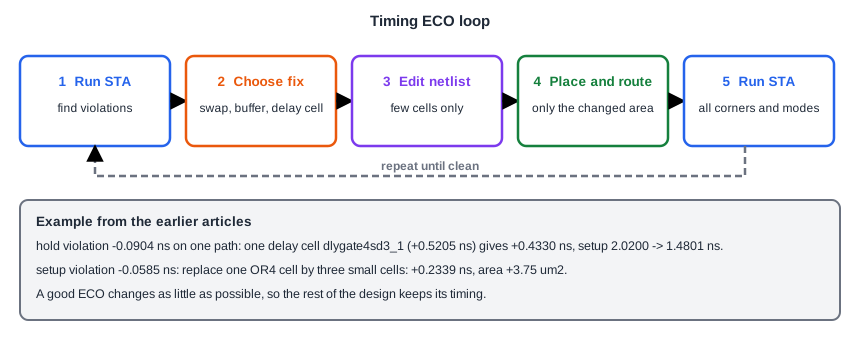
The Loop
- Run STA at all the corners and modes, and collect the violations, setup and hold.
- For each violation, choose a fix from the techniques of the optimization article. The tools can suggest changes, and a designer can adjust them.
- Edit the netlist. Only a few cells change.
- Place the new cells in free space near the old ones and route the changed nets, without moving anything else.
- Extract the changed parasitics and run STA again.
The loop is repeated until no violation remains. A fix for one corner can break another, so the run covers all of them each time.
Two Examples
These come from the earlier articles. First, a hold violation. A path from one flip-flop to the next with a late capture clock had a hold slack of -0.0904 ns. One delay cell dlygate4sd3_1 in the data path adds 0.5205 ns, and the hold slack becomes +0.4330 ns. The same cell takes the setup slack of that path from 2.0200 ns to 1.4801 ns. The ECO has one new cell, and the path has enough setup slack to pay for it.
Second, a setup violation. A path with a 4-input OR cell had a slack of -0.0585 ns. Replacing that one cell by two NOR gates and a NAND gate gave +0.2339 ns, and it costs 3.75 um2 of area. The ECO removes one cell and adds three, and the three have to find space near the old position.
Estimating the effect before the change saves loops. The delay of the new cell is known from the library, and the old delay is in the report, so the new slack is the old slack plus the change of the delays on the path. The tool then confirms the number with a real run, which also includes the new wire.
Spare Cells and Metal-Only ECOs
When a chip has already been sent to manufacturing, the cost of a change is much higher, because each change of a manufacturing layer needs a new mask. Teams scatter spare cells, unused gates of several types, over the chip. A late ECO then reuses a spare cell and changes only a few metal layers, which are the last masks. This is called a metal-only ECO. The design rule is the same: change as little as possible.
What to Check After an ECO
- Timing at all corners and modes, setup and hold, including crosstalk. The new cell changes the capacitance and the neighbours of some wires.
- Design rules: maximum transition, capacitance and fanout of the changed nets.
- Function: an equivalence check between the netlist before and after the ECO, to make sure that the change did not alter the logic.
- Physical rules: the new cell fits, the routes pass the layout checks, and the power grid is intact.
- The paths that were not touched. A new cell can change the timing of a neighbour through shared nets or crosstalk.
Common Mistakes
Mistake #1: Fixing one corner at a time
A delay cell that fixes hold at the fast corner slows the path at the slow corner and can create a setup violation there. Check all corners in each loop.
Mistake #2: Skipping the equivalence check
A timing ECO is supposed to keep the function. A wrong connection of a new cell breaks it silently, and STA does not look at function. Always check that the netlist is still equivalent.
Quick Check: An ECO adds a delay cell of 0.30 ns to a path that has a hold slack of -0.10 ns and a setup slack of 0.50 ns. What are the new slacks?
Hold: -0.10 + 0.30 = +0.20 ns. Setup: 0.50 - 0.30 = +0.20 ns. Both are positive.
Practice Exercise
Challenge: Estimate the ECO
This is a pencil and paper exercise. A path has a setup slack of -0.0585 ns. An ECO replaces a cell that takes 0.4542 ns and a following cell that takes 0.1149 ns by a structure of two cells that is expected to take 0.12 ns and 0.08 ns for the same logic (these two values are assumed for the exercise). Estimate the new slack, assuming the rest of the path does not change, and say what else you would check.
Hint
The new slack is the old slack plus the old delay minus the new delay of the changed region.
Solution
The old delay of the region is 0.4542 + 0.1149 = 0.5691 ns, and the new delay is 0.12 + 0.08 = 0.20 ns. The change is 0.3691 ns, so the new slack is about -0.0585 + 0.3691 = +0.3106 ns. You would also check the new wires, which add delay that the estimate does not include, the hold slack at the fast corner, the cell before the changed region, which now sees different input capacitances, and the equivalence of the netlist.
Summary
- A timing ECO is a small edit of a finished design, done to fix setup or hold violations without changing the function.
- It is used instead of a new flow run so that the rest of the design keeps its timing.
- The loop is: find violations, choose fixes, edit the netlist, place and route only the change, and run STA again.
- Examples: a delay cell for hold (+0.4330 ns, setup cost 0.54 ns) and a restructured OR cell for setup (+0.2339 ns).
- Spare cells allow a metal-only ECO after manufacturing has started.
- After an ECO, check all corners and modes, the design rules, the physical rules and the equivalence of the netlist.
