
Crosstalk does not only change the delay of a signal that switches. It can also create a pulse on a signal that should stay still. When an aggressor switches, the coupling capacitor pushes a bump into a quiet victim net. If the bump is large enough, the next cell sees it as a real signal change. This is a noise or glitch problem, and it is a functional failure and not a timing delay. This article explains how the bump arises, what decides its height, and how a noise check works.
8 min read | Intermediate
What You'll Learn
- Explain how a switching aggressor creates a bump on a quiet victim
- Estimate the size of the bump with the capacitive divider
- Describe what makes a glitch dangerous and what noise immunity is
- List the factors that make a glitch larger or smaller
A Bump on a Quiet Net
Take a victim net that is held at 0 V by its driver, and an aggressor net next to it that switches from 0 to 1.8 V. The coupling capacitor between them passes a part of the change to the victim. The driver of the victim pulls the net back to 0 V, but it needs some time, because it has a limited strength and the net has a resistance and a capacitance. During that time the victim shows a bump:
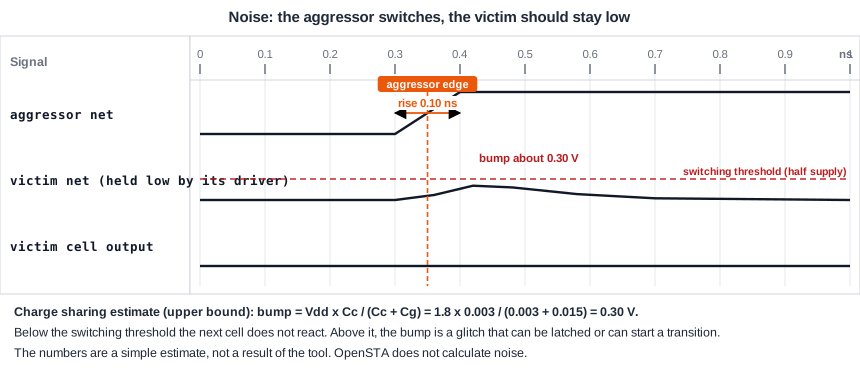
The height of the bump depends on the ratio between the coupling capacitance, Cc, and the capacitance of the victim to ground, Cg. If the aggressor switches fast and the victim driver is weak, the net behaves as a capacitive divider, and the peak is close to:
bump = Vdd x Cc / (Cc + Cg)
For the net r1 of the demo circuit with a coupling capacitance of 0.003 pF and a capacitance to ground of 0.015 pF, the estimate is 1.8 V x 0.003 / (0.003 + 0.015) = 0.30 V. This number is an upper bound. A strong victim driver pulls the net back quickly and the real bump is smaller. A slow aggressor edge also gives a smaller bump, because the driver has time to react. The values in the picture and in this example are a simple estimate, not a result of the tool.
When a Bump Is Dangerous
A cell input reacts when its voltage crosses its switching threshold, which is about half of the supply. A noise check is stricter than that. It compares a bump on a low net with the highest voltage that the input still sees as a logic 0, which is below half of the supply. A bump of 0.30 V on a 1.8 V supply is far from both limits, so the cell does not react. But the bump can be larger, and there are cases in which it matters:
- The bump reaches the threshold of a gate. The output of the gate changes for a short time and creates a glitch on the next net.
- The bump is captured by a flip-flop. If it arrives at a flip-flop at the moment of the clock edge, the flip-flop can store a wrong value.
- The bump is on an asynchronous input, such as a reset or a clock. A glitch there can reset a flip-flop or create an extra clock edge. These nets are the most sensitive.
Each cell input has a noise immunity, which is the height and the width of a pulse that it can tolerate. A noise check compares the bump with this limit. A tall but very narrow bump can be harmless, because a gate does not react to a pulse that is too short. A wide bump of the same height may not be.
What Makes the Glitch Larger
- A large coupling capacitance relative to the capacitance to ground: long parallel wires, small spacing.
- A weak driver on the victim: a small cell or a long wire with a high resistance. The bump lasts longer.
- A fast, strong aggressor: it makes a steep edge.
- Several aggressors at the same time. Their bumps add up.
- A victim that is high impedance, as the output of a gate that is not driving, or a dynamic node.
Noise Analysis in a Flow
Static noise analysis is done in the sign-off tool together with the timing analysis. For each net, it looks at the aggressors, calculates the peak and the width of the bump, and compares them with the noise immunity of the loads. It reports the nets where the bump is too large. The result is a list of nets to fix, not a slack in nanoseconds. OpenSTA, which is used in this tutorial, does not calculate noise, so there is no report to show. The tools that do so rely on the same parasitics, including the coupling capacitances, that you read for the delay analysis.
Common Mistakes
Mistake #1: Looking at delay only
A design can meet every setup and hold check with crosstalk delay and still fail because of a glitch. Noise is a separate check, and it has its own list of violations.
Mistake #2: Ignoring nets that are not data
Clock nets, reset nets and enable signals are the most dangerous victims, because a glitch there changes the state of many flip-flops. Check them first.
Quick Check: A victim has a coupling capacitance of 0.002 pF and a capacitance to ground of 0.008 pF. With Vdd of 1.2 V, what is the upper bound of the bump?
1.2 x 0.002 / (0.002 + 0.008) = 0.24 V.
Practice Exercise
Challenge: Halve the Coupling
This is a pencil and paper exercise. A victim net has a capacitance to ground of 0.015 pF and a coupling capacitance of 0.003 pF, on a 1.8 V supply. The input of the next cell switches at 0.9 V. First calculate the bump. Then calculate it if a layout change halves the coupling capacitance to 0.0015 pF, and say how far each bump is from the threshold.
Hint
Use bump = Vdd x Cc / (Cc + Cg) for both cases, and compare with 0.9 V.
Solution
With 0.003 pF the bump is 1.8 x 0.003 / 0.018 = 0.30 V, which is 0.60 V below the threshold. With 0.0015 pF it is 1.8 x 0.0015 / 0.0165 = 0.164 V, which is 0.736 V below it. Halving the coupling capacitance reduces the bump by about 45 percent. The estimate is an upper bound, and a real analysis also includes the strength of the victim driver.
Summary
- A switching aggressor couples a bump into a quiet victim net through the coupling capacitor.
- The upper bound of the bump is Vdd x Cc / (Cc + Cg), and a strong victim driver reduces it.
- A bump is dangerous when it reaches the threshold of a gate, when a flip-flop captures it, or when it hits an asynchronous input.
- Each cell input has a noise immunity of a height and a width.
- Large coupling, a weak victim driver, a fast aggressor and several aggressors make the glitch larger.
- Noise is a separate check from timing. OpenSTA does not calculate it, and sign-off tools do.
