
An input port is not an ideal source. Something drives it, and that something has a limited strength, so the edge arriving at your chip is not perfectly sharp. An output port is not an open wire either. A pin, a wire on the board and the input of another chip hang on it as a load. STA does not know any of this unless you tell it. This article shows three commands that describe the environment of the ports, and what each one does to delays and slews.
8 min read | Intermediate
What You'll Learn
- Explain why the default environment of a port is optimistic
- Use
set_driving_cell,set_input_transitionandset_load - Predict how each command changes delay, slew and slack
- Choose between
set_driving_cellandset_input_transition
The Default Is Ideal
Without any environment commands, STA assumes that every input is driven by an ideal source, which has no resistance and a perfectly sharp edge, and that every output has no load. In the report of the path from the input a, the first rows look like this:
      Cap      Slew     Delay      Time   Description
                       0.4000    0.4000 v input external delay
   0.0030    0.0000    0.0000    0.4000 v a (in)
   0.0017    0.0335    0.1030    0.5030 v _5_/X (sky130_fd_sc_hd__and2_0)
The slew at the port is 0.0000 ns. No real driver can do that, so the first cell is calculated with an input slew that is too good. At the output, the load is 0.0000 pF. Both make the delays too small.
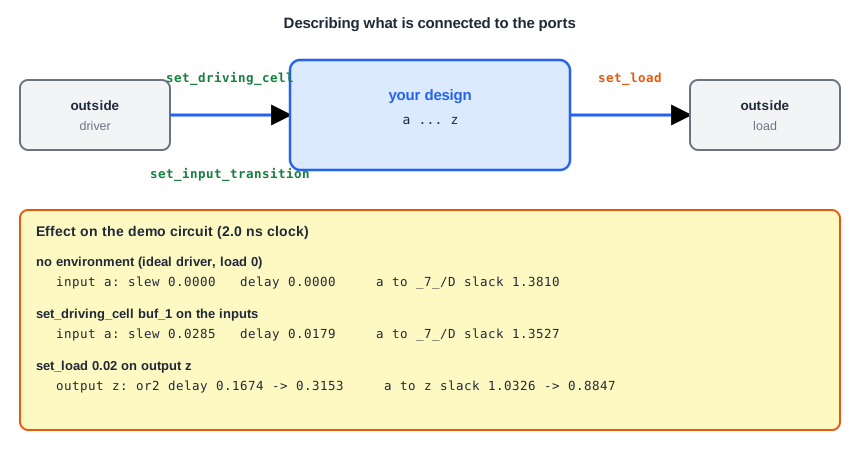
set_driving_cell: What Drives the Input
With set_driving_cell you name a library cell that drives the port. STA then calculates the slew at the port from the strength of that cell and the load of the port, as if the cell were really there:
set_driving_cell -lib_cell sky130_fd_sc_hd__buf_1 -pin X [get_ports {a b c d}]
The option -lib_cell gives the cell and -pin gives its output pin. In the report, the port now has a slew and a delay of its own:
   0.0030    0.0285    0.0179    0.4179 v a (in)
   0.0017    0.0333    0.1135    0.5314 v _5_/X (sky130_fd_sc_hd__and2_0)
The driving cell adds a delay of 0.0179 ns to the path and its slew of 0.0285 ns increases the delay of the first cell inside the chip, from 0.1030 to 0.1135 ns. The setup slack of the path from a to the flip-flop _7_ falls from 1.3810 to 1.3527 ns. A weaker cell would have a larger effect.
set_input_transition: Giving the Slew Directly
If you do not know the driving cell but you know the slew, you can set it directly:
set_input_transition 0.2 [get_ports {a b c d}]
The port then has a slew of 0.2 ns and a delay of zero. This is a simpler model, because it does not include the delay of the driver. It is often used when the datasheet of the driving chip lists the slew of its outputs. The article about slew propagation shows how a slow input slew spreads to other paths.
set_load: What the Output Drives
The load on an output port is the capacitance of the wire and of the input pin of the next chip. It is in pF:
set_load 0.02 [get_ports z]
The cell that drives z, an OR gate, now has a load of 0.02 pF. Its delay grows from 0.1674 to 0.3153 ns, and the setup slack of the path from a to z falls from 1.0326 to 0.8847 ns. A load changes the output slew too. With a larger load of 0.05 pF and a weak driver, the output slew in our run reached 0.75 ns, which is slow enough to break a limit, as the article about design rule constraints shows.
You can also put a load on a net inside the design with set_load 0.006 [get_nets r1], which is the capacitance of the wire of that net. The article about wire load models uses this to estimate wires.
Which One to Use
- If you know the chip that drives the input, use
set_driving_cellwith a similar cell, because it models the delay and the slew together and reacts to the load of the port. - If you only know the slew, use
set_input_transition. - Use
set_loadon every output. The value comes from the board and the receiving chip.
Common Mistakes
Mistake #1: Leaving the environment ideal at sign-off
A design that meets timing with an ideal driver and no load may fail with the real ones. Port paths are the first to show it, because they have little slack to spare, as in the case of an input-to-output path.
Mistake #2: Using set_driving_cell on the clock port
The clock port should be described by the clock definition and by the clock transition, not by a driving cell. Apply the driving cell only to data inputs.
Quick Check: A driving cell is weaker than the one you assumed. What happens to the slew at the port and to the setup slack of the path that starts there?
The slew at the port is larger and the path is slower, so the setup slack is smaller.
Practice Exercise
Challenge: Load the Output
Use the sta_demo design with the basic constraints. The setup slack of the path from a to z is 1.0326 ns, and the delay of the OR gate is 0.1674 ns. Add a load to the output and run again:
set_load 0.02 [get_ports z]
Predict the setup slack of the path to z. Then explain why the setup slack of the paths to the flip-flops does not change.
Open the ready-made example in the lab, run synthesis, and then run STA. Editing constraints.sdc and re-running only STA, and choosing another library or corner, are PRO features.
Hint
The delay of the OR gate grows to 0.3153 ns. The required time of the output stays at 2.0 - 0.4 = 1.6 ns.
Solution
The arrival time is 0.4 + 0.3153 = 0.7153 ns, so the slack is 1.6 - 0.7153 = 0.8847 ns. The path to the flip-flops does not go through the output port z, so its load is not part of those paths. The load on z only changes the cell that drives z, and the paths that end at that port.
Summary
- Without environment commands, inputs have an ideal driver with no delay and no slew, and outputs have no load.
set_driving_cellmodels the delay and the slew of the cell that drives an input port.set_input_transitionsets the slew at an input port directly.set_loadsets the capacitance on an output port, and it makes the driving cell slower.- A weaker driver or a larger load lowers the setup slack of the paths that touch the port.
- Describe the environment before sign-off, because port paths often have little margin.
