
A signal integrity violation, whether it is a crosstalk delay that breaks setup or hold or a glitch that is too large, has one cause: too much coupling for the strength of the victim. The fixes are therefore of two kinds. You can reduce the coupling, or you can make the victim more robust. This article lists the usual fixes, shows how much a change of the coupling capacitance is worth on the demo circuit, and explains how to check that a fix has worked.
8 min read | Intermediate
What You'll Learn
- List the main ways to remove a crosstalk violation
- Explain which fix helps the delay and which helps the noise
- Estimate the benefit of a smaller coupling capacitance on the slack
- Check that a fix does not create a new violation
Reduce the Coupling
The most direct way is to make the coupling capacitor smaller. The capacitance between two wires falls when the distance between them grows, and rises with the length over which they run in parallel.
- Spacing: route the victim and the aggressor farther apart. The coupling capacitance falls quickly with the distance, and the tools can add spacing on the nets that need it.
- Shielding: put a wire at a fixed voltage, a supply or a ground, between the two nets. The coupling to the aggressor becomes a coupling to the shield, which does not switch. The capacitance does not disappear, but the Miller effect does: the victim sees a quiet neighbour.
- Shorter parallel runs: change the routing so that the wires cross instead of running side by side, or use different layers for the two nets, with a layer in between that has other signals.
- Different tracks: reorder the wires so that a sensitive net has quiet neighbours on both sides.
Strengthen the Victim
A strong driver pulls the victim back faster and keeps it near its value while the aggressor switches. For delay, a stronger driver makes the victim edge less sensitive to the added capacitance. For noise, it reduces the height and the width of the bump.
- Upsize the driver of the victim. It is a quick fix, but a larger cell has a larger input capacitance and uses more power.
- Insert a buffer in the middle of a long victim wire. Each half is shorter, has less resistance and less coupling, and the driver of the second half is a new, strong cell.
- Shorten the victim wire by moving the driver and the load closer together.
Soften the Aggressor
- Downsize the aggressor driver, or add a small resistance, so that its edge is slower. A slower edge couples less.
- Change the logic so that the aggressor does not switch at the time of the victim. This is a design decision, supported by the timing windows of the article about aggressor alignment.
What a Smaller Coupling Is Worth
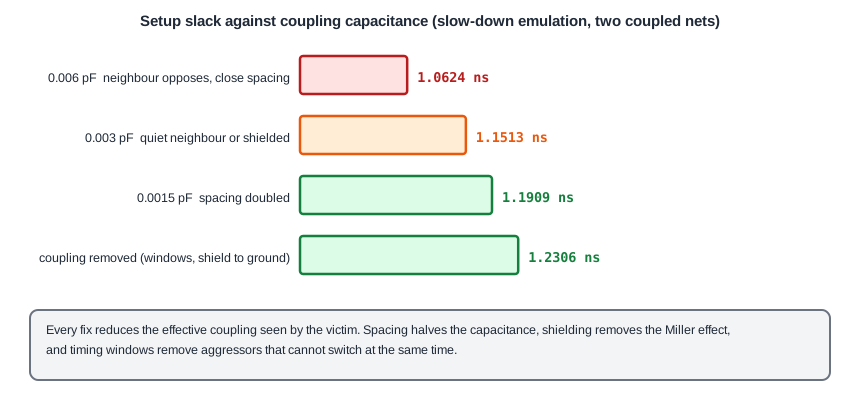
The demo circuit shows the size of the effect. The slow-down case, with 0.006 pF of coupling seen by the victim, gave a setup slack of 1.0624 ns on the path between the two flip-flops. These are the values for a smaller capacitance, read with the quiet-neighbour assumption:
| Case | Coupling capacitance seen by the victim | Setup slack (ns) | Hold slack (ns) |
|---|---|---|---|
| Neighbour opposes the victim | 0.006 pF | 1.0624 | 0.6998 |
| Quiet neighbour, or a shield | 0.003 pF | 1.1513 | 0.6434 |
| Spacing doubled, coupling halved | 0.0015 pF | 1.1909 | 0.6196 |
| Coupling removed | 0 | 1.2306 | 0.5946 |
Each step gives some setup slack back: 0.0889 ns for a shield or for non-overlapping windows, a further 0.0396 ns for double spacing. Notice the hold column: it goes the other way. The hold slack falls as the coupling is removed, from 0.6998 ns to 0.5946 ns, because less capacitance makes the data faster. A fix for a setup problem reduces the hold margin of the same path. After every change, both checks have to be run again.
Checking the Result
- Run the full analysis with crosstalk after the fix. The change of the capacitance changes the windows of other nets too.
- Look at the neighbours. A wire that moved to make room for the victim is now closer to another net.
- Check both setup and hold of the paths that went through the net.
- Check noise as well as delay. A stronger driver reduces both, and spacing reduces both, but a buffer changes the timing of the whole path.
Order of Work
In a typical flow the tool fixes violations automatically in the routing and optimization steps, with spacing, shielding and sizing. The designer looks at the ones that remain, which are usually on a critical clock, in a region with high congestion, or on a net with a special requirement. For those, a manual change of the routing or of the floorplan is the right answer. Clock nets are often routed with extra spacing or shielding from the start, because a glitch or a delay shift there affects many flip-flops.
Common Mistakes
Mistake #1: Upsizing every victim driver
A larger cell loads its own driver, uses more power and takes more area. Use it where the net really needs it, and prefer spacing or shielding for long parallel runs.
Mistake #2: Fixing setup and forgetting hold
Less coupling helps the setup check and can hurt the hold check of the same path. The numbers above show a hold slack that falls by 0.1 ns when the coupling is removed.
Quick Check: Which fix removes the Miller effect without removing the coupling capacitance?
Shielding. The capacitance to the shield stays, but the shield does not switch, so the victim sees a quiet neighbour.
Practice Exercise
Challenge: How Much Does Spacing Buy?
This is a pencil and paper exercise with the table above. A victim has a setup slack of 1.0624 ns with a coupling capacitance of 0.006 pF, and 1.1909 ns with 0.0015 pF. Calculate the slack that is gained per 0.001 pF of coupling capacitance that is removed, and estimate the slack for 0.0045 pF with a straight line between the two points.
Hint
Divide the gain of the slack by the change of the capacitance in units of 0.001 pF. Then interpolate.
Solution
The change is 0.006 - 0.0015 = 0.0045 pF, and the slack gain is 1.1909 - 1.0624 = 0.1285 ns, which is 0.0286 ns per 0.001 pF. A straight line between the two points gives a slack of 1.0624 + 0.0015 x 28.6 = 1.105 ns at 0.0045 pF. The table has a closer point: halfway between 0.006 pF and 0.003 pF the slack is 1.0624 + 0.5 x (1.1513 - 1.0624) = 1.1069 ns. The curve is not a straight line, because the gain per 0.001 pF is 0.0296 ns between 0.006 pF and 0.003 pF and 0.0264 ns between 0.003 pF and 0.0015 pF. For small changes a straight line is a good estimate.
Summary
- A signal integrity violation comes from too much coupling for the strength of the victim.
- Reduce the coupling with spacing, shielding, shorter parallel runs and different tracks or layers.
- Strengthen the victim with a larger driver, a buffer in a long wire, or a shorter wire.
- Soften the aggressor with a slower edge, or make sure it does not switch at the same time as the victim.
- On the demo circuit, going from 0.006 pF to 0.0015 pF of coupling gives back 0.1285 ns of setup slack.
- Less coupling can reduce the hold slack, so check both checks and the noise after every fix.