
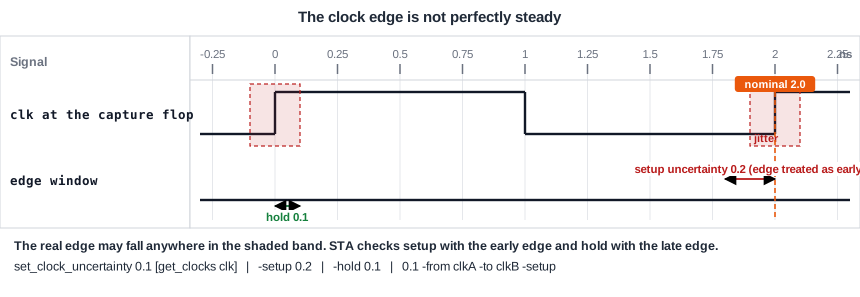
A clock edge is never perfectly steady. It can arrive a little early or a little late, and the clock tree is not known exactly before it is built. Clock uncertainty is the margin that STA keeps for this. It is one number in the constraints, and it reduces the slack of every check on the clock. This article explains where the margin comes from, how it enters the setup and hold equations, and how to set it separately for setup, for hold and between two clocks.
7 min read | Intermediate
What You'll Learn
- Name the reasons for clock uncertainty and say what jitter is
- Apply uncertainty to the setup and the hold equation
- Set uncertainty for setup only, for hold only and between two clocks
- Choose a sensible uncertainty at different stages of the design flow
Where the Margin Comes From
The time between two clock edges is not exactly the period. Jitter is the small, random change in the time of each edge. The clock source, such as a PLL, makes edges that move a little from cycle to cycle, and noise on the supply moves them further. STA analyzes a fixed time, so it keeps a margin for these effects.
Uncertainty has a second use. Before the clock tree is built, STA uses ideal clocks and does not know the skew that the tree will have. Designers then add an uncertainty that covers the skew they expect. After the clock tree is built, the real skew is in the report, and the uncertainty can shrink to cover only the jitter and some safety margin.
How It Enters the Equations
Uncertainty makes both checks harder, but in different ways. For setup, the capture edge is assumed to come early, so the time available shrinks. For hold, the capture edge is assumed to come late, so the old data must stay stable for longer:
Setup: Data required time = Tcapture + Tperiod - Tsetup - Tuncertainty
Hold:  Data required time = Tcapture + Thold + Tuncertainty
With a single value, set_clock_uncertainty 0.5 [get_clocks clk], the demo path from _7_ to _6_ has this result:
| Check | Required | Arrival | Slack without uncertainty (ns) | Slack with 0.5 ns (ns) |
|---|---|---|---|---|
| Setup | 1.8826 - 0.5 = 1.3826 | 0.4323 | 1.4502 | 0.9502 |
| Hold | -0.0583 + 0.5 = 0.4417 | 0.3657 | 0.4241 | -0.0759 |
The setup slack loses 0.5 ns and the hold slack loses 0.5 ns. The hold check becomes a violation of -0.0759 ns, and it stays a violation at any clock period, because the period is not in the hold equation. This is a reason to be careful with large uncertainties: a number that is too large makes hold violations that do not exist, and costs area to fix.
Setup and Hold Separately
The two checks often need different margins. Jitter often matters more for setup, because the setup check depends on the time between two different edges, while hold looks at one edge only. You can set them separately with the options -setup and -hold:
set_clock_uncertainty -setup 0.2 [get_clocks clk]
set_clock_uncertainty -hold  0.1 [get_clocks clk]
For the demo path, the setup slack becomes 1.4502 - 0.2 = 1.2502 ns, and the hold slack becomes 0.4241 - 0.1 = 0.3241 ns. The report adds a row clock uncertainty to the capture clock path, with a negative number for setup and a positive number for hold:
   2.0000    2.0000   clock clk (rise edge)
   0.0000    2.0000   clock network delay (ideal)
  -0.2000    1.8000   clock uncertainty
   0.0000    1.8000   clock reconvergence pessimism
             1.8000 ^ _6_/CLK (sky130_fd_sc_hd__dfxtp_1)
  -0.1174    1.6826   library setup time
             1.6826   data required time
Uncertainty Between Two Clocks
Paths that cross from one clock to another often need more margin, because two different clocks do not share jitter. Use -from and -to:
set_clock_uncertainty 0.1 -from [get_clocks clk_div] -to [get_clocks clk] -setup
The row in the report is called inter-clock uncertainty. For the divider design of the article about generated clocks, the setup slack of the path from the slow clock to the fast clock changed from 1.6200 ns to 1.5200 ns. The setting without -from and -to is called simple uncertainty and applies to the checks within one clock.
Choosing a Value
There is no single right number, but typical practice is:
- Early, with ideal clocks: a larger value that includes the expected skew of the clock tree, plus the jitter.
- After the clock tree is built and with propagated clocks: a smaller value that covers only the jitter and the margin.
- At sign-off: the value that was agreed with the team, based on the clock source and the technology.
Never use uncertainty to hide a problem. A value that is large enough to make a violation disappear is the wrong tool.
Common Mistakes
Mistake #1: Keeping the pre-layout uncertainty after the clock tree is built
The skew is then counted twice, once in the uncertainty and once in the real clock arrival times. The result is pessimistic and creates extra hold violations to fix.
Mistake #2: Assuming uncertainty only hurts setup
The same number is applied to hold unless you set the two separately. A large value breaks hold, and a longer clock period cannot fix it.
Quick Check: The hold time is -0.05 ns, the capture clock arrives at 0.20 ns and the hold uncertainty is 0.10 ns. What is the hold required time?
Required time = 0.20 + (-0.05) + 0.10 = 0.25 ns.
Practice Exercise
Challenge: How Much Uncertainty Is Too Much?
Use the sta_demo design at a 2.0 ns period. Add a clock uncertainty of 0.5 ns for both checks:
set_clock_uncertainty 0.5 [get_clocks clk]
Find the hold slack of the path from _7_ to _6_. Then calculate the largest uncertainty that the hold check allows for this path, and say what the setup slack would be at that value.
Open the ready-made example in the lab, run synthesis, and then run STA. Editing constraints.sdc and re-running only STA, and choosing another library or corner, are PRO features.
Hint
The hold slack is the arrival time minus the required time. It reaches zero when the uncertainty equals the hold slack that you had without uncertainty.
Solution
The hold slack with 0.5 ns is -0.0759 ns, a violation. Without uncertainty it is 0.4241 ns, so the largest uncertainty that this path allows is 0.4241 ns. At that value the setup slack is 1.4502 - 0.4241 = 1.0261 ns. The setup check could stand a much larger uncertainty, and hold is the check that limits the value.
Summary
- Clock uncertainty is a margin for jitter, for the clock tree that is not yet built, and for safety.
- Setup required time = capture clock + period - setup time - uncertainty.
- Hold required time = capture clock + hold time + uncertainty.
- The same number lowers both setup and hold slack, unless you use
-setupand-holdseparately. - Use
-fromand-tofor an inter-clock uncertainty between two clocks. - Use a larger value before the clock tree exists and a smaller one after, and never use it to hide a violation.