
Static timing analysis knows nothing about a clock until you describe it. A flip-flop with an undefined clock is not checked at all, and a wrongly defined clock gives wrong results for every path it touches. This chapter shows how to describe every kind of clock to STA, from a simple port clock to gated and multiplexed clocks.
The command create_clock tells STA where a clock enters the design, how often it ticks and when its edges happen. This article explains its options: the period, the waveform, the duty cycle and the name. It also shows what changes in the timing checks when you change them, and what does not.
7 min read | Intermediate
What You'll Learn
- Write a
create_clockcommand and explain every part of it - Calculate the frequency and the duty cycle of a clock from its period and waveform
- Predict which timing checks change when the waveform changes
- Read the clock summary that STA prints for a design
The create_clock Command
Here is the command that has been used for the demo circuit since the first article:
create_clock -name clk -period 2.0 [get_ports clk]
-name clkgives the clock a name. The name is what you use in later commands, such asset_input_delay -clock clk.-period 2.0is the time of one full clock cycle, in nanoseconds. A period of 2.0 ns is a frequency of 1 / 2.0 ns = 500 MHz.- The last part,
[get_ports clk], says where the clock is. Here it is an input port. It can also be a pin inside the design, such as the output of a clock generator.
Without a -waveform option, STA assumes the clock rises at time 0 and falls at half of the period.
Waveform and Duty Cycle
The option -waveform {rise fall} sets the times of the rising edge and of the falling edge inside one period. The default for a period of 2.0 ns is -waveform {0 1.0}.
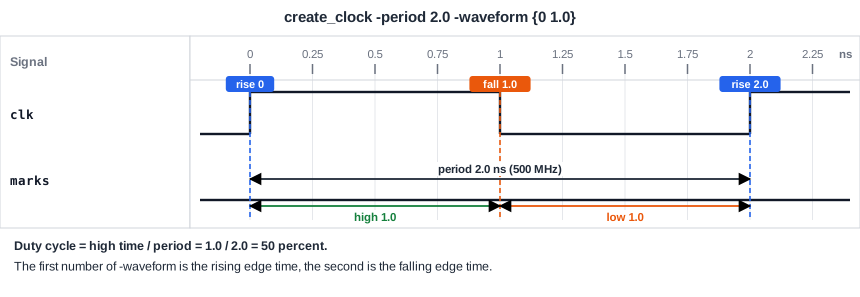
The duty cycle is the part of the period in which the clock is high. It is the high time divided by the period. For {0 1.0} it is 1.0 / 2.0 = 50 percent. A clock with -waveform {0 0.5} is high for only 0.5 ns, so its duty cycle is 25 percent. A clock with -waveform {0.5 1.5} has the same shape as the default but all its edges come 0.5 ns later.
What the Waveform Changes
For a design where all the flip-flops capture on the rising edge, the waveform almost never changes the setup and hold slack. The reason is that the launch edge and the capture edge are both rising edges, and these are always one period apart. The diagram below shows the three versions of the same clock and the result for the demo path:
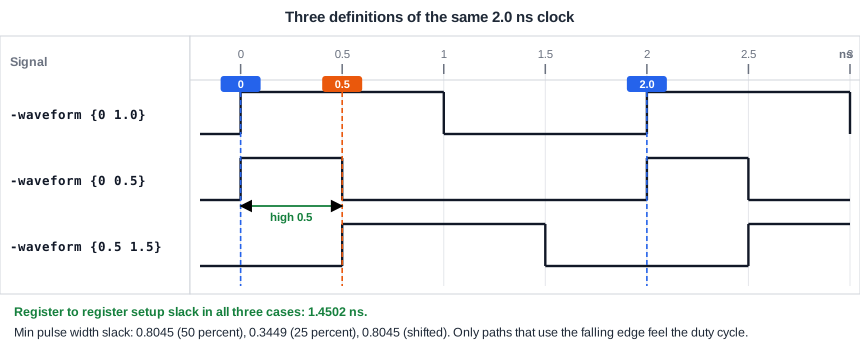
In all three cases, the setup slack of the path from _7_ to _6_ stays at 1.4502 ns. With the shifted clock the report only moves every time by 0.5 ns: the launch edge is at 0.5 ns and the capture edge at 2.5 ns.
   0.5000    0.5000   clock clk (rise edge)
   0.0000    0.5000   clock network delay (ideal)
   0.0000    0.5000 ^ _7_/CLK (sky130_fd_sc_hd__dfxtp_1)
   ...
   2.5000    2.5000   clock clk (rise edge)
             2.3826   data required time
            -0.9323   data arrival time
             1.4502   slack (MET)
The waveform matters when the design uses the falling edge. A falling-edge flip-flop, a latch, or a gated clock can see the high or the low phase, and then the duty cycle sets how much time is available. The chapter about special checks returns to this.
The Minimum Pulse Width
A flip-flop needs the clock to stay high for a minimum time and to stay low for a minimum time. If a pulse is shorter, the flip-flop may not work reliably. The library stores these times, and STA checks them with the clock waveform. For the clock -waveform {0 0.5} the high pulse of 0.5 ns is checked against a limit of 0.1551 ns:
                                      Required    Actual
Pin                                      Width     Width     Slack
------------------------------------------------------------------
_6_/CLK (high)                          0.1551    0.5000    0.3449 (MET)
With a period of 0.5 ns, the low pulse is only 0.25 ns long, against a limit of 0.1955 ns. The slack is 0.0545 ns, which is almost no margin. Here duty cycle and period together decide the result. The command report_check_types -min_pulse_width prints this check in OpenSTA.
The Clock Summary
To see how STA understood your clock definitions, print the clock properties with report_clock_properties. They list the period and the waveform of every clock:
Clock                   Period          Waveform
----------------------------------------------------
clk                       2.00        0.00      1.00
Always look at this summary after writing the constraints. A typing mistake in the period is a common reason why a whole design looks wrong.
Common Mistakes
Mistake #1: Defining the clock on the wrong object
The clock must be created on the pin or port where it really starts. If it is created on a pin that has no clock behind it, or after a gate that changes the clock, the paths are checked against the wrong clock. A clock that STA cannot find at a flip-flop leaves that flip-flop unchecked.
Mistake #2: Confusing the period with the frequency
The period is in nanoseconds, not in megahertz. A clock of 500 MHz needs -period 2.0, and writing -period 500 defines a clock of 2 MHz. The check would pass easily and prove nothing.
Quick Check: What is the duty cycle of create_clock -period 4.0 -waveform {1.0 2.0}, and when is its first rising edge?
The high time is 2.0 - 1.0 = 1.0 ns, so the duty cycle is 1.0 / 4.0 = 25 percent. The first rising edge is at 1.0 ns.
Practice Exercise
Challenge: Find the Fastest Clock
Use the sta_demo design with its input and output delays of 0.4 ns. Change the clock to a period of 0.5 ns:
create_clock -name clk -period 0.5 [get_ports clk]
Predict the setup slack of the path from _7_ to _6_. Then predict the new slack of the minimum pulse width check on the low pulse of the clock pin, whose limit is 0.1955 ns.
Open the ready-made example in the lab, run synthesis, and then run STA. Editing constraints.sdc and re-running only STA, and choosing another library or corner, are PRO features.
Hint
The data arrival time is 0.4323 ns and the setup time is 0.1174 ns. For a clock with 50 percent duty cycle, the low pulse is half of the period.
Solution
The required time is 0.5 - 0.1174 = 0.3826 ns, so the setup slack is 0.3826 - 0.4323 = -0.0498 ns, which is violated. The fastest clock that the path allows is 0.4323 + 0.1174 = 0.5497 ns. The low pulse is 0.25 ns long and the limit is 0.1955 ns, so the pulse width slack is 0.0545 ns, which is met.
Summary
- STA only checks flip-flops that have a clock, and
create_clockis how the clock is defined. - The period is in nanoseconds. The frequency is 1 divided by the period.
-waveform {rise fall}sets the edge times. The default is a rising edge at 0 and a falling edge at half the period.- The duty cycle is the high time divided by the period.
- For rising-edge flip-flops, the waveform does not change the setup and hold slack, because the edges are always one period apart.
- The waveform and period set the minimum pulse width check, and the clock summary lets you verify what STA understood.
