
The netlist says what the chip is. The timing library says how fast its cells are. Neither of them says how fast the chip has to run, or how the outside world is connected. That information comes from the constraint file, and without it STA cannot tell a good design from a bad one. This chapter teaches the constraint format, SDC, command by command.
SDC stands for Synopsys Design Constraints. It is a text file of commands that describes the timing goals of a design and its environment. Almost every timing tool reads it, including OpenSTA, so the same file can be used from synthesis to sign-off. This article shows what an SDC file contains, how its commands select objects of the design, and how to read and check one.
8 min read | Intermediate
What You'll Learn
- Describe the five groups of commands in an SDC file
- Use
get_ports,get_pins,get_cellsandget_clocksto select objects - Read the demo constraint file line by line
- Recognize the warnings that STA prints for a wrong name
An SDC File Is a Tcl Script
SDC is based on Tcl, a simple scripting language. An SDC file is a list of Tcl commands, one command per line, that STA runs in order when it reads the file with read_sdc. Because it is Tcl, a line that starts with # is a comment, square brackets run a command and use its result, and curly braces group a list of names.
This is the complete constraint file of the demo circuit that has been used in this tutorial:
# clock: 500 MHz on the port clk
create_clock -name clk -period 2.0 [get_ports clk]
# the outside logic uses 0.4 ns of the period at every input and output
set_input_delay  0.4 -clock clk [get_ports {a b c d}]
set_output_delay 0.4 -clock clk [get_ports {y z}]
Each command has the same structure: the command name, some options that start with a dash, and the objects that the command applies to. Here set_input_delay has the value 0.4, the option -clock clk and a list of four ports.
Where the File Fits In
STA reads four things in order: the library, the netlist, the constraints, and then it prints reports.
read_liberty  sky130_fd_sc_hd__tt_025C_1v80.lib
read_verilog  netlist.v
link_design   sta_demo
read_sdc      constraints.sdc
report_checks
The commands read_liberty, read_verilog and link_design load the design. The constraints come after them, because they refer to names in the design, such as the port clk. In ChipVerify Lab, you only edit constraints.sdc, and the other steps are done for you.
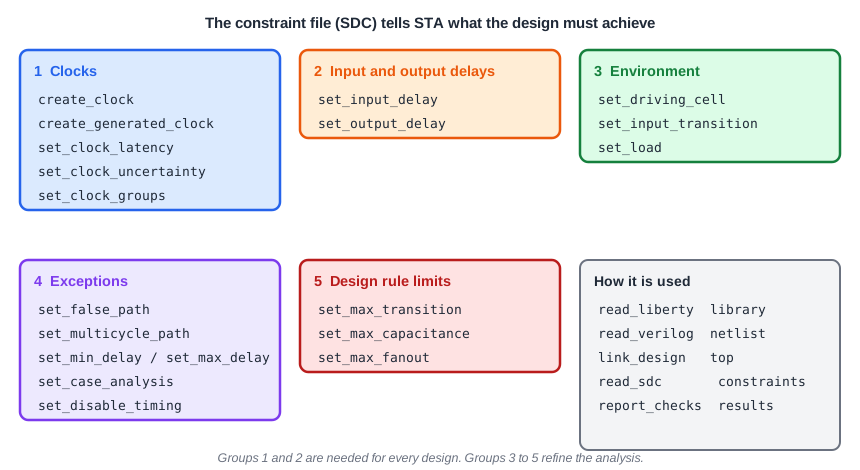
The Five Groups of Commands
- Clocks:
create_clock,create_generated_clock, latency, uncertainty and clock groups. They are covered in the chapter about clocks. - Input and output delays:
set_input_delayandset_output_delay. They say how the outside world uses the clock period. - Environment:
set_driving_cell,set_input_transitionandset_load. They describe what drives the inputs and what the outputs drive. - Exceptions:
set_false_path,set_multicycle_pathand others. They change how STA treats some paths. - Design rule limits:
set_max_transition,set_max_capacitanceandset_max_fanout.
The first two groups are needed for every design. A design without a clock has nothing to check, and a design without input and output delays leaves the ports unconstrained.
Selecting Objects
Most commands need to know which objects of the design they apply to. SDC has query commands for this. Each one returns a list of objects, called a collection:
| Command | Returns | Example |
|---|---|---|
get_ports | Ports of the design | [get_ports {a b c d}] |
get_pins | Pins of cells, written instance/pin | [get_pins _7_/CLK] |
get_cells | Cell instances | [get_cells _7_] |
get_nets | Nets | [get_nets r1] |
get_clocks | Clocks that were created | [get_clocks clk] |
all_inputs, all_outputs | All input or output ports | [all_inputs] |
current_design | The top-level design | [current_design] |
A name can contain a wildcard: [get_ports a*] selects every port that starts with a. The clock port is also an input, so [all_inputs] includes it. For input delays you usually need to leave it out, because the clock is not data. That is why the demo file lists {a b c d}.
Units
SDC does not write units in the commands. The units come from the library: here time is in nanoseconds and capacitance in picofarads. In set_input_delay 0.4 the 0.4 means 0.4 ns. Always check the units of the library when you move a constraint file to a new technology.
What a Wrong Name Does
If a name does not exist, STA does not stop. It prints a warning, and the command does nothing:
Warning 366: constraints.sdc line 1, port 'clock' not found.
Warning 366: constraints.sdc line 2, port 'dd' not found.
With a wrong clock port name, the clock is not attached to the design. The flip-flops have no clock, their paths are unconstrained, and no violation is reported. Always read the warnings after reading the constraint file.
Common Mistakes
Mistake #1: Ignoring the warnings when the constraint file is read
A name that is not found is only a warning, but it means that one of your constraints has no effect. Fix every such warning.
Mistake #2: Using all_inputs for the input delays
The command also selects the clock port, and a data input delay on the clock port is wrong. Select the data inputs by name, or remove the clock port from the list.
Quick Check: What does [get_pins u1/Q] select?
The pin named Q of the cell instance named u1.
Practice Exercise
Challenge: Find the Typo
Take the constraint file of the demo circuit and change the name in the first line, so that it reads [get_ports clock]. Run STA and read the warnings. Then say what happens to the setup report and why it looks clean.
Open the ready-made example in the lab, run synthesis, and then run STA. Editing constraints.sdc and re-running only STA, and choosing another library or corner, are PRO features.
Hint
Look at which objects now have a clock. Then look at what set_input_delay -clock clk refers to.
Solution
STA prints port 'clock' not found. The command create_clock still creates a clock named clk, but without a pin, so it is a virtual clock, as described in Virtual Clocks. The two flip-flops are left without a clock, and check_setup -verbose lists them as unclocked, with three unconstrained endpoints. The setup report shows only the path from the input to z, with a slack of 1.0326 ns, and no violation. It looks clean, but most of the design is not checked. Fix the name to see the real numbers again.
Summary
- SDC is a Tcl-based file that describes the timing goals and the environment of a design.
- STA reads the library, the netlist and then the constraints, because the constraints use names from the design.
- The commands fall into five groups: clocks, input and output delays, environment, exceptions and design rule limits.
- Objects are selected with
get_ports,get_pins,get_cells,get_netsandget_clocks. - Units come from the library, so numbers are written without units.
- A wrong name gives a warning and the command is ignored, so read the warnings after reading the file.