
A real chip has more than one operating mode, and it has to work at more than one corner. Multi-corner multi-mode analysis, MCMM, is the practice of running the checks for every useful combination of the two. Each combination is called a scenario. This article explains modes and scenarios, runs the demo circuit in six scenarios with real numbers, and shows how a violation can hide in a single scenario.
9 min read | Intermediate
What You'll Learn
- Define a mode and a scenario and explain how they differ from a corner
- Build a scenario matrix from modes and corners
- Find the scenario in which a design fails, from a table of results
- Explain how many scenarios a design needs and how teams keep that number low
Modes
A mode is a way of using the chip, described by its own constraints. Examples:
- The functional mode, at full speed, with the normal clock.
- A scan or test mode, where the flip-flops are connected in a chain and the clock is slower.
- A low-power mode with a slower clock, or with some clocks off.
- A mode in which a clock multiplexer selects the second clock.
The constraints of a mode set the clocks and their periods, the input and output delays, the case analysis that fixes the mode pins, and the exceptions that are valid in this mode. The chapter about timing exceptions showed how case analysis and exceptions describe a mode. The difference between modes is therefore in the SDC file: each mode has its own constraint file.
Scenarios
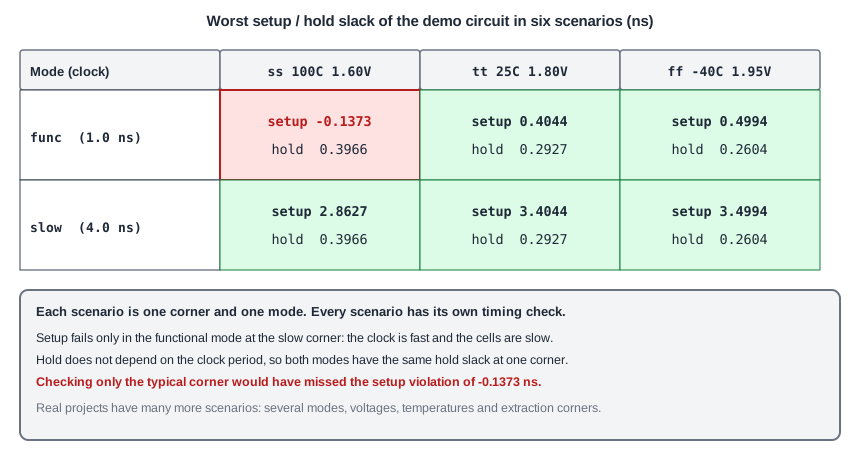
A scenario is the pair of a mode and a corner. For each scenario, STA runs the setup and the hold checks. With three corners and two modes, there are six scenarios. This is the demo circuit in a functional mode with a clock of 1.0 ns, and a slow mode with a clock of 4.0 ns, at the three library corners. The input and output delays are 0.2 ns in both modes:
| Mode | Corner | Worst setup slack (ns) | Worst hold slack (ns) |
|---|---|---|---|
| func, 1.0 ns | ss | -0.1373 (violated) | 0.3966 |
| func, 1.0 ns | tt | 0.4044 | 0.2927 |
| func, 1.0 ns | ff | 0.4994 | 0.2604 |
| slow, 4.0 ns | ss | 2.8627 | 0.3966 |
| slow, 4.0 ns | tt | 3.4044 | 0.2927 |
| slow, 4.0 ns | ff | 3.4994 | 0.2604 |
Look at the numbers:
- Only one scenario fails: the functional mode at the slow corner, where the clock is fast and the cells are slow. The setup slack is -0.1373 ns. At the typical corner of the same mode, the slack is +0.4044 ns, so a typical-corner run would have shown a healthy design.
- The hold slack is the same in the two modes at a given corner, because the clock period does not appear in the hold check. The smallest hold slack, 0.2604 ns, is at the fast corner.
- The slow mode has a large setup slack everywhere. It is not the mode that limits the design. It can still be needed, because a mode can have its own hold problems, its own clocks and its own exceptions.
Running Scenarios
Each scenario needs its own run, or one run with several corners and one mode. In OpenSTA, you can read several libraries into corners in one run, as shown in the article about PVT corners, while the mode is selected by the constraint file that you read. To cover two modes, you run the tool twice, once for each constraint file. Commercial tools can keep many scenarios in memory and report all of them in a single session, but the checks are the same.
A common way to work is to describe each scenario in a script:
# scenario: func_ss
read_liberty sky130_fd_sc_hd__ss_100C_1v60.lib
read_verilog netlist.v
link_design sta_demo
read_sdc func.sdc
report_checks -path_delay max
report_checks -path_delay min
How Many Scenarios
The count is modes times corners, and real projects have a lot of both. A chip can have five modes, ten corners and several extraction corners, which makes dozens or hundreds of scenarios. A full run of all of them is expensive, so teams reduce the number in a few ways:
- Use dominance. If one scenario is always worse than another for a check, the other one does not need to be run. For example, for hold, a slower clock in the same corner does not change the result, as in the table above, so one mode is enough for that check.
- Check setup only at the slow corners and hold only at the fast corners, as for PVT corners.
- Run the full set at the sign-off, and a smaller set in the daily work.
Common Mistakes
Mistake #1: Signing off one mode and assuming the others are covered
Each mode has its own clocks, exceptions and case analysis. A mode that you did not check can have violations that no other run shows.
Mistake #2: Reducing the scenarios without a reason
If you leave out a scenario because it looks unimportant, check that another scenario really dominates it. In the example, the slow mode can be left out for setup, and not for the checks that belong only to it.
Quick Check: A design has 3 modes and 4 corners. How many scenarios does a full run have?
3 x 4 = 12 scenarios.
Practice Exercise
Challenge: Find the Failing Scenario
Use the sta_demo design with a clock of 1.0 ns and input and output delays of 0.2 ns on all ports. Run it at the slow, the typical and the fast library. Find the corner with a violation, then raise the clock period to 1.2 ns and run the slow corner again.
Open the ready-made example in the lab, run synthesis, and then run STA. Editing constraints.sdc and re-running only STA, and choosing another library or corner, are PRO features.
Hint
The setup slack grows by exactly the change of the period, for the paths that scale with it. The slow corner had -0.1373 ns.
Solution
The slow corner fails with a setup slack of -0.1373 ns, and the other two corners pass. With a period of 1.2 ns, the slack grows by 0.2 ns to +0.0627 ns, so the design meets timing at all corners. The smallest period for the slow corner is 1.0 + 0.1373 = 1.1373 ns. The hold slack does not change with the period.
Summary
- A mode is a way of using the chip, with its own constraints. A scenario is a mode at a corner.
- The number of scenarios is the number of modes times the number of corners, and it grows quickly.
- A violation can exist in one scenario only. In the demo circuit, the functional mode at the slow corner fails with -0.1373 ns while all others pass.
- Hold slack does not depend on the clock period, so modes that differ only in the period give the same hold result.
- Teams reduce the work by finding scenarios that dominate others, and by checking each check at its worst corners.
- A sign-off covers every scenario that can fail.
