
The numbers in a library table were not made up and not measured on your chip. They come from circuit simulation of each cell, done once by the library vendor. This is called characterization. It also explains why a library exists in several versions called corners, and why the same cell has different delays in each one.
Think of the fuel consumption figure of a car. It is measured once, in a test laboratory, under fixed conditions, and the same car uses more or less fuel on a hot day or a steep road. A cell library is the same: the delays are measured once by simulation, and the chip is then checked under several different conditions.
7 min read | Intermediate
What You'll Learn
- Describe how a cell is characterized and where the table numbers come from
- Explain process, voltage and temperature, and what a corner is
- Read the nominal and operating conditions in a library header
- Compare the same cell at the slow, typical and fast corners
How a Cell Is Characterized
For every cell, the vendor starts with a transistor-level description of the circuit and the models of the transistors. A circuit simulator then runs the cell over and over, once for every grid point of every table:
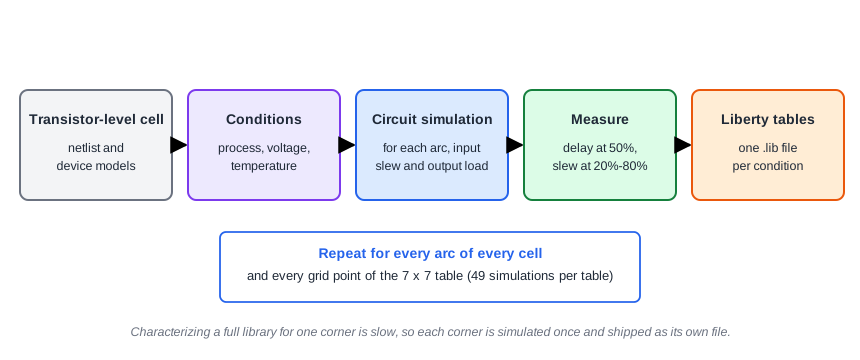
For one arc and one table, that means one simulation for each combination of input slew and output load. A 7 x 7 table needs 49 simulations. Every arc of every cell needs its own tables, and the whole library has to be done again for every set of operating conditions. Characterizing a complete library for one set of conditions can take a long time, which is why vendors deliver it as finished files.
Each simulation is measured the same way. The delay is the time between the 50% point of the input edge and the 50% point of the output edge. The slew is the time the output takes to go from 20% to 80% of the supply voltage. These thresholds are written into the library header, so every tool reads the numbers the same way.
Process, Voltage and Temperature
A chip's speed is not a fixed property. Three things change it:
- Process: small manufacturing differences make some chips faster and some slower than the typical one.
- Voltage: a lower supply voltage makes the transistors switch more slowly.
- Temperature: transistors usually get slower as the chip gets hotter.
A combination of the three is called a PVT condition. A corner is a PVT condition chosen to represent an extreme or typical case. The sky130 library comes in three corners, which also appear in the library name:
| Corner | Process | Temperature | Voltage | Meaning |
|---|---|---|---|---|
| ss_100C_1v60 | slow | 100 C | 1.60 V | Slowest cells |
| tt_025C_1v80 | typical | 25 C | 1.80 V | Typical cells |
| ff_n40C_1v95 | fast | -40 C | 1.95 V | Fastest cells |
Nominal and Operating Conditions
A library header states two things: the conditions the data was characterized at (nom_process, nom_temperature, nom_voltage), and the operating_conditions to use it at. In the sky130 files, both are the same. For the slow corner:
nom_temperature : 100;
nom_voltage     : 1.6;
operating_conditions ("ss_100C_1v60") {
  voltage     : 1.6;
  temperature : 100;
}
If they were different, the tool would adjust (derate) the numbers with correction factors. Such derating is only approximate, so vendors characterize the library at the conditions where it is used. The process value is just the number 1.0 in all three files. The slow or fast character is in the table values themselves.
The Same Cell at Three Corners
The effect is large. These are the delay of the AND gate and2_0 from A to X (rising output, input slew 0.05 ns, load 0.003 pF) and the setup time of the flip-flop dfxtp_1 for falling data:
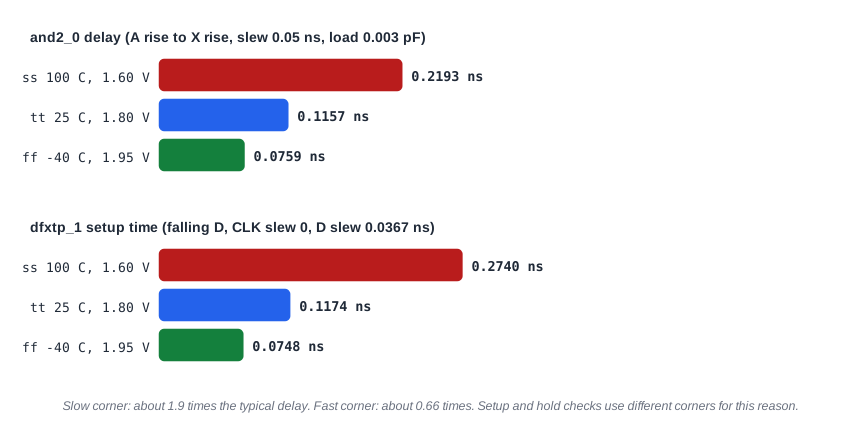
The AND gate delay is about 1.9 times the typical value at the slow corner and about 0.66 times the typical value at the fast corner. The flip-flop setup time moves by a similar factor. That spread is why a design must be checked at more than one corner. The same demo design has these worst slacks with a 2.0 ns clock:
| Corner | Worst setup slack (ns) | Worst hold slack (ns) |
|---|---|---|
| Slow | 0.7856 | 0.5966 |
| Typical | 1.0326 | 0.4241 |
| Fast | 1.0994 | 0.2681 |
Setup is tightest at the slow corner, because the data is late. Hold is tightest at the fast corner, because the data is early. This is the reason that setup is signed off at the slow corner and hold at the fast corner, as explained in Setup and Hold: The Two Fundamental Checks. Later chapters show how a real project analyzes all corners together.
Common Mistakes
Mistake #1: Signing off timing at the typical corner only
The typical corner is the middle of the range. A design that passes setup there can fail at the slow corner, and a design that passes hold there can fail at the fast corner. Typical numbers are fine for learning and early estimates, not for sign-off.
Mistake #2: Comparing numbers from different libraries as if they had the same conditions
A delay of 0.1157 ns at the typical corner and 0.2193 ns at the slow corner are the same cell under different conditions. Always compare timing results at the same corner and library.
Quick Check: Which corner would you use to check hold, and why?
The fast corner. Hold violations happen when data arrives too early, and the fast corner gives the smallest delays, so it is the worst case for hold.
Practice Exercise
Challenge: Run the Same Design at Three Corners
If your ChipVerify Lab session lets you choose the corner, run the sta_demo design with the same constraints (2.0 ns period, 0.4 ns input and output delays) at the slow, typical and fast corner. Write down the worst setup slack and the worst hold slack for each. Predict first: at which corner is setup the worst, and at which is hold the worst?
Open the ready-made example in the lab, run synthesis, and then run STA. Editing constraints.sdc and re-running only STA, and choosing another library or corner, are PRO features.
Hint
Setup is about data arriving late, hold is about data arriving early. Think about which corner makes the cells slowest and which makes them fastest.
Solution
The worst setup slack is 0.7856 ns at the slow corner, 1.0326 ns at the typical corner and 1.0994 ns at the fast corner. The worst hold slack goes the other way: 0.5966, 0.4241 and 0.2681 ns. A design is only safe when it passes both checks at their worst corners. These numbers come from the sky130 hd library. If your netlist differs, the values will move slightly, but the order of the corners will be the same.
Summary
- Library numbers come from circuit simulation of every cell for every grid point of every table, called characterization.
- Delay is measured at the 50% points and slew between 20% and 80%, as set in the library header.
- Process, voltage and temperature together set the speed, and a corner is a chosen combination of them.
- Each corner is a separate library whose nominal and operating conditions match, so no derating is needed.
- Cells are about twice as slow at the slow corner as at the typical one, and faster at the fast corner.
- Setup is checked at the slow corner and hold at the fast corner.
