
The clock edge does not reach every flip-flop at time zero. It travels from the clock source through wires and buffers, and the time this takes is the clock latency. STA has two ways to handle it: it can use numbers that you give (ideal clocks), or it can add up the real delays through the clock network (propagated clocks). This article explains both, and the difference between source latency and network latency.
8 min read | Intermediate
What You'll Learn
- Define source latency and network latency
- Explain the difference between an ideal and a propagated clock
- Read the clock path in a timing report and find the clock arrival time of each flip-flop
- Predict the effect of source latency and of a latency command on slack
Where the Latency Comes From
A chip gets its clock from outside, or from a PLL. Between the clock source and the clock pin of a flip-flop there are two parts:
- Source latency is the delay from the real clock source to the clock port of the chip. It is outside the design, so you must tell STA about it. If a PLL or an external oscillator adds a delay, this is where it counts.
- Network latency is the delay inside the design, from the clock port through the wires and clock buffers up to the clock pin of the flip-flop. The clock tree that is built after placement creates it.
The clock arrival time at a flip-flop is the source latency plus the network latency.
Ideal Clocks
Before the clock tree exists, there is no network to measure. STA treats the clock as ideal: the clock edge reaches every flip-flop at the same time, at the clock edge time plus whatever latency you set. This is what all earlier articles used, and the report shows it as clock network delay (ideal):
   0.0000    0.0000   clock clk (rise edge)
   0.0000    0.0000   clock network delay (ideal)
   0.0000    0.0000 ^ r1/CLK (sky130_fd_sc_hd__dfxtp_1)
You can give the ideal clock a latency with set_clock_latency. It is a way to estimate the clock tree before it exists. With set_clock_latency 0.3 [get_clocks clk], every flip-flop gets its clock at 0.3 ns. Because the latency is the same at the launch and the capture flip-flop, the skew stays zero and the slack of register-to-register paths does not change. It can change the paths to input and output ports, because the ports are not delayed in the same way.
Propagated Clocks
After the clock tree is built, STA should use the real delays. The command set_propagated_clock tells it to follow the clock through the buffers, cell by cell, like any other path:
set_propagated_clock [get_clocks clk]
Here is a small clock tree. A root buffer feeds one flip-flop through one more buffer, and the other flip-flop through two buffers. The delays are from a real run:
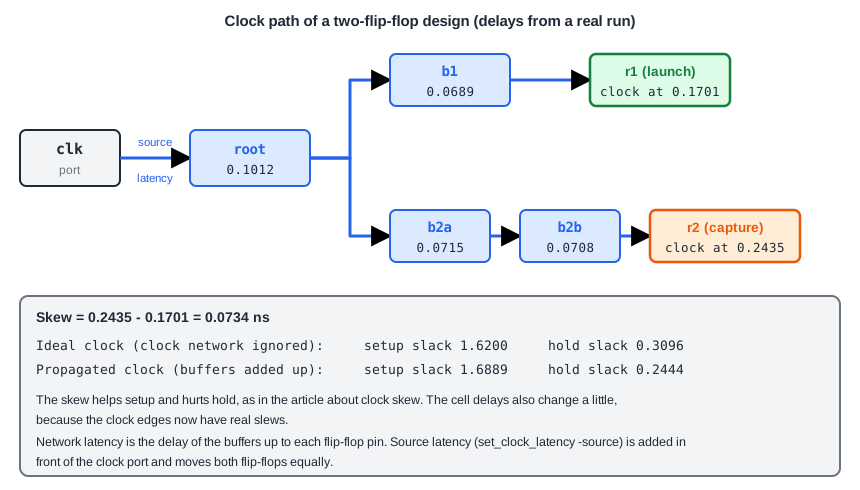
The clock reaches r1 at 0.1012 + 0.0689 = 0.1701 ns and r2 at 0.1012 + 0.0715 + 0.0708 = 0.2435 ns. The skew is 0.0734 ns. The report now lists the clock path rows, both for the launch clock and for the capture clock:
   0.0000    0.0000   clock clk (rise edge)
   0.0000    0.0000   clock source latency
   0.0000    0.0000 ^ clk (in)
   0.1012    0.1012 ^ root/X (sky130_fd_sc_hd__clkbuf_4)
   0.0689    0.1701 ^ b1/X (sky130_fd_sc_hd__clkbuf_1)
   0.0000    0.1701 ^ r1/CLK (sky130_fd_sc_hd__dfxtp_1)
   0.2815    0.4516 v r1/Q (sky130_fd_sc_hd__dfxtp_1)
             0.4516   data arrival time

   2.0000    2.0000   clock clk (rise edge)
   0.0000    2.0000   clock source latency
   0.0000    2.0000 ^ clk (in)
   0.1012    2.1012 ^ root/X (sky130_fd_sc_hd__clkbuf_4)
   0.0715    2.1726 ^ b2a/X (sky130_fd_sc_hd__clkbuf_1)
   0.0708    2.2435 ^ b2b/X (sky130_fd_sc_hd__clkbuf_1)
   0.0000    2.2435 ^ r2/CLK (sky130_fd_sc_hd__dfxtp_1)
  -0.1029    2.1405   library setup time
             2.1405   data required time
                       1.6889   slack (MET)
The setup slack goes from 1.6200 ns with the ideal clock to 1.6889 ns with the propagated clock, and the hold slack goes from 0.3096 ns to 0.2444 ns. The skew of +0.0734 ns explains most of both changes, as the article about clock skew showed. The rest comes from the slightly different clock-to-Q delay and setup time, because the clock edges now have real slews.
Source Latency
The source latency is set with the option -source:
set_clock_latency -source 0.5 [get_clocks clk]
It adds 0.5 ns in front of the clock port, so both flip-flops get their clock 0.5 ns later. With a propagated clock, the report shows a row clock source latency of 0.5000 in both the launch and the capture part. With an ideal clock, the same 0.5000 appears in the row clock network delay (ideal). In both cases every time grows by 0.5 ns. The slack of the path between the two flip-flops does not change, 1.6889 ns, because the delay is common to both. Source latency matters for the ports: if the input data is launched by a clock outside the chip, a different source latency for the clock of the data and for the clock inside shifts the input paths.
A Latency Command Overrides the Calculation
There is a point that can surprise you. If you give a clock a latency with set_clock_latency (network latency), OpenSTA uses that number even when the clock is propagated. The report goes back to clock network delay (ideal) and the buffers of the clock tree no longer appear. The slack of the demo path returns to 1.6200 ns. Therefore, after the clock tree is built, do not leave an estimated latency in the constraints. Remove it, so that the tool uses the real delays.
Common Mistakes
Mistake #1: Signing off with ideal clocks
With ideal clocks, the skew is zero and the checks look better than they are. After clock tree synthesis, switch to propagated clocks. A sign-off report with an ideal clock row (clock network delay (ideal)) is a sign that something is missing.
Mistake #2: Leaving the clock latency estimate in the constraints
A set_clock_latency that was written for the pre-layout run hides the real clock tree. Keep two sets of constraints, one for before and one for after the clock tree.
Quick Check: A source latency of 0.4 ns is added to a clock. How does the setup slack of a path between two flip-flops of that clock change?
It does not change. Both the launch and the capture edge are moved by 0.4 ns, so the difference stays the same.
Practice Exercise
Challenge: Add Source Latency
Use the sta_demo design with a period of 2.0 ns and the input and output delays of 0.4 ns. Note the setup slack of the path from the input c to the flip-flop _6_ (1.3650 ns) and from the flip-flop _7_ to the flip-flop _6_ (1.4502 ns). Add:
set_clock_latency -source 0.5 [get_clocks clk]
Predict both slacks and explain the difference between them.
Open the ready-made example in the lab, run synthesis, and then run STA. Editing constraints.sdc and re-running only STA, and choosing another library or corner, are PRO features.
Hint
The input delay is measured from the clock edge of the outside device. Ask whether the source latency moves the arrival time of the input data.
Solution
The register-to-register slack stays at 1.4502 ns, because the launch and capture flip-flops both get the clock 0.5 ns later. The slack of the input path also stays the same in this design, because the input delay is relative to the same clock, and in the report both the input delay row and the capture clock move by 0.5 ns. The source latency only shifts the whole picture. It would change the input paths if the data were launched by a different clock that did not have the same source latency.
Summary
- Clock latency is the time the clock edge takes to reach a flip-flop. Source latency is outside the chip, network latency is inside.
- An ideal clock reaches all flip-flops at the same time, plus any latency you set. It is used before the clock tree exists.
- A propagated clock follows the real delays through the clock buffers, and creates the skew between flip-flops.
- The skew of a propagated clock moves setup and hold slack in opposite directions.
- Source latency moves all flip-flops of a clock equally and does not change slack between them.
- An explicit
set_clock_latencyreplaces the calculated clock delay in OpenSTA, so remove estimates after the clock tree is built.
