
STA computes arrival times by walking through the timing graph from the startpoints to the endpoints. This only works if the graph has no cycles. A combinational loop, where the output of a gate eventually feeds its own input, is a cycle, and the walk would never end. Real designs contain such loops in a few cases, and designers also sometimes want to remove a timing arc on purpose. This article shows how STA deals with loops, and how set_disable_timing removes an arc.
8 min read | Intermediate
What You'll Learn
- Explain why a combinational loop is a problem for STA
- Read the loop warning of
check_setupand the list of disabled edges - Use
set_disable_timingto disable an arc or a whole cell - Know when an arc should be disabled and when not
Combinational Loops
A combinational loop is a ring of gates with no flip-flop in it. The classic example is a latch made of two cross-coupled NOR gates. The output of the first gate goes into the second one, and the output of the second one goes back into the first:
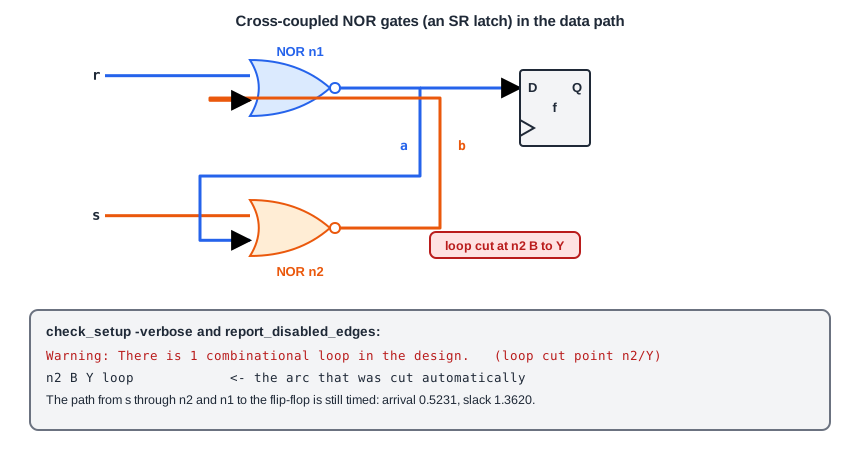
Arrival times are defined by adding delays along a path. In a loop, the path never ends, because you can go round it again and again. STA breaks every loop by cutting one arc, so that the graph has no cycles. It does so automatically and prints a warning. This is the output of check_setup -verbose for the design above:
Warning: There is 1 combinational loop in the design.
  n2/Y
  n1/B
  n1/Y
  n2/B
  | loop cut point
  n2/Y
The list shows the pins of the loop in order, and the line loop cut point marks where STA cut it, at the output n2/Y. The command report_disabled_edges lists the arcs that are not used in the timing. Here it shows the arc that STA has cut:
n2 B Y loop
The line says that the arc from the pin B to the pin Y of the cell n2 is disabled because of the loop. The arc from A to Y of the same cell is still timed. The paths through the loop are still found: the path from the input s through n2 and n1 to the data pin of the flip-flop is checked, and it has a slack of 1.3620 ns.
Why Cutting Is a Choice
Which arc STA cuts decides which paths are timed. A different cut point times a different set of paths, and the same circuit can give different numbers. For this reason, a loop in a design that has to be signed off should not be left to the tool. A designer who knows which arc of the loop is not used in practice can disable it, and the tool then uses that arc as the cut. The loop should also be understood: it may be intended, as in a latch built from gates, or it may be a design mistake.
Disabling an Arc
The command set_disable_timing removes arcs from the timing graph:
set_disable_timing -from B -to Y [get_cells n2]
set_disable_timing [get_cells n2]
set_disable_timing [get_ports test_in]
- With
-fromand-toon a cell, it disables one arc of that cell. The names are the pins of the cell. - With only a cell, it disables all the arcs of the cell.
- With a port or a pin, it disables the timing through that point.
After the first command, the list of disabled edges shows the reason of the arc as both the constraint and the loop:
n2 B Y constraint, loop
It is the same arc that STA had cut. Now the cut is a decision of the designer. The loop warning still appears, because the loop is still in the netlist, but its cut point is the one that you chose.
Other Uses
- An arc that never carries data in the real circuit, such as the arc through a test multiplexer that is only used in a test mode. Case analysis is better when the reason is a constant, as in the article about case analysis.
- An arc inside a macro or a library cell that is not used in your application.
Disabling Compared With a False Path
A false path removes the paths between named points. A disabled arc removes a piece of the graph, so every path that uses the arc is gone, whatever its start and end. It has a bigger effect and is harder to see in the reports, as a disabled arc leaves no message when the paths vanish. Use it for a specific, understood arc, and write the reason in a comment.
Common Mistakes
Mistake #1: Ignoring the loop warning
A loop that was not meant to be there is a design problem. STA's automatic cut makes the numbers look fine and does not say whether the loop is correct. Find out where each loop comes from.
Mistake #2: Disabling a whole cell to remove one arc
Without -from and -to, every arc of the cell is removed, including those that carry real data. Name the arc that you mean.
Quick Check: Why does STA cut a combinational loop?
Arrival times are calculated by walking the graph from the startpoints, and a loop would make the walk endless. Cutting one arc removes the cycle.
Practice Exercise
Challenge: Choose the Cut
This is the netlist of the two cross-coupled NOR gates and a flip-flop. Run it with a 2.0 ns clock, input delays of 0.4 ns on s and r and an output delay of 0.4 ns on q:
module sta_loop (clk, s, r, q);
  input clk; input s; input r; output q;
  wire a, b;
  sky130_fd_sc_hd__nor2_1 n1 (.A(r), .B(b), .Y(a));
  sky130_fd_sc_hd__nor2_1 n2 (.A(s), .B(a), .Y(b));
  sky130_fd_sc_hd__dfxtp_1 f (.CLK(clk), .D(a), .Q(q));
endmodule
Run check_setup -verbose and report_disabled_edges. Then add set_disable_timing -from B -to Y [get_cells n2] and run them again. What changes?
Hint
Look at the reason column of the disabled edge.
Solution
The first run prints the loop warning with the cut point n2/Y and lists n2 B Y loop. After the command, the arc is listed as n2 B Y constraint, loop. The loop warning stays, because the loop is still in the netlist. The slack of the path from s to the flip-flop stays 1.3620 ns, because the cut is at the same arc that STA had chosen. Another cut would give another set of paths.
Summary
- A combinational loop is a cycle in the timing graph, and arrival times cannot be calculated along a cycle.
- STA cuts every loop at one arc, prints a warning and lists the cut with
report_disabled_edges. - The cut point decides which paths are timed, so important loops should be cut by the designer.
set_disable_timingremoves an arc, a cell or a pin from the timing graph.- A disabled arc removes every path through it and leaves no message, so use it narrowly and comment it.
- Every loop in a design has to be understood, because it may be a mistake.
