
A design can choose between two clocks with a multiplexer. For example, a chip can run from a fast clock in normal mode and from a slow clock in a power-saving mode. STA must propagate both clocks through the multiplexer, and then it has to decide which combinations of clocks can really happen. This article shows what STA does by default with a clock mux, why that is too pessimistic, and how to fix it with exclusive clock groups or with case analysis.
8 min read | Intermediate
What You'll Learn
- Explain how STA treats two clocks that reach the same flip-flop
- Recognize the pessimism that comes from impossible clock pairs
- Use
set_clock_groups -logically_exclusiveto remove the impossible pairs - Use
set_case_analysisto fix the select input of the mux
Two Clocks at One Flip-Flop
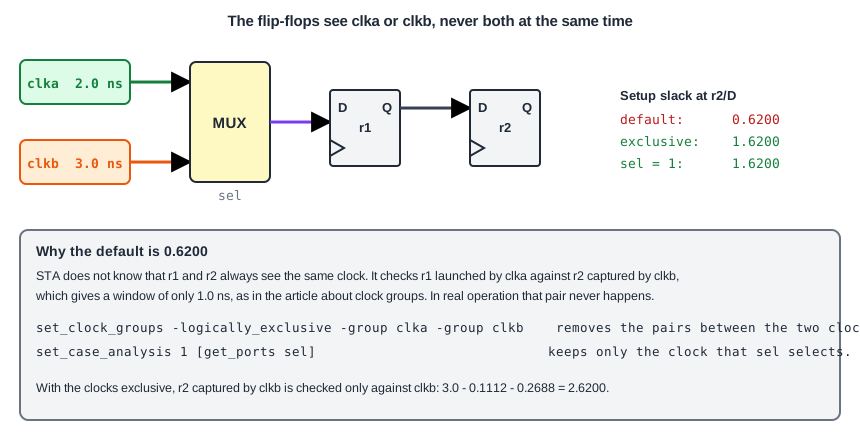
This design chooses between clka (2.0 ns period) and clkb (3.0 ns period) with the input sel. Two flip-flops form a small shift register behind the multiplexer:
module sta_mux (input clka, clkb, sel, d, output q);
  wire mclk = sel ? clka : clkb;
  reg r1, r2;
  always @(posedge mclk) begin
    r1 <= d;
    r2 <= r1;
  end
  assign q = r2;
endmodule
create_clock -name clka -period 2.0 [get_ports clka]
create_clock -name clkb -period 3.0 [get_ports clkb]
set_input_delay  0.4 -clock clka [get_ports d]
set_output_delay 0.4 -clock clka [get_ports q]
STA follows each clock through the mux. Both reach the clock pins of r1 and r2. The flip-flops now have two clocks, and STA analyzes the paths for each of them. It checks the path from r1 to r2 when both flip-flops see clka, when both see clkb, and also when r1 is launched by one clock and r2 captures with the other.
The Impossible Pairs
Only one input of the mux is active at a time. So r1 and r2 always receive the same clock. The pair "launched by clka, captured by clkb" can never happen. STA does not know this, because nothing in the constraints says so. It treats the two clocks as related and picks the worst edges, as in the article about clock groups. The default report shows it:
max_delay/setup group clka

Endpoint                                 Delay     Delay     Slack
q (output)                              3.6000    3.2615    0.3385 (MET)
_2_/D (sky130_fd_sc_hd__dfxtp_1)        3.8888    3.2688    0.6200 (MET)

max_delay/setup group clkb
_2_/D (sky130_fd_sc_hd__dfxtp_1)        2.8888    2.2688    0.6200 (MET)
Both groups report 0.6200 ns for the data pin of _2_, which is the slack of the unreal clka-to-clkb crossing. The real slack of the path between two flip-flops on the same clock is much larger, 1.6200 ns for clka and 2.6200 ns for clkb. This can add false violations that waste a lot of effort. Here it only reduces the slack.
Also note the output q with a slack of 0.3385 ns, where the launch is on clkb and the output delay is related to clka. It is another pair that does not exist, and it is much worse than the real value of 1.3385 ns.
Quick Check
Q: Why can a path launched by clka and captured by clkb never happen in this design?
Show Answer
Both flip-flops get their clock from the same multiplexer, which passes only one of the two clocks at a time. They always see the same clock, so a mix of the two cannot occur.
Fix 1: Exclusive Clock Groups
Tell STA that the two clocks are never active together:
set_clock_groups -logically_exclusive -group clka -group clkb
The paths between the two clocks are removed. Each clock is analyzed against itself only. The setup slack of the data pin of _2_ becomes 1.6200 ns for clka and 2.6200 ns for clkb, and the output q goes to 1.3385 ns.
The option -logically_exclusive means that the design logic, here the multiplexer, never lets both clocks through at the same time. The option -physically_exclusive is for clocks that cannot exist at the same time because of the way the chip is used, such as two modes that are chosen outside the chip. For the checks, STA treats both in the same way, but crosstalk analysis in a later chapter uses the difference.
Fix 2: Case Analysis
If one mode is analyzed at a time, a different way is to set the select input of the multiplexer to a fixed value:
set_case_analysis 1 [get_ports sel]
The mux now passes clka only, and clkb is blocked. The reports show the same values as with the exclusive groups for clka: 1.6200 ns at _2_/D and 1.3385 ns at q. The clock clkb disappears from the report. To analyze the other mode, run again with set_case_analysis 0 [get_ports sel]. This is the method for the modes of a chip, and the chapter about timing exceptions explains case analysis in detail. The exclusive group, on the other hand, checks both modes in one run.
Quick Check
Q: Which command analyzes only the clock that is selected when sel is 0, in the design above?
Show Answer
set_case_analysis 0 [get_ports sel]. The mux then passes clkb, and clka is blocked.
Which Fix to Use
The two fixes answer different questions. The exclusive group says that these two clocks are never active together, and STA still checks both modes in one run, each against itself. It is the right choice when the clock choice is made while the chip runs, or when you want a single sign-off run for all modes. The case analysis says that a particular mode is the one being analyzed, and the unused clock is removed completely. It is the right choice when each mode is checked separately, for example one run for the normal mode and another one for a test mode. Many projects use both: the exclusive groups for the clocks that share a multiplexer, and a different set of constraints for each mode.
Common Mistakes
Mistake #1: Ignoring a clock mux in the constraints
Without a group or a case analysis, STA times clock pairs that never happen. The result is pessimistic, and it can show violations that cannot happen in the real chip.
Mistake #2: Declaring clocks exclusive when they can run together
If two clocks can be active at the same time, for example in different parts of the chip, exclusive groups remove checks that are needed. Use them only for the clocks that the logic never passes together.
Practice Exercise
Challenge: Compare the Three Reports
Paste the sta_mux design and the constraints into the lab. Note the setup slack of the data pin of the second flip-flop in the two path groups. Then add the exclusive group, run again, and compare. Finally replace the group by set_case_analysis 1 [get_ports sel].
Predict the slack of the data pin of the second flip-flop for clkb with the exclusive group.
Hint
Both flip-flops are on clkb with a period of 3.0 ns. The clock-to-Q delay is 0.2688 ns and the setup time is 0.1112 ns.
Solution
The slack is 3.0 - 0.1112 - 0.2688 = 2.6200 ns. It was 0.6200 ns before, so the unreal pair had made the slack 2.0 ns too pessimistic. With the case analysis only clka remains, so there is no clkb group in the report and the slack for clka is 1.6200 ns.
Open the ready-made example in the lab, run synthesis, and then run STA. Editing constraints.sdc and re-running only STA, and choosing another library or corner, are PRO features.
Summary
- STA propagates every clock through a clock multiplexer, so the flip-flops after it have more than one clock.
- By default it checks clock pairs that can never occur, and this adds pessimism.
set_clock_groups -logically_exclusiveremoves the paths between clocks that are never active together.set_case_analysisfixes the select input, so only one clock passes the mux and one mode is analyzed.- Exclusive groups check all modes in one run, and case analysis checks one mode per run.
- Use exclusive groups only for clocks that the design never uses together.