
Two chips from the same wafer are not identical, and one chip does not behave the same on a cold day and in a hot car. The speed of a chip changes with how it was made, the voltage it gets, and its temperature. A design has to work in all of those conditions, and this chapter shows how STA covers them, from corners to statistical variation.
A corner is one combination of these conditions. STA does not guess which one the chip will meet. It checks the design at the corners that give the worst result for each check. This article explains the three conditions, shows the numbers of the demo circuit at three corners, and explains why setup and hold are checked at different corners.
8 min read | Intermediate
What You'll Learn
- Name the three conditions that define a PVT corner
- Explain which corner is worst for setup and which one for hold
- Run STA with several libraries at once and read the combined result
- Say why checking only the typical corner is not enough
Process, Voltage, Temperature
PVT stands for three things that change the speed of every cell:
- Process: small differences in the manufacturing, such as the thickness of a layer. Some chips come out fast and some come out slow.
- Voltage: the supply voltage is not exactly the same everywhere or all the time. A lower voltage makes the cells slower.
- Temperature: the chip is cold when it starts and hot when it runs a heavy load. For many technologies, a higher temperature makes the cells slower.
The library vendor characterizes the cells at a few selected combinations, and delivers one library file for each. The article about library characterization explains how the numbers are made. For sky130 these are three corners:
| Corner | Process | Temperature | Voltage | Speed |
|---|---|---|---|---|
| ss | slow | 100 C | 1.60 V | slowest |
| tt | typical | 25 C | 1.80 V | typical |
| ff | fast | -40 C | 1.95 V | fastest |
Which Corner for Which Check
Setup fails when the data is too slow. The risk is highest when the cells are slowest, so setup is checked at the slow corner. Hold fails when the data is too fast, and the risk is highest when the cells are fastest, so hold is checked at the fast corner. These are the worst slacks of the demo circuit at the three corners, with a clock of 2.0 ns:
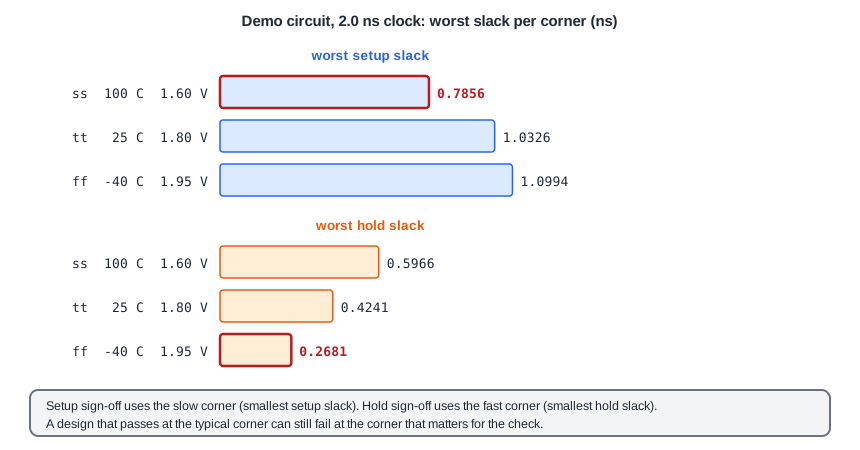
| Corner | Worst setup slack (ns) | Worst hold slack (ns) |
|---|---|---|
| ss | 0.7856 | 0.5966 |
| tt | 1.0326 | 0.4241 |
| ff | 1.0994 | 0.2681 |
The setup slack gets smaller towards the slow corner, from 1.0994 ns to 0.7856 ns, and the hold slack gets smaller towards the fast corner, from 0.5966 ns to 0.2681 ns. If you only had the typical corner, you would see 1.0326 ns and 0.4241 ns, and both numbers are better than the worst case.
Running Several Corners at Once
OpenSTA can read more than one library in one run, one for each corner. You define the corners first, and then read each library into its corner:
define_corners ss tt ff
read_liberty -corner ss sky130_fd_sc_hd__ss_100C_1v60.lib
read_liberty -corner tt sky130_fd_sc_hd__tt_025C_1v80.lib
read_liberty -corner ff sky130_fd_sc_hd__ff_n40C_1v95.lib
read_verilog netlist.v
link_design sta_demo
read_sdc constraints.sdc
After that, report_checks -corner ss reports one corner. Without the option, the report takes the worst result over all corners for each check, so that you do not have to pick the corner yourself:
worst slack max 0.7856
worst slack min 0.2681
The worst setup slack of 0.7856 ns comes from the slow corner and the worst hold slack of 0.2681 ns from the fast corner. These are the same numbers as in the table. Note also that the worst setup endpoint changes with the corner: at the typical corner it is the output z (1.0326 ns), but at the slow corner the output y (0.7856 ns) is worse. A path that is not critical in one corner can be critical in another, because the cells do not all scale by the same factor.
Why Not Only the Typical Corner
The typical corner describes an average chip. Half of the chips that you make are worse than that. A design that has a positive slack only at the typical corner works on some chips and fails on others, and you find out in the lab or at the customer. Signing off at the worst corner for each check means that the design is correct for the whole range of the conditions that the corners describe.
Common Mistakes
Mistake #1: Checking setup at the fast corner and hold at the slow corner
It is the other way round. Setup needs the slowest delays, and hold needs the fastest delays. The wrong combination gives numbers that look good and are wrong.
Mistake #2: Fixing a violation at one corner without checking the others
A fix for a setup violation at the slow corner, for example a faster cell, makes the same path faster at the fast corner too. It can then create a hold violation there. Always check all corners after a fix.
Quick Check: At which corner is the hold slack the smallest for the demo circuit, and what is its value?
At the fast corner, ff, with 0.2681 ns.
Practice Exercise
Challenge: Run the Three Corners
Run the sta_demo design with the basic constraints, once with each of the slow, the typical and the fast library. Note the worst setup slack and the worst hold slack for each. Before you run, predict at which corner each one is the smallest.
Open the ready-made example in the lab, run synthesis, and then run STA. Editing constraints.sdc and re-running only STA, and choosing another library or corner, are PRO features.
Hint
Setup is the smallest when the cells are slowest, hold when they are fastest.
Solution
The worst setup slack is smallest at the slow corner (0.7856 ns) and the worst hold slack at the fast corner (0.2681 ns). At the typical corner the values are 1.0326 ns and 0.4241 ns. Your cell choice in the lab can differ a little, but the order of the corners will be the same.
Summary
- A PVT corner is a combination of process, voltage and temperature, and each corner has its own library.
- Setup is checked at the slow corner, and hold at the fast corner.
- For the demo circuit, the worst setup slack falls from 1.0994 ns (ff) to 0.7856 ns (ss), and the worst hold slack from 0.5966 ns (ss) to 0.2681 ns (ff).
- OpenSTA reads several libraries with
define_cornersandread_liberty -corner, and the plain report gives the worst case over the corners. - The critical path can be a different path in each corner.
- Sign-off at the typical corner alone leaves out half of the chips.
