
A timing path is how you think about a delay. A timing graph is how an STA tool actually stores the design. Picture a subway map: every pin is a station, every way a signal can travel from one pin to the next is a rail line between two stations, and each line has a travel time. The rail lines are called timing arcs. Once you see this map, the numbers in a timing report stop being mysterious: each one is the travel time of one line.
7 min read | Intermediate
What You'll Learn
- Describe how a circuit is converted into a timing graph of pins and arcs
- Distinguish cell arcs, clock-to-Q arcs, net arcs and timing check arcs
- Classify an arc as positive unate, negative unate or non-unate
- Explain why every arc has separate rise and fall delays
From Circuit to Timing Graph
Take a fragment of the demo circuit: the flip-flop r1, the XOR gate, the input c and the flip-flop r2. The timing graph has one node for each pin and one edge for each connection a signal can take.
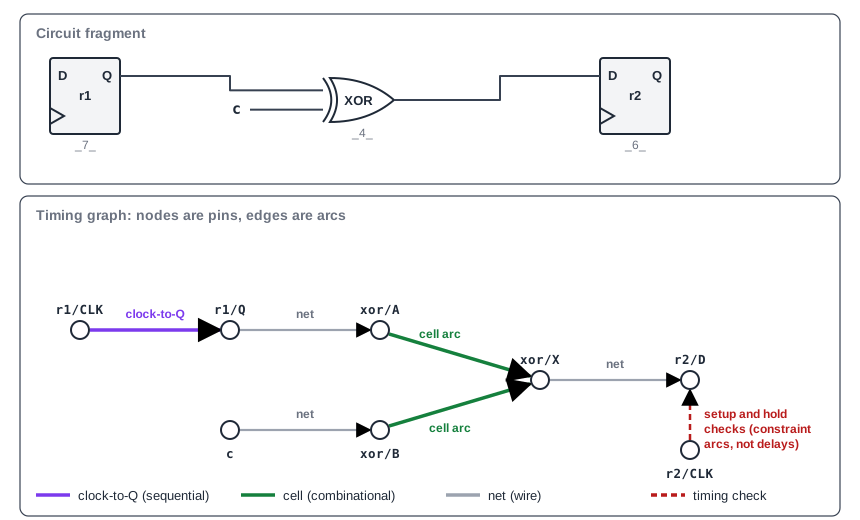
Why use a graph? A design can contain an enormous number of distinct paths, because signals that split and meet again (reconverge) multiply them: two choices at each of 30 places already give over a billion routes. STA does not list them one by one. It propagates times through the graph, visiting each node and edge once, which is why it can analyze a very large design quickly. Arrival Time, Required Time and Slack shows how arrival times travel through the graph.
The Four Kinds of Arc
The edges in the graph are not all the same. Four kinds matter:
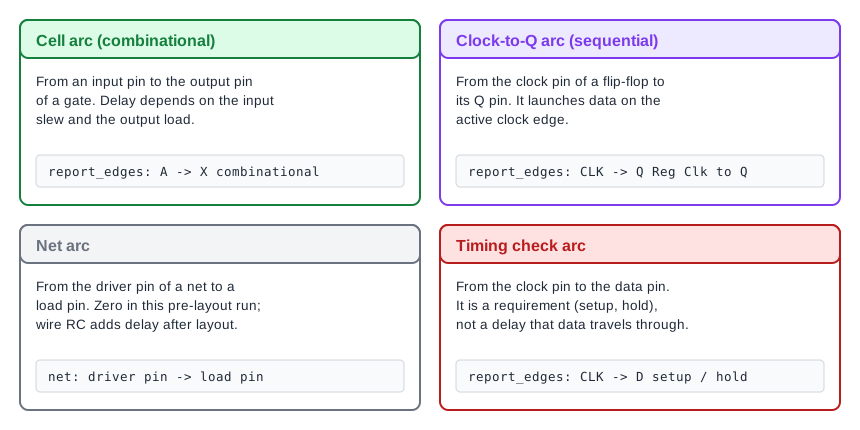
- Cell arcs connect an input pin of a combinational cell to its output pin. A cell has one arc from each input to each output.
- Clock-to-Q arcs connect the clock pin of a flip-flop to its output. They launch data.
- Net arcs connect the driver of a net to each of its loads. Their delay is the wire delay.
- Timing check arcs connect the clock pin of a flip-flop to its data pin. They are not delays. They state a requirement, such as setup and hold.
The last kind is the one people confuse. Data never travels along a setup arc. It says how early data must be stable relative to the clock, and the check is made against it. Here is how OpenSTA lists the arcs of the flip-flop used in our design:
CLK -> Q Reg Clk to Q
  ^ -> ^ 0.28:0.28
  ^ -> v 0.27:0.27
CLK -> D setup
  ^ -> ^ 0.07:0.07
  ^ -> v 0.12:0.12
CLK -> CLK width
  ^ -> v 0.16:0.16
  v -> ^ 0.20:0.20
The clock-to-Q arc has delays, the setup arc has setup times for a rising and for a falling data edge, and the width arc is a minimum pulse width check on the clock pin itself. Each line is for one combination of transitions, shown as ^ for rise and v for fall.
Where an Arc Delay Comes From
A cell arc delay is not a single number. A gate reacts more slowly when its input edge is lazy and when its output has a lot to drive. The laziness of an edge is called its slew: the time the signal takes to change from low to high or from high to low. The load is the capacitance the output has to charge. The library stores the delay in a table whose rows are indexed by the slew of the input signal and whose columns are indexed by the load on the output. The tool finds the input slew and output load of the arc, and interpolates in the table. Part of the lookup for the XOR cell:
Cell: sky130_fd_sc_hd__xor2_1
Arc sense: negative_unate
Arc type: combinational
A ^ -> X v
------- input_net_transition = 0.07
|       total_output_net_capacitance = 0.00
|        0.00     0.00
v      --------------------
0.05 | 0.05     0.06
0.12 | 0.07     0.08
Table value = 0.06
Delay = 0.06
The input transition of 0.07 ns falls between the table rows 0.05 and 0.12, and the result is 0.06 ns. This is why STA reports carry slew and capacitance columns. They are the inputs to the arc lookups. A later chapter covers these tables in detail.
Timing Sense: Unateness
Each arc also has a timing sense, which says how an output edge relates to the input edge that caused it. The technical word is unateness, and it is simpler than it sounds: it asks whether the output moves in the same direction as the input, in the opposite direction, or either.
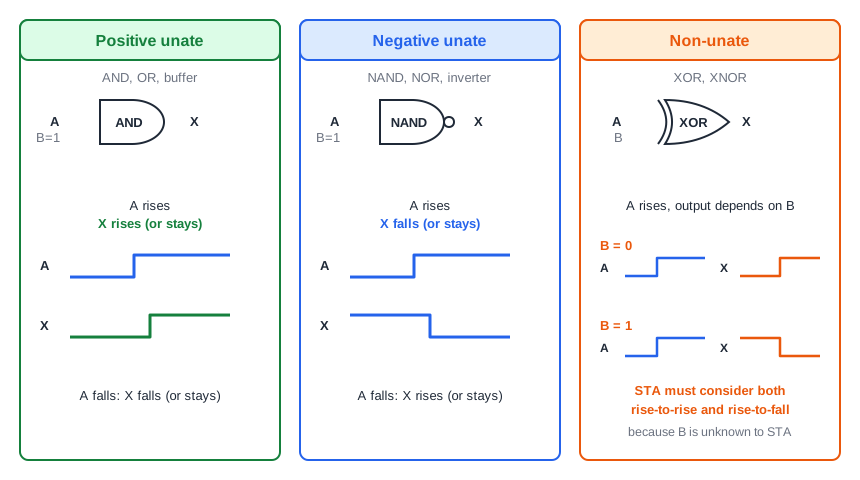
- In a positive unate arc, a rising input makes the output rise (or not change), and a falling input makes it fall. AND and OR cells are positive unate.
- In a negative unate arc, a rising input makes the output fall (or not change), and a falling input makes it rise. NAND, NOR and inverters are negative unate.
- In a non-unate arc, the output direction depends on the state of the other inputs. An XOR gate is non-unate.
Unateness tells STA which edges can propagate through a cell. Because every arc has separate delays for each edge combination, a rising output and a falling output have different arrival times, and STA keeps both. For a non-unate cell it cannot know which case will occur, so it considers both. The sky130 library models its XOR cell with two arcs from the same input, one positive unate and one negative unate, and STA analyzes both. The lookup above is the negative unate one, where a rising A gives a falling X.
Common Mistakes
Mistake #1: Treating a setup arc like a delay arc
A setup or hold arc is a requirement between the clock and data pins of a flip-flop. Data does not propagate through it, so it never adds to a path delay. It only decides the required time at the endpoint.
Mistake #2: Expecting one delay per arc
An arc has different delays for rising and falling transitions, and each depends on the input slew and output load. The number in a path report is the one for the specific transition and slew on that path, and the report marks the edge with ^ or v.
Quick Check: Why does STA consider two output edges for a rising input on an XOR gate?
An XOR is non-unate. Whether the output rises or falls depends on the other input, which STA does not know, so both the rising and the falling output are analyzed.
Practice Exercise
Challenge: Make the Rising Edge Critical
In the sta_demo constraints, replace the single set_input_delay line with separate delays for rising and falling input transitions, then re-run STA:
set_input_delay 0.4 -rise -clock clk [get_ports {a b c d}]
set_input_delay 0.1 -fall -clock clk [get_ports {a b c d}]
Before the change, the worst setup path to output z had a falling transition (v) and an arrival time of 0.5674 ns. Predict which edge is critical now, and whether the slack of z improves or gets worse.
Open the ready-made example in the lab, run synthesis, and then run STA. Editing constraints.sdc and re-running only STA, and choosing another library or corner, are PRO features.
Hint
The OR cell is positive unate. A rising input produces a rising output. Compare the arrival of each edge: its input delay plus the delay of the arc for that edge.
Solution
The falling edge now arrives at 0.1 + 0.1674 = 0.2674 ns, but the rising edge arrives at 0.4 + 0.0522 = 0.4522 ns, so the rising edge is critical and the report shows ^ on the path. The slack of z improves from 1.0326 to 1.1478 ns, because the slowest edge of the OR cell is the falling one and it no longer starts late. Your numbers may differ slightly, but the critical edge should flip the same way.
Summary
- An STA tool stores the design as a timing graph where pins are nodes and arcs are edges.
- Cell arcs, clock-to-Q arcs and net arcs carry delay. Timing check arcs carry a requirement, not a delay.
- A cell arc delay is looked up in a library table using the input slew and the output load.
- Arcs have separate rise and fall delays, and reports mark each transition with
^orv. - Positive unate arcs keep the edge direction, negative unate arcs invert it, and non-unate arcs depend on the other inputs.
- Because the number of paths explodes, STA propagates times through the graph instead of listing paths.
