
Setup and hold checks tell you whether the logic is fast enough and not too fast. There is a second family of checks that has nothing to do with the clock: design rule checks. They make sure that every pin works inside the range for which the library and the technology are valid. This article explains the three main rules, the maximum transition, the maximum capacitance and the maximum fanout, shows where the limits come from, and runs a check in the lab.
Think of the speed limit on a road. You can arrive on time and still have driven too fast, which is unsafe. Design rule checks are the speed limits of a chip: a signal can meet setup and hold and still break a limit on slew, load or fanout.
7 min read | Intermediate
What You'll Learn
- Name the main design rule checks and say what each one limits
- Explain where the limits come from: the library and the SDC file
- Read a design rule report and its slack
- Say why a design can meet timing and still violate a rule
Why Design Rules Exist
The library tables of a cell cover a limited range of input slews and loads. Inside the range the numbers are accurate because they come from simulation. Far outside the range, the tool has to extrapolate, which is a guess. Very slow edges and very heavy loads also cause real problems in a chip: a slow edge makes a gate draw more current while it switches, it makes the circuit sensitive to noise, and a heavily loaded output ages faster.
For these reasons, designers add upper limits that no pin may exceed, whatever the timing slack is. A violation of such a limit is called a design rule violation, and the checks are part of static timing analysis.
The Three Main Rules
- Maximum transition limits the slew at a pin. The slew is the time an edge takes, so a limit of 0.05 ns means no edge on that pin may be slower than 0.05 ns.
- Maximum capacitance limits the load that an output pin may drive. A cell that drives more than its limit would be too slow, and it may be unreliable.
- Maximum fanout limits how many input pins a net may drive.
There are also minimum versions of these limits, but the maximum ones are the common ones. Of the three, the transition and the capacitance limits are the ones that timing analysis is used for most. The fanout limit is often applied by the synthesis and implementation tools instead.
Where the Limits Come From
There are two sources:
- The library. Every output pin of a cell has a
max_capacitance, the largest load that the cell was characterized for. The library can also have a defaultmax_transition. The limits depend on the size of the cell, because a large cell can drive a heavy load. - The SDC file. The commands
set_max_transition,set_max_capacitanceandset_max_fanoutadd limits for a design, a port or a block. The designer uses them to be stricter than the library, for example when a chip needs a clean clock.
set_max_transition 0.05 [current_design]
set_max_capacitance 0.01 [get_ports z]
set_max_fanout 10 [current_design]
Reading the Report
The command report_check_types prints the checks that you select. The option -violators shows only the pins that fail. Here is the maximum transition check of the demo circuit with a limit of 0.05 ns:
set_max_transition 0.05 [current_design]
report_check_types -max_slew -violators -digits 4
max slew

Pin                                      Limit      Slew     Slack
------------------------------------------------------------------
_4_/X                                   0.0500    0.0928   -0.0428 (VIOLATED)
_6_/D                                   0.0500    0.0928   -0.0428 (VIOLATED)
_3_/A                                   0.0500    0.0716   -0.0216 (VIOLATED)
_4_/A                                   0.0500    0.0716   -0.0216 (VIOLATED)
_7_/Q                                   0.0500    0.0716   -0.0216 (VIOLATED)
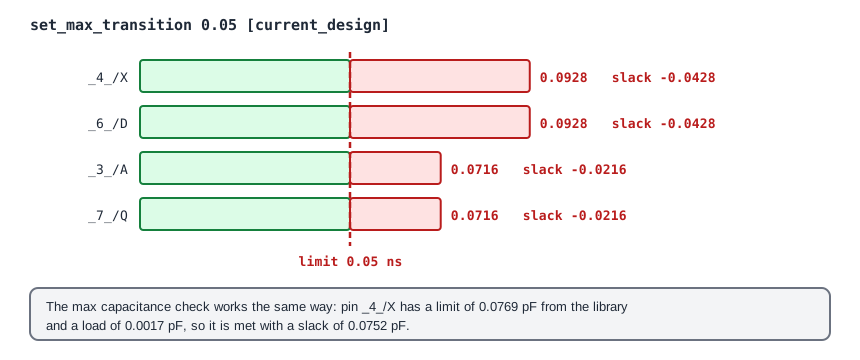
Each line is one pin with its limit and its actual value. The slack is the limit minus the actual value, so a negative slack is a violation. The worst pin is the output of the XOR gate _4_ and the data input _6_/D that it drives. They are the same net, so they have the same slew of 0.0928 ns, 0.0428 ns over the limit. The unit of the slack here is not the time of a path: it is the unit of the rule, ns for the transition and pF for the capacitance.
The maximum capacitance check has the same layout. For the same output _4_/X, the library limit is 0.0769 pF and the load is 0.0017 pF, so the check is met with a slack of 0.0752 pF. The output is far from its limit.
Timing Is Met but the Rule Is Violated
In the example above, the setup slack of the design is positive, 1.03 ns at the worst, and the check still has five violations. The two kinds of checks are independent. A path can be fast and still contain a pin with a slow edge, because the clock period is long and leaves a lot of room. Design rules are therefore checked in addition to setup and hold, and a design is not clean until both are clean.
The usual ways to remove a violation are to use a cell with a stronger output, to add a buffer, to split a heavy load, or to shorten a long wire. Each of them changes the timing as well, so after a fix the timing has to be checked again.
Common Mistakes
Mistake #1: Treating a design rule slack like a timing slack
The slack of a transition check is in ns of slew, and the slack of a capacitance check is in pF. They cannot be compared with the slack of a setup path, and a positive setup slack does not mean that the rules are met.
Mistake #2: Assuming that an SDC limit replaces the library limit
Every cell output also has the limit of its library. A limit set in the SDC file is an addition, and a looser value does not remove the library rule. The Limit column of the report shows the value that was checked for each pin.
Quick Check: A pin has a slew of 0.12 ns and a limit of 0.10 ns. What is its slack and is it a violation?
The slack is 0.10 - 0.12 = -0.02 ns. It is a violation, because the slew is above the limit.
Practice Exercise
Challenge: Find the Limit That Passes
Run the sta_demo design. The tool runs the commands of the SDC file as it reads it, so you can add a report at the end of constraints.sdc:
set_max_transition 0.05 [current_design]
report_check_types -max_slew -violators -digits 4
Look at the list of violators. Then try a limit of 0.08 and a limit of 0.10, and say how many pins fail with each. What is the largest slew in the design?
Open the ready-made example in the lab, run synthesis, and then run STA. Editing constraints.sdc and re-running only STA, and choosing another library or corner, are PRO features.
Hint
A pin fails when its slew is above the limit. The report lists the pins from the worst to the least bad.
Solution
With 0.05 ns, five pins fail, and the worst slew is 0.0928 ns at _4_/X and _6_/D. With 0.08 ns, only these two pins fail, because the other three have 0.0716 ns. With 0.10 ns, no pin fails and the report has no violators. The largest slew in the design is 0.0928 ns, so any limit from 0.0928 ns upward passes.
Summary
- Design rule checks make sure that every pin works inside the range for which the library and the technology are valid.
- The main rules limit the transition, the capacitance and the fanout.
- The limits come from the library, per cell and pin, and from the SDC file, and the report shows the limit that was used.
- The slack of a rule is the limit minus the actual value, and it is in ns or pF, not in the time of a path.
- A design can meet setup and hold timing and still violate a rule, so both kinds of checks are needed.
- Violations are fixed with stronger cells, buffers, split loads or shorter wires, and timing is checked again afterwards.
