
A cell delay depends on its load, and a large part of that load is the wire. Before a chip is placed and routed, no wire exists yet, so the tool has to guess. This chapter shows how static timing analysis accounts for wires, from the quickest guess to a full model of the real layout.
A wire load model estimates the capacitance of a wire from a single number, the fanout of the net. It is the oldest and simplest way to include wires in static timing analysis, and it is still used early in a design when no layout is available. This article explains what a wire load model contains, how the tool uses it, and why it is only an estimate.
Think of estimating the pipe needed for a house that has not been built yet. You cannot measure, but you know that a tap that serves many rooms needs more pipe than a tap that serves one. A wire load model makes the same kind of estimate for wires: more connections on a net means a longer wire.
7 min read | Intermediate
What You'll Learn
- Explain why wires matter for delay and why they are unknown before layout
- Read a wire load model and calculate the wire capacitance of a net from its fanout
- Describe the wire load modes
top,enclosedandsegmented - Show the effect of a wire estimate on a timing report
Why Wires Matter
In the earlier chapters, the delay of a cell came from a table lookup with two inputs: the input slew and the load on the output. The load is the sum of everything that the output pin drives. That is the pin capacitance of the cells that are connected, plus the capacitance of the wire that connects them.
A wire is a piece of metal sitting close to the chip surface and to other wires. That makes it a small capacitor to ground, and the longer the wire, the larger its capacitance. A wire also has resistance. In older technologies the wire capacitance was a small part of the load. In modern technologies the wires often dominate, so ignoring them gives timing numbers that are too optimistic.
The Problem: No Layout Yet
The exact length of a wire is known only after the cells are placed and the wires are routed. During synthesis the design is only a netlist, a list of cells and connections. The tool knows which pins a net connects, so it knows the fanout of every net, but nothing about distances.
Designers have long used a simple observation. Nets with a higher fanout tend to be longer, because they have to reach more cells. A wire load model turns this into a table: for each fanout, an estimated wire length, and from the length an estimated capacitance.
What a Wire Load Model Contains
The model is part of the Liberty library, next to the cells. A small example, written for this tutorial, looks like this:
wire_load ("wlm_demo") {
    resistance : 0.0;
    capacitance : 0.0002;     // pF per unit of length
    area : 0.0;
    slope : 10.0;
    fanout_length (1, 20.0);
    fanout_length (2, 30.0);
    fanout_length (3, 40.0);
}
The lines mean the following:
fanout_lengthgives the estimated length for a net with that many loads.capacitanceandresistanceare the values for one unit of length.slopeis used to extend the table: for a fanout larger than the last entry, the length grows by the slope for every extra load.
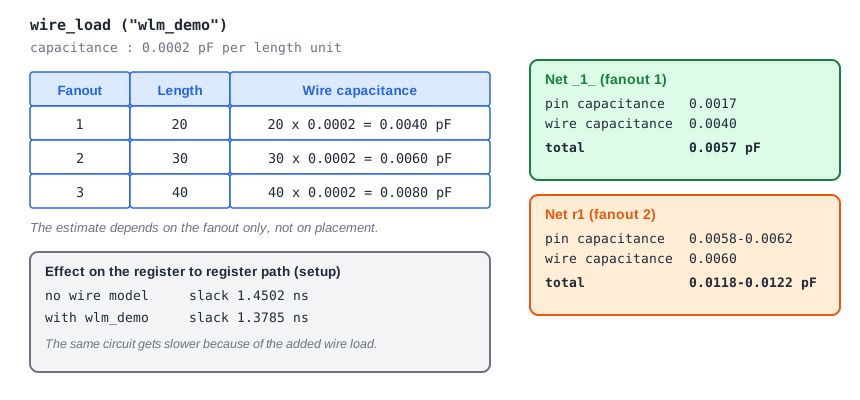
The wire capacitance of a net is the length times the capacitance per unit. A net with one load has 20 x 0.0002 = 0.0040 pF, and a net with two loads has 30 x 0.0002 = 0.0060 pF. A net with five loads is above the table, so its length is 40 + 2 x 10 = 60 units. The model looks only at the fanout. It does not care whether the two loads are next to each other or on opposite ends of the chip.
The standard cell library used in this tutorial does not contain a wire load model, so the example above was added to a copy of the library to run the experiments in this article.
Wire Load Modes
A design usually has a hierarchy of blocks. The mode decides which model applies to a net that crosses a boundary:
top: the model of the top level is used for every net in the design, as if the hierarchy were flat.enclosed: the model of the smallest block that fully contains the net is used.segmented: a net that crosses blocks is split into pieces, and each piece uses the model of the block it lies in.
Large blocks have longer wires, so a library often offers several models for different block areas, and the tool picks one by the area of the block. In the SDC file, set_wire_load_model picks a model and set_wire_load_mode picks the mode.
The Effect on a Timing Report
The demo circuit from earlier articles has a register-to-register path from _7_ to _6_. Without a wire model, its setup slack is 1.4502 ns. After selecting the example model in top mode, the report shows a wire capacitance on each net:
Net r1
 Pin capacitance: 0.0058-0.0062
 Wire capacitance: 0.0060
 Total capacitance: 0.0118-0.0122
 Number of loads: 2
The net r1 drives two cells, so it gets 0.0060 pF. The net _1_ drives one cell and gets 0.0040 pF. The path now has more load at both cells, and the delays grow:
      Cap      Slew     Delay      Time   Description
   0.0122    0.1251    0.3448    0.3448 ^ _7_/Q (sky130_fd_sc_hd__dfxtp_1)
   0.0057    0.1671    0.1878    0.5326 ^ _4_/X (sky130_fd_sc_hd__xor2_1)
             0.1671    0.0000    0.5326 ^ _6_/D (sky130_fd_sc_hd__dfxtp_1)
                      -0.0889    1.9111   library setup time
                                 1.3785   slack (MET)
The slack is now 1.3785 ns instead of 1.4502 ns. Notice also that the critical edge has changed: before, the falling transition limited the path, and now the rising one does, because it reacts more strongly to extra load. The hold slack goes up from 0.4241 to 0.5072 ns, because the same extra delay helps the hold check.
Limits of Wire Load Models
A wire load model is a statistical guess and cannot know about the real design. A short net with a high fanout is overestimated, and a long net with one load is underestimated. As technologies shrank, the wire delay grew more important than the cell delay and the guesses became less reliable. For this reason, a wire load model is used only before layout. After placement and routing, the tool uses the real parasitic data, described in the next article, and the model is switched off.
Common Mistakes
Mistake #1: Trusting wire load model results for sign-off
The model is an estimate based on fanout only. It is useful early, to see roughly how the design will behave, but timing sign-off is always done with extracted parasitics from the real layout.
Mistake #2: Assuming every library has a wire load model
Many modern libraries do not contain one, and then the tool adds no wire capacitance at all. If a report shows a wire capacitance of zero, check whether a model is selected and whether the library has one.
Quick Check: A net has three loads. Using the example model, what is its wire capacitance?
The table gives a length of 40 units for a fanout of 3, so the wire capacitance is 40 x 0.0002 = 0.0080 pF.
Practice Exercise
Challenge: Add the Wire Load by Hand
The library of the lab has no wire load model, but you can add the same wire capacitance to a net yourself with set_load. Run the sta_demo design and note the setup slack of the path from _7_ to _6_ (1.4502 ns). Add these lines to constraints.sdc and run again:
set_load 0.006 [get_nets r1]
set_load 0.004 [get_nets _1_]
Predict whether the slack gets better or worse, and which clock edge of the data becomes critical.
Open the ready-made example in the lab, run synthesis, and then run STA. Editing constraints.sdc and re-running only STA, and choosing another library or corner, are PRO features.
Hint
The two values are the wire capacitances that the example model gives for a fanout of 2 and a fanout of 1. More load on the output of a cell means more delay. Look at the Cap column to see the new loads.
Solution
The slack gets worse, from 1.4502 to 1.3785 ns, the same result as with the wire load model. The load on _7_/Q grows to 0.0122 pF and the rising edge, with a data arrival time of 0.5326 ns, becomes critical. The hold slack improves from 0.4241 to 0.5072 ns. set_load on a net sets the capacitance of the wire, so it is the manual version of what the model does.
Summary
- Wires add capacitance, and often resistance, to the load of every cell, so they change delay.
- Before layout, the wire lengths are unknown, so a wire load model estimates them from the fanout of each net.
- The wire capacitance is the estimated length times the capacitance per unit length.
- The mode (
top,enclosedorsegmented) decides which model a net uses in a hierarchy. - The extra load makes delays grow, which usually reduces the setup slack and improves the hold slack.
- The model is an estimate. Sign-off uses extracted parasitics from the layout.
