
A timing report looks like a wall of numbers. It is not. Every line has a fixed meaning, and every report is built from the same three parts: a data path, a capture clock path and a slack. This article walks through a setup report line by line, then shows how the same pattern appears for input and output paths, and how to read the short summary formats.
8 min read | Intermediate
What You'll Learn
- Find the startpoint, endpoint and check type in the header of a path report
- Read the columns
Cap,Slew,DelayandTime - Recognize the data path, the capture clock path and the slack in a report
- Read the reports of input and output paths and the summary formats
The Header
A path report starts with four lines that say what is being checked:
Startpoint: _7_ (rising edge-triggered flip-flop clocked by clk)
Endpoint: _6_ (rising edge-triggered flip-flop clocked by clk)
Path Group: clk
Path Type: max
Startpointis where the path begins: a flip-flop that launches the data, or an input port.Endpointis where the path ends: a flip-flop that captures the data, or an output port.Path Groupis the clock of the capturing element. Reports sort paths by group.Path Typesays which check this is.maxmeans a setup check, which uses the longest delays.minmeans a hold check, which uses the shortest delays.
The Three Parts of the Report
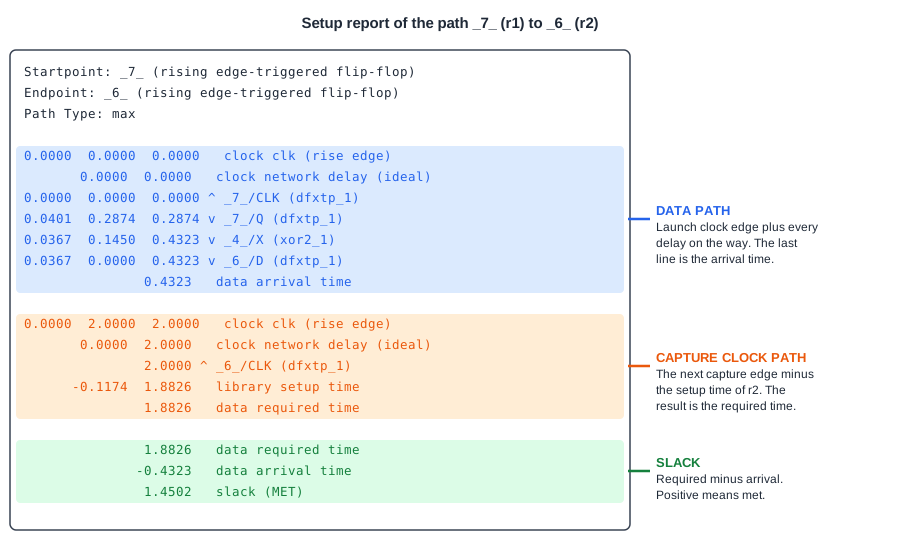
Under the header, every report has the same three parts, in the same order. The picture colors them. Read them in this order.
Part 1: The Data Path
This is the journey of the data. It starts with the launch clock edge and adds every delay on the way. Each row has up to four numbers:
Cap: the load capacitance on the pin, in pF. It is shown only for output pins and only if you ask for it.Slew: how fast the signal changes at this pin, in ns.Delay: the time that this step adds, in ns. This is the number to look at to find the slow cells.Time: the running total, from the clock edge up to this pin.
After the numbers comes a symbol and the name of a pin. The symbol ^ means the signal rises, and v means it falls. The pin name has the form instance name, a slash, and pin name, such as _7_/Q. The cell type follows in brackets. The last row of this part, data arrival time, is the total.
Look at the demo path. The flip-flop _7_ adds 0.2874 ns from clock to output. The XOR gate _4_ adds 0.1450 ns. The wire between them adds 0.0000 ns, because there are no wire delays before layout. The arrival time is 0.4323 ns.
Part 2: The Capture Clock Path
This part calculates the time by which the data is required. It starts at the next clock edge, 2.0 ns after the launch edge, and applies the clock network delay (here an ideal clock with no delay). The row with _6_/CLK is the clock pin of the capturing flip-flop. Then comes the correction for the library: library setup time of -0.1174 ns. The result, 1.8826 ns, is the data required time.
A row called clock reconvergence pessimism is part of real reports. In the example its value is zero. It is explained in the chapter about variation. Another row, clock uncertainty, appears when you set it in the constraints.
Part 3: The Slack
The last block repeats the required time and the arrival time and subtracts: 1.8826 - 0.4323 = 1.4502. The word at the end is MET if the slack is zero or more, and VIOLATED if it is negative. For a hold report, the sign is reversed (arrival minus required) so that a positive slack still means met.
Input and Output Paths
If a path starts at an input port, there is no launch flip-flop. The time starts with the clock edge and the input delay that you set in the constraints. The row says input external delay:
             0.0000    0.0000    0.0000   clock clk (rise edge)
                       0.0000    0.0000   clock network delay (ideal)
                       0.4000    0.4000 v input external delay
             0.0000    0.0000    0.4000 v c (in)
             0.0367    0.1176    0.5176 v _4_/X (sky130_fd_sc_hd__xor2_1)
             0.0367    0.0000    0.5176 v _6_/D (sky130_fd_sc_hd__dfxtp_1)
                                 0.5176   data arrival time
If the path ends at an output port, there is no capture flip-flop, so the required time is the clock edge minus the output delay from the constraints. The row says output external delay:
             0.0000    2.0000    2.0000   clock clk (rise edge)
                       0.0000    2.0000   clock network delay (ideal)
                       0.0000    2.0000   clock reconvergence pessimism
                      -0.4000    1.6000   output external delay
                                 1.6000   data required time
                                -0.3956   data arrival time
                                 1.2044   slack (MET)
Summary Formats
A full report is too long when a design has thousands of paths. Two shorter formats give one line per path or per endpoint. The format end lists each endpoint with its required time, its arrival time and its slack:
max_delay/setup group clk

                                      Required    Actual
Endpoint                                 Delay     Delay     Slack
------------------------------------------------------------------
z (output)                              1.6000    0.5674    1.0326 (MET)
The format summary shows the startpoint and endpoint with the slack:
Startpoint                           Endpoint                                 Slack
----------------------------------------------------------------------------------
a (input)                            z (output)                              1.0326
A good way to work is to start with the summary, pick the path with the worst slack, and open its full report.
Common Mistakes
Mistake #1: Reading the Time column as the delay of a step
The Delay column is the delay of one step and the Time column is the running total. A slow cell is found in the Delay column.
Mistake #2: Ignoring the transition symbols
The symbols ^ and v say which edge this path uses. The rising and the falling edges have different delays, and the report shows the worst one for the check. A different edge on a different row of the same path is normal.
Quick Check: In a setup report, the data required time is 1.8826 ns and the data arrival time is 0.4323 ns. What is printed at the end, and what does it mean?
The slack is 1.8826 - 0.4323 = 1.4502 and the word is MET. The data arrives 1.4502 ns before the latest allowed time.
Practice Exercise
Challenge: Find the Line That Changes
Run the sta_demo design with a period of 2.0 ns and open the report of the path from _7_ to _6_. Write down the arrival time, the required time and the slack. Then change the period to 1.0 ns in the constraints and run again.
Before you run it, say which rows of the report will change and which will not.
Open the ready-made example in the lab, run synthesis, and then run STA. Editing constraints.sdc and re-running only STA, and choosing another library or corner, are PRO features.
Hint
The period only enters in the capture clock path, in the second clock edge. The data path depends on the launch edge at 0 and on cell delays.
Solution
The data path does not change, and the arrival time stays at 0.4323 ns. In the capture clock path, the second clock edge is at 1.0 ns instead of 2.0 ns, so the required time becomes 1.0 - 0.1174 = 0.8826 ns. The slack becomes 0.8826 - 0.4323 = 0.4502 ns, which is 1.0 ns less than before.
Summary
- The header gives the startpoint, endpoint, path group and the check type:
maxfor setup,minfor hold. - A report has three parts: the data path with the arrival time, the capture clock path with the required time, and the slack.
- In the data path, the
Delaycolumn is the delay of one step and theTimecolumn is the running total. - The symbols
^andvshow a rising or falling edge. - Input paths start with the input delay, and output paths end with the output delay.
- The formats
endandsummarygive one line per endpoint or path, which is the best place to start.
