
Input and output delays are always measured against a clock. But the device that sends data into your chip, or receives data from it, has its own clock, and that clock may not exist anywhere inside your design. A virtual clock is a clock that has a period and a waveform but no pin. You use it to describe the timing of the outside world. This article shows how to create one, what it changes in the reports, and when it is better than using a real clock of the chip.
7 min read | Intermediate
What You'll Learn
- Explain why input and output delays need a reference clock
- Create a virtual clock and use it in
set_input_delayandset_output_delay - Model a different clock latency for the outside device with a virtual clock
- Read the report of a path that starts at a port clocked by a virtual clock
Why a Reference Clock Is Needed
When you write set_input_delay 0.4 -clock clk [get_ports a], you say that the data at the port a arrives 0.4 ns after an edge of clk. STA needs the clock to know which edge launches the data, and which capture edge to compare it with. The clock gives the time zero of the delay.
This works when the outside device is clocked by the same clock as the chip. In many systems it is not. A sensor, a memory or another chip may run from its own oscillator, with the same frequency but a different phase. And sometimes the data comes from a device whose clock goes through a long path before it arrives at the chip. In these cases you want a clock with the right period and phase, but you do not want it to connect to any flip-flop of your design.
Creating a Virtual Clock
A virtual clock is made with create_clock and no pin or port:
create_clock -name clk  -period 2.0 [get_ports clk]
create_clock -name vclk -period 2.0
set_input_delay  0.4 -clock vclk [get_ports {a b c d}]
set_output_delay 0.4 -clock vclk [get_ports {y z}]
The clock vclk exists only in the constraints. It has the same period as clk, so the numbers of the demo circuit do not change at first. Look at the path from the input c to the flip-flop _6_. The launch clock in the report is now vclk and the capture clock is clk:
Startpoint: c (input port clocked by vclk)
Endpoint: _6_ (rising edge-triggered flip-flop clocked by clk)

   0.0000    0.0000   clock vclk (rise edge)
   0.0000    0.0000   clock network delay (ideal)
   0.4000    0.4000 v input external delay
   0.0000    0.4000 v c (in)
   0.1176    0.5176 v _4_/X (sky130_fd_sc_hd__xor2_1)
             0.5176   data arrival time

   2.0000    2.0000   clock clk (rise edge)
   -0.1174   1.8826   library setup time
             1.8826   data required time
             1.3650   slack (MET)
The slack of 1.3650 ns is identical to the result with the real clock. Both clocks have the same edges, so nothing differs yet. The benefit comes when they do not.
Giving the Outside Device a Different Latency
Suppose the clock of the device that drives your input reaches it 0.3 ns later than the clock reaches your chip. You can describe this with a clock latency on the virtual clock alone, and the real clock stays untouched:
set_clock_latency 0.3 [get_clocks vclk]
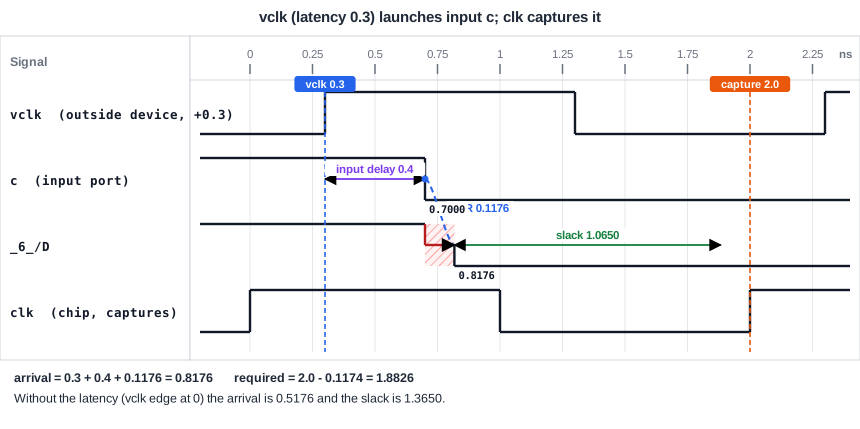
The data now leaves the outside device at 0.3 ns, appears at the port 0.4 ns later, and reaches the flip-flop at 0.3 + 0.4 + 0.1176 = 0.8176 ns. The capture edge of clk is still at 2.0 ns, so the slack falls from 1.3650 to 1.0650 ns:
   0.0000    0.0000   clock vclk (rise edge)
   0.3000    0.3000   clock network delay (ideal)
   0.4000    0.7000 v input external delay
   0.0000    0.7000 v c (in)
   0.1176    0.8176 v _4_/X (sky130_fd_sc_hd__xor2_1)
             0.8176   data arrival time
                       1.0650   slack (MET)
For hold, the same delay helps. The data cannot change earlier than 0.3 + 0.4 + 0.0344 = 0.7344 ns, so the hold slack of the same path grows from 0.4927 to 0.7927 ns. A later launch clock gives less time for setup and more for hold, as in the article about clock skew. The virtual clock is a way to put the skew of the outside world into the constraints.
Input-to-Output Paths
If the same virtual clock is used for the input delays and the output delays, a path that goes from an input to an output without a flip-flop has both its launch and its capture on vclk. In the demo circuit, the path from a to z keeps its slack of 1.0326 ns even with a latency of 0.3 ns, because the latency is added at both ends. If the outside device that receives the data has a different latency than the one that sends it, use two virtual clocks.
When to Use a Virtual Clock
- The outside device has its own clock and the same frequency, but a different phase or latency.
- The clock exists outside the chip and no pin of the design carries it.
- You want to give the interface its own latency, without changing the clock inside the chip.
Common Mistakes
Mistake #1: Giving a virtual clock a different period without a reason
If the virtual clock and the capture clock have different periods, STA checks the paths between them as two different clocks, using the edge selection of the article about clock groups. Use the period of the real interface.
Mistake #2: Forgetting the latency of the outside clock
If the clock of the outside device is later or earlier than the clock at your chip, a virtual clock without a latency hides it. The setup and hold slack of every input path then look better or worse than they are, by exactly the missing latency.
Quick Check: A virtual clock has a latency of 0.2 ns. What is the arrival time at the input port with an input delay of 0.5 ns?
The data leaves at the virtual clock edge plus its latency, 0.2 ns, and then takes the input delay: 0.2 + 0.5 = 0.7 ns after the edge at time 0.
Practice Exercise
Challenge: Move the Outside Clock
Use the sta_demo design with the virtual clock constraints above and a latency of 0.3 ns on vclk. Then change the latency to 0.8 ns:
set_clock_latency 0.8 [get_clocks vclk]
Predict the setup slack and the hold slack of the path from the input c to the data pin of _6_. The slacks with a latency of 0 were 1.3650 ns and 0.4927 ns.
Open the ready-made example in the lab, run synthesis, and then run STA. Editing constraints.sdc and re-running only STA, and choosing another library or corner, are PRO features.
Hint
Each 0.1 ns of latency on the virtual clock moves the data arrival by 0.1 ns, in both checks, and the capture clock does not change.
Solution
The setup slack falls by 0.8 ns, from 1.3650 to 0.5650 ns. The hold slack rises by 0.8 ns, from 0.4927 to 1.2927 ns. With a latency of 0.3 ns, the values were 1.0650 ns and 0.7927 ns, which follows the same rule.
Summary
- Input and output delays are measured against a clock, which gives time zero for the delay.
- A virtual clock has a period and a waveform but no pin. It is created with
create_clockwithout an object. - It describes the clock of an outside device that does not exist in the design.
- A latency on the virtual clock shifts the input arrival: a later launch lowers setup slack and raises hold slack by the same amount.
- A virtual clock lets you give the interface its own latency without changing the clock inside the chip.
