
The best way to trust a timing report is to be able to reproduce its slack with a pencil. This article works through five examples on the demo circuit, one for each kind of path, and a last one that combines skew and clock uncertainty. For each example the steps are the same, and the result is checked against the tool.
9 min read | Intermediate
What You'll Learn
- Follow a fixed recipe to calculate setup and hold slack by hand
- Calculate the slack of register-to-register, input and output paths
- Combine clock skew and clock uncertainty in one calculation
- Check a hand result against a report and explain a difference of the last digit
The Recipe
Use these five steps for every check:
- Draw the path and note the startpoint and the endpoint.
- Calculate the data arrival time: the launch clock arrival (or the input delay) plus all the delays on the way. Use the largest delays for setup and the smallest for hold.
- Calculate the data required time: the capture clock edge, plus the clock latency, minus the setup time (or plus the hold time), and with the uncertainty (or the output delay) applied.
- Subtract: required minus arrival for setup, arrival minus required for hold.
- Decide: zero or more is met.
The demo circuit has a clock period of 2.0 ns, an input delay and an output delay of 0.4 ns, and ideal clocks. The flip-flop _7_ is called r1 and _6_ is called r2.
Example 1: Register to Register, Setup
The path goes from r1 through the XOR gate to r2. The delays are: clock to output of r1, 0.2874 ns, and the XOR gate, 0.1450 ns. The setup time of r2 is 0.1174 ns.
| Step | Calculation | Result (ns) |
|---|---|---|
| Arrival | 0 + 0.2874 + 0.1450 | 0.4323 |
| Required | 2.0 - 0.1174 | 1.8826 |
| Setup slack | 1.8826 - 0.4323 | 1.4502 |
The tool shows 0.4323 for the arrival and 1.4502 for the slack. The sum 0.2874 + 0.1450 is 0.4324 when you add the rounded numbers. The tool keeps more digits internally, so a difference of 0.0001 in the last digit is normal.
Example 2: Register to Register, Hold
Hold uses the smallest delays: 0.3058 ns for a rising output of r1 and 0.0599 ns for the falling output of the XOR gate. The hold time of r2 is -0.0583 ns, and both clocks are at time 0.
| Step | Calculation | Result (ns) |
|---|---|---|
| Arrival | 0 + 0.3058 + 0.0599 | 0.3657 |
| Required | 0 + (-0.0583) | -0.0583 |
| Hold slack | 0.3657 - (-0.0583) | 0.4241 |
Subtracting a negative number adds. A negative required time is normal for hold.
Example 3: Input to Register
The path starts at the input c. The data arrives 0.4 ns after the clock edge because of the input delay, then passes the XOR gate (0.1176 ns for the slowest edge) and reaches r2.
| Step | Calculation | Result (ns) |
|---|---|---|
| Arrival | 0 + 0.4 + 0.1176 | 0.5176 |
| Required | 2.0 - 0.1174 | 1.8826 |
| Setup slack | 1.8826 - 0.5176 | 1.3650 |
This is the slack that the report shows for the data pin of r2 in the summary, because it is the worst of the two paths that end there. The other path, from r1, has 1.4502 ns.
Example 4: Register to Output
At an output port the required time is the clock edge minus the output delay. The path from r1 goes through an AND gate (0.0898 ns) to the output y. The rising output of r1 takes 0.3058 ns.
| Step | Calculation | Result (ns) |
|---|---|---|
| Arrival | 0 + 0.3058 + 0.0898 | 0.3956 |
| Required | 2.0 - 0.4 | 1.6000 |
| Setup slack | 1.6000 - 0.3956 | 1.2044 |
Example 5: Input to Output
A path from input a to the output z through an OR gate has no flip-flop. It pays the input delay and the output delay out of the same period. The OR gate takes 0.1674 ns.
| Step | Calculation | Result (ns) |
|---|---|---|
| Arrival | 0 + 0.4 + 0.1674 | 0.5674 |
| Required | 2.0 - 0.4 | 1.6000 |
| Setup slack | 1.6000 - 0.5674 | 1.0326 |
This is the worst setup slack of the whole design, because the two external delays use 0.8 ns of the 2.0 ns period before the OR gate even starts.
Example 6: Skew and Uncertainty Together
Now repeat the register-to-register checks with three changes: the capture clock is 0.3 ns late, the setup uncertainty is 0.2 ns and the hold uncertainty is 0.1 ns. The constraints are:
set_clock_latency 0.3 [get_pins _6_/CLK]
set_clock_uncertainty -setup 0.2 [get_clocks clk]
set_clock_uncertainty -hold  0.1 [get_clocks clk]
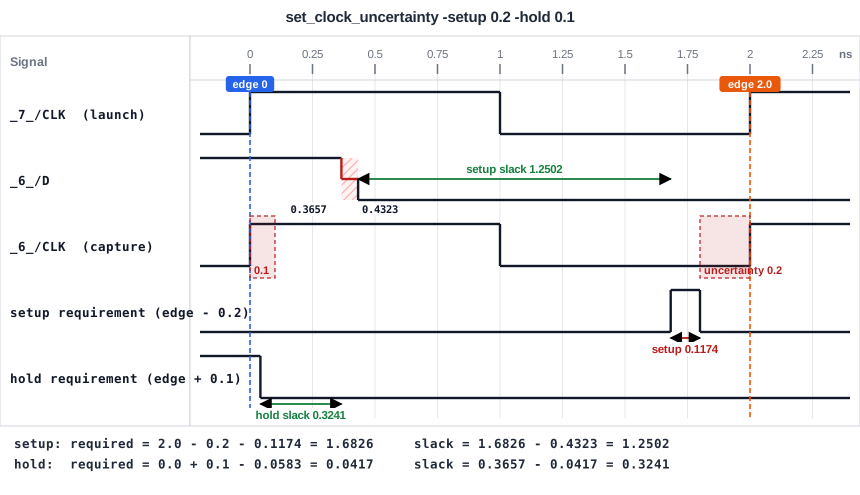
The diagram shows the effect of the uncertainty on the capture clock edge: for setup it takes the edge earlier, and for hold it takes the edge later. With the skew of 0.3 ns added to both, the numbers are:
| Check | Required time | Arrival | Slack |
|---|---|---|---|
| Setup | 0.3 + 2.0 - 0.1174 - 0.2 = 1.9826 | 0.4323 | 1.5502 |
| Hold | 0.3 + (-0.0583) + 0.1 = 0.3417 | 0.3657 | 0.0241 |
The tool agrees: a setup slack of 1.5502 ns and a hold slack of 0.0241 ns. The hold check is close to failing, because skew and uncertainty both make it harder. Increase the skew a little more and it would fail while the setup check still had more than 1.5 ns of margin.
Common Mistakes
Mistake #1: Using one set of delays for both checks
Setup uses the largest delays and hold the smallest. In example 1 the arrival time is 0.4323 ns and in example 2 it is 0.3657 ns, for the same path.
Mistake #2: Forgetting to subtract a negative hold time correctly
With a hold time of -0.0583 ns, the slack is arrival minus (-0.0583), which is arrival plus 0.0583. Dropping the sign gives a slack that is too small by 0.1166 ns.
Quick Check: A path from an input port with an input delay of 0.5 ns goes through 0.6 ns of logic to a flip-flop with a setup time of 0.1 ns. The period is 2.0 ns. What is the setup slack?
Arrival = 0.5 + 0.6 = 1.1 ns. Required = 2.0 - 0.1 = 1.9 ns. Slack = 1.9 - 1.1 = 0.8 ns.
Practice Exercise
Challenge: Predict Before You Run
On the sta_demo design, change the output delay of y to 1.5 ns and the period to 1.2 ns, and keep everything else as before:
create_clock -name clk -period 1.2 [get_ports clk]
set_output_delay 1.5 -clock clk [get_ports y]
Calculate by hand the setup slack of the path from r1 to y and of the path from r1 to r2. Then run STA and compare.
Open the ready-made example in the lab, run synthesis, and then run STA. Editing constraints.sdc and re-running only STA, and choosing another library or corner, are PRO features.
Hint
The delays of the cells are the same as in the examples. Only the required times change.
Solution
For the path to y, the required time is 1.2 - 1.5 = -0.3 ns and the arrival time is 0.3956 ns, so the slack is -0.3 - 0.3956 = -0.6956 ns, which is violated. The output delay is larger than the clock period, so no data can ever meet it. For the path to r2, the required time is 1.2 - 0.1174 = 1.0826 ns, and the slack is 1.0826 - 0.4323 = 0.6502 ns, which is met. The tool agrees to within 0.0001 ns. If you look at the endpoint summary, the line for r2 shows 0.5650 ns instead, because the worst path that ends at r2 starts at the input c (an input delay of 0.4 ns). Ask for the path that starts at r1 to see 0.6502 ns.
Summary
- Use five steps: draw the path, find the arrival time, find the required time, subtract, decide.
- Setup uses the largest delays and hold the smallest delays.
- Input paths start with the input delay, and output paths end with the output delay.
- An input-to-output path pays both external delays out of one clock period, so it often has the smallest setup slack.
- Clock skew and uncertainty are added to the required time, and they move setup and hold in opposite directions.
- A difference of 0.0001 ns between a hand calculation and the tool comes from rounding.