
An STA report that shows no violations can mean two very different things. Either the design meets timing, or part of the design was never checked. STA does not tell you which one, because a path without constraints is not an error, it is simply skipped. This article shows how to find out what was not checked, using the command check_setup, and explains each warning it can print.
8 min read | Intermediate
What You'll Learn
- Explain why unconstrained paths are the most dangerous kind of timing problem
- Run
check_setup -verboseand read each warning - Find a missing input delay, a missing output delay and an unclocked flip-flop
- Make validation part of every timing run
The Problem With Missing Constraints
STA checks a path only if it has a launch clock and a capture clock. An input without an input delay, an output without an output delay, or a flip-flop without a clock has no clock on one side, so the path is not timed. There is no violation, no error and no line in the report. The result looks like a better design than the one you have.
A Design With Missing Constraints
Take the demo circuit, and leave out the input delay of d and the output delay of z:
create_clock -name clk -period 2.0 [get_ports clk]
set_input_delay  0.4 -clock clk [get_ports {a b c}]
set_output_delay 0.4 -clock clk [get_ports y]
The setup summary has no violations:
max_delay/setup group clk

                                      Required    Actual
Endpoint                                 Delay     Delay     Slack
------------------------------------------------------------------
y (output)                              1.6000    0.3956    1.2044 (MET)
_7_/D (sky130_fd_sc_hd__dfxtp_1)        1.8840    0.5201    1.3639 (MET)
_6_/D (sky130_fd_sc_hd__dfxtp_1)        1.8826    0.5176    1.3650 (MET)
The worst slack is 1.2044 ns. But with complete constraints, the worst slack of this design is 1.0326 ns, on the path from a to z, and that path is missing from the list. The check does not exist, so nothing can fail. The incomplete constraint file looks better than the complete one.
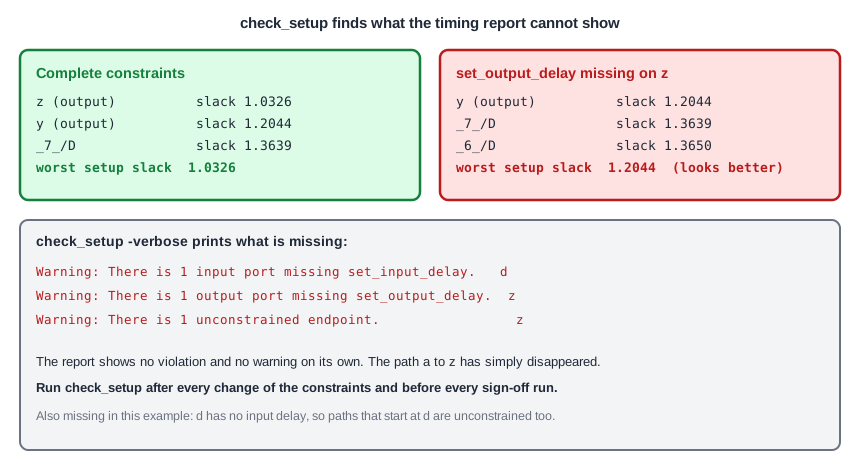
check_setup
The command check_setup looks for these problems. The option -verbose prints the names of the objects, which is the form you want:
check_setup -verbose
Warning: There is 1 input port missing set_input_delay.
  d
Warning: There is 1 output port missing set_output_delay.
  z
Warning: There is 1 unconstrained endpoint.
  z
Each warning is a message about one kind of problem:
| Warning | Meaning | Usual fix |
|---|---|---|
Input port missing set_input_delay | Paths from this input have no launch clock and are not checked | Add an input delay |
Output port missing set_output_delay | Paths to this output have no capture clock and are not checked | Add an output delay |
| Unclocked register/latch pin | A flip-flop has no clock reaching its clock pin | Define the clock or the generated clock |
| Unconstrained endpoint | A path ends here without a requirement | Constrain the start of the path or the end |
The command can also report other problems, if you ask: -multiple_clock for registers that have more than one clock, -generated_clocks for generated clocks that cannot be traced to a source, and -loops for combinational loops. By default, check_setup prints all of them, so the plain call is enough to start with.
A Design Without Any Clock
The same check shows what happens when the clock is missing completely:
Warning: There are 5 input ports missing set_input_delay.
  a
  b
  c
  clk
  d
Warning: There are 2 output ports missing set_output_delay.
  y
  z
Warning: There are 2 unclocked register/latch pins.
  _6_/CLK
  _7_/CLK
Warning: There are 4 unconstrained endpoints.
  y
  z
  _6_/D
  _7_/D
No paths found.
All the ports, all the flip-flops and all the endpoints are listed, and the setup report is empty: No paths found. If you see an empty report, the first thing to do is to look at the constraints. The clock port clk shows up as an input without an input delay. That is not a mistake. The clock port does not need an input delay, so it is safe to ignore that single line.
What check_setup Cannot Tell You
The command finds constraints that are missing. It cannot tell you that a constraint is wrong. An input delay of 0.04 ns instead of 0.4 ns is complete as far as the check is concerned, and a clock with a period of 20 ns instead of 2.0 ns is still a clock. For those errors, look at the values themselves: the clock summary with the period of every clock, the input and output delays against the interface specification, and the slack of the port paths. A slack that is much larger than you expect is as suspicious as a violation.
Make It a Habit
- Run
check_setup -verboseafter every change of the constraints and before every timing run that you want to trust. - Read the warnings that STA prints when it reads the constraint file. A name that is not found is only a warning.
- Compare the number of endpoints in the report with what you expect. A design with 10,000 flip-flops and 5,000 endpoints in the report has a problem.
- Keep every warning that you accept on purpose in a list, with the reason.
Common Mistakes
Mistake #1: Treating an empty violation list as a pass
A report without violations is only meaningful if the report contains all the paths. Check the constraints first, then read the slack.
Mistake #2: Fixing the warning with an exception that removes the path
A command such as a false path makes the warning disappear, but it also removes the check. Use an exception only when the path really cannot happen. A missing delay should be fixed with the delay.
Quick Check: Why does a design with a missing output delay on one port often show a better worst slack than the same design with complete constraints?
The path to that port has no capture clock, so it is not checked and it is not in the report. If that path was the worst one, the worst reported slack is the next best path.
Practice Exercise
Challenge: Find What Is Missing
Run the sta_demo design with the three constraint lines above, which leave out the input d and the output z. Print the worst setup slack and run check_setup -verbose. Then add the two missing lines and print the worst setup slack again:
set_input_delay  0.4 -clock clk [get_ports d]
set_output_delay 0.4 -clock clk [get_ports z]
Open the ready-made example in the lab, run synthesis, and then run STA. Editing constraints.sdc and re-running only STA, and choosing another library or corner, are PRO features.
Hint
Compare the worst slack before and after. Ask yourself which path appeared in the second run.
Solution
With the incomplete constraints, check_setup reports d as an input without input delay, z as an output without output delay, and z as an unconstrained endpoint, and the worst setup slack is 1.2044 ns. With the complete constraints, the worst slack is 1.0326 ns, on the path from a to z, which was not checked before. Complete constraints made the result 0.1718 ns worse, and this is the true value.
Summary
- STA only checks paths that have a launch clock and a capture clock. A missing constraint removes the path without any message in the report.
check_setup -verboselists input ports without input delay, output ports without output delay, unclocked flip-flops and unconstrained endpoints.- An incomplete constraint file can show a better slack than the complete one.
- An empty report with
No paths foundusually means that the clock is missing. - The clock port itself is listed as an input without input delay, and that line can be ignored.
- Run the check after every constraint change and before every run that you rely on.
