
Every delay in a timing report comes from a file. The tool does not measure your design and does not guess. It looks each number up in data that the chip manufacturer ships with the cell library. Once you can read that data, no number in a timing report is a mystery.
A standard cell library is a collection of ready-made logic gates and flip-flops that a design is built from. The Liberty file (.lib) is the data sheet of that library. It tells static timing analysis how fast every cell is, how much load every pin presents, and what every flip-flop requires.
Think of the library as the parts catalogue of a hardware shop. Every part has a data sheet with its size, its speed and what it needs. A designer builds the chip from catalogue parts, and STA reads the same data sheets to know how fast each part is.
7 min read | Intermediate
What You'll Learn
- Describe what a standard cell library contains and how cell and corner names are built
- Identify the main parts of a Liberty file: header, operating conditions, cells, pins and timing groups
- Explain pin capacitance and how it adds up to the load on a net
- Read the units and the key attributes of a real cell
What a Standard Cell Library Is
When synthesis turns your RTL into gates, it does not draw transistors. It picks cells from a library. Each cell is a small pre-designed block, such as an AND gate, an XOR gate or a D flip-flop, with a known layout and known electrical behavior.
Most functions come in several sizes. The names show it:
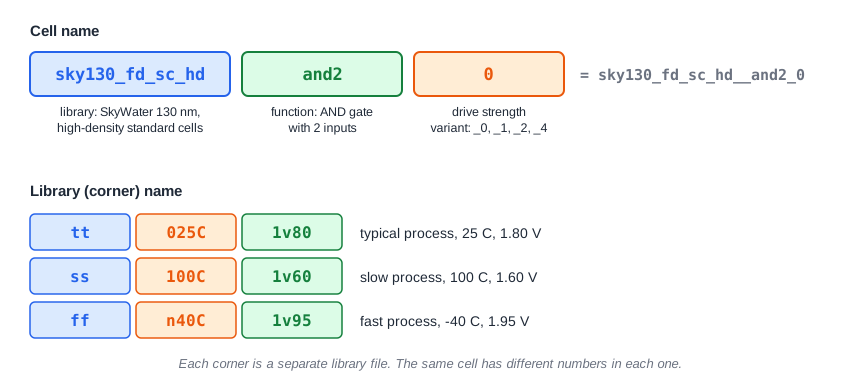
The four AND2 cells of the library used in ChipVerify Lab are a good example. A larger variant can drive a bigger load, but it takes more area:
| Cell | Area | Largest load its output may drive |
|---|---|---|
| and2_0 | 6.256 | 0.109 pF |
| and2_1 | 6.256 | 0.158 pF |
| and2_2 | 7.507 | 0.303 pF |
| and2_4 | 8.758 | 0.539 pF |
The lab offers several libraries, such as high density (hd), high speed (hs) and low leakage (ls). The examples in this series use the high-density library, sky130_fd_sc_hd, which has 428 cells. Each library exists in several corners. A corner is a set of operating conditions: process, voltage and temperature. A later article explains corners in detail.
What Liberty Is
Liberty is a text format. An STA tool reads the Liberty file together with the netlist and the constraints. For every cell it holds the area, the function, the pins, the capacitance of each pin, and a timing group for every timing arc. This is what a Liberty file looks like, reduced to its structure:
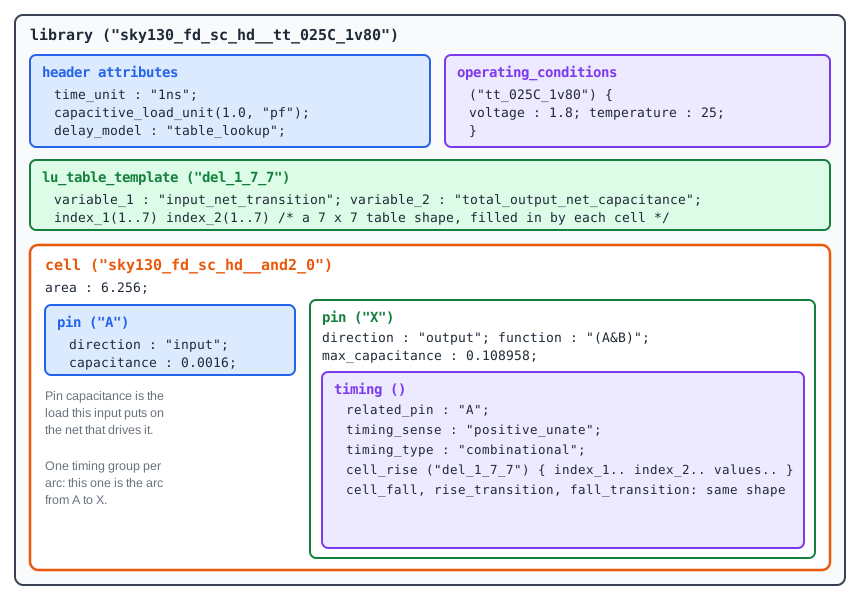
The file is a tree. A library holds cells, a cell holds pins, and an output pin holds timing groups. Each timing group is one arc of the timing graph you met earlier, together with its delay tables.
The Header: Units and Operating Conditions
The first lines of the file set the units for every number below them. In this library:
time_unit : "1ns";
capacitive_load_unit(1.0000000000, "pf");
delay_model : "table_lookup";
So all times are in nanoseconds and all capacitances are in picofarads. The line delay_model : "table_lookup" says that delays are stored in tables. The next article explains them.
The operating_conditions group states the voltage and temperature the numbers were calculated for. For tt_025C_1v80 they are 1.8 V and 25 degrees C.
Pin Capacitance
Every input pin of a cell is a small capacitor. When a net drives several input pins, their capacitances add up, and that sum is the load the driving cell has to charge. A bigger load means a slower driver, so STA needs these values.
Pin capacitance in the library is given for rising and for falling input edges. Output pins normally have no capacitance of their own, because the load of an output is made of the inputs and wires it connects to. In the demo circuit, the output Q of r1 drives the XOR and the AND gate:
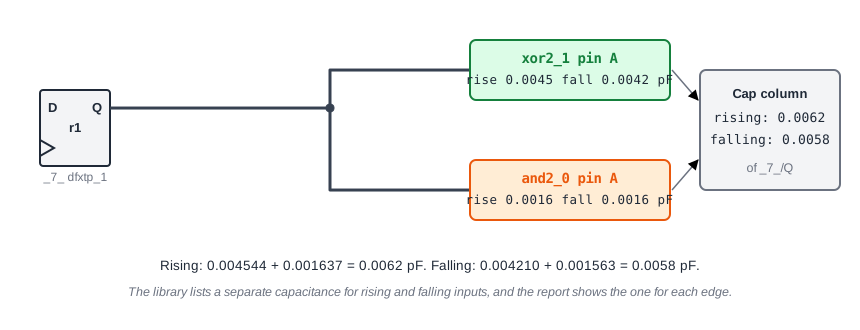
The sums, 0.0062 pF for a rising edge and 0.0058 pF for a falling edge, are exactly what the Cap column of the timing report shows for _7_/Q.
Reading One Cell
For the and2_0 cell the data that matters is short:
- Pin
Aand pinBare inputs with capacitances of about 0.0016 pF. - Pin
Xis the output. Itsfunctionis(A&B). max_capacitanceofXis 0.108958 pF, the largest load the manufacturer allows this output to drive.- One timing group for the arc from
AtoXand one forBtoX.
Common Mistakes
Mistake #1: Ignoring the units of a library
The numbers in a library have no unit written next to them. The header sets it for the whole file. In this library, times are in ns and capacitances in pF. A library in picoseconds would read 1000 times larger.
Mistake #2: Expecting the same numbers from every library
Each library and each corner is a separate file. The same cell has different delays in the typical, slow and fast corners, and different cells in different library families. Always know which library your timing run used.
Quick Check: Why does the Cap column show 0.0062 for the Q pin of r1 on a rising edge?
The Q net drives pin A of the XOR (0.0045 pF on a rising edge) and pin A of the AND gate (0.0016 pF). Together they make 0.0062 pF, which is the load on the flip-flop output.
Practice Exercise
Challenge: Add a Load and Watch the Delay
Use the sta_demo design and constraints from the first chapter, with a 2.0 ns period. The path from a to z goes through one OR gate, with a delay of 0.1674 ns and a worst setup slack of 1.0326 ns. Add this line to constraints.sdc and re-run STA:
set_load 0.02 [get_ports z]
This puts 0.02 pF, about ten times a typical input pin, on the output port z. Predict what happens to the OR gate delay, to the slew at z and to the slack.
Open the ready-made example in the lab, run synthesis, and then run STA. Editing constraints.sdc and re-running only STA, and choosing another library or corner, are PRO features.
Hint
The output of a cell has to charge the load connected to it. Find the Cap column on the row of the OR gate output in the report.
Solution
The Cap column for the OR gate output changes from 0.0000 to 0.0200. The delay of the gate grows from 0.1674 to 0.3153 ns, the slew at z grows from 0.0297 to 0.1725 ns, and the setup slack falls from 1.0326 to 0.8847 ns. A heavier load makes the driving cell slower and its output edge slower, and the library tables describe exactly how much.
Summary
- A standard cell library is the set of cells a design is built from. Cell names encode the function and the drive strength.
- The Liberty file is the data sheet that gives STA the area, function, pin capacitance and timing arcs of each cell.
- The header sets the units (ns and pF here) and the operating conditions of the library.
- The load on a net is the sum of the pin capacitances of its receivers, separate for rising and falling edges.
- Larger drive-strength variants handle bigger loads but cost area.
- Every corner is its own library file with its own numbers.
