
A flip-flop is the one cell that STA treats differently. Its output does not follow its input. It changes only after a clock edge, and its data input has to be stable around that edge. The library therefore describes a flip-flop with a delay arc for the output and with requirements for the input. This article shows where the clock-to-Q delay, the setup time and the hold time come from, using the flip-flop dfxtp_1.
A flip-flop is like a camera, as described in Setup and Hold Checks: the data must stand still just before and just after the clock click. The library stores the exact size of that window, and also how long the camera takes to show the picture after the click.
8 min read | Intermediate
What You'll Learn
- Identify the library data that describes a flip-flop: the clock-to-Q arc and the setup, hold and pulse width checks
- Read a setup constraint table and look up a setup time
- Explain why setup and hold times are not constants and why hold time can be negative
- Predict how the clock slew changes clock-to-Q delay and setup time
What the Library Says About a Flip-Flop
The library describes dfxtp_1, a D flip-flop that captures on the rising edge, with four groups of timing data. All of them are related to the clock pin:
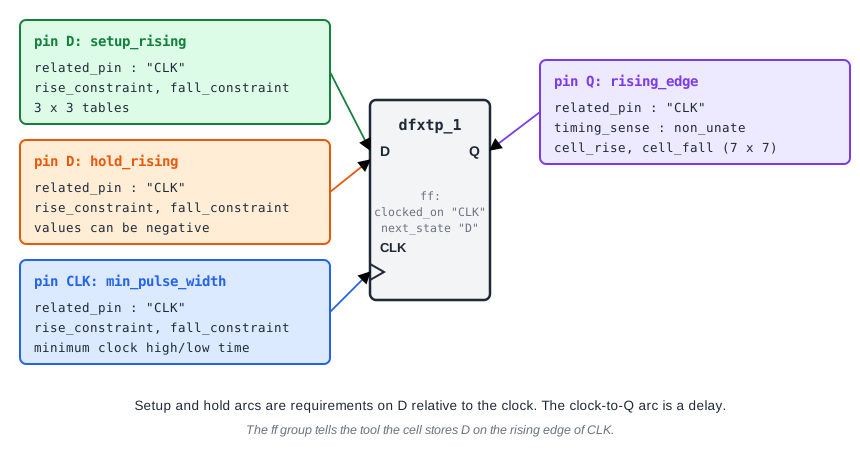
- The
rising_edgearc onQis the clock-to-Q delay. - The
setup_risingarc onDis the setup requirement. - The
hold_risingarc onDis the hold requirement. - The
min_pulse_widtharc onCLKis the shortest time the clock may stay high or low.
A small ff group tells the tool what the cell does: clocked_on : "CLK" and next_state : "D". It stores the value of D on a clock edge. For timing, the arcs matter most.
Clock-to-Q Delay
The clock-to-Q arc is a delay arc, like the arcs of a gate. It has the same four tables, with the slew of the clock as one axis and the load on Q as the other. Its sense is non_unate: the output can rise or fall on the same clock edge, depending on what is stored.
The two edges of the output have different delays, so a path report shows the one that matters. For the flip-flop _7_ the rising output has a delay of 0.3058 ns with a load of 0.0062 pF, and the falling output 0.2874 ns with 0.0058 pF:
             0.0000    0.0000    0.0000 ^ _7_/CLK (sky130_fd_sc_hd__dfxtp_1)
   0.0058    0.0401    0.2874    0.2874 v _7_/Q (sky130_fd_sc_hd__dfxtp_1)
Setup and Hold Tables
Setup and hold requirements are stored as small tables of 3 x 3 entries. They are indexed by two slews: the slew of the clock (related_pin_transition) and the slew of the data (constrained_pin_transition). There is one table for a rising data edge (rise_constraint) and one for a falling data edge (fall_constraint), because the two edges need different times.
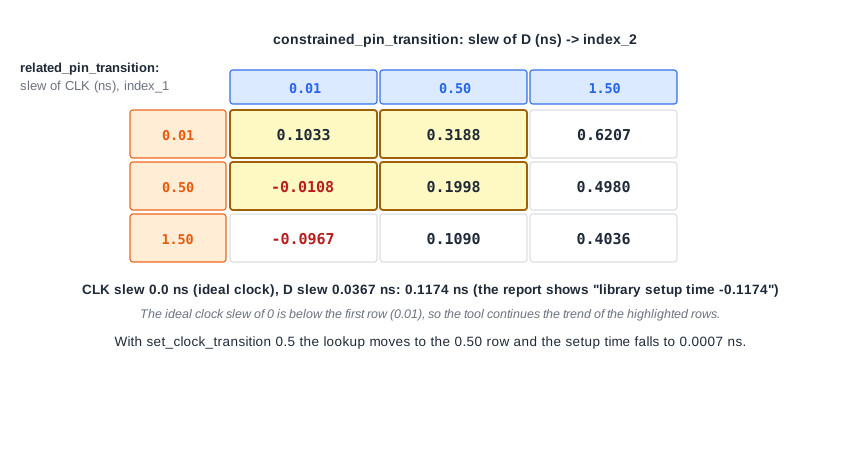
The setup report of the register-to-register path shows the lookup. The clock is ideal, so its slew is 0, which is below the first row of the table. The slew at the data pin D is 0.0367 ns. The tool continues the trend of the first rows and finds 0.1174 ns:
                                 2.0000 ^ _6_/CLK (sky130_fd_sc_hd__dfxtp_1)
                      -0.1174    1.8826   library setup time
The hold table works the same way. Many entries are negative. For the falling data edge at a data slew of 0.0321 ns, the lookup gives -0.0583 ns, which is the hold time in the report. A negative hold time means that the data pin may start to change slightly before the clock edge. The setup time and the hold time of one cell still add up to a positive number, because together they are the width of the window in which D must be steady. Inside the flip-flop, the data takes longer to reach the capturing circuit than the clock does, so the cell still captures the old value correctly.
Setup and Hold Are Not Constants
Because the tables depend on slews, the setup time of the same flip-flop changes with the conditions. A slower clock edge reduces the setup time but also delays the output. That is a real trade-off that STA calculates automatically.
The clock-to-Q delay behaves the opposite way: a slower clock edge makes the output change later. You can see both effects in the lab by giving the ideal clock a slew of 0.5 ns:
| Clock slew | Clock-to-Q delay (ns) | Setup time (ns) | r1 to r2 setup slack (ns) |
|---|---|---|---|
| 0.0 (ideal) | 0.2874 | 0.1174 | 1.4502 |
| 0.5 | 0.4191 | 0.0007 | 1.4353 |
The delay gets worse by 0.1317 ns and the setup time gets better by 0.1167 ns, so the net effect on slack is small, 0.0149 ns. Each number alone would mislead.
Minimum Pulse Width
The clock pin has its own check. The clock must stay high for at least a minimum time and low for at least a minimum time, or the flip-flop may not switch reliably. The library gives these as min_pulse_width tables for the clock pin. STA checks them in a later chapter.
Common Mistakes
Mistake #1: Treating setup and hold times as fixed constants
They come from tables and depend on the clock slew and the data slew, and they differ for rising and falling data. The values in the report belong to the transitions of that one path.
Mistake #2: Thinking a negative hold time is an error
A negative hold time is normal. It only means the hold window ends before the clock edge at the pin. The hold check still applies, and it is simply a little easier to meet.
Quick Check: Why does the library have separate rise_constraint and fall_constraint tables?
A rising and a falling data edge need different times to be captured reliably, so the setup and hold requirements differ for the two edges. For a data slew of 0.01 ns, the setup time is 0.0508 ns for rising data and 0.1033 ns for falling data when the clock slew is 0.01 ns.
Practice Exercise
Challenge: Slow Down the Clock Edge
Run the sta_demo design with a 2.0 ns period and look at the register-to-register path from _7_ to _6_. Note the clock-to-Q delay of _7_/Q and the library setup time at _6_/CLK. Add this line to constraints.sdc and re-run STA:
set_clock_transition 0.5 [get_clocks clk]
The command sets the slew of the ideal clock to 0.5 ns. Predict which of the two numbers rises and which falls, and whether the slack improves or gets worse.
Open the ready-made example in the lab, run synthesis, and then run STA. Editing constraints.sdc and re-running only STA, and choosing another library or corner, are PRO features.
Hint
The slew of the clock is one axis of both the clock-to-Q table and the setup table, so both numbers change. Think about which way each one moves when the clock edge gets slower.
Solution
The clock-to-Q delay rises from 0.2874 to 0.4191 ns, because the output starts to change later. The library setup time falls from 0.1174 to 0.0007 ns, because a slower clock edge lets the flip-flop accept data closer to it. The data arrival time becomes 0.5641 ns and the required time 1.9993 ns, so the slack goes from 1.4502 to 1.4353 ns. It gets slightly worse, because the delay change is bigger than the setup change.
Summary
- The library describes a flip-flop with a clock-to-Q delay arc, setup and hold arcs on
D, and a minimum pulse width onCLK. - Setup and hold are 3 x 3 tables indexed by the clock slew and the data slew, with separate tables for rising and falling data.
- The setup time is a lookup, not a constant: the report shows the value for that path's slews.
- A negative hold time is normal and means the hold window ends before the clock edge.
- A slower clock edge delays the output but reduces the setup time, so the effect on slack is a balance of both.
