
Imagine you design a chip, switch it on, and it does not work. Or it works at a slow clock and fails at full speed. Very often the logic is correct and the problem is timing: a signal arrived a fraction of a nanosecond too late. Static timing analysis is how designers find these problems before the chip is built.
Static timing analysis (STA) is a method of checking that every signal in a digital design arrives where it is needed on time, without running a single test. It answers one question: can this design run safely at the clock speed you want?
STA is the standard timing check for ASIC and FPGA designs. This series starts with the basic ideas, in plain language, and builds up to running STA on real designs in ChipVerify Lab.
8 min read | Beginner to Intermediate
What You'll Learn
- Explain what a timing requirement is and why a correct design can still fail at speed
- Describe what STA checks and why it is called static
- Compare STA with timing simulation and see why simulation alone cannot sign off timing
- Identify the inputs STA needs, the reports it produces, and the problems it cannot catch
Why Timing Matters
A digital chip is a team of flip-flops that pass data to each other, with logic gates in between. A clock tells all the flip-flops when to move: on every clock edge, each flip-flop takes a new value and sends it on.
Think of a relay race. Each runner is a signal and each leg of the track is a piece of logic. The runner has to finish the leg and hand over the baton before the whistle blows, and the whistle is the next clock edge. If the runner is late, the next runner starts without the baton.
Gates and wires are not instant. Every gate takes some time to react, and every wire takes some time to carry the signal. A chip can contain millions of such legs, and each has its own delay. If even one leg is too slow for the clock, the chip captures the wrong value at that point and behaves incorrectly, even though the logic on paper is perfect.
What Is a Timing Requirement?
A timing requirement is a rule about when a signal must arrive. STA checks two main rules, and a third one for the edges of the chip.
- Setup rule: not too late. New data must arrive at a flip-flop and settle before the next clock edge, a little earlier than the edge itself. This is the runner who must hand over the baton before the whistle.
- Hold rule: not too early. After a clock edge, the flip-flop needs the data to stay unchanged for a very short time. If the next data races through the logic and changes the input too soon, the flip-flop can capture the wrong value. This is the next runner who must not grab the baton before the whistle.
- Input and output rule. The chip is connected to the outside world, and the outside logic uses part of the clock period for itself. STA checks that the chip does its part in the time that is left.
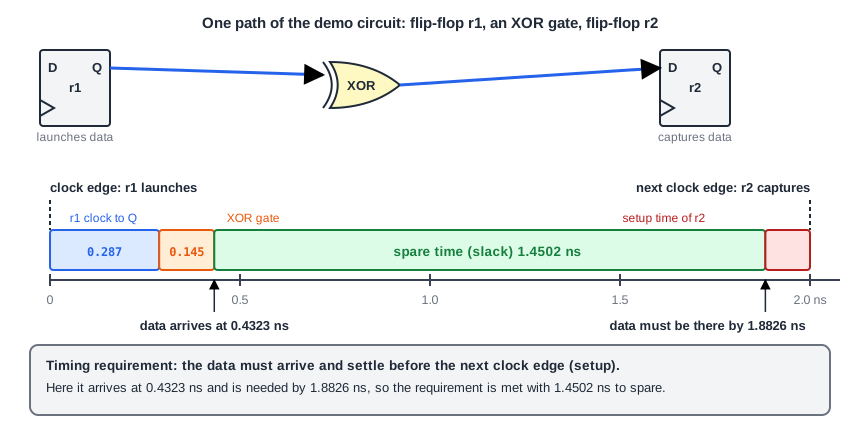
Here is one path of the demo circuit that is used throughout this series. The flip-flop r1 sends data at a clock edge, the data passes one XOR gate, and the flip-flop r2 must capture it at the next edge, 2.0 ns later. The data needs 0.287 ns to leave r1 and 0.145 ns to go through the XOR gate, so it arrives at 0.4323 ns. The flip-flop r2 needs the data settled 0.1174 ns before the edge, so the data must be there by 1.8826 ns.
The data arrives long before it is needed. The spare time is called slack, and here it is 1.4502 ns. Slack is simply the margin: positive slack means the requirement is met, and negative slack means it is violated. If the clock were made so fast that the period fell below about 0.55 ns, this path would run out of slack and fail.
The hold rule is checked in the same way, with the fastest possible data. For the same path, the earliest new data arrives 0.3657 ns after the clock edge. The flip-flop asks for the old data to be held only until -0.0583 ns, which means almost no hold time is needed. The gap between the two is the hold margin, 0.4241 ns. Both rules are met. Setup and hold are explained in detail in Setup and Hold Checks.
The same path is drawn as a timing diagram below. It shows two clock waveforms, because each flip-flop sees the clock on its own. The launch clock is the clock at r1: its edge tells r1 to send the data. The capture clock is the clock at r2: its edge tells r2 to take the data in. They are the same clock signal, drawn once for each flip-flop.
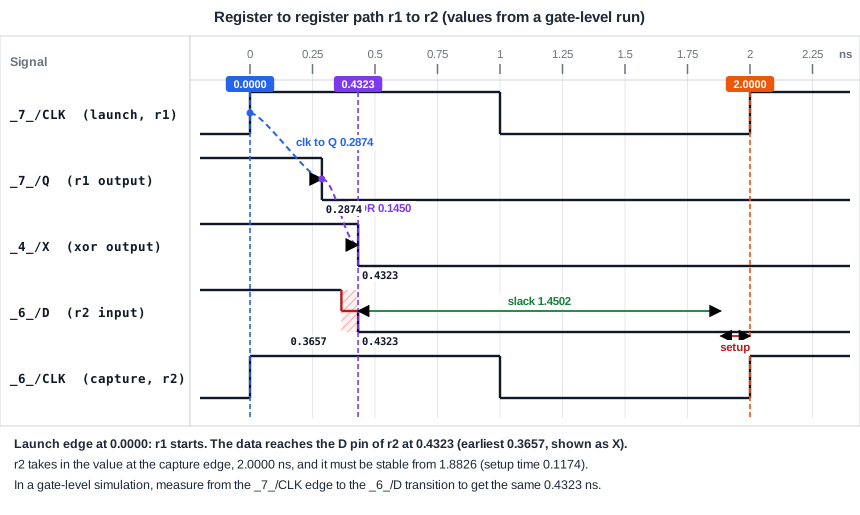
Look at the capture clock. Its first edge, at time 0, is the one at which r2 takes in the old data while r1 is already sending the new data. That is the edge that matters for hold. Its second edge, 2.0 ns later, is the one at which r2 takes in the new data. That is the edge that matters for setup. The data travels from the launch edge towards the second capture edge, and the time that is left over is the slack.
What STA Verifies
STA takes the design, the clock definitions and a description of the outside world, and checks every setup and hold requirement in the design. If all of them have positive slack, the design can run at the rated speed. Getting a design to that point is called timing closure, and it is the main job of the flow you will learn in this series.
The analysis is static because it does not depend on the data values at the inputs. STA never asks what happens when a is 1 and b is 0. It asks how slow, and how fast, a signal can possibly travel between two points of the design. If the slowest case meets setup and the fastest case meets hold, every other case does too.
STA vs. Timing Simulation
Timing simulation is the alternative: simulate the gate-level netlist with delays, apply stimulus, observe the result, advance time, apply more stimulus. It verifies function and timing together, but only along the paths your stimulus actually exercises. It is exactly as thorough as your test vectors.
The numbers are against it. A design with only 50 flip-flops has 2^50 states, over a quadrillion, and a slow path may matter only in one rare state. For a large design, simulating enough vectors to hit every timing condition is slow and still incomplete. STA analyzes the entire design once and performs the required checks on all paths and scenarios, which makes it exhaustive.
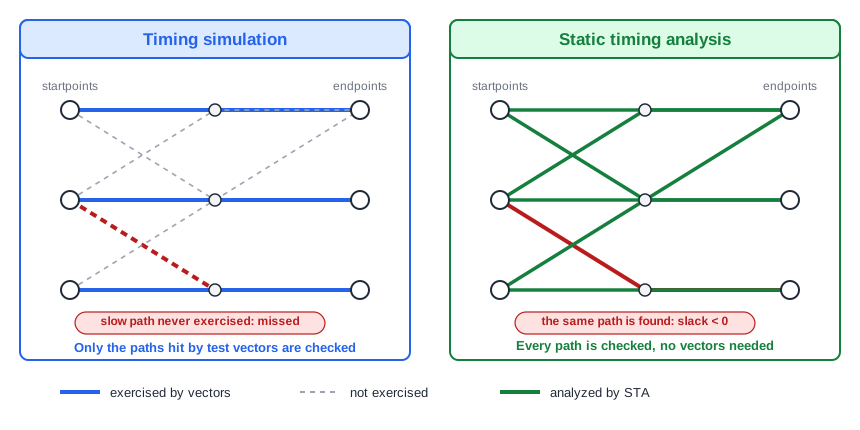
STA also models effects that logic simulation cannot, such as crosstalk noise and on-chip variation. Later chapters cover them.
| Question | STA | Timing simulation |
|---|---|---|
| Needs test vectors? | No | Yes |
| Paths covered | All paths | Only paths the vectors exercise |
| Checks functionality? | No | Yes |
| Speed on a large design | Fast | Slow |
| Handles X values and reset sequences? | No | Yes |
STA Among Other Verification Methods
Timing simulation is only one of several ways to check a design. Each method answers a different question, and a real project uses all of them.
| Method | Question it answers | Covers every case? |
|---|---|---|
| RTL simulation | Does the design behave correctly? (no real delays) | No, only the tests you write |
| Gate-level timing simulation | Does the real netlist behave correctly with real delays? | No, only the tests you write |
| Static timing analysis | Is every path fast enough, and not too fast? | Yes, for timing |
| Formal equivalence checking | Does the netlist do the same thing as the RTL? | Yes, for logic (it ignores timing) |
STA and equivalence checking are the two exhaustive methods, and they do not overlap: one proves the logic is unchanged, the other proves the timing works.
What Goes In and What Comes Out
STA does not read your RTL. It works on the gate-level netlist, after synthesis, because only then do real cells and their delays exist. It needs four inputs:
- The gate-level netlist, typically Verilog from synthesis
- Timing libraries in Liberty (
.lib) format, which hold the delay and setup/hold data of every cell - Timing constraints in SDC format: clock definitions, input and output delays, and exceptions
- Wire parasitics in SPEF format, available once the design has been placed and routed
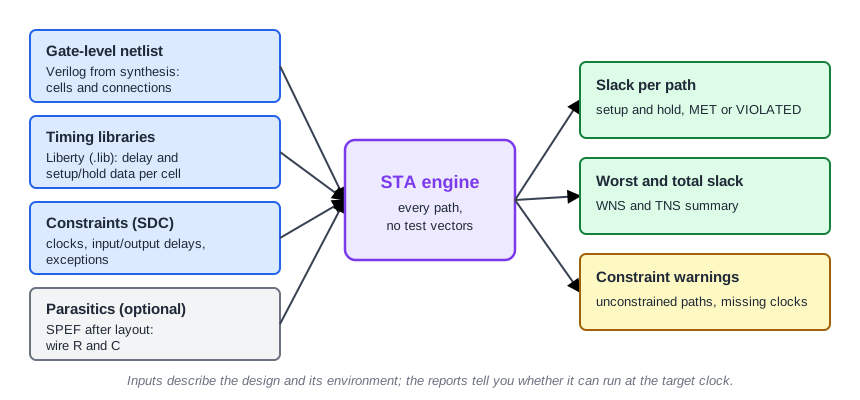
The output is a set of timing reports. For every path checked, the report lists when the data arrives, when it is required, and the difference, called slack. Positive slack means the check is met. Negative slack means a violation.
A First Look at a Real Report
The circuit below is used throughout this series. It has two flip-flops, four inputs and two outputs.
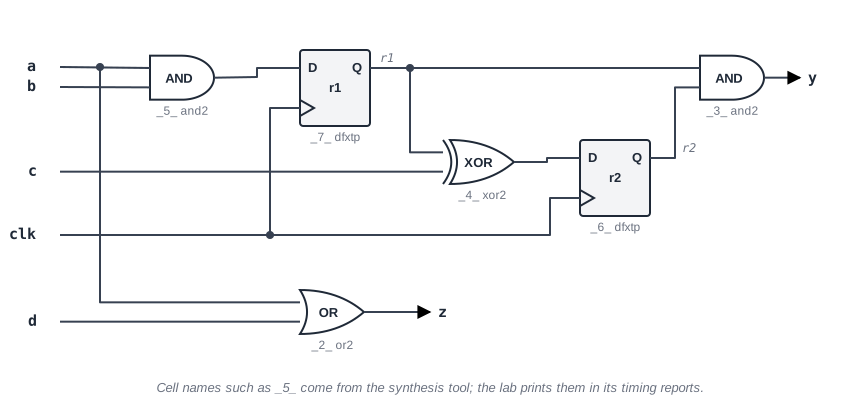
module sta_demo (input clk, input a, b, c, d, output y, z);
  reg r1, r2;
  always @(posedge clk) r1 <= a & b;     // input -> register
  always @(posedge clk) r2 <= r1 ^ c;    // register -> register (c: input -> register)
  assign y = r1 & r2;                    // register -> output
  assign z = a | d;                      // input -> output
endmodule
The constraints describe a 2 ns clock, and external logic that uses 0.4 ns of the period at every input and every output:
create_clock -name clk -period 2.0 [get_ports clk]
set_input_delay  0.4 -clock clk [get_ports {a b c d}]
set_output_delay 0.4 -clock clk [get_ports {y z}]
After synthesizing to the sky130 standard-cell library (typical corner) and running OpenSTA, the setup summary looks like this:
max_delay/setup group clk

                                      Required    Actual
Endpoint                                 Delay     Delay     Slack
------------------------------------------------------------------
z (output)                              1.6000    0.5674    1.0326 (MET)
y (output)                              1.6000    0.3956    1.2044 (MET)
_7_/D (sky130_fd_sc_hd__dfxtp_1)        1.8840    0.5201    1.3639 (MET)
_6_/D (sky130_fd_sc_hd__dfxtp_1)        1.8826    0.5176    1.3650 (MET)
Each row is an endpoint. Actual Delay is when the data arrives, Required Delay is the latest time it may arrive, and the last column is the slack. Names such as _7_ come from the synthesis tool.
Numbers in ChipVerify Lab may differ in the last digits, because synthesis can pick different cells. What matters is how they react when you change the constraints. Running STA in the lab is a PRO feature.
What STA Cannot Check
STA only reasons about delays on the logic values 0 and 1 and their rising and falling transitions. Several verification problems are outside its reach:
- Reset behavior: whether every flip-flop reaches its intended value after reset
- Unknown (X) values, which STA does not model
- Clock domain crossings: STA does not check that the right synchronizers are in place, see Synchronizers and Clock Domain Crossing
- PLL settings and the interface between analog and digital blocks
- Functional behavior that changes across clock cycles
- Clock generation logic: STA trusts that the clock arrives with exactly the waveform you defined
STA can also flag a path as failing although the logic can never actually propagate through it. Such false paths are handled with constraints, covered later in the series. Simulation therefore stays in the flow for function and corner cases, while STA signs off timing.
Common Mistakes
Mistake #1: Treating a clean timing report as proof the design works
STA verifies timing only. A design can meet every setup and hold check and still contain a functional bug, a missing reset or an unsynchronized clock crossing. Keep functional verification in the flow.
Mistake #2: Trusting STA results when the constraints are incomplete
STA checks the design against the constraints you give it. A clock that was never defined, or an input without an input delay, leaves paths unchecked, and unchecked paths do not show up as violations. A clean report from incomplete constraints is not a pass.
Quick Check: Why can STA check all paths without any test vectors?
Because it does not simulate behavior. It computes the slowest and fastest possible delay along every path from the cell and wire delays alone, whatever data values would actually flow through it.
Every ASIC project ends with an STA sign-off run before the design goes to manufacturing, and the same analysis runs repeatedly while the design is implemented.
Practice Exercise
Challenge: Find the Tightest Path in ChipVerify Lab
Paste the sta_demo module and the three SDC lines above into the lab, synthesize it, and run STA. Note the worst setup slack and which endpoint it belongs to. Then change the clock period in constraints.sdc from 2.0 to 1.0, re-run STA, and compare. Predict first: by how much should every setup slack change?
Open the ready-made example in the lab, run synthesis, and then run STA. Editing constraints.sdc and re-running only STA, and choosing another library or corner, are PRO features.
Hint
The required time of every setup check is built from the clock period, while the arrival times depend only on the delays and the input delay. Which side of the slack equation moves when you edit the period?
Solution
The worst setup slack at 2.0 ns is on the output z (about 1.03 ns), the path from input a straight to output z. At 1.0 ns every required time drops by exactly 1.0 ns while the arrival times stay the same, so every setup slack drops by 1.0 ns and the worst slack becomes about 0.03 ns. The input-to-output path is the tightest because it spends both the 0.4 ns input delay and the 0.4 ns output delay out of the same period. The shift of 1.0 ns holds even if the lab's netlist differs slightly.
Summary
- STA verifies that a design meets its timing requirements by analyzing every path, independent of input data values.
- Timing simulation only checks the paths its stimulus exercises, so it cannot sign off timing on a large design.
- STA works on a gate-level netlist with timing libraries and SDC constraints, and optionally layout parasitics.
- Its output is slack per path: positive means met, negative means violated.
- STA does not check function, reset, X values, clock domain crossings or the clock generator, so it complements simulation.
- STA only checks what the constraints describe, so complete constraints matter as much as the design.
