
A process design kit, or PDK, is everything a foundry gives designers so they can build chips in its process: the rules, the device models, the technology files for every tool, and libraries of ready-made cells. Physical design tools cannot do anything without it. This article explains what a PDK contains, using the open-source SkyWater sky130 PDK that ChipVerify Lab is built on, and which part each step of the flow uses.
7 min read | Beginner
What You'll Learn
- List the main parts of a PDK
- Explain the different views of a standard cell and which tool uses each
- Read the name of a sky130 Liberty file and know which corner it describes
- Know which parts of the sky130 PDK the lab's flow uses
The Parts of a PDK
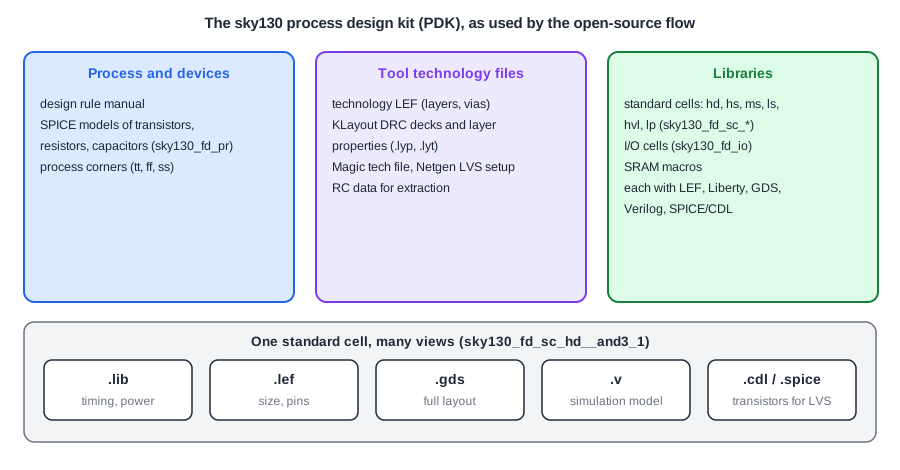
Process and Device Data
The design rule manual describes every layer of the process and every rule for drawing it: minimum widths, spacings, enclosures, densities. The device models describe how transistors, resistors and capacitors behave electrically, for circuit simulation with SPICE. In sky130 the primitive devices are in the sky130_fd_pr library. Models come in corners: typical (tt), fast (ff) and slow (ss) silicon, which bound how much the process varies between wafers.
Technology Files for the Tools
Each tool needs the process described in its own format:
- Technology LEF for place and route: routing layers, pitches, vias, placement sites. See Technology LEF.
- DRC rule decks for KLayout and Magic, which check a layout against the design rules.
- LVS setup for Netgen, which compares the layout with the netlist.
- Layer maps and display properties (KLayout
.lypand.lytfiles), which map layer names to GDSII layer numbers and colours. - Extraction data: the resistance and capacitance of each layer, for parasitic extraction.
Libraries
sky130 has several standard cell libraries that trade speed, area and power:
| Library | Cell height | Use |
|---|---|---|
| sky130_fd_sc_hd | 2.72 um | high density, the default |
| sky130_fd_sc_hs | 3.33 um | high speed |
| sky130_fd_sc_ms | 3.33 um | medium speed |
| sky130_fd_sc_ls | 3.33 um | low speed, low leakage |
| sky130_fd_sc_hvl | 4.07 um | high voltage (3.3 V and up) |
There are also I/O cells (sky130_fd_io) for the pad ring and SRAM macros generated with OpenRAM. ChipVerify Lab offers the hd, hs, ms, ls and hvl libraries in its synthesis and PnR panels.
Quick Check
Q: Why does sky130 offer both a 2.72 um and a 3.33 um library?
Show Answer
Taller cells have room for wider transistors, so they are faster, but each cell takes more area. The high-density library packs more logic into the same area; the high-speed library is used where timing is tight.
One Cell, Many Views
Every standard cell is delivered in several views, each for a different tool:
- Liberty (.lib): timing, power and pin capacitance, for synthesis, place and route and STA.
- LEF (.lef): the outline and the pin shapes, for place and route.
- GDSII (.gds): the complete layout with every transistor, merged into the chip at the end.
- Verilog (.v): a functional model, for simulation.
- SPICE or CDL: the transistor netlist, for circuit simulation and LVS.
All views must describe the same cell. If the LEF says a cell is 2.30 um wide and the GDS is 2.76 um, the placed layout will have overlaps that only DRC finds.
Corners in File Names
Liberty files are characterized at one process, voltage and temperature (PVT) point each, and the file name says which: sky130_fd_sc_hd__tt_025C_1v80.lib is typical process, 25 C and 1.80 V. The lab uses three corners:
| Lab corner | Liberty file | Conditions |
|---|---|---|
| typical | tt_025C_1v80 | typical silicon, 25 C, 1.80 V |
| fast | ff_n40C_1v95 | fast silicon, -40 C, 1.95 V |
| slow | ss_100C_1v60 | slow silicon, 100 C, 1.60 V |
The full sky130 PDK has many more, for example ss_n40C_1v28 or ff_100C_1v65. The PVT Corners article of the STA tutorial explains how corners are used for sign-off.
Quick Check
Q: What conditions does sky130_fd_sc_hd__ss_n40C_1v60.lib describe?
Show Answer
Slow process (ss), -40 C ("n40C", n for negative) and a 1.60 V supply, for the high-density library.
Running It in ChipVerify Lab
Run synthesis on the counter twice, once with the typical corner and once with the slow corner, and compare the delays in the timing report. Then run Place and Route on each: the library and corner of the synthesis run carry over to place and route.
Common Mistakes
Mistake #1: Using views from different PDK versions
A LEF from one release and a GDS or Liberty from another can disagree in size, pins or timing. Take all views of a library from the same release.
Mistake #2: Signing off at a single corner
Timing at the typical corner says little about the slow corner. Setup is usually worst at slow silicon and low voltage, hold at fast silicon.
Practice Exercise
Challenge: Slow Corner
Synthesize the counter with the slow corner, then run Place and Route at 5 ns. Before running, predict whether the slack is larger or smaller than the +3.65 ns of the typical corner.
Hint
Slow silicon at high temperature and low voltage makes every cell slower.
Solution
The slack drops from +3.65 ns to +2.20 ns, because every gate on the carry chain and the flip-flop are slower at the slow corner. The layout hardly changes: the cells are the same size in every corner. The design area grows slightly, from 298 to 302 um2, because the clock tree picks a stronger buffer for the slower cells.
Open the ready-made example in the lab, synthesize it and run Place and Route.
Summary
- A PDK holds process rules, device models, technology files for every tool, and cell libraries.
- Each cell comes in several views: Liberty, LEF, GDSII, Verilog and SPICE/CDL, all describing the same cell.
- sky130 has hd, hs, ms, ls and hvl standard cell libraries with different heights and speeds.
- Liberty file names encode the corner: process, temperature and voltage.
