
Routing turns every logical connection in the netlist into metal wires and vias that obey the foundry's rules. After placement and CTS, the 16x16 multiplier has about 1,300 nets to connect, each between a driver pin and one or more load pins sitting on li1 inside the standard cells. This article explains how a router sees the chip: a stack of layers, each with tracks in one preferred direction, connected by vias, and why routing is split into a global and a detailed step. It then reads the routing result of the lab's flow for the multiplier.
7 min read | Intermediate
What You'll Learn
- Explain how routing layers, tracks and preferred directions work together
- Describe what vias cost and why their count matters
- Explain the split between global and detailed routing
- Read the routing summary of an OpenROAD run
Layers, Tracks and Preferred Direction
The Metal Stack introduced the sky130 layers. For routing, each layer is a set of parallel tracks, the centre lines on which wires may run. The global router prints the track pitch it uses for each layer:
[INFO GRT-0088] Layer li1     Track-Pitch = 0.4600  line-2-Via Pitch: 0.3400
[INFO GRT-0088] Layer met1    Track-Pitch = 0.3400  line-2-Via Pitch: 0.3400
[INFO GRT-0088] Layer met2    Track-Pitch = 0.4600  line-2-Via Pitch: 0.3500
[INFO GRT-0088] Layer met3    Track-Pitch = 0.6800  line-2-Via Pitch: 0.6150
[INFO GRT-0088] Layer met4    Track-Pitch = 0.9200  line-2-Via Pitch: 1.0400
[INFO GRT-0088] Layer met5    Track-Pitch = 3.4000  line-2-Via Pitch: 3.1100
Each layer has a preferred direction: met1, met3 and met5 horizontal, met2 and met4 vertical. Alternating directions mean a net can go anywhere with an L or Z shape by changing layer at each turn, and wires on neighbouring layers cross at right angles, which keeps the coupling between them small. A wire in the other direction, a wrong-way wire, blocks every track it crosses, so routers use it only for short jogs.
The lab's flow routes signals on met1 to met5. li1 is used only inside the cells, for pins and the cells' own connections.
Vias
A via is a cut between two layers with a landing pad on each. Every change of layer needs one, and every connection to a cell pin starts with a via from li1 up to met1 (in sky130 called mcon). Vias are not free:
- Each via has resistance, several ohms for a single cut in sky130, far more than a short wire.
- The landing pads block nearby tracks on both layers.
- Vias are a common cause of manufacturing defects, so fewer and redundant (double-cut) vias improve yield.
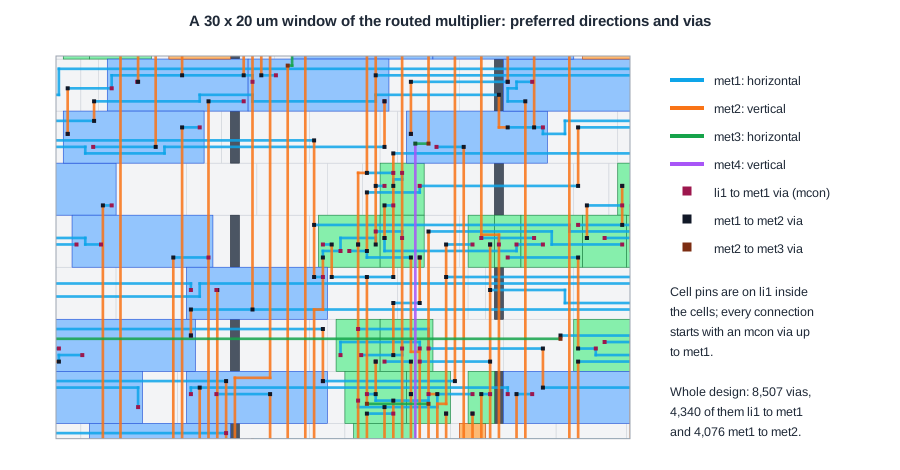
The picture zooms into a 30 x 20 um area of the routed multiplier. The horizontal met1 and vertical met2 wires are clearly separated by direction, and every wire ends in a via, either down to a cell pin or up to the next layer. One met3 wire crosses horizontally and one met4 wire vertically, the only upper-layer wires in this window.
Quick Check
Q: A net must go 20 um to the right and 15 um up. With met1 horizontal and met2 vertical, how many vias does the simplest route need, counting the pin connections?
Show Answer
Four: an mcon from the driver pin's li1 up to met1, a via from met1 to met2 at the corner of the L, then a via from met2 down to met1 and an mcon down to li1 at the load pin. An L-shaped route on two layers needs one layer change at the corner, plus the pin connections at both ends.
Global and Detailed Routing
Routing 1,300 nets directly on hundreds of thousands of track segments is too hard to do in one step, so routers split it:
- Global routing (
global_route) covers the die with a coarse grid of GCells, 6.9 x 6.9 um here, 25 x 25 of them. It decides which GCells and layers each net passes through, while keeping the number of wires through each GCell edge below its track capacity. The result is a set of route guides, not wires. Global Routing and Congestion covers this step. - Detailed routing (
detailed_route) works inside the guides and assigns every wire to exact tracks, adds the vias, and fixes every design rule violation: spacing, minimum width and area, via enclosure. Detailed Routing and DRC-Clean Routes covers this step.
Between the two, the lab's flow runs repair_antennas, which is described in The Antenna Effect and Diode Insertion.
Routing Resources
The global router starts by counting the track capacity of each layer over the whole grid:
Routing resources analysis:
          Routing      Original      Derated      Resource
Layer     Direction    Resources     Resources    Reduction (%)
---------------------------------------------------------------
li1        Vertical            0             0          0.00%
met1       Horizontal       9313          9313          0.00%
met2       Vertical         8132          8132          0.00%
met3       Horizontal       5867          5867          0.00%
met4       Vertical         4078          4078          0.00%
met5       Horizontal       1013          1013          0.00%
The resources fall from met1 to met5 because the pitch grows: met5's 3.4 um pitch gives one tenth of met1's tracks. The derated column would show capacity removed for blockages and for an adjustment factor; here none was set. li1 has no resources, because the flow does not route signals on it.
The Routing Result
The detailed router reports the final wire length per layer and the vias by type:
Total wire length = 28270 um.
Total wire length on LAYER li1 = 0 um.
Total wire length on LAYER met1 = 13182 um.
Total wire length on LAYER met2 = 14311 um.
Total wire length on LAYER met3 = 665 um.
Total wire length on LAYER met4 = 110 um.
Total wire length on LAYER met5 = 0 um.
Total number of vias = 8507.
Up-via summary (total 8507):
-----------------------
 FR_MASTERSLICE       0
            li1    4340
           met1    4076
           met2      87
           met3       4
           met4       0
-----------------------
               8507
- 97 % of the wire is on met1 and met2. For a block this small, the short nets fit on the lower layers, and the extra vias needed to reach met3 and above are not worth it.
- The 4,340 li1-to-met1 vias are the pin connections, about 3.3 per net.
- The 4,076 met1-to-met2 vias are the corners of L-shaped routes, almost one per pin connection.
The detailed router needed four passes. The first pass routed everything and left 427 violations, mostly shorts and spacing errors on met1 where the routes crowded around the pins. Each further pass ripped up and rerouted the wires around the violations: 427, then 306, then 191, then 0.
Quick Check
Q: The final wire length went from 28,602 um after the first detailed routing pass to 28,270 um at the end. Why did fixing violations make the wires shorter rather than longer?
Show Answer
The first pass routes quickly and allows violations, including detours. The later passes reroute the wires around the problem areas with better solutions, and some of the detours disappear. Fixing a violation does not always mean adding wire.
Running It in ChipVerify Lab
Run Place and Route on the multiplier, open the layout and zoom into a small area. Turn layers on and off to confirm the preferred directions, and find vias at the ends of wires. In the log, find the routing resources table, the per-layer wire lengths and the up-via summary. The lab's resources table has a fifth column filled in: the flow keeps about half of every layer's tracks in reserve for the detailed router, so the derated resources are about half the original ones, as explained in Global Routing and Congestion.
Common Mistakes
Mistake #1: Expecting upper layers to be used for every net
Upper layers have lower resistance but fewer tracks and cost two vias for every layer climbed. Routers send only long or congested nets there; the multiplier used met3 and met4 for 2.7 % of its wire.
Mistake #2: Ignoring via count
Vias add resistance and are a yield risk. 8,507 vias for 28 mm of wire is about one via every 3.3 um, a significant part of each net's delay on short nets.
Mistake #3: Treating global routing as the final answer
Global routing only plans which regions nets pass through. Timing and wire length are only final after detailed routing.
Practice Exercise
Challenge: Tracks per GCell
A GCell is 6.9 um wide and tall. How many met1 tracks (0.34 um pitch) and met2 tracks (0.46 um pitch) cross one GCell? How many met5 tracks (3.4 um pitch)?
Hint
Divide the GCell size by the pitch and round down.
Solution
6.9 / 0.34 = 20 met1 tracks, 6.9 / 0.46 = 15 met2 tracks, 6.9 / 3.4 = 2 met5 tracks. Each GCell edge can carry at most that many wires per layer, which is the capacity the global router works with.
Open the ready-made example in the lab, synthesize it and run Place and Route.
Summary
- Each routing layer has tracks in one preferred direction; directions alternate up the stack.
- Vias connect layers; every pin connection starts with an li1-to-met1 via.
- Global routing plans routes over a GCell grid, detailed routing places exact wires and fixes design rules.
- The multiplier routed with 28.3 mm of wire, 97 % on met1 and met2, and 8,507 vias.
- The detailed router converged from 427 violations to zero in four passes.
