
Debugging congestion means finding out why a design does not route, or routes only after hours of repair passes, and fixing the cause instead of the symptom. The usual first reaction, a bigger die, often works but wastes area. This article shows how to read the warning signs in the global and detailed routing logs, why the global router's verdict depends on how much capacity it keeps in reserve, and which fixes target which cause, using a 16x16 multiplier that was made hard to route on purpose and then fixed in two different ways.
8 min read | Intermediate
What You'll Learn
- Recognize congestion in the global and detailed routing logs
- Explain how the global router's capacity reserve shapes its verdict
- Locate congestion with maps of track usage and cell density
- Fix congestion at the placement stage with density and routability-driven placement
The Warning Signs
Congestion shows up in several places of a run log, earlier than most people look:
- Overflow in the global routing report. Any non-zero value in the overflow columns of the final congestion report, described in Global Routing and Congestion, means some GCell edges need more tracks than the router allows.
- Extra global routing iterations.
GRT-0101followed by manyGRT-0102lines means the first global route had overflow and the router had to rip up and reroute. Two or three iterations are normal in a dense design; dozens are not. - Global wire length. The
GRT-0018total grows when nets detour around full regions. - Detailed routing passes. The violation count after the first pass, and above all whether it keeps falling, as shown in Detailed Routing.
The Global Router's Capacity Reserve
The global router works on coarse GCells. It counts the tracks crossing each GCell edge but does not see pin access inside the cells or the spacing rules between neighbouring wires, which the detailed router must still satisfy. To leave room for those, flows tell the global router to use only part of each layer's tracks:
set_global_routing_layer_adjustment met1-met5 0.5
An adjustment of 0.5 removes half of the capacity from the global router's model. The global routing log shows it in the routing resources table (GRT-0053), as derated resources about half the original ones; GRT-0022 Global adjustment reports only an adjustment set for all layers at once, and stays at 0 % when the reserve is set per layer range. OpenROAD-flow-scripts uses 0.5 by default for sky130, and so does the lab's flow, which retries once with 0.3 when global routing fails at 0.5 and lets PRO users set the value.
The reserve decides what the overflow report means. With no reserve, zero overflow says only that the wires fit into the raw track count. With a reserve, zero overflow means they fit with room left for the detailed router.
A Design Made Hard to Route
The multiplier from the routing articles was placed in a 137 um die at 75 % core utilization, and its signals were restricted to met1 and met2. On a real chip the upper layers are often taken by the power grid and by long top-level routes, so a block may have only a few layers for its own signals. The cells were placed with global_placement -density 0.95, far more tightly than the core required. The same die with all five layers routed clean in 10 passes.
| met1 and met2 only, density 0.95 | No reserve (adjustment 0) | Reserve 0.5 |
|---|---|---|
| Global routing iterations to remove overflow | 24 | 148, then stopped |
| Final global routing overflow | 0 | 944 edges, met1 at 102 %, met2 at 108 % |
| Result | Detailed routing: 2,088 violations after 60 passes, stopped after 12 h | GRT-0116 Global routing finished with congestion, the run stops |
Without a reserve, the global router worked hard, 24 rip-up iterations and 9 % more wire than with all layers, and then reported zero overflow. The detailed router spent 12 hours without converging. With the 0.5 reserve, the global router gave the right answer within minutes: this placement does not fit.
Quick Check
Q: Without a reserve, the global router reported zero overflow after 24 extra iterations. What should that have told you?
Show Answer
That the global route fits only into the raw track count, with almost no spare capacity, and that it took a lot of rerouting to get there. The detailed router needs spare tracks for pin access and spacing, so a global route with no reserve and many iterations is a warning, not a pass.
Locating the Problem
Before changing anything, find out where the congestion is and what is there. Two maps answer most questions:
- Track usage per GCell from the routed or global-routed wires, as in the heat map of Global Routing and Congestion. OpenROAD writes the overflowing GCells with
global_route -congestion_report_file, and its GUI shows them as a heat map. - Cell density per GCell from the placement. Congestion follows the cells and their pins, so a hot spot in the routing usually sits on a dense patch of cells.
The placement explains the failure. The left map is the placement above; the other two are the fixes described next:
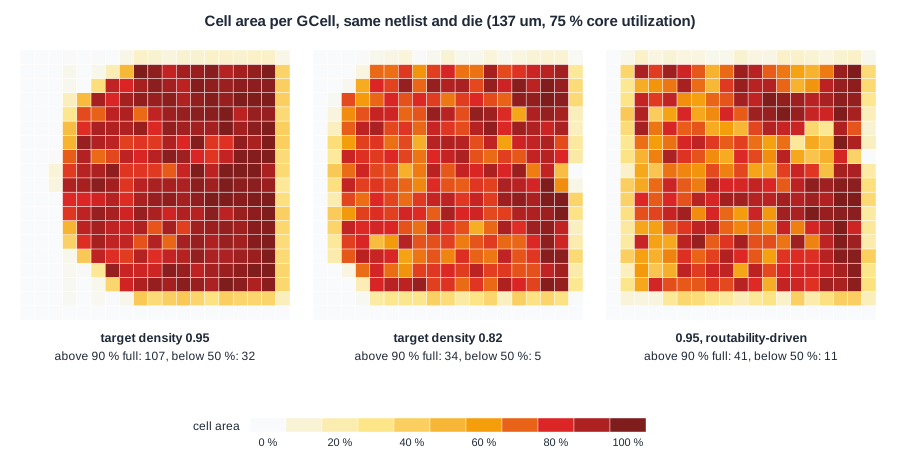
The target density is the share of each region the placer may fill with cells. At 0.95 in a core that is only about 78 % full, the placer packed the cells as tightly as allowed: 107 of the 225 GCells away from the core edge are more than 90 % covered, while a strip along one side stays nearly empty. Every net between the tightly packed cells competes for the same few tracks, and the empty strip offers capacity no net needs.
Fix 1: Lower the Target Density
The same two-layer run was repeated with global_placement -density 0.82, a little above the 0.79 that the placer reports as its minimum feasible density for this core.
- Placement: the cells spread over almost the whole core. Wire length after legalization fell from 24,457 to 20,050 um, because at 0.95 the legalizer had to push many cells out of the overfilled region.
- Without a reserve: 3 global routing iterations, then 43 detailed routing passes and 2 h 43 min to a clean route, with 26,386 um of wire and a worst setup slack of +0.56 ns.
- With the 0.5 reserve: the global router still stopped, with overflow on 224 edges (met1 at 85 % and met2 at 89 % of the reduced capacity).
That last result is the other side of the reserve. This placement does route clean, as the run without a reserve shows, but a 0.5 reserve on only two layers leaves the global router too little capacity to accept it. A reserve that is too small lets unroutable placements through; one that is too large rejects routable ones. The default is a starting point, and teams tune it per technology and per block.
Fix 2: Routability-Driven Placement
OpenROAD's placer can estimate congestion while it places and react to it:
set_routing_layers -signal met1-met2
global_placement -density 0.95 -routability_driven
During placement it measures the routing congestion, inflates the cells in congested regions so they take more room, and repeats from a saved snapshot. The log shows it working:
[INFO GPL-0040] Routability iteration: 1
[INFO GPL-0047] Routability iteration weighted routing congestion: 1.2476
[INFO GPL-0087] Routability end iteration: increase inflation and revert back to snapshot.
...
[INFO GPL-0047] Routability iteration weighted routing congestion: 1.1639
With the same target density of 0.95, the result was the best of all the runs: no extra global routing iterations, a clean detailed route in 13 passes and 17 minutes, 27,148 um of wire and a worst setup slack of +0.51 ns. The right-hand map shows why: the cells are spread where the routing needs room and stay dense elsewhere.
The order of the commands matters. The placer can only see the routing resources it knows about when it runs. In a first attempt the layer limit was set after placement, just before global routing, and routability-driven placement made no difference at all: the placer estimated congestion with all five layers, found none, and produced exactly the same placement. Any constraint that should shape a step must be in place before that step runs.
Quick Check
Q: Routability-driven placement was given the same target density as the failing run. How could it produce a routable placement?
Show Answer
The target density sets the limit; routability-driven placement decides where to stay below it. By inflating cells in the regions it estimates as congested, it spreads those regions out and leaves the uncongested ones dense, so the routing demand follows the available tracks instead of piling up in one area.
Causes and Fixes
| Cause | What you see | Typical fixes |
|---|---|---|
| Cells packed too tightly | Dense patches next to empty areas | Lower placement density, routability-driven placement, cell padding (set_placement_padding) |
| High pin density | Hot spots on clusters of complex cells | Cell padding for those cells, logic restructuring, smaller fan-in cells |
| Too few routing resources | Many global iterations everywhere | More routing layers, narrower or sparser power straps, a larger die |
| Macros and blockages | Hot spots in channels and at macro corners | Wider channels, halos, macro moves, pin positions |
| Global route judged without a reserve | Clean global route, stalled detailed route | Set a layer adjustment so the global router's verdict means something |
Fix in the order of the flow. A placement problem cannot be solved by the router, and a floorplan problem cannot be solved by the placer.
Running It in ChipVerify Lab
Run Place and Route on the multiplier at 70 % utilization and open the congestion map of the report, which shows the usage of every GCell. Then read the log: the routing resources table with the reserve, the extra global routing iterations, the final congestion report and the detailed routing violation counts pass by pass. At 70 % the multiplier needed five detailed routing passes: 420, 201, 167, 12 and then 0 violations.
The lab's flow already applies the lessons of this article: it places with a density 0.10 above the real core utilization, uses the 0.5 reserve with a retry at 0.3, and offers routability-driven placement and the reserve as PRO options. On the multiplier at 70 %, the whole run took 4 minutes. With the reserve set to 0 it took 7.7 minutes for the same result, and routability-driven placement found the congestion below its target (0.86 against 1.01) and changed nothing. The runs in this article used a fixed die, two routing layers and an overpacked placement, and took far longer.
Common Mistakes
Mistake #1: Judging a global route without knowing its reserve
Zero overflow with no capacity reserved says little. Check the reserve in the routing resources table, the iteration count and the detailed routing trend before calling a design routable.
Mistake #2: Setting the placement density close to 1
A high target density packs cells into a smaller region than the core offers. Unless the design is meant to be tight, keep it a little above the utilization, or let routability-driven placement decide where to spread.
Mistake #3: Setting constraints after the step that needs them
Routing layer limits, clocks and blockages must exist before placement for the placer to take them into account. Set too late, they have no effect on the steps that already ran.
Practice Exercise
Challenge: How Much of the Core Stays Empty?
The placer reported a utilization of 78.4 % of the free core area and placed with a target density of 0.95. If every region the cells occupy is filled to the target density, what share of the free core area holds no cells? What happens to that share at density 0.82?
Hint
The occupied area is the cell area divided by the target density.
Solution
Occupied share = 0.784 / 0.95 = 82.5 %, so about 17.5 % of the free core is left empty while the rest is packed at 95 %. At 0.82 the occupied share is 0.784 / 0.82 = 95.6 %, so only about 4 % stays empty and the cells spread over almost the whole core. That matches the maps: a nearly empty strip at 0.95, an even spread at 0.82.
Open the ready-made example in the lab, synthesize it and run Place and Route.
Summary
- Congestion first shows as extra global routing iterations and longer global wire length, then as a detailed route that stops converging.
- The global router's capacity reserve shapes its verdict: with none, an unroutable placement passed; with 0.5 on two layers, even a routable one was rejected.
- Maps of cell density locate placement problems; here the cells were packed at 0.95 density in a 78 % full core.
- Lowering the density to 0.82 made the design route in 2 h 43 min; routability-driven placement at 0.95 routed it in 17 minutes.
- Constraints only shape the steps that run after them, and fixes work best at the stage where the problem was created.
