
Design rule checking (DRC) verifies that every shape in the final GDSII obeys the foundry's manufacturing rules: minimum widths, spacings, enclosures, areas and hundreds more. The router already checks a subset of these while it routes, but sign-off DRC runs the full rule deck on the real polygons, including the inside of every cell. This article runs the sky130 rule deck in KLayout on the routed 16x16 multiplier, reads its report, plants three violations to see how they are reported, and shows an error that DRC cannot see at all.
7 min read | Intermediate
What You'll Learn
- Explain how sign-off DRC differs from the router's checks
- Run the sky130 KLayout rule deck on a GDSII file
- Read rule names and violation markers in the DRC report
- Recognize the kinds of errors DRC cannot find
Router Checks and Sign-Off DRC
The detailed router reads a simplified set of rules from the technology LEF and keeps its own wires legal, as described in Detailed Routing. Sign-off DRC is different in three ways:
- It works on the GDSII, the file that goes to the foundry, after the cells' full layouts have been merged in. It sees every layer: wells, diffusion, poly, implants, contacts and all metals.
- It uses the foundry's rule deck, the executable form of the design rule manual, with far more rules than the LEF can express.
- It is independent of the tool that made the layout. A bug in the router, a hand edit or a bad cell layout shows up here.
Running the sky130 Deck in KLayout
The lab's flow streams the routed DEF to GDSII (see GDSII Out and Tapeout) and then runs the sky130 deck in batch mode:
klayout -b -rd input=layout.gds -rd top_cell=mult16 -rd report=drc_report.lyrdb \
        -rd feol=true -rd beol=true -rd offgrid=true -r sky130A.drc
- feol enables the front-end rules: wells, diffusion, poly, implants and contacts, the layers inside the cells.
- beol enables the back-end rules: li1, the metals and the vias between them.
- offgrid checks that every vertex sits on the manufacturing grid of 5 nm.
On the routed multiplier at a 10 ns clock the run took 16 seconds and wrote a report with about 200 rule categories and no violations:
Writing report database: /w/output/drc_report.lyrdb ..
Total elapsed: 16.050s  Memory: 483.00M
A clean result here means the whole layout, the router's wires and the cells' internal shapes, passed every rule in this deck.
Reading Rule Names and Markers
To see what violations look like, three met1 shapes were added to the GDSII in the empty margin outside the core, and DRC was run again. It reported exactly three violations, one per shape:
| Rule | Description in the report | Planted shape |
|---|---|---|
| m1.1 | min. m1 width : 0.14um | a wire 0.10 um wide |
| m1.2 | min. m1 spacing : 0.14um | two wires 0.10 um apart |
| m1.6 | min. m1 area : 0.083um² | a 0.2 x 0.2 um square, 0.04 um² |
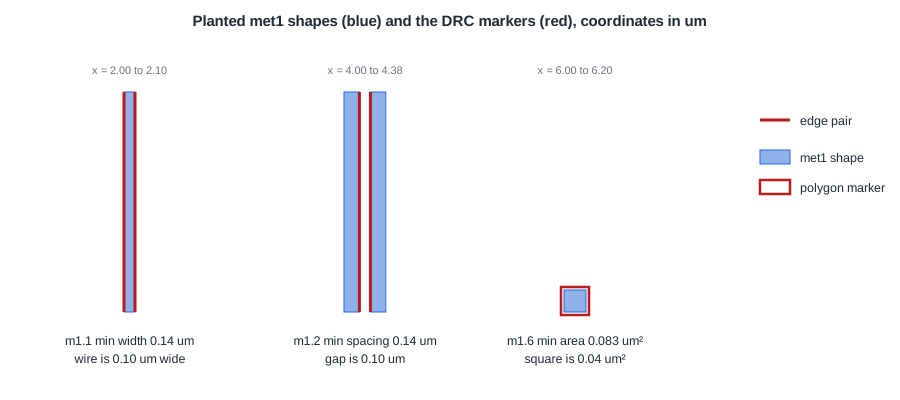
Rule names follow the sky130 rule manual: the layer, then a number. The report stores each violation as a marker with its geometry:
'm1.1' edge-pair: (2,40;2,42)|(2.1,42;2.1,40)
'm1.2' edge-pair: (4.24,40;4.24,42)/(4.14,42;4.14,40)
'm1.6' polygon: (6,40;6,40.2;6.2,40.2;6.2,40)
- A width violation is an edge pair on the same shape: the two edges that are too close, here the left and right edges of the 0.10 um wire.
- A spacing violation is an edge pair on two shapes: the facing edges of the two wires, 0.10 um apart.
- An area violation marks the whole polygon.
The .lyrdb file opens in KLayout's marker browser on top of the layout, which zooms to each marker. On a real design the first step is to sort the markers by rule: hundreds of violations of one rule usually have one cause.
Quick Check
Q: The router reported zero violations for this design. Why run a separate DRC on the GDSII at all?
Show Answer
The router only checks the rules it reads from the technology LEF, only on the layers it routes, and only on its own wires. Sign-off DRC uses the foundry's full deck on every layer of the final GDSII, including the cell layouts merged in at stream-out and anything added or edited after routing.
What DRC Cannot See
DRC checks geometry, not connectivity. As a test, a met1 strap 0.3 um wide was drawn from a VSS rail to the neighbouring VDD rail at the edge of the core. The power and ground networks of the whole design were now one net. DRC on that layout ran in 18 seconds, and its report contained no violations.
The strap is a perfectly legal piece of met1, wide enough and far enough from its neighbours, so every rule passed. The short is found by LVS, which compares the connectivity of the layout with the netlist. The two checks complement each other: DRC asks whether the shapes can be manufactured, LVS asks whether they form the right circuit.
The deck also has limits of its own. This sky130 deck contains no density rules; density is checked separately, over windows larger than this block, as described in Antenna, ERC and Density Checks.
Quick Check
Q: A designer adds a met2 wire by hand to fix a timing problem, and the wire happens to cross a met2 wire of another net. Which check finds it?
Show Answer
LVS. Two overlapping met2 shapes merge into one shape, so there is no spacing or width violation for DRC to report. The two nets are now connected, which LVS finds as a mismatch between the layout's connectivity and the netlist.
Running It in ChipVerify Lab
Run Place and Route on the multiplier and open the DRC section of the report (KLayout). It lists the violations per rule with their descriptions; a clean run shows zero. The report file can be opened in KLayout with the GDSII to browse the markers.
Common Mistakes
Mistake #1: Treating a clean router as a clean layout
The router's check is a subset. Only the foundry deck on the final GDSII counts for sign-off.
Mistake #2: Fixing violations one by one
Sort the markers by rule first. Many violations of the same rule usually come from one cell, one via type or one script setting.
Mistake #3: Reading a clean DRC as proof the circuit is right
A short between VDD and VSS passed DRC. DRC and LVS answer different questions, and both are required.
Practice Exercise
Challenge: Which Rule Fails?
On sky130 met1, the minimum width is 0.14 um, the minimum spacing 0.14 um and the minimum area 0.083 um². Which rule, if any, does each of these shapes break? (a) A wire 0.14 um wide and 0.5 um long. (b) Two parallel wires 0.20 um wide with a gap of 0.12 um. (c) A via landing pad of 0.26 x 0.26 um.
Hint
Check width, spacing and area separately for each shape.
Solution
(a) Width is fine, but the area is 0.14 x 0.5 = 0.07 um², below 0.083: m1.6. (b) The gap of 0.12 um is below 0.14: m1.2. (c) 0.26 x 0.26 = 0.0676 um², below 0.083: m1.6, which is why via pads are often extended on one side to reach the minimum area.
Open the ready-made example in the lab, synthesize it and run Place and Route.
Summary
- Sign-off DRC runs the foundry deck on the final GDSII, on every layer, independently of the routing tool.
- The sky130 KLayout deck checked the routed multiplier in 16 seconds and found no violations.
- Planted shapes produced exactly one m1.1, one m1.2 and one m1.6 violation, reported as edge pairs and a polygon.
- A VDD-to-VSS short passed DRC; connectivity errors are found by LVS.
