
Detailed routing turns the global router's plan into real metal. Every wire gets an exact track, every layer change gets a via, and every shape must satisfy the foundry's design rules: minimum width, minimum spacing, minimum area, via enclosure. OpenROAD's detailed router, TritonRoute, does this in a first routing pass followed by repair passes that rip up and reroute the wires around each violation. This article follows those passes on the 16x16 multiplier at four utilizations and explains the violation types it reports.
7 min read | Intermediate
What You'll Learn
- List the steps of detailed routing, from pin access to the final pass
- Read the violation table printed after each pass
- Explain why dense designs need more passes and much more run time
- Tell the difference between a clean route and a DRC-clean layout
The Steps of Detailed Routing
The lab's flow runs a single command, detailed_route, but the log shows several steps inside it:
- Pin access. For each distinct cell placement (cell type, orientation and position relative to the tracks), the router finds the points where a via can land on each pin without breaking a rule. The multiplier has 82 such unique instances. Pin access matters because the li1 pins in sky130 cells are small and close together.
- Guide processing. The 8,261 route guides from global routing are read and cleaned up. Each net may only be routed inside its guides, with a small margin.
- Track assignment. Long wire segments in each guide are assigned to tracks, so that parallel wires do not start on top of each other.
- Detailed routing passes. The router splits the die into small regions and routes every net in each region with a maze search, then repeats over the whole die with repair passes until no violations remain or it reaches its iteration limit.
The First Pass and Its Violations
The first pass, called the 0th optimization iteration in the log, routes every net quickly and allows violations. At 44 % core utilization it ended with:
[INFO DRT-0195] Start 0th optimization iteration.
[INFO DRT-0199]   Number of violations = 427.
Viol/Layer         li1   mcon   met1   met2
Cut Spacing          0      4      0      0
Metal Spacing        0      0     99     15
Recheck              1      0     24     10
Short                0      0    231     43
- Short: two different nets touch on the same layer. Most of them are on met1, where routes come up from the pins and the power rails also run.
- Metal Spacing: two shapes of different nets are closer than the minimum spacing for that layer and width.
- Cut Spacing: two vias (cuts) are too close; here on mcon, the li1-to-met1 cut.
- Recheck: places the router has changed and will verify again in the next pass, not confirmed errors.
Other types appear in other designs: minimum area (a metal piece too small, often a short stub around a via), minimum step, and end-of-line spacing.
Each repair pass reroutes the wires in the regions that hold violations, using different region boundaries and higher costs for shapes that caused violations before. The 44 % run went from 427 to 306 to 191 to 0 violations in four passes.
Quick Check
Q: Almost all first-pass violations are on met1 and met2, none on met4. Why?
Show Answer
That is where almost all the wires are. 97 % of the multiplier's wire length is on met1 and met2, and every pin connection starts on met1 next to the dense li1 pins and the met1 power rails. met3 and met4 carry a few hundred micrometres of wire with plenty of free tracks, so the router has no trouble placing them legally.
Dense Designs: More Passes, Much More Time
The same multiplier was routed at four core utilizations, in die sizes from 175 um down to 127 um, as in Global Routing and Congestion, with a placement target density of 0.95 and no capacity reserve in global routing. The chart shows the violations left after each pass:
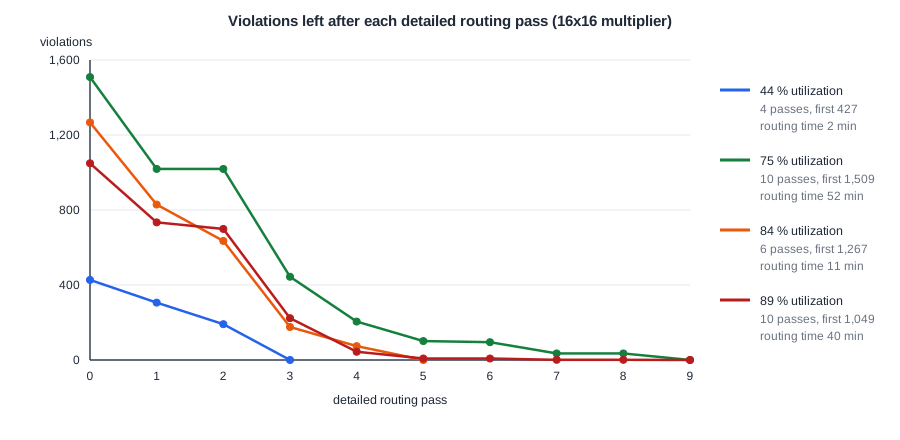
Every run ended with zero violations, but the effort was very different:
| Core utilization | First-pass violations | Passes | Detailed routing time | Final wire length |
|---|---|---|---|---|
| 44 % | 427 | 4 | 2 min 11 s | 28,270 um |
| 75 % | 1,509 | 10 | 51 min 51 s | 30,565 um |
| 84 % | 1,267 | 6 | 10 min 59 s | 30,404 um |
| 89 % | 1,049 | 10 | 40 min 30 s | 27,904 um |
- First-pass violations roughly triple once the core is dense: more pins per area, fewer free tracks, more nets competing for the same spots.
- The tail is slow. The 75 % run was stuck at 1,019 violations for one pass, and once it was down to 101 it took four more passes to clear them. The last violations sit in the tightest spots and each one may need many reroutes.
- Run time depends on the placement, not only on utilization. The order of the dense runs is not monotonic: the 75 % run took longest because of where its hardest spots ended up.
The placement matters more than the table suggests. At 75 % the placer's minimum feasible density was 0.79, but it was allowed to pack cells up to 0.95, so it built tight clusters next to empty space. The same die placed at density 0.83, with a 0.5 capacity reserve in global routing and the per-layer wire RC values of OpenROAD-flow-scripts, routed clean in 5 passes and 3 minutes, against 10 passes and 52 minutes. Much of the run time came from an overpacked placement, not from the utilization itself, which is why Debugging Congestion starts with the placement.
Leaving routing margin still matters in real projects. A block that routes clean but takes ten times longer slows down every iteration of the design.
Clean Routing Is Not DRC Sign-Off
Zero violations at the end of detailed_route means the router found no violations of the rules it checks. Two caveats:
- The router reads the design rules from the technology LEF, which does not contain every rule of the foundry's rule deck. In the lab's runs it even warns that it skips some of the rules it does read:
[WARNING DRT-0349] LEF58_ENCLOSURE with no CUTCLASS is not supported. Skipping for layer mcon
- The router checks only the routing layers it uses, not the cells' internal layers or fill.
So the final layout still goes through a full DRC run on the GDSII with the foundry deck. In sky130 flows this is done with KLayout or Magic, described in Design Rule Checking (DRC).
When violations do remain, the lab's flow writes them to drc_violations.rpt, with the rule, the layer and the location of each one.
Quick Check
Q: The 89 % run started with fewer violations (1,049) than the 75 % run (1,509). Does that make the 89 % layout easier to route?
Show Answer
No. The first-pass count depends on the details of each placement, and both runs needed ten passes and about 40 to 50 minutes. The number of passes and the time to converge are better measures of routing difficulty than the first-pass count, and the real limit is whether the count reaches zero at all.
Running It in ChipVerify Lab
Run Place and Route on the multiplier and find the detailed routing section of the log: the pin access step, the number of guides, and the violation count after each pass. The multiplier at 40 % went from 255 to 105, 107 and 0 violations in four passes; a second, short detailed route follows when the post-route antenna repair has added diodes. Then open the DRC section of the report (KLayout), which is the sign-off check on the GDSII.
The lab's flow places with a density just above the real core utilization and keeps the 0.5 reserve, the settings of the 3-minute run above, and it shows: the multiplier at 70 % and 75 % utilization finished the whole lab run in 4 and 5 minutes. Free jobs stop after 5 minutes and PRO jobs after 30; with PRO, a limit on the detailed routing passes makes a run stop early and report the violations left.
Common Mistakes
Mistake #1: Treating zero routing violations as sign-off
The router checks a subset of the rules. Run the foundry DRC deck on the final GDSII before calling a layout clean.
Mistake #2: Judging routability by the first pass
Hundreds of first-pass violations are normal. Watch whether the count keeps falling and how many passes it takes; a count that stalls is the warning sign.
Mistake #3: Blaming slow routing on utilization alone
The 75 % multiplier took 52 minutes with an overpacked placement and 3 minutes with a well-spread one in the same die. Check the placement density and the global routing settings before shrinking the design or growing the die.
Practice Exercise
Challenge: Reading a Violation Table
The 84 % run's first pass reported 714 shorts and 156 spacing violations on met1, 277 shorts and 37 spacing violations on met2, 6 shorts and 2 spacing violations on met3, 1 short on met4, and 5 cut spacing violations on mcon. What share of the shorts were on met1, and what does that suggest about where the router struggled?
Hint
Add up the shorts on all layers first.
Solution
714 + 277 + 6 + 1 = 998 shorts, so 714 / 998 = 72 % were on met1. The router struggled at the lowest routing layer, where wires leave the pins and meet the met1 power rails. That points to pin access and local cell density, not to a lack of tracks on the upper layers.
Open the ready-made example in the lab, synthesize it and run Place and Route.
Summary
- Detailed routing analyses pin access, follows the global route guides, assigns tracks, and routes in passes until no violations remain.
- The violation table lists shorts, metal spacing, cut spacing and recheck markers per layer; most sit on met1 near the pins.
- The multiplier routed clean at every utilization with the lab's settings, but the dense runs needed 6 to 10 passes and up to 52 minutes; a better-spread placement cut the 75 % run to 3 minutes.
- A clean detailed route is not DRC sign-off: the GDSII still goes through the foundry DRC deck.
