
A placement can be legal and still be poor: wires too long, cells packed so tightly that the router cannot get through, or critical paths stretched across the core. Before moving on to clock tree synthesis, it pays to check the placement with a few numbers and one picture. This article explains the usual placement quality measures, HPWL, density, congestion and estimated timing, and compares three placements of the 16x16 multiplier with them.
7 min read | Intermediate
What You'll Learn
- List the measures used to judge a placement
- Read a cell density map and spot hot spots
- Use the congestion estimate from global placement
- Decide whether a placement is ready for CTS
The Measures
| Measure | What it tells | Where to find it in OpenROAD |
|---|---|---|
| HPWL after legalization | Total wire length estimate; the router starts from this | "legalized HPWL" in the detailed placement report |
| Utilization | Cell area over core area | GPL-0019, and "Design area" in the final report |
| Local density | How full each small region is; hot spots | A density map in the GUI, or computed from the DEF |
| Routing congestion estimate | Track demand over supply per routing tile | GPL-0043 to GPL-0047 in routability mode, or a global route |
| Estimated timing | Worst slack with wire parasitics estimated from placement | estimate_parasitics -placement, then report_worst_slack |
| Displacement | How far legalization moved cells from the global solution | "average/max displacement" in the detailed placement report |
No single number decides. A low HPWL with severe hot spots routes badly; a nicely spread placement with long critical paths misses timing.
Density Maps
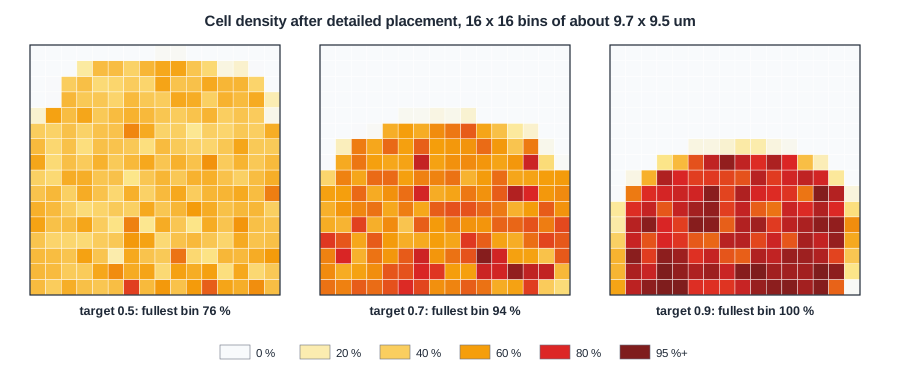
Each square is a bin of about 9.7 x 9.5 um, coloured by the fraction of its area covered by standard cells after detailed placement. Tap cells and fillers are not counted. The three placements are those from Global Placement, with target densities 0.5, 0.7 and 0.9:
| Target density | Bins with cells | Average density in those bins | Bins above 80 % | Fullest bin |
|---|---|---|---|---|
| 0.5 | 232 of 256 | 45 % | 0 | 76 % |
| 0.7 | 171 | 61 % | 15 | 94 % |
| 0.9 | 142 | 74 % | 78 | 100 % |
At 0.5 the cells are spread almost evenly and no bin is above 80 %. At 0.9 more than half the occupied bins are above 80 %, and some are completely full. The cells cluster towards the bottom edge, where the tool placed all the I/O pins.
A full bin is not an error: the cells are legal. But every cell has pins, and a region full of cells needs many wires. Bins above about 80-85 % are where routing problems and timing repair difficulties usually start, because there is no room left for buffers or for the router's detours.
Quick Check
Q: The total utilization is the same, 44 %, in all three runs. Why do the density maps look so different?
Show Answer
Utilization is an average over the whole core. The target density decides how evenly the cells are spread: at 0.9 the placer may fill some regions almost completely and leave others empty, with the same total cell area.
Congestion Estimate
Density counts cell area; congestion counts wires. With -routability_driven, the global placer runs a quick routing estimate and reports the most congested tiles. For the target of 0.9:
[INFO GPL-0041] Total routing overflow: 0.0000
[INFO GPL-0042] Number of overflowed tiles: 0 (0.00%)
[INFO GPL-0043] Average top 0.5% routing congestion: 0.8490
[INFO GPL-0046] Average top 5.0% routing congestion: 0.7679
A congestion of 1.0 means a tile needs all the tracks it has. The most congested 0.5 % of the tiles are at 85 %, so even the densest of the three placements is routable, and indeed all three routed without violations. Global Routing and Congestion covers the full congestion report.
Comparing the Three Placements
| Target density | Legalized HPWL | Fullest bin | Routed wire | Worst slack at 10 ns |
|---|---|---|---|---|
| 0.5 | 22.4 mm | 76 % | 28.3 mm | +0.58 ns |
| 0.7 | 19.7 mm | 94 % | 25.8 mm | +0.74 ns |
| 0.9 | 19.3 mm | 100 % | 25.8 mm | +0.49 ns |
The 0.7 placement is the best of the three: 9 % shorter wires than 0.5 and the best slack, with a moderate density peak. The 0.9 placement has the lowest HPWL but no shorter routed wire, the worst slack and many full bins. On a larger design, those full bins would be the first to fail routing.
Quick Check
Q: A placement has the lowest HPWL of all candidates but its estimated worst slack is the worst. How can that be?
Show Answer
HPWL is a total over all nets. A placement can shorten many non-critical nets while stretching a few nets on the critical path, or pack cells so tightly that the drivers see more load. Timing depends on the critical paths, not the total.
Ready for CTS?
A practical checklist after placement:
- The detailed placer reports no failures and the final checks find no overlaps.
- No large areas of bins above 85-90 %, and none around macros or I/O pins.
- The congestion estimate stays below 1.0 in the top few percent of tiles.
- The estimated worst slack is negative by no more than what the timing repair after CTS can fix; a placement that is far off will not close.
- No unexpected long nets, for example a high-fanout net spanning the whole core without buffers.
Running It in ChipVerify Lab
Run Place and Route on the multiplier and collect the numbers: the legalized HPWL and displacement from the first detailed placement, the utilization, and the final routed wire length and slack. Then open the layout, hide the routing and look at the cells: where are they densest, and where are the pins?
Common Mistakes
Mistake #1: Looking only at the total utilization
All three placements had 44 % utilization. The density map shows the difference that matters for routing.
Mistake #2: Choosing the placement with the lowest HPWL
The 0.9 run had the lowest HPWL and the worst slack. Judge by the full set of measures, and confirm with routing.
Practice Exercise
Challenge: Average Density
In the 0.9 placement, 142 bins hold cells, at an average density of 74 %. Each bin is about 92 um2. Estimate the cell area in those bins and compare it with the multiplier's cell area of about 9,700 um2 before taps and fillers.
Hint
Cell area = number of bins x bin area x average density.
Solution
142 x 92 x 0.74 = 9,670 um2, which matches the cell area: all cells are in those 142 bins, packed into about 55 % of the core while the rest is empty.
Open the ready-made example in the lab, synthesize it and run Place and Route.
Summary
- Judge a placement by legalized HPWL, utilization, local density, congestion, estimated timing and displacement together.
- A density map shows hot spots that the overall utilization hides.
- For the multiplier, a target of 0.7 gave the best result; 0.9 had the lowest HPWL but 78 bins above 80 % and the worst slack.
- Check for failures, hot spots, congestion, slack and unbuffered long nets before CTS.
