
Scan chains make a chip testable after manufacturing: every flip-flop is replaced by a scan flip-flop, and in test mode the flip-flops are linked into long shift registers through which test patterns are loaded and results read out. The order of the flip-flops in a chain does not matter for testing, but it matters a lot for physical design: a chain stitched in netlist order zigzags across the whole block. This article inserts scan chains into the 16x16 multiplier with OpenROAD, once before and once after placement, and measures the difference.
8 min read | Intermediate
What You'll Learn
- Explain what a scan flip-flop and a scan chain are
- Insert scan chains in OpenROAD
- Explain why scan chains are ordered using placement
- Measure the cost of scan in area, wire length and timing
Scan Flip-Flops and Chains
A scan flip-flop is a normal flip-flop with a multiplexer in front of its D input. In sky130 hd, sdfxtp_1 is the scan version of dfxtp_1: besides D, CLK and Q it has SCD (scan data) and SCE (scan enable). With SCE low it behaves like the plain flip-flop; with SCE high it captures SCD instead of D.
In a scan chain, the Q of each flip-flop connects to the SCD of the next. In test mode the tester shifts a pattern in through the chain's input port, runs one functional clock cycle with SCE low, then shifts the captured values out through the chain's output port. This turns the problem of testing a sequential circuit into testing its combinational logic, which automatic test pattern generation handles well.
For testing, any order works: the test patterns are generated after the chain order is known. That freedom is what physical design uses.
Scan Insertion in OpenROAD
create_clock -name clk -period 10.0 [get_ports clk]
scan_replace
global_placement -density 0.50
...
set_dft_config -max_length 32 -clock_mixing clock_mix
report_dft_plan -verbose
execute_dft_plan
place_pins -hor_layers met3 -ver_layers met2
scan_replaceswaps every flip-flop for its scan equivalent. In the multiplier, all 64dfxtp_1becamesdfxtp_1, and the cell area grew from 10,297 to 10,673 um2, 3.7 % more.set_dft_config -max_length 32limits each chain to 32 flip-flops, so the 64 flip-flops form two chains.execute_dft_planbuilds the chains: it connects Q to SCD from one flip-flop to the next, ties all SCE pins to a newscan_enable_0port, and adds the scan input and output ports.place_pinsruns again so the new ports get positions on the die edge.
The report confirms the plan:
Number of chains: 2
Scan chain 'chain_0' has 32 cells (32 bits)
Scan chain 'chain_1' has 32 cells (32 bits)
The DEF output then has a SCANCHAINS section listing every chain in order, from its start pin through each flip-flop's SCD input and Q output. A later tool can use it to reorder the chain.
Two Things That Go Wrong
The clock must be defined first. Without it, scan_replace still swaps the cells, but the chain builder cannot tell which clock domain each flip-flop belongs to:
[WARNING DFT-0005] Cell '_2407_' doesn't have a valid clock connected. Can't create a scan cell
...
Number of chains: 0
And the new ports must be placed. When the chains were built after the pins had been placed, without placing them again, global routing stopped:
[ERROR GRT-0042] Pin scan_out_1 does not have geometries in a valid routing layer.
Quick Check
Q: Why does a scan flip-flop make the functional path a little slower?
Show Answer
The scan multiplexer sits in front of D, so the data must pass through it before reaching the storage element. The scan cell also has a larger setup time and is slightly larger. In addition, each Q now drives one more load, the next flip-flop's SCD pin.
Order From the Netlist or From the Placement
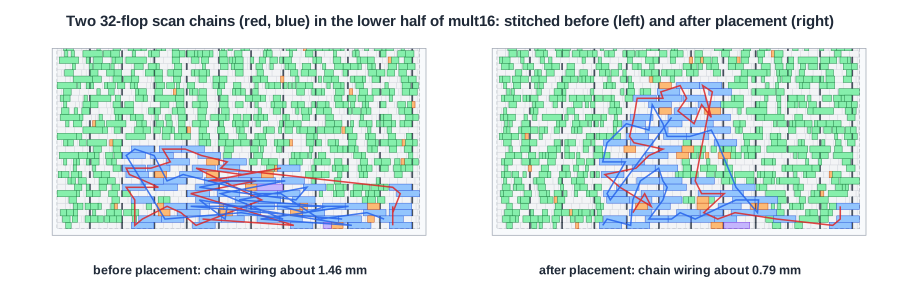
On the left, the chains were built before placement: the flip-flops are linked in the order they appear in the netlist, which has nothing to do with where they end up. The chains zigzag back and forth across the flip-flop area. On the right, the chains were built after global placement, and each one links neighbouring flip-flops. Measured as the Manhattan distance from each flip-flop to the next:
| Run | Scan chain wiring | Routed signal wire | Worst slack at 10 ns |
|---|---|---|---|
| no scan | - | 28.3 mm | +0.58 ns |
| chains built before placement | about 1.46 mm | 30.1 mm | +0.14 ns |
| chains built after global placement | about 0.79 mm | 29.4 mm | +0.43 ns |
Building the chains with placement information almost halved the scan wiring, and the total routed wire is 0.7 mm shorter. The slack difference is larger than the wiring alone would suggest: a chain built in netlist order also pulls flip-flops towards their chain neighbours during placement, away from the logic they actually serve. Built after global placement, the chain had no influence on where the flip-flops went.
Scan still costs something even when it is placement-aware: 3.7 % more cell area, 1.1 mm more wire and 0.15 ns of slack, all from the scan multiplexers and the extra connections.
Quick Check
Q: In a commercial flow, scan chains are inserted during synthesis and then reordered after placement. Why is reordering allowed after the test patterns' structure has been decided?
Show Answer
The test patterns are generated after layout, from the final scan chain order recorded in the scan DEF. Before that, only the number of chains and which flip-flops belong to them are fixed; the order within a chain is free.
Running It in ChipVerify Lab
By default the lab's flow does not insert scan. With PRO, the Scan option takes a maximum chain length and runs the commands of this article in the placement-aware order: set_dft_config and scan_replace before global placement, execute_dft_plan and a second place_pins right after it. With a length of 100, the multiplier got one chain of all 64 flip-flops and two new ports, scan_enable_0 and scan_in_0; its design area grew from 10,405 to 10,777 um2, and the worst slack at 10 ns went from +0.13 to +0.09 ns. Compare with a run without scan, then search the DEF output for SCANCHAINS.
Common Mistakes
Mistake #1: Stitching chains in netlist order
Netlist order is random with respect to the layout. In the multiplier it nearly doubled the scan wiring and cost 0.3 ns of slack compared with chains built after placement.
Mistake #2: Mixing clock domains in one chain without care
Flip-flops on different clocks in the same chain need lockup latches between the domains, or the shift fails. -clock_mixing controls whether the tool may mix them.
Mistake #3: Forgetting the scan ports
Scan insertion adds ports. They need positions on the die edge and must be connected at the next level up, or routing and the chip-level test fail.
Practice Exercise
Challenge: Shift Time
The multiplier's 64 flip-flops are in two chains of 32. How many shift cycles does loading one test pattern take? How many would one chain of 64 take, and four chains of 16? What is the cost of more chains?
Hint
All chains shift in parallel; the longest chain sets the shift time.
Solution
Two chains of 32: 32 shift cycles per pattern. One chain of 64: 64 cycles. Four chains of 16: 16 cycles. More chains cut test time, but each one needs its own scan input and output pin, and pins are limited on a chip. Large designs balance the two with test compression logic.
Open the ready-made example in the lab, synthesize it and run Place and Route.
Summary
- A scan flip-flop adds a multiplexer (SCD, SCE) in front of D; a scan chain links Q to SCD of the next flip-flop.
- In OpenROAD:
scan_replace,set_dft_config,execute_dft_plan, with the clock defined first and the new ports placed. - The chain order is free for testing, so it is chosen to follow the placement.
- In the multiplier, chains built after placement needed 0.79 mm of wiring against 1.46 mm in netlist order, and kept 0.29 ns more slack.
- Scan cost 3.7 % area even when placement-aware.
