
Every flip-flop in a synchronous design needs the same clock edge at nearly the same moment. Before clock tree synthesis, timing analysis pretends that happens for free: the clock is ideal, with zero delay and zero skew to every flip-flop. In the layout, the clock pin is one point at the edge of the die and the flip-flops are spread over the core. A clock tree is the network of buffers and wires that carries the edge from that pin to every clock input with controlled delay, skew and edge rate. This article explains those three quantities and what CTS achieved for the 16x16 multiplier.
7 min read | Intermediate
What You'll Learn
- Define clock latency, skew and transition
- Explain why one wire cannot drive all clock pins
- Describe how skew affects setup and hold checks
- Read the clock latency and skew reports after CTS
The Ideal Clock and the Real One
Up to placement, the clock is ideal. The timing engine treats the edge as arriving at every flip-flop at time zero, with an instant rise. That is a good assumption early on, because the clock network does not exist yet, and an unbuffered clock net would give meaningless numbers.
In the multiplier, one clk port drives the CLK pins of 64 flip-flops placed across an area of about 100 x 60 um. Driving that load from one point with one wire has three problems:
- The total load is far more than any single cell can drive with a sharp edge. A data net with 64 loads in the same library reached a 2.27 ns transition, against a 1.5 ns limit, as shown in Design Repair.
- Flip-flops close to the driver would see the edge earlier than flip-flops at the far end of the wire.
- A slow edge increases the delay and the short-circuit power of every clock input it drives.
Clock tree synthesis (CTS) solves all three by building a tree of clock buffers, each driving a small group of flip-flops, with paths of nearly equal delay from the root to every leaf.
Latency, Skew and Transition
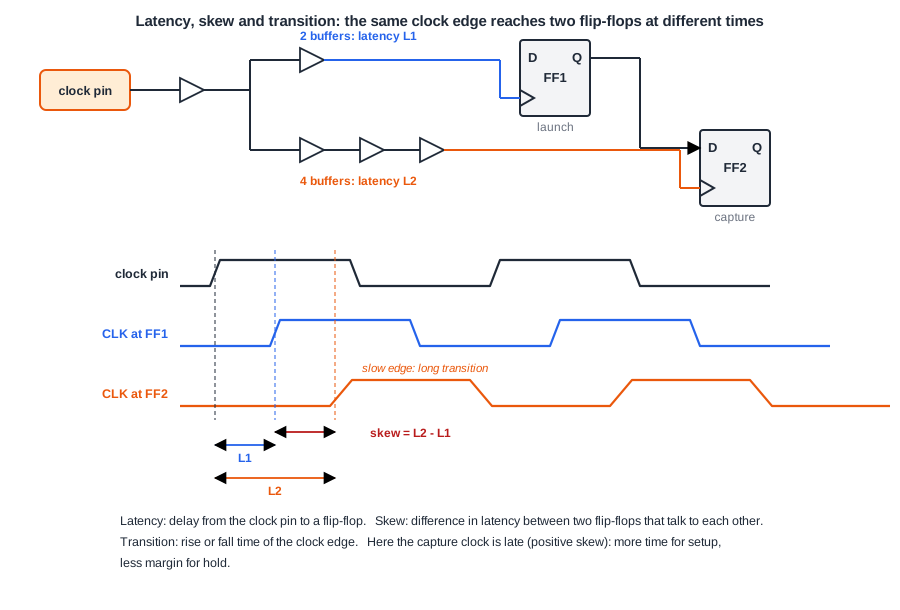
- Latency (insertion delay) is the time from the clock source to a flip-flop's clock pin. In a tree it is the sum of the buffer and wire delays along the path.
- Skew is the difference in latency between two flip-flops. For a timing path, the skew that matters is between its launch and capture flip-flops. The tool also reports the largest skew over all related pairs.
- Transition (slew) is the rise or fall time of the clock edge at a pin. Clock nets usually get a tighter transition target than data nets, because the clock edge rate sets the flip-flop's clock-to-Q delay and its setup and hold times.
Latency on its own is mostly harmless: if every flip-flop sees the same 0.31 ns delay, the launch and capture edges move together and cancel in each timing check. It matters for paths that leave or enter the block, and when two parts of the clock tree are affected differently by voltage or temperature. Skew is what directly changes the timing of internal paths.
Quick Check
Q: Every flip-flop in a block sees exactly 0.8 ns of clock latency. How does that change the slack of a path between two of those flip-flops?
Show Answer
It does not change it. The launch edge and the capture edge are both delayed by 0.8 ns, so the difference between data arrival and required time is unchanged. Only the skew, the difference in latency, shifts the slack of an internal path.
Skew in the Setup and Hold Checks
Take a path from a launch flip-flop FF1 to a capture flip-flop FF2, with clock latencies L1 and L2. The skew is L2 - L1.
- Setup: the data launched at the first edge must arrive before the next edge at FF2. With positive skew, the capture edge comes later, so the path gets that much more time. Negative skew takes time away.
- Hold: the new data launched at an edge must not reach FF2 before FF2 has captured the old data at the same edge. With positive skew, FF2 captures later, so the new data has more chance to overtake it. Positive skew makes hold harder.
So skew moves time between setup and hold: whatever skew helps one check costs the other. Zero skew is the neutral choice, and it is what a CTS tool aims for by default. Skew, Useful Skew and Hold After CTS looks at the exceptions.
What CTS Achieved for the Multiplier
The lab's flow runs clock_tree_synthesis after placement. For the multiplier it built a tree with one root buffer and eight leaf buffers, all clkbuf_16. With the clock switched from ideal to propagated, the latency report of the routed design shows the result:
report_clock_latency

Clock clk
rise -> rise
    min     max
   0.00    0.00 source latency
   0.32         network latency _2432_/CLK
           0.33 network latency _2414_/CLK
---------------
   0.32    0.33 latency
           0.01 skew
The shortest clock path takes 0.32 ns and the longest 0.33 ns, so the skew is 0.01 ns. Each clock path goes through exactly two buffers: the root buffer and one leaf buffer, about 0.16 ns each.
The Clock's Share of Power
The clock net switches twice every cycle, on every flip-flop, whether or not the data changes. That makes the clock network one of the largest consumers of dynamic power. The final power reports of three designs from this chapter, with the default activity the tool assumes for data signals:
| Design | Flip-flops | Logic | Clock network share of total power |
|---|---|---|---|
| 16x16 multiplier | 64 | about 1,200 gates | 8.8 % |
| 64-bit shift register | 64 | none | 31 % |
| Register file with clock gates | 528 | about 540 gates | 66 % |
The "clock" group counts the clock buffers and their wires. The flip-flops' own clock pins are counted in the "sequential" group, so the real cost of the clock is higher still. In designs dominated by registers, the clock tree is often the largest single item in the power budget, which is why clock gating matters.
Quick Check
Q: Why does a CTS tool aim for zero skew by default instead of using skew to help critical paths?
Show Answer
Skew that helps the setup check of one path costs hold margin on that path and setup margin on the paths that start at the delayed flip-flop. Without knowing every path's slack, zero skew is the safe target. Deliberately using skew needs the timing information, which is a separate optimization.
Running It in ChipVerify Lab
Run Place and Route on the multiplier and find the CTS section of the log. Note the number of clock buffers the tool created, the number of buffers on each clock path, and the sink count of the clock net. The CTS section of the report has the same numbers, and the clock section the latency and skew after routing. Then compare the worst slack before CTS with the final worst slack after routing.
Common Mistakes
Mistake #1: Trusting timing reports with an ideal clock after CTS
Once the tree exists, the clock must be propagated (set_propagated_clock) for the real latencies and skew to appear in the timing reports. An ideal clock after CTS hides every skew problem.
Mistake #2: Treating large latency as a problem in itself
Common latency cancels in internal paths. What matters is skew, and latency only for I/O timing and for sensitivity to variation along long clock paths.
Mistake #3: Ignoring the clock's power
The clock switches every cycle. In register-heavy designs it can be the largest part of dynamic power, so buffer count and wire length in the tree are a power issue, not only a timing one.
Practice Exercise
Challenge: Skew and Two Checks
A path has 3.0 ns of data delay at a 4.0 ns clock period. The launch flip-flop's clock latency is 0.50 ns and the capture flip-flop's is 0.65 ns. Ignore setup and hold times and clock-to-Q. What is the setup slack, and how did the skew change it? If the shortest data delay through the same flip-flops is 0.10 ns, is hold met?
Hint
Setup: data arrives at 0.50 + 3.0, required at 4.0 + 0.65. Hold: data arrives at 0.50 + 0.10 and must come after the capture edge at 0.65.
Solution
Setup: required 4.65 ns, arrival 3.50 ns, slack +1.15 ns, of which 0.15 ns comes from the positive skew. Hold: arrival 0.60 ns, capture edge at 0.65 ns, slack -0.05 ns: hold fails. The same 0.15 ns of skew helped setup and broke hold.
Open the ready-made example in the lab, synthesize it and run Place and Route.
Summary
- Before CTS the clock is ideal; afterwards it must be propagated so real latency and skew are used.
- Latency is the delay to a clock pin, skew the difference in latency, transition the edge rate.
- Positive skew helps setup and hurts hold on a path; zero skew is the default target.
- For the multiplier, CTS built 9 buffers in two levels, with 0.32 to 0.33 ns latency and 0.01 ns skew after routing.
- The clock network is a large share of power, from 6.5 % in the multiplier to 60 % in a register file.
