
The floorplan is the first physical decision about a design: how big the chip is, how much of it holds standard cells, and what shape it has. Three numbers describe it: the die size, the core size and the utilization, the fraction of the core filled with cells. Choose them well and placement and routing go smoothly; choose them badly and the design is either wastefully large or impossible to route. This article defines die, core, utilization and aspect ratio, and shows how the lab's flow sizes a floorplan, with numbers from the 16x16 multiplier.
8 min read | Beginner
What You'll Learn
- Define die, core, core margin and utilization
- Calculate the core size from the cell area and a target utilization
- Explain the aspect ratio and how it changes the die shape
- Know how the lab's PnR panel sizes the floorplan
Die and Core
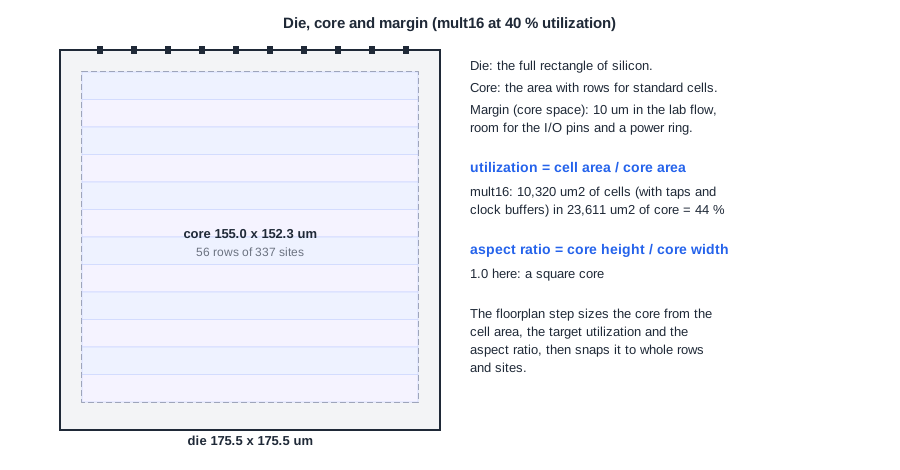
The die is the whole rectangle of silicon. The core is the area inside it that holds the rows for standard cells. Between them is the core margin (also called core space): room for the I/O pins and, in larger designs, power rings around the core. On a full chip, the margin also holds the pad ring of I/O cells; in a block that will sit inside a larger chip, it is usually small.
For the 16x16 multiplier, OpenROAD reports:
[INFO IFP-0107] Defining die area using utilization: 40.00% and aspect ratio: 1.
[INFO IFP-0001] Added 56 rows of 337 site unithd.
[INFO IFP-0100] Die BBox:  (  0.000  0.000 ) ( 175.465 175.465 ) um
[INFO IFP-0101] Core BBox: ( 10.120 10.880 ) ( 165.140 163.200 ) um
[INFO IFP-0102] Core area:                        23612.646 um^2
[INFO IFP-0103] Total instances area:              9668.022 um^2
[INFO IFP-0104] Effective utilization:                0.409
Utilization
Utilization is the cell area divided by the core area. To reach a target utilization U, the floorplan step makes the core area about cell area / U. The multiplier's cells from synthesis take 9,668 um2; at 40 % that asks for about 24,170 um2 of core. The tool then snaps the core to whole rows and sites, so the result, 23,613 um2, gives an effective utilization of 40.9 %.
Why not fill the core to 100 %? The cells need space around them:
- Routing: wires need tracks, and pins inside crowded cells are hard to reach.
- Buffers and resizing: timing repair and the clock tree add cells and make others bigger.
- Physical cells: tap cells, and later decaps and fillers.
Typical starting points are 40 to 70 % for logic blocks. After place and route, the multiplier's design area is 10,320 um2, 44 % of the core: the 319 tap cells, the clock buffers and the resized cells added 650 um2.
Quick Check
Q: A block has 50,000 um2 of cells and the target utilization is 60 %. About how large is the core, and how wide is it if it is square?
Show Answer
50,000 / 0.6 = 83,333 um2, a square of about 289 um per side. The tool rounds to whole rows (2.72 um) and sites (0.46 um), and the die adds the margin on each side.
Aspect Ratio
The aspect ratio is the core height divided by its width. 1.0 is a square, 0.5 is twice as wide as it is tall, 2.0 twice as tall as it is wide. A block's shape usually comes from the chip floorplan: a block that must fit along an edge of the chip is long and thin.
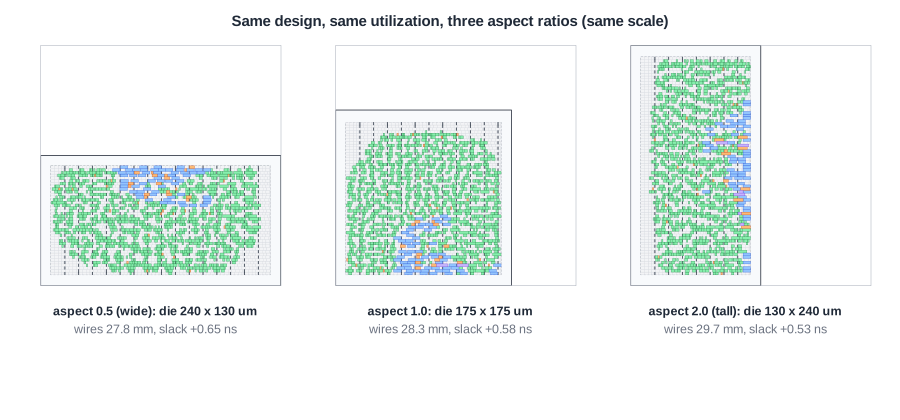
For the multiplier, all three shapes place and route without trouble, and the differences are small: 27.8 mm of wire for the wide shape, 28.3 mm for the square, 29.7 mm for the tall one. The shape changes where the pins and cells end up, and with them the wire lengths, but for a block like this one by only a few percent. For a design with many pins, the length of the edges also limits how many pins fit; extreme aspect ratios leave one pair of edges very short.
Quick Check
Q: A core of 20,000 um2 has an aspect ratio of 0.5. What are its width and height?
Show Answer
Height = 0.5 x width, so 0.5 x width2 = 20,000 and the width is 200 um, the height 100 um.
How the Lab Sizes the Floorplan
The lab's flow uses initialize_floorplan -utilization U -aspect_ratio 1.0 -core_space 10.0, with three rules:
- The floorplan utilization is the panel value, but at most 40 %. Higher panel values only raise the target density for placement; the core does not shrink further.
- The aspect ratio is always 1.0 and the margin 10 um.
- Designs with fewer than 20 cells get a fixed 60 x 60 um die, because utilization-based sizing gives too few rows for them.
PRO users can set the die area directly instead, or change the floorplan command in the OpenROAD script. The aspect-ratio and higher-utilization runs in this chapter were made that way.
Running It in ChipVerify Lab
The example is the 16x16 multiplier. Synthesize it and run Place and Route with 20 %, 30 % and 40 % utilization, and compare the Area and Floorplan sections: die size, core size and final utilization.
Common Mistakes
Mistake #1: Confusing cell area with design area
The synthesis cell area does not include tap cells, clock buffers or the cells added by timing repair. Size the core for the final design, with a margin.
Mistake #2: Choosing the shape without looking at the pins
A thin block with hundreds of pins on its short edges runs out of pin space. Check the pin count against the edge lengths before fixing the aspect ratio.
Practice Exercise
Challenge: Predict the Die
The multiplier has 9,668 um2 of cells. Predict the die size at 20 % and 30 % utilization (square core, 10 um margin), then run Place and Route at both settings and compare.
Hint
Core side = square root of (cell area / utilization); die = core + 2 x 10 um.
Solution
At 20 %: core about 219.9 um, die about 240 um. At 30 %: core about 179.5 um, die about 200 um. The lab gives dies of 239.9 um and 199.5 um. The low utilization costs timing too: at 20 % the wires get so long (40.3 mm in total) that the worst setup slack at 10 ns is -0.08 ns, while at 30 % it is +0.36 ns.
Open the ready-made example in the lab, synthesize it and run Place and Route.
Summary
- The die is the whole chip area; the core holds the rows; the margin between them holds the pins.
- Utilization is cell area over core area; the core is sized as cell area / target utilization, then snapped to rows and sites.
- The aspect ratio is core height over width; it sets the shape and the edge lengths for pins.
- The lab sizes the floorplan for at most 40 %, aspect ratio 1.0 and a 10 um margin; PRO can set the die area.
