
GDSII is the file format a chip is delivered in. It holds the complete layout as polygons on numbered layers, organised into a hierarchy of cells, with every transistor of every standard cell included. The mask shop turns each layer into a photomask. Place and route works with LEF and DEF, and the very last step merges the full cell layouts into the routed design and writes GDSII. This article explains how GDSII describes a layout, how sky130 numbers its layers, and how the lab produces the GDSII of a design.
7 min read | Beginner to Intermediate
What You'll Learn
- Explain how GDSII stores a layout: cells, references and polygons
- Read sky130 layer and datatype numbers
- Recognize the base layers of a standard cell: well, diffusion, poly, contacts, li1, met1
- Describe how DEF and the cell GDS are merged into the final GDSII
How GDSII Describes a Layout
A GDSII file (also called a stream file) is binary and contains a library of cells, called structures. Each cell holds:
- Boundaries and paths: polygons and wires, each on a layer number and a datatype number.
- References to other cells, placed at a position with a rotation or mirror. A single reference can also be an array.
- Text labels, used for pin names.
The top cell of a chip references the standard cells, which may reference smaller cells in turn. Each standard cell is stored once and referenced thousands of times, which keeps the file small. GDSII has no notion of nets, timing or even which polygons are transistors: it is pure geometry. The newer OASIS format stores the same information more compactly.
Layers and Datatypes
Every polygon has a layer number and a datatype. The PDK's layer map gives them meaning. For sky130:
| Layer | drawing | pin | label |
|---|---|---|---|
| nwell | 64/20 | 64/16 | 64/5 |
| diff (active) | 65/20 | 65/16 | 65/6 |
| poly | 66/20 | 66/16 | 66/5 |
| licon1 (contact) | 66/44 | ||
| li1 | 67/20 | 67/16 | 67/5 |
| mcon | 67/44 | ||
| met1, via, met2 | 68/20, 68/44, 69/20 | 68/16, -, 69/16 | 68/5, -, 69/5 |
| via2, met3, via3 | 69/44, 70/20, 70/44 | -, 70/16, - | |
| met4, via4, met5 | 71/20, 71/44, 72/20 | 71/16, -, 72/16 |
The pattern is regular: each metal layer has its own number, datatype 20 is the drawn shape, 44 the via or contact above it, 16 the pin shape and 5 the text label. There are many more layers for implants, high-voltage devices, resistors and identification markers; the display colours and names live in the KLayout layer properties file (sky130hd.lyp).
Quick Check
Q: A polygon is on layer 70, datatype 20. What is it?
Show Answer
A drawn shape on met3. Datatype 16 on the same layer would be a met3 pin, and 70/44 would be a via3 cut.
Inside a Flip-Flop
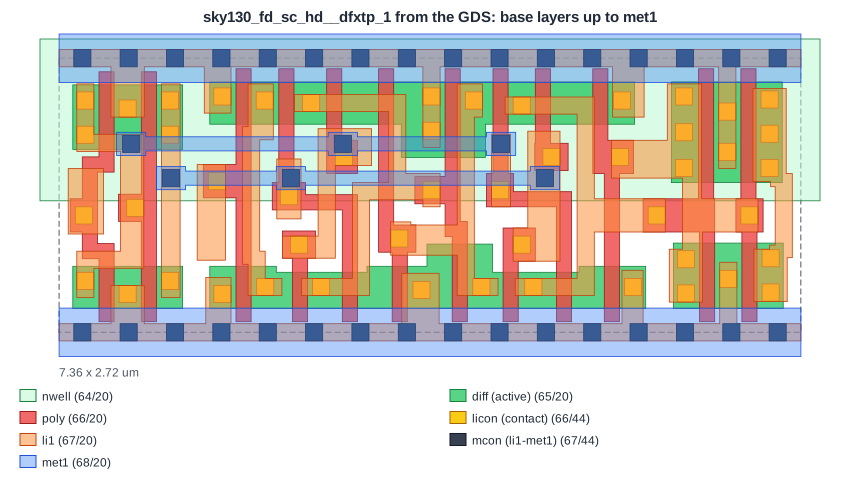
This is sky130_fd_sc_hd__dfxtp_1 from the library GDS, showing the base layers up to met1. The n-well covers the top half, where the PMOS transistors sit; the NMOS transistors are in the bottom half. Each red poly line crossing a green diffusion is a transistor. Yellow licon contacts connect diffusion and poly to the orange li1, and grey mcon cuts connect li1 to the met1 power rails. The cell has 14 poly shapes, 50 contacts and 16 li1 shapes. The LEF abstract of this cell shows only its outline, its five pins (D, CLK, Q, VPWR, VGND) and the li1 obstructions.
From DEF to GDSII
The lab's flow writes the routed design as DEF, then KLayout builds the GDSII:
- it reads the technology LEF and cell LEF, and the DEF with every placed cell and routed wire;
- it writes the wires, vias and power grid of the DEF as polygons on the right layers, using the layer map;
- it merges the library GDS (
sky130_fd_sc_hd.gds) and replaces every cell abstract with a reference to the full cell layout.
The result is checked by DRC and LVS, which work on the real polygons. In the counter, the DEF is 48 kB of text; the GDSII additionally contains the full layouts of the 14 different cell types the design uses, fillers and taps included.
Quick Check
Q: The stream-out step cannot find the GDS of one cell type used in the design. What happens to the final layout?
Show Answer
That cell would be an empty reference: its wires and pins are routed, but its transistors are missing. DRC may not notice, but LVS fails, because the extracted layout has no devices where the netlist has a cell. Stream-out tools warn about missing cells; never ignore that warning.
Running It in ChipVerify Lab
Run Place and Route on the counter. The report has a link to download the GDSII. Open it in KLayout on your own computer, load the sky130 layer properties, and descend into one of the cells to see its transistors.
Common Mistakes
Mistake #1: Using the wrong layer map
Layer numbers mean nothing without the map. Streaming out with the map of another process puts shapes on the wrong layers, and the masks would be wrong.
Mistake #2: Treating GDSII as the design database
GDSII has no nets or timing. Keep the DEF or the tool database for changes, and write GDSII again after every change.
Practice Exercise
Challenge: Count the Transistors
In the inverter layout shown in Cell LEF, one poly line crosses two diffusion areas. How many transistors does inv_1 have, and which type sits in the n-well?
Hint
A transistor is formed wherever poly crosses diffusion.
Solution
Two: the poly line crosses the diffusion in the n-well (the PMOS transistor, pulling the output up to VPWR) and the diffusion in the p-region below it (the NMOS transistor, pulling the output down to VGND). That is the classic CMOS inverter.
Open the ready-made example in the lab, synthesize it and run Place and Route.
Summary
- GDSII stores a layout as cells holding polygons, references and labels, on layer and datatype numbers.
- sky130 uses datatype 20 for drawn shapes, 44 for vias, 16 for pins and 5 for labels, with one layer number per level.
- A standard cell's GDS holds the wells, diffusion, poly, contacts, li1 and met1 rails.
- Stream-out writes the DEF wires as polygons and merges the library GDS of every cell.
