
DEF, the Design Exchange Format, is a text file that describes a physical design: the die, the rows, every placed cell, the pins, the power network and every routed wire. Place and route tools read and write it, and it is the usual way to move a layout between tools before the final GDSII. Being able to read a DEF is a practical skill: when something looks wrong in a layout, the DEF tells you exactly what the tool did. This article walks through the DEF of the routed 8-bit counter.
8 min read | Beginner to Intermediate
What You'll Learn
- Name the sections of a DEF file and what each one describes
- Read component placements, orientations and pin definitions
- Read a routed net: layers, coordinates and vias
- Tell special nets (power) from regular nets
The Sections
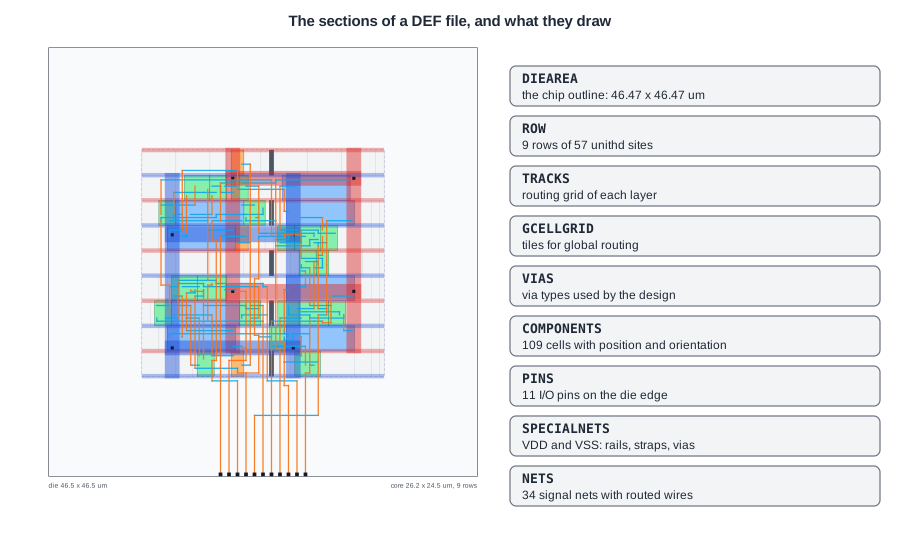
The header says which design this is and what the units are:
VERSION 5.8 ;
DIVIDERCHAR "/" ;
BUSBITCHARS "[]" ;
DESIGN counter8 ;
UNITS DISTANCE MICRONS 1000 ;
DIEAREA ( 0 0 ) ( 46470 46470 ) ;
All coordinates are integers in database units, 1000 per micron: the die runs from (0, 0) to (46.47 um, 46.47 um). ROW, TRACKS and GCELLGRID statements then define the placement rows, the routing tracks of every layer and the tiles the global router uses. The rows were explained in Standard Cells, Rows and Sites.
COMPONENTS
COMPONENTS 109 ;
    - FILLER_0_0 sky130_fd_sc_hd__fill_8 + SOURCE DIST + PLACED ( 10120 10880 ) N ;
    - _22_ sky130_fd_sc_hd__and3_1 + PLACED ( 21160 27200 ) N ;
    - _47_ sky130_fd_sc_hd__dfxtp_1 + PLACED ( 12880 13600 ) FS ;
    ...
END COMPONENTS
Each line is an instance name, a cell name, a placement status, the position of the lower-left corner and the orientation. The status says how much the tools may move it:
- PLACED: has a position, but tools may move it.
- FIXED: must not be moved by the tools (for example a macro placed by hand).
- COVER: part of the cover layer, such as bumps; never moved.
- No status: not placed yet, as in the DEF written right after the floorplan.
+ SOURCE DIST marks cells added by the physical design tool (fillers here), as opposed to cells from the netlist. Orientation N is upright, FS flipped about the horizontal axis; others are S, FN, E, W, FE and FW.
PINS
PINS 11 ;
    - clk + NET clk + DIRECTION INPUT + USE SIGNAL
      + PORT
        + LAYER met2 ( -70 -242 ) ( 70 243 )
        + PLACED ( 18630 242 ) N ;
    ...
The clock pin is a 0.14 x 0.485 um rectangle on met2, centred at (18.63, 0.242): on the bottom edge of the die. The rectangle is given relative to the placement point.
Quick Check
Q: A component line reads - _40_ sky130_fd_sc_hd__dfxtp_1 + PLACED ( 25760 13600 ) FS ;. Where is its right edge?
Show Answer
The cell is 7.36 um wide, so the right edge is at 25.76 + 7.36 = 33.12 um. Flipping (FS) changes the orientation but not the bounding box.
SPECIALNETS
Power and ground are special nets: they are routed by the power grid generator with fixed shapes, and the signal router leaves them alone.
    - VDD ( _47_ VPWR ) ( _46_ VPWR ) ... + USE POWER
      + ROUTED met5 1600 + SHAPE STRIPE ( 19155 32300 ) ( 33865 32300 )
      NEW met4 1600 + SHAPE STRIPE ( 33065 13360 ) ( 33065 35600 )
      NEW met1 480 + SHAPE FOLLOWPIN ( 10120 35360 ) ( 36340 35360 )
      NEW met4 0 + SHAPE STRIPE ( 33065 32300 ) via5_6_1600_1600_1_1_1600_1600
      ...
Each segment has a layer, a width and a shape type: STRIPE for straps, FOLLOWPIN for the row rails, and segments with width 0 followed by a via name are via arrays. The VDD net here has two met5 straps, two met4 straps and five met1 rails, joined by vias. The VIAS section near the top of the file defines the via arrays the power grid uses, such as a 1 x 5 array of met1-to-met2 cuts.
NETS
    - _00_ ( _46_ D ) ( _25_ Y ) + USE SIGNAL
      + ROUTED met1 ( 14905 17170 ) ( 16330 * )
      NEW met2 ( 16330 13090 ) ( * 17170 )
      NEW li1 ( 16330 13090 ) L1M1_PR_MR
      NEW met1 ( 16330 13090 ) M1M2_PR
      NEW met1 ( 16330 17170 ) M1M2_PR
      NEW li1 ( 14905 17170 ) L1M1_PR_MR ;
Net _00_ connects pin Y of _25_ to pin D of flip-flop _46_. The routing reads like a pen drawing: a met1 wire from (14.905, 17.17) to (16.33, 17.17), where * repeats the previous coordinate; a met2 wire from (16.33, 13.09) up to (16.33, 17.17); and vias at the ends: L1M1_PR_MR from li1 to met1 at each pin, M1M2_PR from met1 to met2 at both ends of the met2 wire. In total the net is 1.4 um of met1 and 4.1 um of met2.
Quick Check
Q: Why does net _00_ need four vias for one connection?
Show Answer
Both pins are on li1, so each end needs an li1-to-met1 via. The route also changes from met1 (horizontal) to met2 (vertical) and back, which needs a met1-to-met2 via at each end of the met2 segment.
Running It in ChipVerify Lab
Run Place and Route on the counter. The layout viewer draws exactly the content of the DEF: the die, the rows, the components, the pins, the power network and the routed nets. Hover over a cell to see its instance name and compare it with the netlist.
Common Mistakes
Mistake #1: Forgetting the database units
DEF coordinates are integers. Reading 13600 as microns instead of 13.6 um puts every shape 1000 times too far away. Always check the UNITS line.
Mistake #2: Editing routed DEF by hand
A hand edit can easily create a short or an open that the tool would never make. Make changes in the tool, as an ECO, and re-check DRC and LVS.
Practice Exercise
Challenge: Decode a Pin and a Wire
The DEF of the counter contains - en + NET en + DIRECTION INPUT ... + LAYER met2 ( -70 -242 ) ( 70 243 ) + PLACED ( 25990 242 ) N ;. Which die edge is this pin on, and what is its size? The routing of net en contains the segment NEW met2 ( 25990 340 0 ) ( * 9860 ). Is it horizontal or vertical, and how long?
Hint
Add the rectangle to the placement point. A * repeats the coordinate of the previous point; a third number inside the brackets is the wire extension at that end, here 0.
Solution
The pin spans x = 25.92 to 26.06 um and y = 0 to 0.485 um: a 0.14 x 0.485 um met2 rectangle on the bottom edge of the die. The segment runs from (25.99, 0.34) to (25.99, 9.86): vertical, 9.52 um long, on met2, the vertical layer. It starts on the pin and runs up towards the core, where the net continues to its five loads.
Open the ready-made example in the lab, synthesize it and run Place and Route.
Summary
- DEF describes a layout as text: header, die area, rows, tracks, vias, components, pins, special nets and nets.
- Coordinates are database units, 1000 per micron in sky130.
- Components have a placement status (PLACED, FIXED, COVER) and an orientation (N, FS, ...).
- Special nets hold the power grid; regular nets hold routed wires as layer segments and vias.
