
How full should the core be? Too empty, and the chip is larger than it needs to be and its wires are long. Too full, and the placer and router run out of room. The best way to understand the trade-off is to measure it. This article runs the same design, the 16x16 multiplier, at core utilizations from 20 % to 80 % and compares die size, wire length, layer usage and timing, then shows what happens when the target is impossible.
8 min read | Intermediate
What You'll Learn
- Measure how utilization changes die size, wire length and timing
- Explain why very low and very high utilization both hurt
- Recognize the signs of a floorplan that is too full
- Run a utilization sweep in the lab
The Sweep
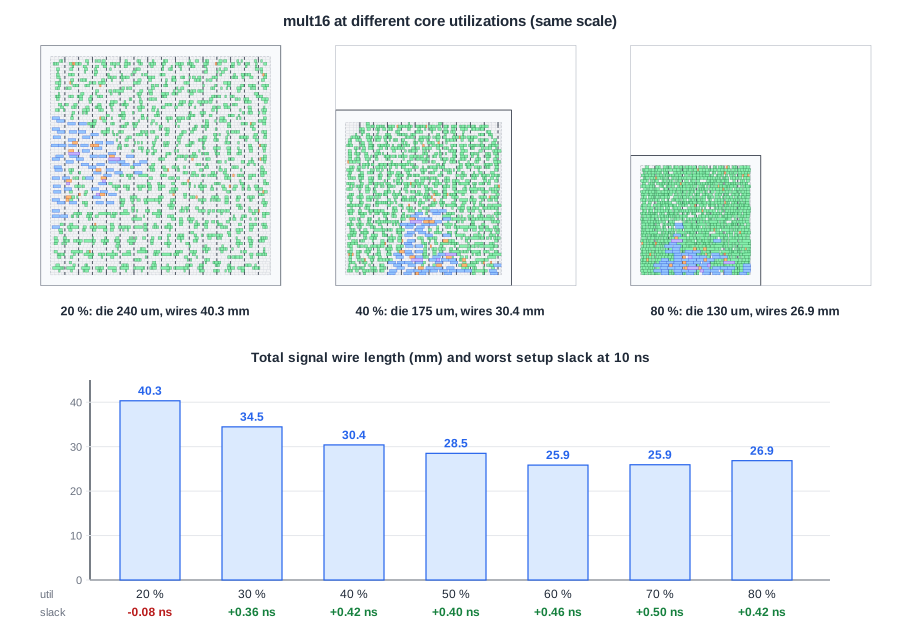
The multiplier has 9,668 um2 of cells from synthesis. Each run sizes the core for a different utilization; everything else is identical (10 ns clock, sky130 hd, typical corner):
| Utilization | Die (um) | Final utilization | Signal wire | met3 + met4 wire | Worst slack |
|---|---|---|---|---|---|
| 20 % | 239.9 | 22 % | 40.3 mm | 2.3 mm | -0.08 ns |
| 30 % | 199.5 | 33 % | 34.5 mm | 1.4 mm | +0.36 ns |
| 40 % | 175.5 | 44 % | 30.4 mm | 0.5 mm | +0.42 ns |
| 50 % | 159.1 | 54 % | 28.5 mm | 1.2 mm | +0.40 ns |
| 60 % | 146.9 | 64 % | 25.9 mm | 2.3 mm | +0.46 ns |
| 70 % | 137.5 | 75 % | 25.9 mm | 3.2 mm | +0.50 ns |
| 80 % | 129.9 | 84 % | 26.9 mm | 3.0 mm | +0.42 ns |
All seven runs route without violations.
Reading the Results
Low utilization: long wires
At 20 % the die is 3.4 times the area of the 80 % die. The cells are spread out, the wires are 40.3 mm in total, and the extra wire capacitance makes the design miss timing at 10 ns by 0.08 ns, while every denser run passes. A half-empty core is not a safe choice: it costs area, power and speed.
The sweet spot
Wire length falls steadily up to 60-70 %, where it reaches 25.9 mm, and the slack is best at 70 %. In this range the cells are close together and there is still enough room for routing on met1 and met2.
High utilization: crowding
At 80 % the total wire length rises again, to 26.9 mm, and more of it goes to met3 and met4: the lower layers are crowded, so the router takes detours up and around. The design still routes, but the margin is shrinking. A larger or more connected design would hit routing congestion and DRC violations sooner; Global Routing and Congestion shows how to see it coming.
Quick Check
Q: The final utilization is always a few percent above the target. Why?
Show Answer
The core is sized for the synthesized cells only. Tap cells, clock buffers and the cells upsized or inserted by timing repair are added later, and they take area in the same core.
When the Target Is Impossible
At 95 %, the flow stops right at the start of global placement:
[ERROR GPL-0301] Utilization 106.180 % exceeds 100%.
The placer adds the tap cells and a pin-density allowance (extra area around cells with many pins) to the cell area, which pushes the 95 % core past 100 %. There is no legal solution, and the tool says so immediately. Real designs fail much earlier, not with an error but with routing congestion that cannot be resolved.
Quick Check
Q: Why does a design with many small, highly connected cells reach its practical limit at a lower utilization than one with large cells?
Show Answer
Routing demand grows with the number of pins and nets, not with cell area. Many small cells pack many pins into a small area, so the wires run out of tracks before the rows run out of sites.
Running It in ChipVerify Lab
The lab's panel sizes the floorplan for at most 40 %, so with the free tier you can run the left half of the sweep: 20 %, 30 % and 40 %. With PRO, set the die area instead to reproduce the denser runs: the lab keeps a 10 um margin inside the die, so the die areas 0 0 159.06 159.06, 0 0 146.94 146.94, 0 0 137.52 137.52 and 0 0 129.93 129.93 give the 50 % to 80 % cores of this article.
Common Mistakes
Mistake #1: Starting with a very low utilization "to be safe"
As the 20 % run shows, an empty core makes wires long and timing worse. Start around 50-60 % for logic and adjust from measurements.
Mistake #2: Judging by placement alone
A design can place at 85 % and still fail routing. Look at congestion after global routing and at the final DRC count before deciding a utilization works.
Practice Exercise
Challenge: Run the Free Half of the Sweep
Run the multiplier at 20 %, 30 % and 40 % utilization. For each run note the die size, the worst slack and, from the CTS section, the number of clock buffers. Does the clock tree change with the die size?
Hint
CTS sizes the tree mainly from the number of flip-flops it must reach, 64 here.
Solution
Die sizes 239.9, 199.5 and 175.5 um, slack -0.08, +0.36 and +0.42 ns. The clock tree is the same size in all three runs: 9 buffers, 2 buffers deep to every flip-flop, because it is built for the same 64 sinks. What changes is the wire: the log reports an average sink wire length of 147 um at 20 %, 126 um at 30 % and 138 um at 40 %. Where the flip-flops happen to cluster matters as much as the die size.
Open the ready-made example in the lab, synthesize it and run Place and Route.
Summary
- Low utilization costs area and wire length: at 20 % the multiplier missed timing at 10 ns.
- Wire length was lowest around 60-70 %, and timing best at 70 %.
- At 80 % the router used more upper-layer detours; at 95 % placement failed with GPL-0301.
- Final utilization is always above the target because of taps, clock buffers and timing repair.
