
A Verilog design and its testbench contain many always and initial blocks, continuous assignments and procedural statements, all of which become active at different times during the simulation. A simulator runs on a single processor, so it needs precise rules for which of these runs first. Those rules are the scheduling semantics of Verilog, and they explain why a nonblocking assignment, a $display and a $strobe in the same time step can see different values.
12 min read | Beginner Level
What You'll Learn
- The difference between update events and evaluation events
- How the event queue divides every time step into the Active, Inactive, NBA and Monitor regions
- How the simulator processes one time step and then advances time
- What makes simulation results nondeterministic, and how coding rules avoid race conditions
Event Types
The simulator works with two kinds of events:
- An update event is a change in the value of a net or variable.
- An evaluation event is the execution of a process, such as an
alwaysblock or a continuous assignment, in response to an update event it is sensitive to.
module tb;
  reg a, b, c;
  wire d;

  // 'always' is a process that gets evaluated when either 'a' or 'b' is updated.
  // When 'a' or 'b' changes in value it is called an 'update event'. When 'always'
  // block is triggered because of a change in 'a' or 'b' it is called an evaluation
  // event
  always @ (a or b) begin
    c = a & b;
  end

  // Here 'assign' is a process which is evaluated when either 'a' or 'b' or 'c'
  // gets updated
  assign d = a | b ^ c;
endmodule
One update event can start a whole chain. When a changes, both the always block and the assign are evaluated. If the always block then changes c, that is a new update event, and because c is also an input of the assign, the assign is evaluated again. The chain stops when no evaluation produces a new value.
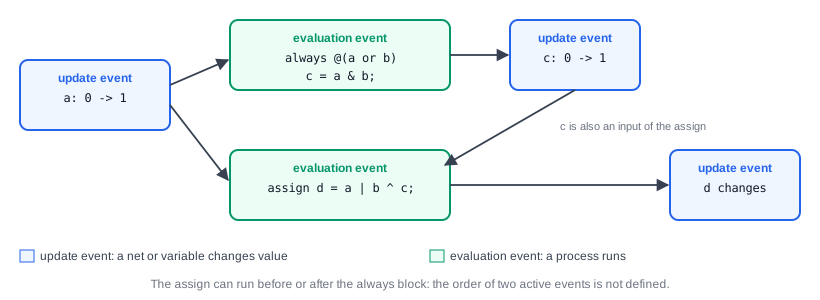
Because events are created at different simulation times, the simulator keeps them in an event queue, sorted by time, so that they are executed in the correct order.
Quick Check
In the module above, b is 0 when a changes from 0 to 1. Does the always block cause a second evaluation of the assign?
Show Answer
No. The always block is evaluated, but c = a & b is still 0, so c does not change, there is no update event on c, and the assign is only evaluated once, because of the change on a.
Event Queue
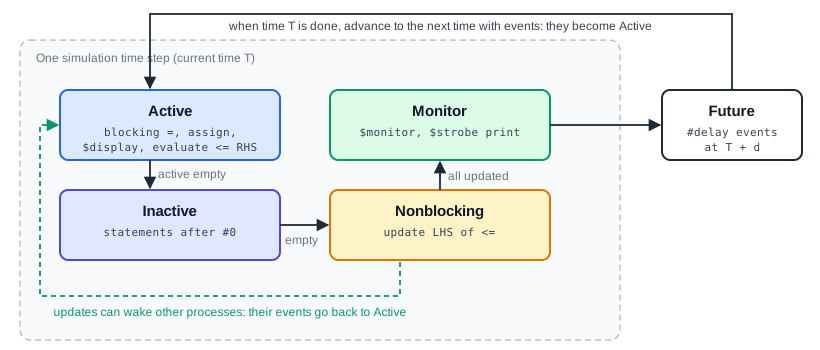
All events that belong to the same simulation time form a time slot. Within a time slot, the event queue is divided into four regions. Events can be added to any region, but they are only executed from the Active region. When the Active region is empty, events are moved into it from the next region in line; when all regions are empty, simulation time advances to the next time slot.
Active Region
The Active region holds the events that are being processed at the current simulation time. This includes evaluating continuous assignments, executing blocking assignments, running $display, and evaluating the right-hand side of nonblocking assignments. Events in the Active region can be processed in any order, and the simulator is free to choose that order.
Inactive Region
The Inactive region holds events for the current time that must wait until all Active events are done. A statement after an explicit zero delay, #0, is scheduled here. When the Active region is empty, all Inactive events are moved to the Active region.
Nonblocking Assignment (NBA) Region
A nonblocking assignment q <= d; evaluates d in the Active region, but the update of q is scheduled in the NBA region. It is applied only after all Active and Inactive events of the current time are done. Any process woken up by these updates puts new events into the Active region, and the cycle starts again.
Monitor Region
The Monitor region runs $monitor and $strobe. It is processed last, after all other regions of the time slot are empty, so these tasks always print the final values of that time.
| Region | Contains | Processed |
|---|---|---|
| Active | Blocking assignments, continuous assignments, $display, right-hand sides of <= | First, in any order |
| Inactive | Statements after #0 | When Active is empty |
| NBA | Updates of nonblocking assignments | When Active and Inactive are empty |
| Monitor | $monitor, $strobe | Last, when all others are empty |
Synthesis result: None. The event queue is a model of how a simulator executes code; hardware has no event regions. The scheduling rules matter for synthesis only indirectly: code that follows them, with nonblocking assignments in clocked blocks, simulates the same way the synthesized flip-flops behave.
Example
module tb;
  reg x, y, z;

  initial begin
    #1  x = 1;
        y = 1;
    #1  z = 0;
  end
endmodule
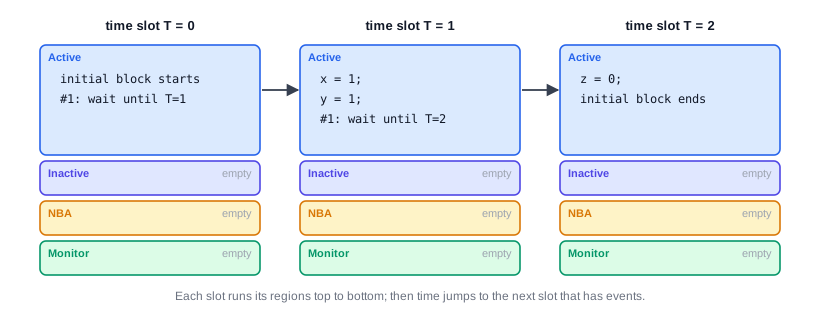
The simulation starts at time 0, where the initial block begins and immediately reaches #1. The rest of the block is scheduled for a future time. At time 1, x and y are assigned 1 in the Active region, and the next #1 schedules the last statement for time 2, where z is assigned 0. Before their first assignment, all three variables are x.
Event Processing Flow
Within one time slot, the simulator repeats these steps:
- Execute all events in the Active region, in any order. New events created while doing so are added to the matching region.
- When the Active region is empty, move all Inactive events to the Active region and go back to step 1.
- When Active and Inactive are both empty, move all NBA events to the Active region, apply the updates, and go back to step 1, because the updates can wake up other processes.
- When Active, Inactive and NBA are all empty, run the Monitor events.
- Advance simulation time to the next time slot that has events.
The code below shows the regions at work in a single time step:
module regions;
  reg [3:0] a;

  initial begin
    a = 1;
    a <= 2;                              // Update scheduled in the NBA region
    $display ("display : a=%0d", a);     // Active region
    #0 $display ("after #0: a=%0d", a);  // Inactive region
    $strobe ("strobe  : a=%0d", a);      // Monitor region
  end
endmodule
display : a=1
after #0: a=1
strobe  : a=2
The nonblocking update to 2 waits in the NBA region. The first $display runs in the Active region and prints 1. The #0 moves the rest of the block to the Inactive region, which still comes before the NBA region, so the second $display also prints 1. $strobe is called at the same time, but only prints in the Monitor region, after the update, so it shows 2.
Quick Check
If a <= 2; were replaced by a = 2;, what would the three lines print?
Show Answer
All three would print 2. A blocking assignment updates a immediately in the Active region, before the first $display runs.
Why Clocked RTL Uses Nonblocking Assignments
In a real chip, every flip-flop on a clock samples its input at the same instant, and only then do all outputs change. The NBA region recreates exactly that: at a clock edge, every always @(posedge clk) block reads its inputs in the Active region, and all registers are updated together afterwards in the NBA region. This is why shift registers, pipelines and state machines written with <= simulate the same way as the flip-flops that synthesis builds from them.
What makes simulation nondeterministic ?
Because the events in the Active region can be processed in any order, the same design and testbench can give different results on different simulators, or even after a small change to the code. This happens when two processes at the same time read and write the same variable, which is called a race condition.
module race;
  reg clk = 0;
  reg a = 0, b = 0;

  always #5 clk = ~clk;

  always @(posedge clk) a = 1;    // Block 1
  always @(posedge clk) b = a;    // Block 2: reads a at the same time
endmodule
At the first rising edge of clk, both blocks are woken up in the Active region. If Block 1 runs first, b gets the new value 1; if Block 2 runs first, b gets the old value 0. Both orders are legal, so the result is not defined by the language.
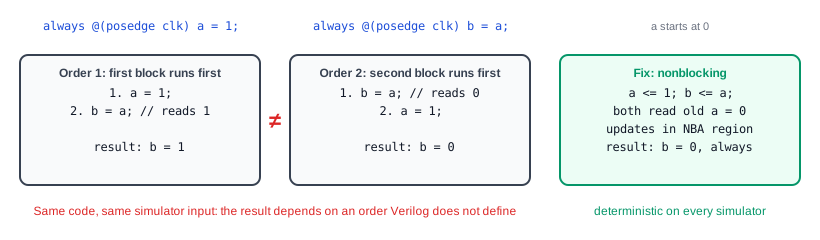
Writing both blocks with nonblocking assignments removes the race. Both read a in the Active region, where it is still 0, and both updates happen later in the NBA region, so b is 0 after the first edge and 1 after the second, on every simulator. Other sources of nondeterminism are statements in different processes that write the same variable at the same time, and testbenches that change inputs at exactly the clock edge with blocking assignments.
Simulator Upgrades That Change Results
A design with a hidden race can pass for years and then fail after a simulator upgrade or when optimizations are turned on, simply because the new version processes Active events in a different order. Verification teams therefore follow strict coding rules: nonblocking assignments in clocked always blocks, blocking assignments in combinational blocks, and testbench stimulus driven away from the active clock edge. Lint tools check these rules automatically.
Common Beginner Mistakes
Mistake #1: Blocking assignments in clocked always blocks
Wrong: always @(posedge clk) q1 = d; always @(posedge clk) q2 = q1;
Right: always @(posedge clk) q1 <= d; always @(posedge clk) q2 <= q1;
Why? With blocking assignments, q2 may receive the new or the old value of q1, depending on which block runs first. With nonblocking assignments, it always receives the old value, which is how two flip-flops in a row behave.
Mistake #2: Using #0 to fix a race
Wrong: Adding #0 before a statement so that it runs "after" the other block
Right: Fix the cause, normally by using nonblocking assignments
Why? #0 only moves the statement to the Inactive region. If the other process also uses #0, or updates its value through a nonblocking assignment, the race comes back. Code full of #0 is hard to understand and fragile.
Mistake #3: Printing with $display to check nonblocking results
Wrong: q <= d; $display("q=%b", q);, expecting the new value
Right: Use $strobe or $monitor, which run in the Monitor region
Why? $display runs in the Active region, before the NBA region has applied the update.
Mistake #4: Assuming processes run in the order they are written
Wrong: Expecting the first always block in the file to run before the second at the same time
Right: Write code whose result does not depend on the order of processes
Why? Only statements within one begin ... end block are guaranteed to run in order. The order of different processes in the Active region is up to the simulator, and it may change between versions or with different options.
Practice Exercise
Challenge: Trace the Regions
For the code below, list the order in which the four print statements produce output at time 10, and the value each one prints.
module tb;
  reg [3:0] v;

  initial begin
    v = 0;
    #10;
    v <= 5;
    $strobe  ("A: v=%0d", v);
    $display ("B: v=%0d", v);
    v = 3;
    #0 $display ("C: v=%0d", v);
  end

  initial #10 $display ("D: v=%0d", v);
endmodule
Hint
Place each statement in its region. Remember that the two initial blocks wake up at time 10 in an undefined order, and that the NBA update overwrites any blocking assignment made earlier in the same time step.
Solution
B: v=0
C: v=3
A: v=5
Line D is printed in the Active region at time 10, either before B (showing 0) or after the blocking assignment v = 3 (showing 3), depending on which initial block the simulator runs first, so its position and value are a race. B runs in the Active region before v = 3 and prints 0. C runs in the Inactive region, after v = 3 but before the NBA update, and prints 3. A, from $strobe, prints in the Monitor region after the NBA region has set v to 5.
Summary
In this tutorial, you learned:
- An update event is a change of value, and an evaluation event is a process that runs because of it
- Events are kept in an event queue sorted by time, and each time slot has an Active, Inactive, NBA and Monitor region
- Blocking assignments and
$displayrun in the Active region,#0statements in the Inactive region, nonblocking updates in the NBA region, and$strobeand$monitorin the Monitor region - Time advances only when all regions of the current time slot are empty
- Active events can run in any order, so two processes reading and writing the same variable at the same time create a race
- Nonblocking assignments in clocked blocks remove these races and match the behavior of real flip-flops
