
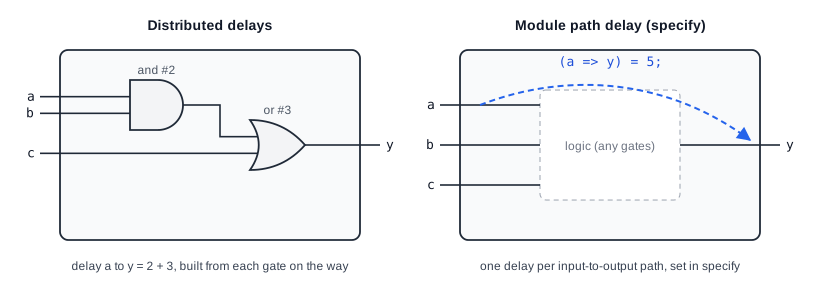
Structural models, such as the simulation models of ASIC library cells, describe delays in two ways. Distributed delays are placed on the individual gates and nets inside the module, as in and #2 (y, a, b);. Module path delays describe the total delay from an input pin to an output pin, no matter which gates the signal passes through on the way. Module path delays, together with timing checks, are written in a specify block.
11 min read | Beginner Level
What You'll Learn
- What a specify block is and where it is used
- How to declare full and parallel module paths with
*>and=> - How to write edge-sensitive and state-dependent paths, and the
ifnonedefault - How timing checks such as
$setupand$holdreport timing violations
What is a specify block ?
A specify block defines the timing of a module as seen from its ports: how long each output takes to respond to a change on each input, and which timing rules the inputs must follow, such as the setup and hold times of a flip-flop. Simulators use these values to model the real timing of a cell, and the values can later be replaced by more accurate ones calculated from the chip layout.
Syntax
A specify block is written inside a module, between the keywords specify and endspecify. It can contain three kinds of items:
specify

// Checks and Statements

endspecify
specparamdeclarations: named constants for delays and limits, which can only be used inside the module- Path declarations: the delay from a source port to a destination port
- System timing checks: tasks such as
$setupand$holdthat report when the inputs violate a timing rule
Specify Example
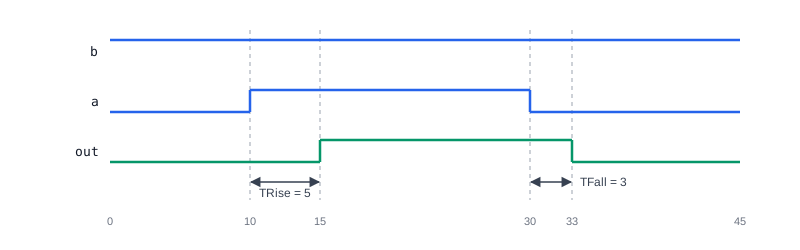
The module below is a 2-input AND cell. The output rises 5 time units and falls 3 time units after a change on either input:
module example_module (
    input wire a,
    input wire b,
    output wire out
);

specify
    // Specparam declaration to define timing parameters
    specparam TRise = 5; // Rise time delay
    specparam TFall = 3; // Fall time delay

    // Path declarations to specify delays between signals
    (a => out) = (TRise, TFall);   // Delay from input 'a' to output 'out'
    (b => out) = (TRise, TFall);   // Delay from input 'b' to output 'out'
endspecify

// Logic for the output
assign out = a & b; // Example combinational logic

endmodule
The assign statement describes what the cell computes, and the specify block describes when the output changes. If b is 1 and a rises at time 10, out rises at time 15; if a then falls at time 30, out falls at time 33.
As with gate delays, a path delay can be one value for all transitions, two values for rise and fall, or three values for rise, fall and turn-off. Each value can also be a min:typ:max triple.
Synthesis result: None. Synthesis tools ignore specify blocks, because the timing of the synthesized circuit comes from the target library. Specify blocks belong in simulation models of cells, not in RTL that will be synthesized.
Module Paths
A module path connects a source, which must be an input or inout port, to a destination, which must be an output or inout port with only one driver inside the module. Paths can be simple, edge-sensitive or state-dependent.
Simple Module Paths
There are two ways to connect the source to the destination:
- Full connection
*>: every bit of every source connects to every bit of every destination. Several sources and destinations can be listed, separated by commas. - Parallel connection
=>: bit 0 of the source connects to bit 0 of the destination, bit 1 to bit 1, and so on. Source and destination must have the same width.
specify
    // Full connection using the (*>) operator
    (c, a *> z) = 5;  // Delay of 5 time units for a simple path from 'a' to 'z' or 'c' to 'z'

    // Parallel connection using the (=>) operator
    (b => y) = 10;  // Delay of 10 time units from input 'b' to output 'y'
endspecify
For 2-bit ports in[1:0] and out[1:0], the two connections describe different sets of paths:
| Declaration | Paths |
|---|---|
(in => out) = 5; | in[0] to out[0], in[1] to out[1] |
(in *> out) = 5; | in[0] to out[0], in[0] to out[1], in[1] to out[0], in[1] to out[1] |
![Paths between 2-bit ports: the parallel connection (in => out) creates two paths, in[0] to out[0] and in[1] to out[1], and requires equal widths; the full connection (in *> out) creates four paths, from each input bit to each output bit, and works with any widths](/images/verilog/specify-full-vs-parallel.svg)
Use => when each output bit depends only on the matching input bit, as in a buffer or inverter bank, and *> when any input bit can affect any output bit, as in an adder or a decoder.
Quick Check
A 4-bit input sel and an 8-bit output y are connected with (sel => y) = 2;. What happens?
Show Answer
The compiler reports an error, because a parallel connection requires source and destination of the same width. A full connection, (sel *> y) = 2;, works for any widths and describes 32 paths, one from each bit of sel to each bit of y.
Edge Sensitive Paths
An edge-sensitive path applies only when a particular edge occurs on the source, such as the clock of a flip-flop. The destination is followed by a colon and the data source, the input whose value is passed to the output:
specify
    // Edge-sensitive path declaration
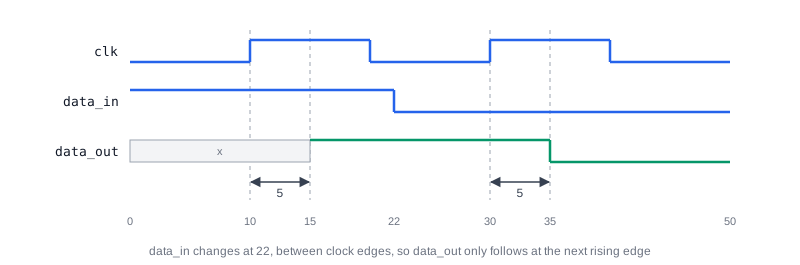
    (posedge clk => (data_out : data_in)) = 5;  // Delay of 5 time units for the rising edge of 'clk' affecting 'data_out'
endspecify
This reads as "on a rising edge of clk, data_out takes the value of data_in after 5 time units", which is the clock-to-output delay of a flip-flop. Without an edge keyword, the path applies to any transition of the source. Many simulators also accept the shorter form (posedge clk *> data_out) = 5; without the data source, but the form with ( : ) is the one defined by the standard.
State Dependent Paths
A state-dependent path applies its delay only while a condition is true. This models cells whose delay depends on the value of another input, for example a mux whose delay from one input differs depending on the select.
specify
    // State-dependent path declaration
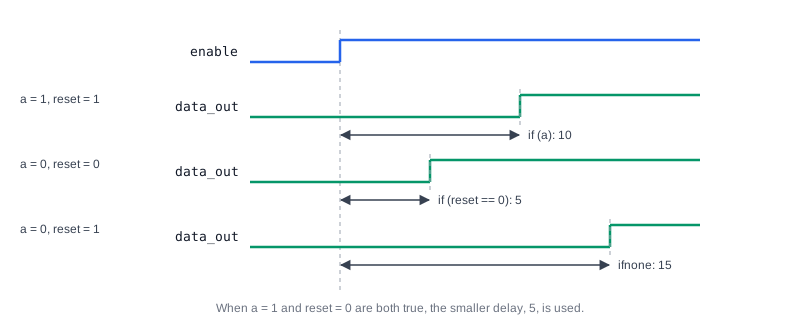
    if (a) (enable => data_out) = 10;  // Delay of 10 time units when 'a' is true
    if (reset ==0) (enable => data_out) = 5; // Delay of 5 time units when 'reset' is low
endspecify
The condition can only use ports and constants of the module. If several conditions are true at the same time, the simulator uses the smallest of their delays.
ifnone Condition
ifnone gives the delay to use when none of the conditions of the state-dependent paths is true. It must have exactly the same source and destination as those paths.
specify
    // Default state-dependent path delay using ifnone
    ifnone (enable => data_out) = (15.0, 15.0);           // Default delay of 15 time units when no other conditions are met
endspecify
Together with the two conditional paths above, the delay from enable to data_out is 10 while a is 1, 5 while reset is 0, the smaller value 5 when both are true, and 15 otherwise. ifnone cannot be combined with an unconditional path between the same two ports, because the unconditional path would already cover every case.
Quick Check
With the conditional paths and the ifnone above, what is the delay from enable to data_out when a = 0 and reset = 1?
Show Answer
15. Neither if (a) nor if (reset == 0) is true, so the ifnone delay applies.
Timing Checks
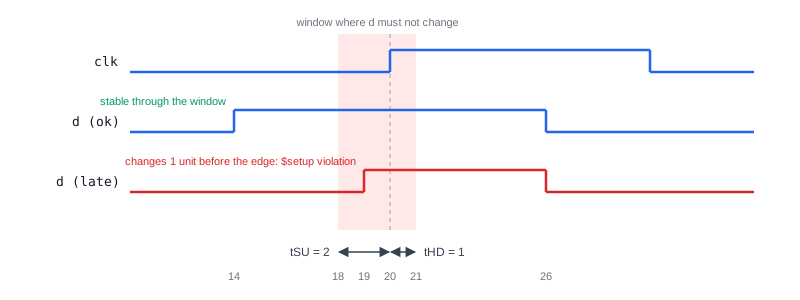
Besides delays, a specify block can check that the inputs of a cell follow its timing rules. The most common checks are for the setup and hold times of a flip-flop: the data must be stable for a minimum time before the clock edge (setup) and after it (hold). The flip-flop model below uses the d_flop primitive from Verilog UDP:
module dff_cell (input clk, d, output q);

  d_flop u0 (q, clk, d);           // Functional model of the flip-flop

  specify
    specparam tCQ = 3;             // Clock to output delay
    specparam tSU = 2;             // Setup time
    specparam tHD = 1;             // Hold time

    (posedge clk => (q : d)) = tCQ;

    $setup (d, posedge clk, tSU);  // d must be stable 2 units before the edge
    $hold  (posedge clk, d, tHD);  // and 1 unit after it
  endspecify

endmodule
If d changes 1 time unit before a rising edge of clk, the setup check is violated, and the simulator prints a warning with the time and the names of the signals. The simulation continues; the check only reports the problem. In library models, an extra notifier argument, such as $setup(d, posedge clk, tSU, notifier);, toggles a register on every violation, and the cell's UDP uses it to set q to x, just as a real flip-flop could go metastable.
| Check | Checks that |
|---|---|
$setup(data, ref, limit) | data does not change within limit before the reference event |
$hold(ref, data, limit) | data does not change within limit after the reference event |
$setuphold(ref, data, setup, hold) | both of the above in one check |
$width(edge, limit) | a pulse is at least limit wide |
$period(edge, limit) | the time between two edges is at least limit |
$recovery(ref, data, limit) | an asynchronous reset is released at least limit before a clock edge |
SDF Back-Annotation
The values in a library cell's specify block are only defaults. After place and route, timing tools calculate the real delay of every cell instance, including the effect of its load and wiring, and write them to a Standard Delay Format (SDF) file. The simulator reads the SDF file and replaces the specify block values of each instance, so the gate-level simulation runs with the timing of the actual chip and the timing checks use the real limits.
Finding Clock Domain Problems
Static timing analysis cannot check signals that cross between unrelated clocks. In a gate-level simulation with timing, the $setup and $hold checks of the synchronizer flip-flops fire when data from one clock domain arrives too close to the edge of the other clock. These warnings are expected on synchronizers, but a violation on any other flip-flop points to a missing synchronizer in the design.
Common Beginner Mistakes
Mistake #1: Using => for ports of different widths
Wrong: (addr => data) = 2; with an 8-bit addr and a 16-bit data
Right: (addr *> data) = 2;
Why? A parallel connection pairs up bits one by one, so both sides must have the same width. When every input bit can affect every output bit, the full connection is also the correct description of the cell.
Mistake #2: Swapping the arguments of $setup and $hold
Wrong: $setup(posedge clk, d, 2);
Right: $setup(d, posedge clk, 2); and $hold(posedge clk, d, 1);
Why? $setup takes the data event first, while $hold takes the reference event first, following the order in which the two events happen in time. With swapped arguments, the check measures the wrong interval and misses real violations.
Mistake #3: Expecting path delays and distributed delays to add up
Wrong: A module with and #2 (out, a, b); and (a => out) = 5;, expecting a delay of 7
Right: Describe the delay in one place, normally the specify block
Why? When a module has both kinds of delay, the simulator uses the larger of the distributed delay and the path delay for each path, here 5, not the sum.
Mistake #4: Putting a specify block in synthesizable RTL to meet timing
Wrong: Adding $setup checks or path delays to an RTL design and expecting synthesis to respect them
Right: Give timing requirements to synthesis and static timing analysis as timing constraints
Why? Synthesis ignores specify blocks completely. Clock periods, input and output delays are given to the tools in a separate constraints file.
Practice Exercise
Challenge: Timing for a 2:1 Mux Cell
Write a module mux2_cell (input a, b, sel, output y) with assign y = sel ? b : a; and a specify block with these delays: from a and b to y, rise 2 and fall 3; from sel to y, 4 for both transitions.
Hint
The data inputs share the same delays, so they can be listed together in one full connection. Use specparam names for the values so that they are easy to change.
Solution
module mux2_cell (input a, b, sel, output y);

  assign y = sel ? b : a;

  specify
    specparam tD_RISE = 2;
    specparam tD_FALL = 3;
    specparam tSEL    = 4;

    (a, b *> y) = (tD_RISE, tD_FALL);   // Data inputs to output
    (sel => y)  = tSEL;                 // Select to output
  endspecify

endmodule
If sel is 0 and a rises at time 10, y rises at time 12. If sel then changes to 1 at time 20 while b is 0, y falls at time 24. A more detailed model could make the data delays state-dependent, for example if (!sel) (a => y) = ...;, because a only affects y while sel is 0.
Summary
In this tutorial, you learned:
- A specify block, between
specifyandendspecify, describes the pin-to-pin timing of a module withspecparams, path delays and timing checks *>declares a full connection between all bits, and=>a parallel connection between bits of equal width- Edge-sensitive paths such as
(posedge clk => (q : d))model clock-to-output delays - State-dependent paths use
if (condition), andifnonegives the default delay when no condition is true - Timing checks such as
$setupand$holdreport violations, and a notifier can turn them into x on the output - Specify blocks are used in cell library models, their values are replaced through SDF back-annotation, and synthesis ignores them
