
A flip-flop only captures its input reliably if the input is stable for a short time before and after the clock edge, and an asynchronous reset must be released far enough away from a clock edge. In a gate-level simulation with real delays, Verilog timing checks watch for exactly these conditions and report every place where a signal arrives too late or too early, before such a violation becomes a failing chip.
12 min read | Beginner Level
What You'll Learn
- What reference, data, timestamp and timecheck events are
- How
$setup,$holdand$setupholdcheck data around a clock edge - How
$recovery,$removaland$recremcheck the release of an asynchronous reset - How a notifier turns a violation into an x on the flip-flop output
What are timing checks ?
Timing checks verify that a circuit meets its timing requirements: that signals arrive within the allowed time limits relative to each other, so that setup and hold violations, and similar problems with resets, are found in simulation.

Timing checks must be placed inside a specify block in a module. Although their names start with $, they are not system tasks that run when a statement is executed: they are declarations that the simulator monitors continuously for the whole simulation.
specify
  // Timing check statements
endspecify
What are reference and data events ?
Every timing check compares two events:
- The reference event sets the point in time that the check is measured from. It is usually a clock edge, or the release of a reset.
- The data event is the signal being checked against that reference. It is usually the data input of a flip-flop, or the clock in reset checks.
The example below checks the setup and hold time of data_signal against the rising edge of clk:
specify
    $setup(data_signal, posedge clk, setup_time_limit);     // posedge clk is reference event
    $hold(posedge clk, data_signal, hold_time_limit);       // data_signal is the data event
endspecify
Either event can be given a condition with &&&, as in $setup(d, posedge clk &&& en, 2);. The check then only detects events while the condition is true, for example only when the flip-flop is enabled.
What are timestamp and timecheck events ?
Internally, each check works with two more names for the same events. The timestamp event is the one whose time the simulator records. The timecheck event is the one that makes the simulator evaluate the check: when it happens, the simulator compares its time with the recorded timestamp, and reports a violation if the difference is smaller than the limit. Which of the reference and data events plays which role depends on the check.
Example
Consider a setup check on a path between two flip-flops, FF1 and FF2, clocked by the same clock. Data launched by FF1 travels through logic and arrives at FF2.D, and FF2 captures it at the next rising clock edge.
- Reference event: the capturing clock edge at FF2
- Data event: the arrival of the new data at
FF2.D - Timestamp event: the data arrival, whose time is recorded
- Timecheck event: the rising clock edge, which triggers the check

If the data arrived less than the setup limit before the clock edge, the check reports a setup violation.
$setup
$setup reports a violation when the data event occurs within the setup limit before the reference event. The data change is the timestamp event and the reference event, usually the clock edge, is the timecheck event:
time_window_begin  = timecheck_time - limit
time_window_end    = timecheck_time

// Report violation if
time_window_begin < timestamp_time < time_window_end
$setup(data_event, reference_event, limit[, notifier]);

$setup(data, posedge clk, 3);   // Example
The data event is usually a data signal, and the reference event is usually a clock. In the example, data must not change in the 3 time units before each rising edge of clk. A limit of 0 never produces a violation.

$hold
$hold reports a violation when the data event occurs within the hold limit after the reference event. Here the reference event, the clock edge, is the timestamp event, and the data change is the timecheck event:
time_window_begin    = timestamp_time
time_window_end      = timestamp_time + limit

// Report a violation if
time_window_begin <= time_check_time < time_window_end
$hold(reference_event, data_event, limit[, notifier]);

$hold(posedge clk, data, 5);    // Example
The reference event is usually a clock, and the data event a data signal. In the example, data must stay stable for 5 time units after each rising edge of clk. Note that the window starts exactly at the clock edge, so a data change at the same time as the edge is a hold violation. A limit of 0 never produces a violation.

Quick Check
With $setup(data, posedge clk, 3) and $hold(posedge clk, data, 5), the clock rises at 100. Which of these data changes cause a violation: at 96, at 98, at 103, at 106?
Show Answer
98 (setup, it falls between 97 and 100) and 103 (hold, it falls between 100 and 105). The change at 96 is more than 3 units before the edge, and the change at 106 is more than 5 units after it.
$setuphold
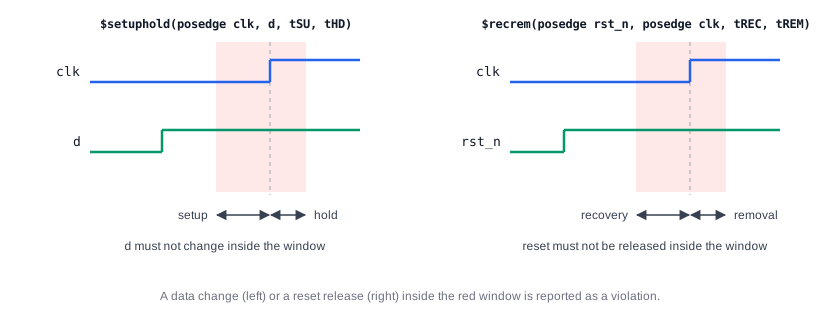
$setuphold combines a setup check and a hold check in one statement, with a separate limit for each. Its argument order follows $hold: reference event first.
$setuphold(reference_event, data_event, setup_limit, hold_limit[, notifier]);

$setuphold(posedge clk, data, 5, 10);   // Example
The example is the same as $setup(data, posedge clk, 5) together with $hold(posedge clk, data, 10): data must be stable from 5 units before each rising edge until 10 units after it. Library cell models almost always use $setuphold, because the two limits belong together.
$recovery
An asynchronous reset or clear works at any time while it is active, but when it is released, the flip-flop needs some time before it can respond to the next clock edge. $recovery checks that the release of the reset (the reference event) comes at least the recovery limit before the clock edge (the data event):
time_window_begin    = timestamp_time          // reference event
time_window_end      = timestamp_time + limit

// Report violation if
time_window_begin <= timecheck_time < time_window_end

$recovery(reference_event, data_event, limit[, notifier]);

$recovery(posedge rst_n, posedge clk, 4);   // Example
The reference event is usually the release of a control signal such as clear or reset, and the data event is usually a clock. In the example, an active-low reset rst_n is released with its rising edge, and the next rising edge of clk must come at least 4 time units later. A limit of 0 never produces a violation.
$removal
$removal is the counterpart of $recovery: it checks that the reset is not released too soon after a clock edge. If the reset is removed just after the edge, the flip-flop may still be held in reset at the edge, or may already react to it, so the result is uncertain. The clock edge is the timestamp event and the reset release is the timecheck event:
time_window_begin    = timecheck_time - limit   // reference event
time_window_end      = timecheck_time

// Report a violation if
time_window_begin < timestamp_time < time_window_end

$removal(reference_event, data_event, limit[, notifier]);

$removal(posedge rst_n, posedge clk, 5);   // Example
The reference event is usually the release of a reset or clear, and the data event is usually a clock. In the example, rst_n must not be released within 5 time units after a rising edge of clk.
$recrem
$recrem combines a recovery check and a removal check in one statement, in the same way that $setuphold combines setup and hold:
$recrem(reference_event, data_event, rec_limit, rem_limit[, notifier]);

$recrem(posedge rst_n, posedge clk, 4, 5);    // Example
Together, the two limits define a window around each clock edge, from 4 units before it to 5 units after it, in which the reset must not be released, as shown on the right of the diagram above.
Quick Check
With $recrem(posedge rst_n, posedge clk, 4, 5) and a clock edge at 200, is releasing the reset at 198 a recovery or a removal violation? What about at 202?
Show Answer
At 198, the reset is released only 2 units before the clock edge, less than the recovery limit of 4: a recovery violation. At 202, it is released 2 units after the edge, less than the removal limit of 5: a removal violation.
Timing Checks in a Cell Model
The optional notifier argument is a reg that the simulator toggles every time the check reports a violation. A cell model connects it to its functional model, so that the flip-flop's output becomes x after a violation, just as a real flip-flop could go metastable:
module dff_r (input clk, d, rst_n, output q);
  reg notifier;

  // UDP flip-flop with an asynchronous active-low reset; any change on
  // notifier drives q to x
  dff_r_udp u0 (q, d, clk, rst_n, notifier);

  specify
    (posedge clk => (q : d)) = 2;
    $setuphold (posedge clk, d, 1.5, 0.5, notifier);
    $recrem    (posedge rst_n, posedge clk, 1.0, 0.8, notifier);
  endspecify
endmodule
The simulator prints a warning for each violation, with the simulation time, the check that failed and the instance name, for example a setup violation on the d pin of one flip-flop. The x on q then spreads through the following logic, and the testbench checks fail, so the problem cannot be overlooked.
Synthesis result: None. Timing checks are ignored by synthesis, which uses constraints and the timing data of the library instead. Static timing analysis verifies the same setup, hold, recovery and removal requirements on the synthesized netlist without simulation; timing checks in a gate-level simulation catch the cases static analysis does not cover, such as signals crossing between unrelated clocks.
Reset Synchronizers
Asynchronous resets often come from outside the chip, with no relation to the clock. If such a reset were released directly at every flip-flop, some would see the release before a clock edge and some after it, and the design would start up in an inconsistent state. Designs therefore assert the reset asynchronously but release it through a small synchronizer clocked by the destination clock. The $recovery and $removal checks in a gate-level simulation confirm that the synchronized release meets the limits at every flip-flop.
Gate-Level Simulation with SDF
The limits written in a cell model are only defaults. After layout, a Standard Delay Format file provides the real setup, hold, recovery and removal limits of each cell instance, and the simulator replaces the specify block values with them. The gate-level simulation then checks the actual chip timing on the paths the tests exercise, which is especially useful for asynchronous interfaces and reset sequences. See Verilog SDF.
Common Beginner Mistakes
Mistake #1: Swapping the argument order of $setup
Wrong: $setup(posedge clk, data, 3);
Right: $setup(data, posedge clk, 3);
Why? $setup is the only check that takes the data event first; $hold, $setuphold, $recovery, $removal and $recrem all take the reference event first. With swapped arguments, the check measures the wrong interval and misses real violations.
Mistake #2: Using the wrong edge of the reset
Wrong: $recovery(negedge rst_n, posedge clk, 4); for an active-low reset
Right: $recovery(posedge rst_n, posedge clk, 4);
Why? Recovery and removal are about the release of the reset. For an active-low reset, the release is the rising edge; the falling edge asserts the reset, which takes effect immediately and does not need a timing check against the clock.
Mistake #3: Placing timing checks outside a specify block
Wrong: Calling $setup(...) inside an initial or always block
Right: Declare timing checks inside specify ... endspecify
Why? Timing checks are not procedural system tasks. They are declarations that the simulator monitors throughout the simulation, and they are only allowed in a specify block.
Mistake #4: Expecting violations in a zero-delay RTL simulation
Wrong: Relying on RTL simulation to find setup and hold problems
Right: Check timing with static timing analysis, and run gate-level simulation with SDF timing for asynchronous paths
Why? RTL models usually have no specify blocks and no delays. Data changes exactly at the clock edge, and no timing check exists to fire. Timing checks only become meaningful with cell models and real delays.
Practice Exercise
Challenge: Checks for a Flip-Flop with Enable
A flip-flop cell has inputs clk, d, en and an active-high asynchronous clear clr. Write a specify block with these checks, all reporting to a notifier: setup 1.2 and hold 0.4 for d, checked only when en is 1; setup 1.0 and hold 0.3 for en; recovery 0.9 and removal 0.6 for clr.
Hint
Use &&& to add a condition to the reference event. For an active-high clear, the release is its falling edge.
Solution
specify
  $setuphold (posedge clk &&& en, d, 1.2, 0.4, notifier);
  $setuphold (posedge clk, en, 1.0, 0.3, notifier);
  $recrem    (negedge clr, posedge clk, 0.9, 0.6, notifier);
endspecify
The condition &&& en means that a change of d near a clock edge is only reported when the flip-flop would actually capture it. The enable itself is checked at every edge, because it decides what is captured. The clear is active high, so its release is negedge clr.
Summary
In this tutorial, you learned:
- Timing checks are declared in specify blocks and monitored by the simulator throughout the simulation
- Each check compares a reference event with a data event; the timestamp event is recorded and the timecheck event triggers the comparison
$setupand$holdcheck that data is stable before and after a clock edge, and$setupholddoes both$recoveryand$removalcheck that a reset is not released too close before or after a clock edge, and$recremdoes both$setuptakes the data event first; all other checks take the reference event first- A notifier makes the cell output x after a violation, so the error shows up in the testbench
