
A debounce circuit filters the noisy signal from a mechanical button or switch so that one press produces exactly one clean transition. In Verilog, a debouncer synchronizes the raw input to the clock, then changes its output only after the input has stayed at a new level for a fixed time, typically a few milliseconds.
12 min read | Beginner Level
What You'll Learn
- Why mechanical contacts bounce, and what bouncing does to digital logic
- Write a counter-based debouncer with an input synchronizer
- Write a shift register debouncer and compare the two approaches
- Size the debounce time for real hardware and test the debouncer efficiently in simulation
What is debouncing ?
Mechanical buttons and switches do not make a clean transition from 0 to 1. When the contacts close, they bounce against each other, making and breaking contact many times before settling. A typical bounce lasts about 5 to 20 ms, which is hundreds of thousands of cycles of a 50 MHz clock.
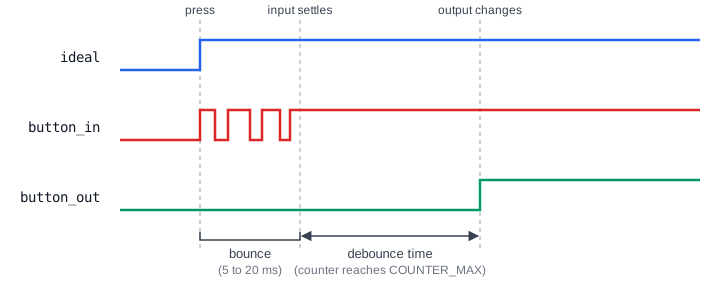
Digital logic sees every bounce as a separate edge. Without debouncing, one press can register as several presses: a counter increments several times, a state machine skips states, or an action runs repeatedly. Debouncing replaces the burst of edges with a single clean change.
Counter Based Debouncer
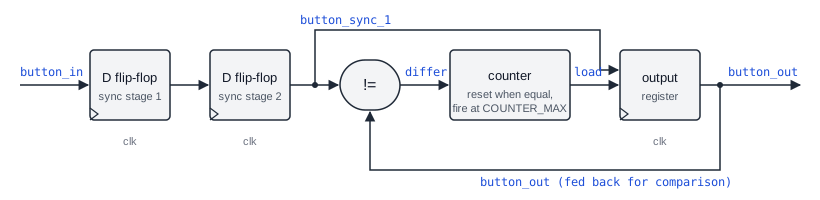
The most common and reliable approach waits until the input has been stable for a set time before passing it on:
Key Components
- Input synchronizer: two flip-flops in series. The button is not synchronized to the clock and can change just as a flip-flop samples it, which can make that flip-flop metastable. The second flip-flop gives the value time to settle.
- Counter logic: compares the synchronized input with the current output. While they differ, it counts clock cycles. If the input changes back before the count reaches the threshold, the counter restarts. Only when the input has been stable for the whole debounce period does the output change.
- Output register: holds the debounced value, which changes only after the debounce period has passed.
Verilog Code
module debouncer #(
    parameter CLK_FREQ = 50_000_000,    // Clock frequency in Hz
    parameter DEBOUNCE_TIME_MS = 20     // Debounce time in milliseconds
)(
    input wire clk,           // System clock
    input wire rst_n,         // Active low reset
    input wire button_in,     // Raw button input (noisy)
    output reg button_out     // Debounced button output
);

    // Calculate counter value for debounce time
    localparam COUNTER_MAX = (CLK_FREQ / 1000) * DEBOUNCE_TIME_MS;
    localparam COUNTER_WIDTH = $clog2(COUNTER_MAX + 1);

    // Internal registers
    reg [COUNTER_WIDTH-1:0] counter;
    reg button_sync_0, button_sync_1;

    // Double-flop synchronizer to avoid metastability
    always @(posedge clk or negedge rst_n) begin
        if (!rst_n) begin
            button_sync_0 <= 1'b0;
            button_sync_1 <= 1'b0;
        end else begin
            button_sync_0 <= button_in;
            button_sync_1 <= button_sync_0;
        end
    end

    // Debounce logic
    always @(posedge clk or negedge rst_n) begin
        if (!rst_n) begin
            counter <= 0;
            button_out <= 1'b0;
        end else begin
            if (button_sync_1 != button_out) begin
                // Input differs from output, start/continue counting
                counter <= counter + 1;
                if (counter >= COUNTER_MAX) begin
                    button_out <= button_sync_1;
                    counter <= 0;
                end
            end else begin
                // Input matches output, reset counter
                counter <= 0;
            end
        end
    end

endmodule
With the default parameters, COUNTER_MAX is 50,000 x 20 = 1,000,000 cycles, which is 20 ms at 50 MHz. Every bounce makes the synchronized input match the output again for a moment, which resets the counter, so the count only completes once the bouncing has stopped for a full 20 ms.
Synthesis result: The tool builds two synchronizer flip-flops, a COUNTER_WIDTH-bit counter (20 bits for the default values), a comparator for counter >= COUNTER_MAX, an XOR that detects button_sync_1 != button_out, and the output flip-flop. The constant COUNTER_MAX is computed during elaboration and costs no logic.
Quick Check
Q: For a 100 MHz clock and a 10 ms debounce time, what are COUNTER_MAX and COUNTER_WIDTH?
Show Answer
COUNTER_MAX = (100,000,000 / 1000) x 10 = 1,000,000, and COUNTER_WIDTH = $clog2(1,000,001) = 20 bits. The same width as the default, because 100 MHz for 10 ms is the same number of cycles as 50 MHz for 20 ms.
Where are Debouncers Used?
Push buttons on development boards, appliances and industrial control panels all bounce. Every button that a design reads as an event, such as a reset button, a mode select or a menu key, passes through a debouncer, usually followed by an edge detector that turns each clean press into a single one-cycle pulse. See Verilog Positive Edge Detector.
Shift Register Debouncer
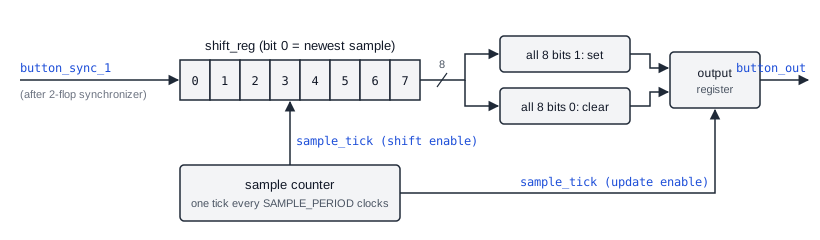
This approach samples the synchronized button at a slow, fixed rate, for example once per millisecond, and shifts each sample into an 8-bit register. The output goes high only when all eight samples are 1, goes low only when all eight are 0, and otherwise keeps its previous value.
Advantages:
- Predictable timing: the output needs exactly 8 matching samples to change
- Can detect stuck-at faults: a register that never fills with 1s or 0s shows a contact that is not switching cleanly
- Slightly lower resource usage when one sample tick is shared by many buttons
Trade-offs:
- Needs a sample-rate generator
- Very short glitches between samples are not seen at all, which is usually desirable but means fast signals cannot be debounced this way
- Less intuitive to tune than a single debounce time
Verilog Code
module debouncer_shift #(
    parameter CLK_FREQ = 50_000_000,    // Clock frequency in Hz
    parameter SAMPLE_RATE_MS = 1        // Sample rate in milliseconds
)(
    input wire clk,           // System clock
    input wire rst_n,         // Active low reset
    input wire button_in,     // Raw button input
    output reg button_out     // Debounced output
);

    // Calculate sampling period
    localparam SAMPLE_PERIOD = (CLK_FREQ / 1000) * SAMPLE_RATE_MS;
    localparam SAMPLE_WIDTH = $clog2(SAMPLE_PERIOD + 1);

    reg [SAMPLE_WIDTH-1:0] sample_counter;
    reg sample_tick;
    reg [7:0] shift_reg;  // 8-bit shift register
    reg button_sync_0, button_sync_1;

    // Synchronizer
    always @(posedge clk or negedge rst_n) begin
        if (!rst_n) begin
            button_sync_0 <= 1'b0;
            button_sync_1 <= 1'b0;
        end else begin
            button_sync_0 <= button_in;
            button_sync_1 <= button_sync_0;
        end
    end

    // Sample rate generator: one-cycle tick every SAMPLE_PERIOD clocks
    always @(posedge clk or negedge rst_n) begin
        if (!rst_n) begin
            sample_counter <= 0;
            sample_tick <= 0;
        end else begin
            if (sample_counter >= SAMPLE_PERIOD - 1) begin
                sample_counter <= 0;
                sample_tick <= 1;
            end else begin
                sample_counter <= sample_counter + 1;
                sample_tick <= 0;
            end
        end
    end

    // Shift register debouncer
    always @(posedge clk or negedge rst_n) begin
        if (!rst_n) begin
            shift_reg <= 8'h00;
            button_out <= 1'b0;
        end else if (sample_tick) begin
            shift_reg <= {shift_reg[6:0], button_sync_1};

            // Output is high if all bits are 1, low if all bits are 0
            if (shift_reg == 8'hFF)
                button_out <= 1'b1;
            else if (shift_reg == 8'h00)
                button_out <= 1'b0;
        end
    end

endmodule
The sample-rate generator is a Mod-N counter that produces a one-cycle sample_tick, and the sampled values move through an 8-bit shift register. The comparison uses the register value from before the current sample is shifted in, so the output changes on the tick after the eighth matching sample.
Synthesis result: Two synchronizer flip-flops, a 16-bit sample counter for the default values (50,000 cycles per millisecond), an 8-bit shift register, and two 8-input comparisons (an AND for all-ones and a NOR for all-zeros) feeding the output flip-flop.
| Counter based | Shift register | |
|---|---|---|
| Stability check | Every clock cycle | Once per sample tick |
| Response time | Exactly the debounce time after bouncing stops | 8 to 9 sample periods after bouncing stops |
| Main storage | One wide counter per button | 8-bit register per button, one shared tick counter |
| Best for | A single button, simple tuning | Many buttons sharing one sample tick |
Quick Check
Q: With SAMPLE_RATE_MS = 2, about how long must the button be stable before button_out changes?
Show Answer
About 16 to 18 ms. The shift register needs eight consecutive matching samples, taken 2 ms apart, and the output updates on the tick after the register has filled. That should be longer than the bounce time of the switch.
Rotary Encoder Knobs
Volume and menu knobs on audio equipment and instruments are often mechanical rotary encoders with two switch contacts. Both contacts bounce as the knob turns, and without debouncing the decoding logic counts extra steps or even steps in the wrong direction. Each contact is debounced before the two signals are decoded into direction and count.
Testbench
A debounce time of several milliseconds is millions of clock cycles at a typical clock frequency, which makes simulation slow. The testbench therefore uses a 1 MHz clock and a 1 ms debounce time, so COUNTER_MAX is only 1000 cycles. A task simulates a press or release by bouncing the input randomly for a while before settling at the final level, then holds that level for longer than the debounce time.
`timescale 1ns/1ps

module debouncer_tb;
    reg clk, rst_n;
    reg button_in;
    wire button_out;
    integer i;

    debouncer #(
        .CLK_FREQ(1_000_000),     // Must match the clock generated below
        .DEBOUNCE_TIME_MS(1)      // 1 ms = 1000 clock cycles
    ) dut (
        .clk(clk),
        .rst_n(rst_n),
        .button_in(button_in),
        .button_out(button_out)
    );

    always #500 clk = ~clk;       // 1 us period = 1 MHz

    // Bounce the input randomly, then settle at final_level
    task bounce_to (input final_level);
        reg [3:0] delay;
        begin
            for (i = 0; i <= 10; i = i + 1) begin
                button_in = $random;
                delay = $random;
                #(delay * 5_000);     // 0 to 75 us per bounce
            end
            button_in = final_level;
        end
    endtask

    initial begin
        rst_n = 0;
        clk = 0;
        button_in = 0;
        #5_000 rst_n = 1;

        bounce_to(1);             // Press
        #3_000_000;               // Hold for 3 ms, longer than the debounce time
        bounce_to(0);             // Release
        #3_000_000;
        bounce_to(1);             // Press again
        #3_000_000;

        $finish;
    end

    initial begin
        $monitor("Time=%0t button_in=%b button_out=%b", $time, button_in, button_out);
    end
endmodule
In the output, button_in changes many times during each bounce burst, while button_out changes only once per press or release, about 1 ms after the input settles. Each burst of 11 bounces lasts at most 825 us, less than the 1 ms debounce time, so no part of a burst can reach the threshold, however the random levels fall.
Limit Switches and Relay Contacts
Industrial controllers read limit switches on moving machinery and the auxiliary contacts of relays and contactors. These contacts bounce like buttons, and a false edge can stop a conveyor or trigger an alarm. Controllers debounce each input, often with longer times than for push buttons, because heavy contacts can bounce for tens of milliseconds.
Common Beginner Mistakes
Mistake #1: Skipping the synchronizer
Wrong: if (button_in != button_out) counter <= counter + 1; using the raw input
Right: Pass button_in through two flip-flops and use button_sync_1
Why? The button can change at any time relative to the clock. The flip-flops in the counter logic that sample it directly can go metastable, and different flip-flops can see different values in the same cycle. Debouncing removes bounce, but only the synchronizer makes the signal safe to sample.
Mistake #2: Debounce time shorter than the bounce
Wrong: DEBOUNCE_TIME_MS = 1 for a switch that bounces for 10 ms
Right: Choose a debounce time longer than the worst-case bounce, typically 10 to 20 ms for push buttons
Why? A gap between bounces that lasts longer than the debounce time passes as a real change, so one press can still produce two or more output transitions. Too long a time makes the button feel slow, so check the switch's datasheet or measure its bounce.
Mistake #3: CLK_FREQ not matching the actual clock
Wrong: .CLK_FREQ(1_000_000) while the testbench or board clock runs at 100 MHz
Right: Set CLK_FREQ to the frequency of the clock actually connected to clk
Why? The debounce time is calculated from CLK_FREQ. If the real clock is 100 times faster, the debounce time is 100 times shorter than intended, and bouncing passes straight through. In simulation, a mismatch makes the expected and observed timing disagree.
Mistake #4: Testbench pulses shorter than the debounce time
Wrong: Holding the button for 1000 ns in a testbench where the debounce time is 5 ms
Right: Hold each level for longer than the debounce time, and shrink the debounce time for simulation
Why? If the input never stays stable for the full debounce period, button_out never changes, and the test shows nothing. Reducing CLK_FREQ and DEBOUNCE_TIME_MS in the testbench keeps the number of cycles small, so the simulation runs fast while the logic is unchanged.
Practice Exercise
Challenge: Debounced Press Pulse
Write a module button_press that instantiates debouncer and adds an output pressed, a pulse exactly one clock cycle wide each time the debounced button goes from 0 to 1. Holding the button down must produce only one pulse.
Hint
Keep a copy of button_out delayed by one clock in a register. A rising edge is the cycle in which the current value is 1 and the delayed value is 0.
Solution
module button_press #(
    parameter CLK_FREQ = 50_000_000,
    parameter DEBOUNCE_TIME_MS = 20
)(
    input  wire clk,
    input  wire rst_n,
    input  wire button_in,     // Raw, bouncy button
    output wire pressed        // One-cycle pulse per press
);

    wire btn_db;               // Debounced level
    reg  btn_db_dly;           // Debounced level, one clock older

    debouncer #(
        .CLK_FREQ(CLK_FREQ),
        .DEBOUNCE_TIME_MS(DEBOUNCE_TIME_MS)
    ) u_db (
        .clk(clk), .rst_n(rst_n),
        .button_in(button_in), .button_out(btn_db)
    );

    always @(posedge clk or negedge rst_n) begin
        if (!rst_n) btn_db_dly <= 1'b0;
        else        btn_db_dly <= btn_db;
    end

    // Rising edge of the debounced signal
    assign pressed = btn_db & ~btn_db_dly;

endmodule
Both inputs of the AND come from flip-flops on the same clock, so pressed is high for exactly one cycle per press, however long the button is held. A counter or state machine can now use pressed as an enable and advance once per press.
Summary
In this tutorial, you learned:
- Mechanical contacts bounce for several milliseconds, which logic sees as many separate edges
- Every button input needs a two-flip-flop synchronizer before any other logic uses it
- A counter-based debouncer changes its output only after the input has been stable for the full debounce time
- A shift register debouncer samples slowly and changes its output after eight matching samples
- The debounce time must be longer than the switch's bounce, and
CLK_FREQmust match the real clock - Testbenches should scale the debounce time down so the simulation runs in a reasonable time
- A debouncer followed by an edge detector turns each press into a single one-cycle pulse
