
A gate-level netlist says which cells a design contains and how they are connected, but not how fast each signal travels through them. That information is calculated separately, by timing tools, and handed to other tools in the Standard Delay Format (SDF). Reading an SDF file into a gate-level simulation is how a Verilog simulation finally runs with the real timing of the chip.
11 min read | Beginner Level
What You'll Learn
- What SDF is and where it is used in the design flow
- The structure of an SDF file: header, cells, IOPATH and INTERCONNECT delays, and timing checks
- How SDF entries correspond to Verilog specify blocks
- How to back-annotate an SDF file in a gate-level simulation with
$sdf_annotate
What is SDF ?
The Standard Delay Format is an IEEE standard (IEEE 1497) for describing the timing of a design in electronic design automation. An SDF file is a plain ASCII text file that holds:
- Cell delays: how long a signal takes from an input pin of a cell to an output pin
- Interconnect delays: how long a signal takes along a wire from one cell to the next
- Timing checks: the setup, hold, recovery and removal limits of each cell instance
Unlike a library, which describes a cell type in general, an SDF file contains values for each instance in a particular design, calculated from its actual load, wiring and operating conditions.
What is it used for ?
SDF connects the dynamic world of simulation with the static world of timing analysis, so that both can use the same, accurate delays. It appears at several stages of the design flow:

- Timing Representation: SDF gives a standard way to describe the delays of gates, flip-flops and interconnects, which is needed to verify timing requirements.
- Interoperability: because the format is standard, tools for synthesis, simulation and timing analysis from different vendors can exchange timing data without compatibility problems.
- Back-Annotation: timing data calculated after layout is added to a gate-level simulation, so that the simulation results reflect the real physical delays.
- Forward Annotation: timing requirements can also be passed forward to tools before or during implementation, to guide optimization.
Structure of SDF
An SDF file is made of nested parenthesized expressions. The whole file is one DELAYFILE expression, which contains a header followed by one or more CELL entries.
Header Section
The header holds general information about the file: the SDF version, the design name, the date, the tool that wrote it, the operating conditions, and the time unit of all values that follow.
(DELAYFILE
(SDFVERSION "3.0")
(DESIGN "PROTOTYPE")
(DATE "October 27, 2009 12:31")
(VENDOR "SOME_EDA")
(VOLTAGE 1.1:0.9:0.8)
(PROCESS "min:typ:max")
(TEMPERATURE -40:25:125)
(TIMESCALE 1ns)
...
)
VOLTAGE, PROCESS and TEMPERATURE describe the process, voltage and temperature (PVT) conditions for which the delays were calculated, as min:typ:max triples. A high voltage and a low temperature make cells fast, so the voltage triple runs from high to low. TIMESCALE 1ns means that every delay value in the file is in nanoseconds.
Cell and Instance Definitions
Each CELL entry gives the timing of one cell instance, or of all instances of one cell type. A file must contain at least one cell entry, and there is no upper limit. Each entry names the cell type with CELLTYPE and the instance with INSTANCE, and then lists its delays:
(CELL
  (CELLTYPE "AND2")
  (INSTANCE U1)
  (DELAY
    (ABSOLUTE
      (IOPATH A Y (0.5::0.6) (0.7::0.8))
    )
  )
)
IOPATH A Y is the delay from input pin A to output pin Y of the AND gate U1. Each value in parentheses is a min:typ:max triple, where an empty field is allowed: (0.5::0.6) means a minimum of 0.5 ns and a maximum of 0.6 ns. With two triples, the first is the rise delay and the second the fall delay, as in Verilog gate delays.
Wire delays are given with INTERCONNECT, usually in a cell entry for the top-level design:
(CELL
  (CELLTYPE "PROTOTYPE")
  (INSTANCE)
  (DELAY
    (ABSOLUTE
      (INTERCONNECT U1/Y U2/A (0.1::0.2) (0.3::0.4))
    )
  )
)
This is the delay of the wire from output pin Y of U1 to input pin A of U2. An empty INSTANCE refers to the design itself.
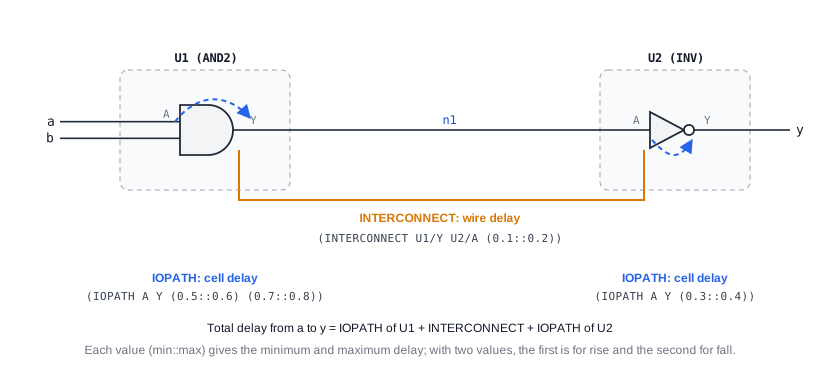
The order of cell entries matters. If several entries describe the same part of the design, the later one wins when its delays are marked ABSOLUTE, which replaces the existing values. Delays marked INCREMENTAL are added to the existing values instead, which is used to adjust delays, for example to add extra wire delay on top of the cell delays.
Path Delays
Path delays describe how long a signal takes along specific paths through a cell. Besides simple input-to-output paths, they can depend on a clock edge or on the state of other inputs, just like the paths in a Verilog specify block:
(CELL
  (CELLTYPE "DFFR")
  (INSTANCE U3)
  (DELAY
    (ABSOLUTE
      (IOPATH (posedge CK) Q (0.4::0.5) (0.45::0.55))
      (COND RN==1'b1 (IOPATH D Q (0.6::0.7)))
    )
  )
)
The first entry is the clock-to-output delay of the flip-flop U3, from the rising edge of CK to Q. The second shows a conditional path, which is only used while the condition is true. These path delays are what static timing analysis adds up along each path to check whether the design meets its clock period.
Timing Checks
The TIMINGCHECK section gives the timing limits of a cell instance, such as setup, hold, recovery and removal times:
(CELL
  (CELLTYPE "DFFR")
  (INSTANCE U3)
  (TIMINGCHECK
    (SETUP D (posedge CK) (0.2::0.3))
    (HOLD  D (posedge CK) (0.1::0.1))
    (RECOVERY (posedge RN) (posedge CK) (0.25::0.3))
  )
)
Here the data input D of U3 must be stable from 0.3 ns before to 0.1 ns after each rising edge of CK in the slow corner, and the reset RN must be released at least 0.3 ns before the clock edge. Read more on Verilog Timing Checks!
Each SDF entry has a counterpart in the specify block of the cell's Verilog model, and annotation replaces the value of that counterpart:
| SDF entry | Verilog specify item it updates |
|---|---|
(IOPATH A Y ...) | (A => Y) = ...; |
(IOPATH (posedge CK) Q ...) | (posedge CK => (Q : D)) = ...; |
(COND ... (IOPATH ...)) | if (...) (D => Q) = ...; |
(SETUP ...), (HOLD ...), (SETUPHOLD ...) | $setup, $hold, $setuphold |
(RECOVERY ...), (REMOVAL ...) | $recovery, $removal |
(INTERCONNECT ...) | No specify item; the simulator adds a delay on the input port of the receiving cell |
Synthesis result: None. SDF is not read by synthesis to build logic. It is produced by timing tools after synthesis or layout, and consumed by simulation and timing analysis.
Quick Check
With (TIMESCALE 1ns), what is the maximum fall delay from A to Y in (IOPATH A Y (0.5::0.6) (0.7::0.8))?
Show Answer
0.8 ns. The second triple is the fall delay, and its last field is the maximum.
Application of SDF
- Static timing analysis: SDF can carry the cell and interconnect delays calculated for a layout into timing analysis tools, which check every path against the clock constraints.
- Post-layout verification: after place and route, SDF captures the delays caused by the real wire lengths and loads, so verification uses the timing of the actual layout.
- Simulation: back-annotated gate-level simulations catch timing violations and timing-dependent functional bugs before fabrication.
- Design optimization: delay information helps find the critical paths that limit performance, so they can be improved.
How is SDF used in Gate Level Simulations ?
The main use of SDF in simulation is to back-annotate timing into a gate-level simulation, which makes the simulation far more accurate than a zero-delay RTL simulation.
After synthesis, the design exists as a gate-level netlist. The cell models in the library have default delays in their specify blocks, but the real delays depend on the layout. After place and route, a timing tool calculates the propagation delay of every cell instance and every wire, and writes them to an SDF file. The simulator reads this file with the system task $sdf_annotate, which replaces the default values in the specify block of each instance:
module tb;
  top u_top ( /* ports */ );         // Gate-level netlist of the design

  initial begin
    // Annotate the maximum delays to the instance u_top
    $sdf_annotate ("top_max.sdf", tb.u_top, , "sdf_annotate.log", "MAXIMUM");
  end

  // ... clock, stimulus and checks as in the RTL testbench ...
endmodule
The arguments are the SDF file, the instance to annotate, an optional configuration file (left empty here), a log file that lists what was annotated, and which value of each min:typ:max triple to use. The annotation must run at time 0, before the design starts switching.
The simulation then runs with the delays of the real layout, and the timing checks in the cell models use the real limits. A final back-annotated simulation is run to confirm that the delays do not cause timing violations or functional failures, typically twice: with maximum delays for the slow corner, where setup violations appear, and with minimum delays for the fast corner, where hold violations appear.
Quick Check
Which $sdf_annotate setting is most likely to reveal hold violations, and why?
Show Answer
"MINIMUM". A hold violation happens when new data arrives too quickly after the clock edge, so it shows up when paths are as fast as possible, in the fast corner with minimum delays.
Signoff Gate-Level Simulations
Before a chip goes to manufacturing, verification teams run a set of gate-level simulations with SDF from the final layout, at the slow and fast corners. Static timing analysis already covers the synchronous paths, so these simulations focus on what it cannot fully check: reset and power-up sequences, clock switching, and signals crossing between unrelated clock domains. A timing check violation in these runs is reviewed before the design is released.
Debugging Annotation Problems
When an SDF file does not match the netlist, for example because the netlist was regenerated after the SDF was written, the simulator cannot find some instances or pins and skips their entries. Those cells then simulate with default delays, and the results look plausible but are wrong. Engineers therefore always check the annotation log, and treat any unannotated instance as an error.
Common Beginner Mistakes
Mistake #1: Using an SDF file from a different netlist
Wrong: Annotating an SDF file written for an older version of the netlist
Right: Always generate the SDF file from the same netlist that is simulated, and check the annotation log
Why? Instance and pin names change between netlist versions. Entries that do not match are skipped, often with only a warning, so part of the design runs with default delays.
Mistake #2: Annotating the wrong scope
Wrong: $sdf_annotate("top.sdf", tb); when the SDF instance names start below the design top
Right: $sdf_annotate("top.sdf", tb.u_top);
Why? The instance paths in the SDF file are relative to the design top that the timing tool saw. If the annotation scope is one level too high, no instance names match, and nothing is annotated.
Mistake #3: Running only one corner
Wrong: Annotating only the maximum delays
Right: Run with maximum delays and with minimum delays
Why? Setup problems appear with slow paths, but hold problems appear with fast paths. A simulation at the slow corner alone will not show any hold violations.
Mistake #4: Confusing the order of rise and fall values
Wrong: Reading (IOPATH A Y (0.5::0.6) (0.7::0.8)) as a minimum of 0.5 to 0.6 and a maximum of 0.7 to 0.8
Right: The first triple is the rise delay and the second the fall delay; within each triple, the values are min, typ and max
Why? Each pair of parentheses is one min:typ:max triple for one transition. Misreading them gives the wrong delay for every edge.
Practice Exercise
Challenge: Write the SDF Entries
A design alu_top has an inverter instance U5 of cell type INV with pins A and Y, and a wire from U5/Y to pin B of instance U7. Write the SDF cell entries for: an inverter delay of 0.10 to 0.15 ns rising and 0.08 to 0.12 ns falling, and a wire delay of 0.02 to 0.03 ns for both transitions. Then write the $sdf_annotate call to annotate the minimum values to the instance tb.u_alu.
Hint
Use one cell entry for the inverter with an IOPATH, and one for the design with an INTERCONNECT. One triple means the same delay for rise and fall.
Solution
(CELL
  (CELLTYPE "INV")
  (INSTANCE U5)
  (DELAY
    (ABSOLUTE
      (IOPATH A Y (0.10::0.15) (0.08::0.12))
    )
  )
)
(CELL
  (CELLTYPE "alu_top")
  (INSTANCE)
  (DELAY
    (ABSOLUTE
      (INTERCONNECT U5/Y U7/B (0.02::0.03))
    )
  )
)
initial $sdf_annotate ("alu_top.sdf", tb.u_alu, , "sdf.log", "MINIMUM");
With "MINIMUM", the inverter rises in 0.10 ns and falls in 0.08 ns, and the wire adds 0.02 ns, so a rising edge on U5/A reaches U7/B as a falling edge after 0.08 + 0.02 = 0.10 ns.
Summary
In this tutorial, you learned:
- SDF (IEEE 1497) is a text format for the cell delays, interconnect delays and timing check limits of each instance in a design
- An SDF file has a header with version, design, PVT conditions and timescale, followed by CELL entries
- IOPATH gives delays through a cell, INTERCONNECT gives wire delays, and TIMINGCHECK gives setup, hold, recovery and removal limits
- Values are min:typ:max triples, with one triple per transition; ABSOLUTE replaces values and INCREMENTAL adds to them
- Each SDF entry updates the matching item in the specify block of the cell model
$sdf_annotateback-annotates an SDF file at time 0, and signoff simulations run both the slow and the fast corner
