
Below the gate level, every logic gate in a CMOS chip is built from transistors that act as switches. Verilog can model a circuit at this level too, with switch primitives such as nmos, pmos and tran. Designers rarely write switch-level code today, because circuits have grown far too large to describe transistor by transistor, but it is still useful for modeling custom cells and bidirectional connections, and for understanding how a gate works inside.
11 min read | Beginner Level
What You'll Learn
- How the nmos, pmos and cmos switch primitives pass or block a signal
- How tran, tranif0 and tranif1 connect two nets in both directions
- How supply1 and supply0 model power and ground, and how to build a CMOS inverter from switches
- Why switch-level code is not synthesized, and the common mistakes with switch primitives
NMOS/PMOS
An nmos or pmos primitive behaves like a transistor used as a switch between a data input and an output. A third terminal, the control (the transistor's gate), decides whether the switch is closed:
| Primitive | Syntax | ctrl = 1 | ctrl = 0 |
|---|---|---|---|
| nmos | nmos (out, data, ctrl); | out = data | out = z |
| pmos | pmos (out, data, ctrl); | out = z | out = data |
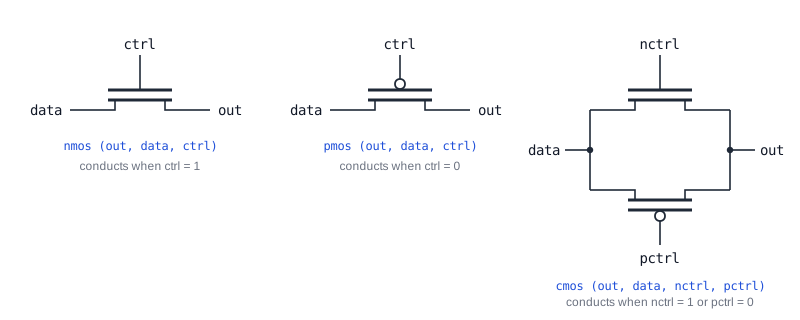
When the switch is open, nothing drives the output, so it floats at z. As with gate primitives, the output comes first in the terminal list and the instance name is optional.
module des (input d, ctrl,
            output outn, outp);

  nmos (outn, d, ctrl);    // Passes d when ctrl = 1
  pmos (outp, d, ctrl);    // Passes d when ctrl = 0
endmodule
module tb;
  reg d, ctrl;
  wire outn, outp;

  des u0 (.d(d), .ctrl(ctrl), .outn(outn), .outp(outp));

  initial begin
    {d, ctrl} <= 0;

    $monitor ("T=%0t d=%0b ctrl=%0b outn=%0b outp=%0b", $time, d, ctrl, outn, outp);

    #10 d <= 1;
    #10 ctrl <= 1;
    #10 ctrl <= 0;
    #10 d <= 0;
  end
endmodule
ncsim> run
T=0 d=0 ctrl=0 outn=z outp=0
T=10 d=1 ctrl=0 outn=z outp=1
T=20 d=1 ctrl=1 outn=1 outp=z
T=30 d=1 ctrl=0 outn=z outp=1
T=40 d=0 ctrl=0 outn=z outp=0
ncsim: *W,RNQUIE: Simulation is complete.
The two outputs are always opposite in behavior: while ctrl = 0, outp follows d and outn floats at z. At T=20, ctrl becomes 1 and the roles swap.
A real NMOS transistor passes a 0 well but a 1 poorly, because its output can only rise to about one threshold voltage below the supply. PMOS has the opposite weakness. Verilog's nmos and pmos do not model this: they pass both values at full strength. This is why the CMOS switch below, which combines both types, is used in real circuits.
Quick Check
With d = 0 and ctrl = 1, what are outn and outp?
Show Answer
outn = 0, because the nmos switch is closed and passes d. outp = z, because the pmos switch is open when its control is 1.
CMOS Switches
A cmos switch is an nmos and a pmos connected in parallel between the same data input and output, with separate controls. It is also called a transmission gate. The switch conducts if either transistor is on, that is, when nctrl = 1 or pctrl = 0:
cmos (out, data, nctrl, pctrl);

// Behaves the same as:
nmos (out, data, nctrl);
pmos (out, data, pctrl);
In normal use, pctrl is the inverse of nctrl, so both transistors turn on and off together. Then a 0 passes well through the nmos half and a 1 passes well through the pmos half.
module des (input d, nctrl, pctrl,
            output out);

  cmos (out, d, nctrl, pctrl);
endmodule
module tb;
  reg d, nctrl, pctrl;
  wire out;

  des u0 (.d(d), .nctrl(nctrl), .pctrl(pctrl), .out(out));

  initial begin
    {d, nctrl, pctrl} <= 0;

    $monitor ("T=%0t d=%0b nctrl=%0b pctrl=%0b out=%0b", $time, d, nctrl, pctrl, out);

    #10 d <= 1;
    #10 nctrl <= 1;
    #10 pctrl <= 1;
    #10 nctrl <= 0;
    #10 pctrl <= 0;
    #10 d <= 0;
    #10;
  end
endmodule
ncsim> run
T=0 d=0 nctrl=0 pctrl=0 out=0
T=10 d=1 nctrl=0 pctrl=0 out=1
T=20 d=1 nctrl=1 pctrl=0 out=1
T=30 d=1 nctrl=1 pctrl=1 out=1
T=40 d=1 nctrl=0 pctrl=1 out=z
T=50 d=1 nctrl=0 pctrl=0 out=1
T=60 d=0 nctrl=0 pctrl=0 out=0
ncsim: *W,RNQUIE: Simulation is complete.
The output follows d in every row except T=40. That is the only point where nctrl = 0 turns the nmos half off and pctrl = 1 turns the pmos half off at the same time, so the switch is open and out floats at z.
Quick Check
Out of the four combinations of nctrl and pctrl, how many leave the cmos switch open?
Show Answer
Only one: nctrl = 0 and pctrl = 1. In the other three combinations, at least one of the two transistors is on, and the switch conducts.
Transmission Gates Inside Standard Cells
Transmission gates are a common building block inside the library cells that synthesis uses. Many flip-flop and latch cells use them to connect or isolate their internal storage nodes on each clock phase, and some multiplexer and XOR cells are built from them because they need fewer transistors than an AND-OR structure.
Bidirectional Switches
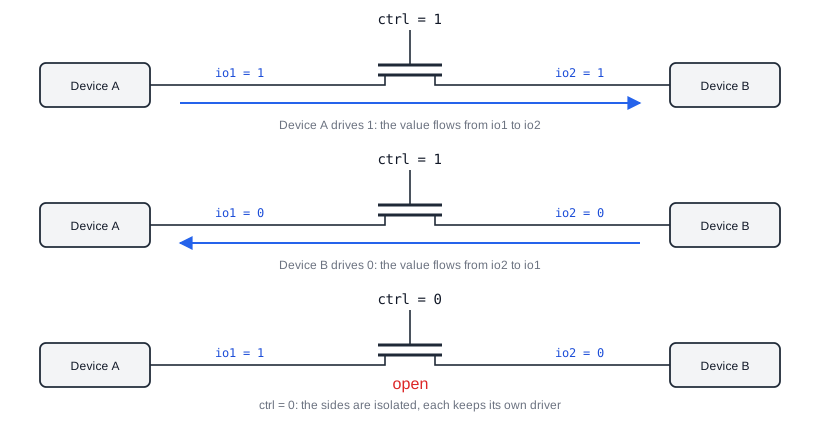
The switches above pass a signal in one direction, from data to out. Bidirectional switches connect two nets so that a signal can flow either way, from whichever side is driven to the other. Their first two terminals are therefore both inout, and neither is called the output.
| Primitive | Syntax | Connects the nets when |
|---|---|---|
| tran | tran (io1, io2); | Always |
| tranif0 | tranif0 (io1, io2, ctrl); | ctrl = 0 |
| tranif1 | tranif1 (io1, io2, ctrl); | ctrl = 1 |
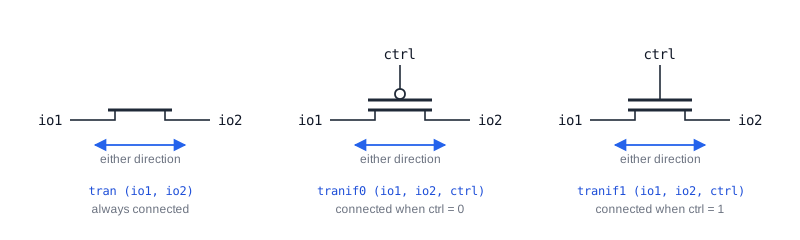
tran
A tran switch has no control input and always connects its two terminals, like a piece of wire that can be placed between two named nets.
module des (input io1, ctrl,
            output io2);

  tran (io1, io2);    // io1 and io2 are always connected
endmodule
The same testbench is used for all three bidirectional switches. It drives io1 and ctrl, and observes io2. The tran design does not use ctrl, so changes on ctrl have no effect in this first run.
module tb;
  reg io1, ctrl;
  wire io2;

  des u0 (.io1(io1), .ctrl(ctrl), .io2(io2));

  initial begin
    {io1, ctrl} <= 0;

    $monitor ("T=%0t io1=%0b ctrl=%0b io2=%0b", $time, io1, ctrl, io2);

    #10 io1  <= 1;
    #10 ctrl <= 1;
    #10 ctrl <= 0;
    #10 io1  <= 0;

  end
endmodule
ncsim> run
T=0 io1=0 ctrl=0 io2=0
T=10 io1=1 ctrl=0 io2=1
T=20 io1=1 ctrl=1 io2=1
T=30 io1=1 ctrl=0 io2=1
T=40 io1=0 ctrl=0 io2=0
ncsim: *W,RNQUIE: Simulation is complete.
io2 always has the same value as io1. In this testbench only io1 is driven, so the signal flows from io1 to io2. If io2 were driven instead, the value would flow the other way.
tranif0
tranif0 connects its two terminals only when ctrl is 0, and isolates them when ctrl is 1.
module des (input io1, ctrl,
            output io2);

  tranif0 (io1, io2, ctrl);    // Connected when ctrl = 0
endmodule
ncsim> run
T=0 io1=0 ctrl=0 io2=0
T=10 io1=1 ctrl=0 io2=1
T=20 io1=1 ctrl=1 io2=z
T=30 io1=1 ctrl=0 io2=1
T=40 io1=0 ctrl=0 io2=0
ncsim: *W,RNQUIE: Simulation is complete.
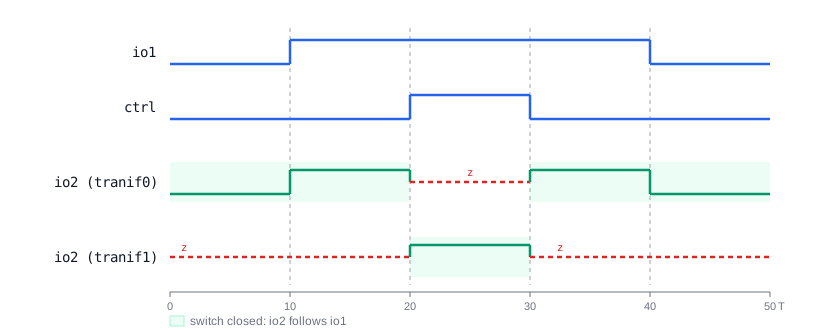
From T=20 to T=30, ctrl = 1 opens the switch. Nothing else drives io2, so it floats at z. At T=30 the switch closes again and io2 follows io1.
tranif1
tranif1 is the opposite: it connects its terminals only when ctrl is 1.
module des (input io1, ctrl,
            output io2);

  tranif1 (io1, io2, ctrl);    // Connected when ctrl = 1
endmodule
ncsim> run
T=0 io1=0 ctrl=0 io2=z
T=10 io1=1 ctrl=0 io2=z
T=20 io1=1 ctrl=1 io2=1
T=30 io1=1 ctrl=0 io2=z
T=40 io1=0 ctrl=0 io2=z
ncsim: *W,RNQUIE: Simulation is complete.
Here io2 only has a value from T=20 to T=30, the one interval where ctrl = 1. Compare it with the tranif0 log: the two switches are open and closed at exactly opposite times.
Each of these switches also has a resistive version, rtran, rtranif0 and rtranif1, and the same exists for the unidirectional switches as rnmos, rpmos and rcmos. They work the same way, but lower the drive strength of the signal that passes through them, for example from strong to pull. This models the resistance of a real transistor, and lets a stronger driver on the other side win when two drivers meet.
Quick Check
In the tranif1 design, the testbench drives io1 = 1 and ctrl = 0. If another module also drove io2 = 0, what values would io1 and io2 have?
Show Answer
io1 = 1 and io2 = 0. With ctrl = 0, the tranif1 is open, so the two nets are isolated and neither driver affects the other. If ctrl were 1, the two drivers would meet on one connected net with equal strength, and the result would be x.
Bus Switches and I/O Pads
Bus switch chips connect or isolate two sections of a bidirectional data bus with transistors, exactly like tranif1, so that a board can disconnect a device that is powered down or being hot-plugged. Simulation models of such parts, and of the bidirectional I/O pads at the edge of a chip, use tran switches so that data can flow both ways through the model.
Power and Ground
Transistor circuits need a connection to the supply and to ground. Verilog provides two special net types for this: supply1, a net that is always 1, and supply0, a net that is always 0. Both are driven with supply strength, the highest strength in Verilog, so no other driver can override them.
module des (output vdd,
            output gnd);

  supply1 _vdd;    // Always 1, at supply strength
  supply0 _gnd;    // Always 0, at supply strength

  assign vdd = _vdd;
  assign gnd = _gnd;
endmodule
module tb;
  wire vdd, gnd;

  des u0 (.vdd(vdd), .gnd(gnd));

  initial begin
    #10;
    $display ("T=%0t vdd=%0d gnd=%0d", $time, vdd, gnd);
  end
endmodule
ncsim> run
T=10 vdd=1 gnd=0
ncsim: *W,RNQUIE: Simulation is complete.
Putting It Together: A CMOS Inverter
With switches and supplies, you can build a logic gate the way it is built on silicon. A CMOS inverter connects a pmos from vdd to the output and an nmos from the output to gnd, with both controls tied to the input. Exactly one of the two transistors is on at a time.
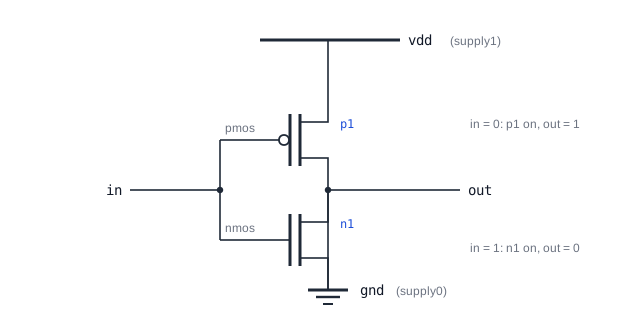
module inv_sw (input in, output out);

  supply1 vdd;
  supply0 gnd;

  pmos p1 (out, vdd, in);    // in = 0: connects out to vdd
  nmos n1 (out, gnd, in);    // in = 1: connects out to gnd

endmodule
| in | p1 | n1 | out |
|---|---|---|---|
| 0 | on, passes vdd | off, z | 1 |
| 1 | off, z | on, passes gnd | 0 |
The two switches both drive out, but because their controls are the same signal, one of them is always at z, so there is never a conflict. A signal that passes through an nmos or pmos keeps its strength, except that supply strength becomes strong, so out is driven at strong strength.
Synthesis result: Switch primitives and switch-level designs are not synthesized. Synthesis tools for standard cell and FPGA flows build circuits from library cells and LUTs, and do not accept transistors as inputs. The transistors inside the cells are created by custom layout and checked with circuit simulators. Switch-level Verilog is used to model those cells for logic simulation, not to create them.
Common Beginner Mistakes
Mistake #1: Putting the control in the wrong position
Wrong: nmos (out, ctrl, d);
Right: nmos (out, d, ctrl);
Why? The order is always output, data, control. Swapping data and control compiles without any error, but then ctrl is passed to the output while d opens and closes the switch.
Mistake #2: Mixing up the active levels
Wrong: Expecting pmos or tranif0 to conduct when the control is 1, or driving cmos with pctrl = nctrl
Right: nmos and tranif1 conduct when the control is 1; pmos and tranif0 conduct when it is 0; drive cmos with pctrl = ~nctrl
Why? With pctrl = nctrl, the cmos switch is always on, because one of its two halves always conducts. The circuit seems to work in simulation, but the switch can never be opened.
Mistake #3: Driving both sides of a tran with different values
Wrong: Driving io1 = 1 from one module and io2 = 0 from another, with a tran between them
Right: Make sure only one side drives at a time, or use resistive switches and weaker drivers so that one driver clearly wins
Why? A tran joins the two nets into one. Two drivers of equal strength with opposite values give x on both sides, and in hardware they would short the supply to ground through the transistors.
Mistake #4: Writing switch-level code for a synthesizable design
Wrong: Building RTL blocks out of nmos, pmos and cmos primitives, expecting synthesis to turn them into transistors
Right: Use RTL or gate primitives for synthesizable logic, and keep switch-level code for cell models and testbenches
Why? Synthesis tools do not support switch primitives, and stop with an error or ignore them. The transistors of a chip are created by library cells, not by Verilog switches.
Practice Exercise
Challenge: CMOS NAND Gate
Write a module nand_sw with inputs a and b and an output out, built only from nmos, pmos, supply1 and supply0. The output must be 0 only when both inputs are 1.
Hint
Like the inverter, use a pull-up network of pmos switches from vdd and a pull-down network of nmos switches to gnd. The output must be pulled down only when a and b are both 1, so the two nmos switches go in series, joined by an internal wire. The output must be pulled up when either input is 0, so the two pmos switches go in parallel.
Solution
module nand_sw (input a, b, output out);

  supply1 vdd;
  supply0 gnd;
  wire    mid;                // Node between the two nmos switches

  pmos p1 (out, vdd, a);      // Pull-up when a = 0
  pmos p2 (out, vdd, b);      // Pull-up when b = 0 (in parallel with p1)

  nmos n1 (out, mid, a);      // Pull-down path, top switch
  nmos n2 (mid, gnd, b);      // Pull-down path, bottom switch (in series)

endmodule
For a = 1 and b = 1, both pmos switches are off, and n2 passes gnd to mid, which n1 passes to out, so out = 0. For any input at 0, at least one pmos connects out to vdd, and at least one nmos in the series path is off, so out = 1. The two nmos switches are joined in series through mid, which is the data terminal of n1 and the output terminal of n2.
Summary
In this tutorial, you learned:
nmos (out, data, ctrl)passes data when ctrl is 1, andpmoswhen ctrl is 0; an open switch leaves its output at zcmos (out, data, nctrl, pctrl)is an nmos and a pmos in parallel, and is normally driven withpctrl = ~nctrltranalways connects two nets in both directions, whiletranif0andtranif1connect them when ctrl is 0 or 1- Resistive versions such as
rnmosandrtranlower the strength of the signal passing through them supply1andsupply0model power and ground with the highest drive strength- Logic gates can be built from switches, such as the CMOS inverter, but switch-level code is for simulation models only and is not synthesized
