
There are ways to group a set of statements together that are syntactically equivalent to a single statement and are known as block statements. There are two kinds of block statements: sequential (begin-end) and parallel (fork-join). Block statements enable structured control flow, scoped variable declarations, and concurrent execution modeling.
What You'll Learn
- Master sequential blocks (
begin-end) for ordered statement execution with cumulative delays - Understand parallel blocks (
fork-join) for concurrent execution with independent timing - Apply named blocks for hierarchical references, disabling, and local variable scoping
- Differentiate delay semantics: relative delays in sequential vs. absolute delays in parallel blocks
Sequential Blocks
Statements are wrapped using begin and end keywords and will be executed sequentially in the given order, one after the other. Delay values are treated relative to the time of execution of the previous statement (cumulative delays). After all the statements within the block are executed, control may be passed elsewhere.
Syntax
	// Basic begin-end block
	begin
		statement1;     // Executes first
		statement2;     // Executes after statement1 completes
		statement3;     // Executes after statement2 completes
	end

	// Named begin-end block (for hierarchical access and disable)
	begin : block_name
		[local variable declarations]  // Optional: variables scoped to this block
		[statements]                   // Executed sequentially
	end
Example: Sequential Execution with Relative Delays
module design0;
	reg [31:0] data;            // 4-state variable

	// "initial" block starts at time 0
	initial begin
		// Statement 1: Executes at time 0 + 10 = 10 time units
		#10 data = 8'hfe;         // Wait 10 time units, then assign 0xfe
		$display ("[Time=%0t] data=0x%0h", $time, data);

		// Statement 2: Executes at time 10 + 20 = 30 time units (relative delay)
		#20 data = 8'h11;         // Wait 20 MORE time units (cumulative: 30 total)
		$display ("[Time=%0t] data=0x%0h", $time, data);
	end
endmodule
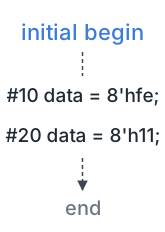
In the example above, the first statement in the begin-end block will be executed at 10 time units (relative to block start at time 0), and the second statement at 30 time units (10 + 20) because delays are cumulative. The #20 delay is relative to the completion of the previous statement, not to time 0.
ncsim> run
[Time=10] data=0xfe
[Time=30] data=0x11
ncsim: *W,RNQUIE: Simulation is complete.
Parallel Blocks
A parallel block can execute statements concurrently and delay control can be used to provide time-ordering of the assignments. Statements are launched in parallel by wrapping them within the fork and join keywords. Delays in fork-join are absolute (measured from the fork launch time), not cumulative like begin-end blocks.
Syntax
	// Basic fork-join block (waits for ALL threads to complete)
	fork
		statement1;     // Thread 1: executes concurrently with other threads
		statement2;     // Thread 2: executes in parallel with thread 1
		statement3;     // Thread 3: executes in parallel with threads 1 and 2
	join                // Blocks until ALL threads finish

	// Named fork-join block (for hierarchical access and disable)
	fork : block_name
		[statements]    // All statements launch simultaneously at fork time
	join                // Resumes after all threads complete
SystemVerilog adds fork-join_any (resumes when ANY thread completes) and fork-join_none (resumes immediately without waiting); plain Verilog only has fork-join. See SystemVerilog fork-join for details.
Example: Parallel Execution with Absolute Delays
	initial begin
		#10 data = 8'hfe;         // Executes at time 10 (sequential statement before fork)

		fork                      // Fork launches at time 10
		  #20 data = 8'h11;       // Executes at time 10+20 = 30 (absolute from fork)
		  #10 data = 8'h00;       // Executes at time 10+10 = 20 (absolute from fork)
		join                      // Resumes at time 30 (when longest thread completes)
	end
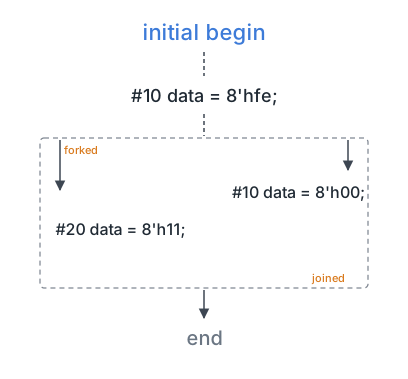
In the example above, the fork-join block will be launched after executing the statement at 10 time units. Statements within this block will be executed in parallel, and the first statement to execute will be data = 8'h00 at time 20 (fork time + 10). Then data = 8'h11 executes at time 30 (fork time + 20). The join blocks until time 30 when all threads complete.
Real-World Application: Testbench Stimulus Generation
Verification testbenches use begin-end blocks for sequential test stimulus and fork-join for concurrent protocol monitoring:
// AXI4 transaction testbench (uses the SystemVerilog join_any and $error)
initial begin
  // Sequential test phases using begin-end
  begin : RESET_PHASE
    reset = 1'b1;           // Assert reset
    #100;                   // Hold for 100ns (cumulative delay)
    reset = 1'b0;           // Deassert reset
    #50;                    // Wait for reset recovery (cumulative: 150ns total)
  end

  // Parallel monitoring and stimulus using fork-join
  fork
    // Thread 1: Write transaction stimulus
    begin
      #200 axi_write(32'h1000, 32'hDEADBEEF);  // First write at 200ns
      #300 axi_write(32'h2000, 32'hCAFEBABE);  // Second write at 500ns (cumulative)
    end

    // Thread 2: Watchdog timeout (concurrent with Thread 1)
    begin
      #1000;                                   // Wait 1000ns from fork
      if (!test_done)
        $error("Test timeout!");
    end

    // Thread 3: Continuous response monitor (concurrent)
    begin
      forever @(posedge bvalid)                // Monitor write responses
        $display("Write response: %h", bresp);
    end
  join_any                  // Resume when ANY thread completes (watchdog or test)

  $finish;
end
This pattern combines sequential test phases (reset, stimulus) with parallel monitoring (responses, timeout), demonstrating how block types model real-world concurrent hardware behavior.
Example: Nested Blocks (Sequential inside Parallel)
	initial begin
		#10 data = 8'hfe;         // Time 0+10 = 10 (sequential statement before fork)

		fork                      // Fork launches at time 10
			// Thread 1: Single assignment with delay
			#10 data = 8'h11;       // Time 10+10 = 20 (absolute delay from fork)

			// Thread 2: Sequential begin-end block (launched in parallel with Thread 1)
			begin
				#20 data = 8'h00;     // Time 10+20 = 30 (delay relative to begin block start)
				#30 data = 8'haa;     // Time 30+30 = 60 (cumulative delay within begin-end)
			end
		join                      // Resumes at time 60 (when longest thread completes)
	end
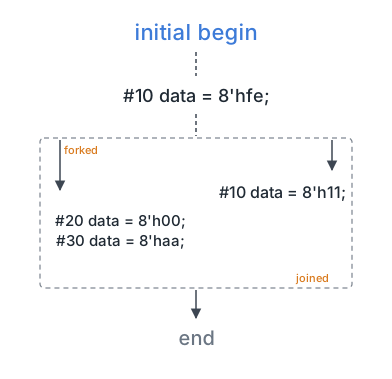
There is a begin-end block nested inside the fork-join in the example above. All statements within the begin-end block will be executed sequentially with cumulative delays, but the begin-end block itself will be launched in parallel along with Thread 1. Execution timeline:
- Time 20:
data = 8'h11(Thread 1 completes) - Time 30:
data = 8'h00(first statement in Thread 2's begin-end) - Time 60:
data = 8'haa(second statement in Thread 2's begin-end, cumulative #30 delay)
Naming of blocks
Both sequential and parallel blocks can be named by adding : name_of_block after the keywords begin and fork. Named blocks provide three key benefits:
- Hierarchical references: Access signals within the block using
module.block_name.signal - Disable capability: Terminate the block prematurely using
disable block_name;(useful for timeouts/watchdogs) - Local variable scoping: Declare variables local to the block (the block must be named in Verilog)
	// Named sequential block
	begin : name_seq
		integer local_var;        // Local to this named block
		[statements]              // Can be referenced as module.name_seq.local_var
	end

	// Named parallel block
	fork : name_fork
		[statements]              // Can disable with: disable name_fork;
	join
| Aspect | begin-end (Sequential) | fork-join (Parallel) |
|---|---|---|
| Execution Model | Statements execute in order, one at a time | All statements launch simultaneously (concurrent threads) |
| Delay Semantics | Relative (cumulative): #10 #20 -> execute at 10, 30 | Absolute (from fork): #10 #20 -> execute at 10, 20 |
| Completion Time | Sum of all delays | Maximum delay among all threads |
| Use Cases | Sequential test stimulus, tasks with ordered steps | Concurrent monitors, parallel transactions, watchdog timers |
| Synthesizable | ? Yes (in always blocks for sequential logic) | ? No (simulation-only construct) |
| Example | begin #10; #20; end -> 0, 10, 30 | fork #10; #20; join -> 0, 10, 20 |
Real-World Application: Named Blocks for Debugging
Named blocks enable hierarchical signal access for waveform debugging and assertions:
module cpu_core;
  reg [31:0] pc, instr;

  initial begin : FETCH_STAGE          // Named block for instruction fetch
    integer fetch_count;               // Local variable scoped to this block
    forever begin
      @(posedge clk);
      instr = imem[pc];                // Fetch instruction
      pc = pc + 4;                     // Increment program counter
      fetch_count = fetch_count + 1;   // Track fetches
    end
  end

  // External access from testbench:
  // - Waveform dump: $dumpvars(0, cpu_core.FETCH_STAGE.fetch_count);
  // - Check: if (cpu_core.pc >= 32'h1000) $display("pc out of range");
  // - Disable: disable cpu_core.FETCH_STAGE; (abort fetch on exception)
endmodule
Named blocks improve testability by exposing internal state without modifying the design interface.
Common Beginner Mistakes
Mistake #1: Confusing relative delays (begin-end) with absolute delays (fork-join)
// MISUNDERSTANDING: Thinking fork-join delays are cumulative like begin-end
fork
  #10 data = 8'hAA;   // Student expects: time 10
  #20 data = 8'hBB;   // Student expects: time 30 (WRONG!)
join
// ACTUAL: Both execute at time 10 and 20 (absolute from fork), not 10 and 30
Why it's problematic: Delays in fork-join are measured from the fork launch point, not from the previous statement. #10 and #20 mean "10 time units after fork" and "20 time units after fork," not cumulative delays like in begin-end. This causes race conditions where later statements execute before earlier ones if delays are misordered.
Best Practice: Remember: begin-end = cumulative (0->10->30), fork-join = absolute (0->10, 0->20).
Mistake #2: Using fork-join in synthesizable RTL code
always @(posedge clk) begin
  fork                        // ERROR: fork-join not synthesizable
    out1 <= data1;
    out2 <= data2;
  join
end
Why it's problematic: Fork-join is a simulation-only construct for modeling concurrent behavior in testbenches. Synthesis tools cannot convert fork-join to hardware because all statements in an always block execute in zero time (scheduling regions handle timing). This causes synthesis errors: "fork-join not supported in synthesizable code."
Best Practice: Use fork-join only in testbenches (initial blocks). For synthesizable RTL, use multiple always blocks or non-blocking assignments for concurrent behavior.
Mistake #3: Forgetting that join blocks until ALL threads complete
initial begin
  fork
    #10  $display("Thread 1 done");
    #100 $display("Thread 2 done");   // Longest thread
  join
  $display("After join");             // Blocked until time 100!
end
Why it's problematic: join blocks execution until all threads complete, so the block finishes at time 100 (longest delay), not time 10. If one thread has a very long delay or runs forever, the join never completes, hanging the simulation. This is a common cause of simulation hangs when watchdog threads use forever loops.
Best Practice: Use join_any (resume when first thread completes) or join_none (resume immediately) for non-blocking forks. Reserve join for cases where you truly need to wait for all threads.
Mistake #4: Declaring variables inside unnamed blocks (Verilog-2001)
begin
  integer i;                  // ERROR in Verilog-2001: unnamed block cannot have declarations
  for (i = 0; i < 10; i = i + 1)
    $display("i=%0d", i);
end
Why it's problematic: Verilog-2001 requires blocks to be named if they contain local variable declarations. Unnamed blocks can only contain executable statements. SystemVerilog relaxed this restriction, but Verilog-2001 simulators will reject this code with "illegal declaration in unnamed block."
Best Practice: Either name the block (begin : LOOP) or declare variables outside the block in the parent scope (module/task/function level).
Summary
In this tutorial, you learned:
- Sequential blocks:
begin-endexecute statements in order with cumulative (relative) delays, used for ordered stimulus and synthesizable RTL - Parallel blocks:
fork-joinlaunch concurrent threads with absolute delays from fork time, used for testbench parallelism and monitoring - Delay semantics: begin-end delays are cumulative (sum of all #delays), fork-join delays are absolute (from fork launch point)
- Named blocks: Enable hierarchical signal access,
disablecontrol flow, and local variable scoping (must be named for declarations in Verilog-2001) - Nested blocks: begin-end inside fork-join executes sequentially within a parallel thread, combining both delay semantics
