
Display system tasks are mainly used to print informational and debug messages during simulation. They let you follow the flow of a simulation in the log file and find bugs faster. There are several groups of display tasks, which differ in when they print, and all of them use the same format specifiers to print values in different number systems.
11 min read | Beginner Level
What You'll Learn
- The difference between
$displayand$write - When
$display,$strobeand$monitorprint within a time step - How to format values with format specifiers, field widths and escape sequences
- Common mistakes that make a log show the wrong value or the wrong layout
| Task | Prints | Adds a newline |
|---|---|---|
$display | Immediately, when the statement executes | Yes |
$write | Immediately, when the statement executes | No |
$strobe | Once, at the end of the current time step | Yes |
$monitor | At the end of every time step in which one of its arguments changed | Yes |
Display/Write Tasks
Syntax
Both $display and $write print their arguments in the order they appear in the argument list. Arguments can be text in double quotes, format specifiers that are filled in with the following values, and expressions.
$display(<list_of_arguments>);
$write(<list_of_arguments>);
The only difference is that $write does not add a newline character at the end of its output, while $display does.
Example
This testbench mixes both tasks to show where each line ends:
module tb;
  initial begin
    $display ("This ends with a new line ");
    $write ("This does not,");
    $write ("like this. To start new line, use newline char\n like this");
    $display ("This continues from where it was left off !");
    $display ("And now we get a new line again");
  end
endmodule
$ /usr/bin/vvp simulation +random_seed+379947390
This ends with a new line
This does not,like this. To start new line, use newline char
 like thisThis continues from where it was left off !
And now we get a new line again
After the first $write, the next output continues on the same line. The \n inside the second $write starts a new line in the middle of the string, and because $write adds no newline of its own, the following $display continues right after "like this". That $display then ends its line, so the last message starts on a fresh line.
A few variants exist that change the default number format. $displayb, $displayo and $displayh print arguments without a format specifier in binary, octal and hexadecimal, and $writeb, $writeo and $writeh do the same without a newline. Plain $display uses decimal.
Synthesis result: None. All display tasks are simulation-only. Synthesis tools ignore them, usually without a warning, so they can be left in RTL for debugging without changing the hardware.
Verilog Strobes
$strobe prints the values of its arguments at the end of the current time step, after all other events of that time step, including nonblocking assignments, have been processed. Its syntax is the same as that of $display.
module tb;
  reg [7:0] a;
  reg [7:0] b;

  initial begin
    a = 8'h2D;
    b = 8'h2D;

    #10;                  // Wait till simulation reaches 10ns
    b <= a + 1;           // Assign a+1 value to b

    $display ("[$display] time=%0t a=0x%0h b=0x%0h", $time, a, b);
    $strobe  ("[$strobe]  time=%0t a=0x%0h b=0x%0h", $time, a, b);

    #1;
    $display ("[$display] time=%0t a=0x%0h b=0x%0h", $time, a, b);
    $strobe  ("[$strobe]  time=%0t a=0x%0h b=0x%0h", $time, a, b);

  end
endmodule
ncsim> run
[$display] time=10 a=0x2d b=0x2d
[$strobe]  time=10 a=0x2d b=0x2e
[$display] time=11 a=0x2d b=0x2e
[$strobe]  time=11 a=0x2d b=0x2e
ncsim: *W,RNQUIE: Simulation is complete.
ncsim> exit
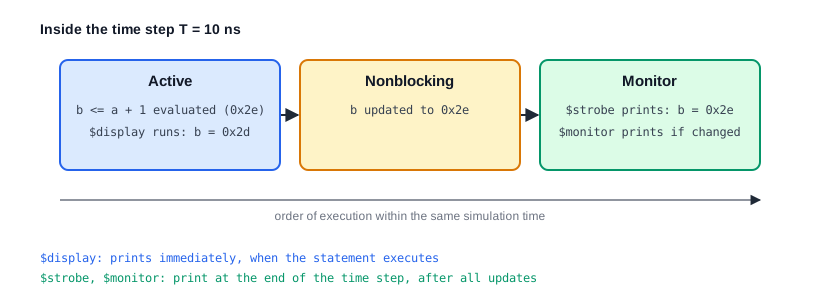
At 10 ns, $strobe already shows the new value of b, 0x2e, but $display still shows the old value 0x2d. $display only sees the new value at the next time step, 11 ns.
Difference between $display and $strobe
$display executes in the Active region of the time step, at the moment the statement is reached. The nonblocking assignment b <= a + 1 has been evaluated by then, but b is only updated later, in the Nonblocking region. $strobe waits until all processes of the time step have finished, so it shows values after every nonblocking assignment of that time step has taken effect.
Quick Check
If b <= a + 1; were changed to the blocking b = a + 1;, what would the $display at 10 ns print for b?
Show Answer
b=0x2e. A blocking assignment updates b immediately, before the $display statement runs, so $display and $strobe would print the same value.
Verilog Continuous Monitors
$monitor prints the values of its arguments automatically whenever any of them changes. It behaves as if a $strobe were executed at the end of every time step in which at least one argument changed. $time itself does not count as a change, otherwise $monitor would print at every time step.
module tb;
  reg [7:0] a;
  reg [7:0] b;

  initial begin
    a = 8'h2D;
    b = 8'h2D;

    #10;                  // Wait till simulation reaches 10ns
    b <= a + 1;           // Assign a+1 value to b

    $monitor ("[$monitor] time=%0t a=0x%0h b=0x%0h", $time, a, b);

    #1 b <= 8'hA4;
    #5 b <= a - 8'h33;
    #10 b <= 8'h1;

  end
endmodule
ncsim> run
[$monitor] time=10 a=0x2d b=0x2e
[$monitor] time=11 a=0x2d b=0xa4
[$monitor] time=16 a=0x2d b=0xfa
[$monitor] time=26 a=0x2d b=0x1
ncsim: *W,RNQUIE: Simulation is complete.
The first line is printed when the monitor is started, at 10 ns, and already shows the updated b, because $monitor prints at the end of the time step. After that, there is one line for each change of b. At 16 ns, 0x2d - 0x33 is negative and wraps around in 8 bits to 0xfa.
$monitor runs in the background until the end of the simulation. Only one monitor can be active at a time: calling $monitor again replaces the previous one. Two more tasks control it:
$monitoroff;    // Pause the active monitor
$monitoron;     // Resume it, and print the current values once
Transaction Logs
Testbenches for bus interfaces print one line per completed transfer, such as [1250 ns] WRITE addr=0x0040 data=0xdeadbeef. These lines are printed with $display from the code that detects the end of a transfer, so they appear exactly once per transaction. A $monitor on the bus signals would print a line for every signal change instead, and quickly flood the log.
Verilog Format Specifiers
To print a variable inside a display task, place a format specifier in the string, and pass the variable after the string. Each specifier is replaced by the next argument in the list.
| Argument | Description |
|---|---|
| %h, %H | Display in hexadecimal format |
| %d, %D | Display in decimal format |
| %b, %B | Display in binary format |
| %o, %O | Display in octal format |
| %c, %C | Display as an ASCII character |
| %m, %M | Display hierarchical name |
| %s, %S | Display as a string |
| %t, %T | Display in time format |
| %v, %V | Display net signal strength |
| %f, %F | Display 'real' in a decimal format |
| %e, %E | Display 'real' in an exponential format |
module tb;
  reg [7:0]  a;
  reg [39:0] str = "Hello";
  time       cur_time;
  real       float_pt;

  initial begin
    a = 8'h0E;
    float_pt = 3.142;

    $display ("a = %h", a);
    $display ("a = %d", a);
    $display ("a = %b", a);

    $display ("str = %s", str);
    #200 cur_time = $time;
    $display ("time = %t", cur_time);
    $display ("float_pt = %f", float_pt);
    $display ("float_pt = %e", float_pt);
  end
endmodule
ncsim> run
a = 0e
a =  14
a = 00001110
str = Hello
time =                  200
float_pt = 3.142000
float_pt = 3.142000e+00
ncsim: *W,RNQUIE: Simulation is complete.
Notice the extra spaces in some lines. Without a width, each specifier pads its value to the largest width the variable could need: an 8-bit value can be up to 255, so %d prints 14 in 3 characters as 14. %h prints two hex digits and %b eight binary digits for the same reason, and %t uses a field of 20 characters. Putting a 0 after the %, as in %0d, %0h or %0t, prints only the digits that are needed. A string is stored as 8 bits per character, so "Hello" needs a 40-bit variable.
$display ("a=%0d a=%0h a=%0b", a, a, a);    // a=14 a=e a=1110
$display ("in module %m");                   // in module tb
Quick Check
What do $display("%d", 4'd9); and $display("%0d", 4'd9); print?
Show Answer
%d pads to the width of the largest 4-bit value, 15, which has 2 digits, so it prints 9 with a leading space. %0d prints 9.
Verilog Escape Sequences
Some characters have a special meaning inside a string, such as the double quote, which ends the string, and the percent sign, which starts a format specifier. To print them, or to print characters such as newline and tab, they must be escaped:
| Argument | Description |
|---|---|
| \n | The newline character |
| \t | The tab character |
| \\ | The backslash character |
| \" | The double quote character |
| \ddd | The character with the octal code ddd, such as \101 for "A" |
| %% | The percentage character |
module tb;
  initial begin
    $display ("Newline character \n");
    $display ("Tab character\tstop");
    $display ("Escaping \\ \" %%");

/*
    // Compilation errors
    $display ("Without escaping \");       // ERROR : Unterminated string
    $display ("Without escaping "");       // ERROR : Unterminated string
*/
  end
endmodule
ncsim> run
Newline character

Tab character	stop
Escaping \ " %
ncsim: *W,RNQUIE: Simulation is complete.
The first line is followed by an empty line, because the \n in the string ends the line and $display then adds its own newline. In the commented-out lines, \" escapes the closing quote, and "" closes the string and opens a new one, so in both cases the string never ends.
Error Messages That Scripts Can Find
Regression scripts decide whether a test passed by searching its log for patterns such as ERROR or UVM_ERROR. Testbenches therefore print errors in a fixed format, for example $display("ERROR: [%0t] %m: expected %0h, got %0h", $time, exp, act);. The time, the hierarchical name from %m and both values make each line useful on its own, even when it is read without the waveform.
Common Beginner Mistakes
Mistake #1: Using $display to check the result of a nonblocking assignment
Wrong: b <= a + 1; $display("b=%h", b);, expecting the new value
Right: b <= a + 1; $strobe("b=%h", b);
Why? $display runs before the nonblocking update, so it prints the old value, as the first line of the strobe example shows. $strobe prints after the update.
Mistake #2: Calling $monitor more than once and expecting several monitors
Wrong: $monitor("a=%h", a); $monitor("b=%h", b);, expecting changes of both to be printed
Right: $monitor("a=%h b=%h", a, b);
Why? Only one $monitor is active at a time. The second call replaces the first, so changes of a alone are no longer printed.
Mistake #3: A mismatch between format specifiers and arguments
Wrong: $display("a=%h b=%h", a);
Right: $display("a=%h b=%h", a, b);
Why? Each specifier consumes one argument. With too few arguments, the simulator reports an error or prints nothing for the missing value; with too many, the extra values are printed without a format, joined to the end of the line. Count the specifiers whenever you edit a message.
Mistake #4: Expecting %d to print without padding
Wrong: $display("count=%d", count); for a 32-bit integer, expecting count=5
Right: $display("count=%0d", count);
Why? %d pads to the width of the largest possible value. For a 32-bit signed integer that is 11 characters, so the log shows count= 5.
Practice Exercise
Challenge: Predict the Log
Predict the exact output of this code, including spaces.
module tb;
  reg [3:0] x;

  initial begin
    x = 4'hA;
    $write ("x=%0d ", x);
    $write ("x=%h", x);
    $display (" x=%b", x);
    x <= 4'h3;
    $display ("display x=%0d", x);
    $strobe  ("strobe  x=%0d", x);
  end
endmodule
Hint
$write does not end the line. %h for a 4-bit value prints one digit, and %b prints four. The nonblocking assignment is applied before $strobe prints.
Solution
x=10 x=a x=1010
display x=10
strobe  x=3
The two $write calls and the first $display build one line. $display still sees the old value 10, because x <= 4'h3 has not been applied yet, while $strobe prints 3 at the end of the time step.
Summary
In this tutorial, you learned:
$displayprints immediately and ends with a newline, and$writedoes the same without the newline$strobeprints once at the end of the time step, after nonblocking assignments, so it shows final values$monitorprints at the end of every time step in which one of its arguments changed; only one monitor is active at a time- Format specifiers such as
%h,%d,%b,%s,%tand%mchoose how values are printed, and%0removes padding - Escape sequences such as
\n,\t,\\,\"and%%print special characters - All display tasks are simulation-only and ignored by synthesis
